translate-toolkit: the conversion and quality layer under localisers
Useful localization tools with Python API for building localization & translation systems
At a glance
- What is it?
- The Translate Toolkit is the part of localisation tooling that almost nobody sees and everybody needs. It converts between a dozen or more file formats, compiles the compiled ones, counts what is translatable, and runs dozens of automated checks over translations so that a human reviewer only has to look at the things a machine cannot judge.
- Who is it for?
- translate-toolkit suits a project that ships software in several languages and wants its translators to work in a format they can edit rather than one dictated by the build system, and it is the reference implementation behind the platform that maintains it.
- Can I use it commercially?
- Yes, with conditions. GPL-3.0 is a copyleft licence: if you distribute software that includes it, you must release that software's source code under the same licence. Running it internally without distributing it does not trigger that obligation.
- Is it still maintained?
- Yes. The repository last received commits 1 day ago.
- What is it written in?
- Mainly Python, according to GitHub's language statistics.
Answers come from the project's GitHub data, last synced on November 7, 2026, and from our analysis. They are not legal advice.
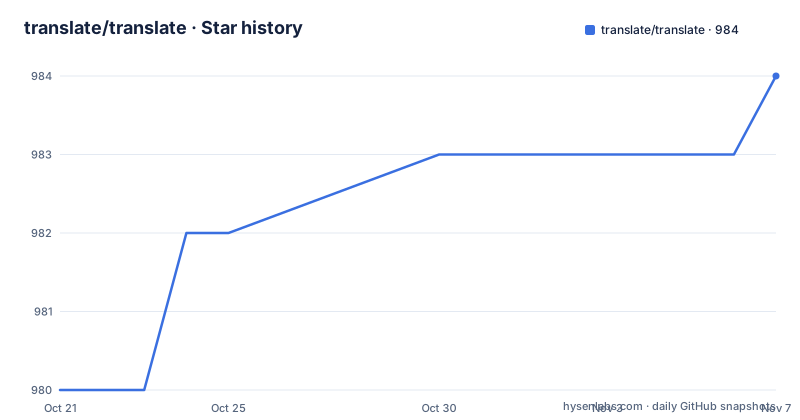
Star history
- translate/translate984 ★ · +4
| Repository | 2026-10-21 | 2026-11-07 |
|---|---|---|
| translate/translate | 980 | 984 |
4 Stars in the last 17 days, measured from the daily GitHub snapshot. Compare with other projects
Editorial analysis
What the toolkit actually does for a translator
The description is framed around a person rather than a format, which is the right frame for this project.
The toolkit is described as an essential toolkit for localization engineers, containing tools and documentation to help localizers convert, count, manipulate, review and debug localization files with less repetitive work.
Five verbs, and each one corresponds to a job that a localiser would otherwise do by hand. Convert, which is the obvious one. Count, which is the number of strings, the number of words, the number of characters, the number of placeholders, and the budget for a translation, and getting the placeholder count wrong is how a translated build ends up crashing at run time. Manipulate, which is merging, splitting, segmenting and swapping. Review, which is the automated checking. And debug, which is finding the mistranslation that only shows up in one locale.
The software includes programs to convert localisation formats to the common PO and XLIFF formats, and also programs to check and manage PO and XLIFF files. The toolkit is part of the Translate project, which is hosted separately, and it is maintained by the platform described at the end of this readme.
The key idea is that PO and XLIFF are the two formats that everything else converts through. That is a deliberate hub design, and it is why the toolkit is a toolkit rather than a pile of pairwise converters: you convert your proprietary format to PO once, do all the work in PO, and convert back.
The project goal is about the people, not the formats
There is a project goals section, and it is short and unusual enough to be worth quoting in substance.
The vision of the Translate Project is to be a meta project for localizers, built on the premise that your language deserves to be a project on its own right, not a poor cousin of the main project.
The complaint that follows is the sharpest part. Most projects are inattentive to the needs and difficulties experienced by localizers. The aim is to work towards creating tools and documentation that allows localizers to focus on what they do best, which is translating software.
That is a design principle rather than a slogan, and it explains several otherwise odd decisions in the project. The explanation that a downloaded tool becomes a collectible, which is a theme across the sibling projects, is the same instinct applied to localisation: a translator given a binary format and a translation memory and a test suite is doing a different job from a translator given a spreadsheet and a sense of how the product reads.
The feature list is consistent with it. There are format converters for localisation, translation and software formats, so translators can work in standard translation formats. There are quality assurance tools for pattern searches, language-aware checks, terminology extraction and other review tasks. And there are Python APIs that can be expanded with new formats, project types, localisation tests and language modules.
That last point is the strategic one. A localisation format nobody has written a converter for is a format that locks a project out of good tooling, and a language module for a language nobody has written is a language whose speakers are stuck in a worse workflow than everyone else.
One API over a dozen formats
The core of the software is a set of Python classes for handling storage formats, and the list is the argument.
The formats named are DTD, Java properties, the OpenOffice.org GSI and SDF formats, CSV, compiled MO files, the Qt translation format, TMX, TBX, WordFast text, Gettext MO, Windows resource files, PO and XLIFF.
That is a list of formats from four decades of software, and the ones in the middle are the interesting ones. TMX and TBX are the translation memory and term base interchange formats, the two that let you move terminology between tools. The OpenOffice and Mozilla and Qt converters are there because those projects have shipped their own string formats for so long that a large part of the world's translated software lives in them.
The design consequence is that a converter is a class, and the same class handles reading, writing, statistics and the storage of a format's metadata. That is why the project can offer a general set of quality checks and a general counting tool rather than a set of format-specific scripts, and it is why the API is described as expandable with new formats, project types, localisation tests and language modules.
For an adopter, the practical question is which of these formats your project actually has, and the answer is usually one or two, in which case the toolkit is a converter plus a set of checks rather than a whole workflow.
The converters, and the two hubs
The program overview lists the tools, and the naming convention makes the shape obvious: everything is two letters and a format, joined by a digit.
The OpenOffice converter moves between the office formats and PO, and there is a second one to XLIFF. The Mozilla converter moves Mozilla files to PO. Then there is a converter from PO to CSV, described as converting the PO format to CSV for editing in a spreadsheet program, which is the escape hatch for a translator who does not want to edit a PO file by hand. A PHP converter handles PHP localisable string arrays, and a Qt converter handles the Linguist files, and a plain text converter handles simple text files, and an HTML converter that is marked as beta, and a Markdown converter.
The XLIFF converter is the other big one, and the direction matters. Several converters read into PO, and the XLIFF one goes in the other direction too, so XLIFF is a hub alongside PO. That is what makes the XLIFF and TMX and TBX formats worth supporting: they are the interchange points between different tool chains.
There are also the outward-facing converters, from PO to a WordFast translation memory, from PO to TMX, and the reverse direction, from CSV to TBX. And a PO file initialiser, which is the tool that turns a set of source strings into an empty translation file, and is usually the first thing you run on a new project.
The readme is careful to say this is a selection of the most commonly used tools, and points to the command documentation for the complete list, and tells you that the help flag works on every command.
The quality assurance tools are the reason to install it
The tools are split into two groups, and the second group is more interesting than the first.
The quality assurance group starts with the filter tool, which runs any of more than forty checks on your PO files, and the merge tool, which merges corrected translations from the filter back into your existing files. That pair is a workflow: run the checks, fix what they found, and fold the fixes back in. The conflict tool identifies conflicting use of terms, the restructure tool restructures PO files according to conflict directives, and the grep tool finds words in PO files.
The other group is the miscellaneous one, and the entries are named after the specific headaches of localisation.
The compile tool creates the compiled Gettext files from PO or XLIFF files, which is the last step before shipping. The count tool counts translatable file formats, which is the tool you run to answer the question of how big this translation is. The debug tool is the clever one: it creates a comment in the message string of your PO files which can then be used to quickly track down mistranslations, as the comments appear in the application. That is a debugging technique that only makes sense in a localised application, and it is the sort of thing this project exists to provide.
The segment tool breaks a PO or XLIFF file into sentence segments, which is useful for creating a segmented translation memory, and the swap tool uses a translation of one string in place of another, which is a crude but effective way of reusing a translation across a large file.
The group of forty checks is the reason a localiser is not a person reading every string. A machine can check placeholders, check whitespace, check that the same source string was translated consistently, and flag anything suspicious in a way a reviewer can prioritise.
Installation, the Python floor and the extras
The installation is two commands and a version requirement.
The recommended installation uses the modern Python package manager, or pip, inside a virtual environment.
uv pip install translate-toolkitpip install translate-toolkitPython 3.11 or newer is required, and the runtime dependencies are named exactly: an XML library at version 6.1 or newer and below 7.0, and a Unicode segmentation library at 0.2 and above 0.3. The segmentation dependency is worth noticing, because segmenting a string into sentences correctly is not a solved problem in every language, and the project has chosen to depend on a dedicated implementation for it rather than to guess.
The optional dependencies are where the format-specific work lives. There is an extra that installs all of them, and there are extras that install selected ones.
pip install translate-toolkit[all]pip install translate-toolkit[markdown,ini,ical,subtitles,yaml,spellcheck]The available extras are listed, and the list is a good map of what the optional features actually do: a character encoding detector, the Fluent localisation format, iCalendar, configuration files, an edit distance library, Markdown, PHP arrays, Windows resources, a spell checker, subtitles, TOML and YAML. The spell checker and the edit distance library are for the quality checks, and the subtitle and calendar converters are for the formats that appear in products people do not think of as localised.
The readme also points at the packaging manifest for the current dependency versions, which is a small courtesy that saves an argument when something breaks.
Maintenance, Weblate and how the licensing is handled
Three closing facts.
The first is that the toolkit is maintained by Weblate, described as a privacy-respecting localisation platform built on open-source foundations. That is a meaningful arrangement, because the tools that a localisation platform needs internally are the tools that a random project cannot easily rebuild. It also means the toolkit is effectively the reference implementation for a large piece of open source localisation infrastructure, and the two are released and improved together.
The second is the release cadence. Version 3.19.18 came out in August 2026, 3.19.19 in September and 3.20.0 in the same month, with the last push on 2026-10-17 and the repository not archived. The project classifies itself as production and stable, and the supported Python versions run from 3.11 to 3.15.
The third is licensing, and it is handled with more care than most projects manage. The toolkit itself is released under the GNU General Public License, with contributions from many people credited separately, and the repository carries a dedicated licences directory and a manifest for the reuse specification, which is how a project with many vendored files of different licences keeps track of what is what. Security issues have their own reporting route rather than going through the public issue tracker.
The build tooling matches the seriousness. The project manifest groups the development dependencies by purpose, with pinned versions for the documentation, the linting, the tests and the type checking, and the test group includes a snapshot testing library and a parallel test runner, which is what you would expect for a project whose output is compared against expected files. The Makefile has targets for the documentation, the unit tests and the functional tests, with the unit tests run through the modern package manager with coverage enabled.
Editorial conclusion
translate-toolkit suits a project that ships software in several languages and wants its translators to work in a format they can edit rather than one dictated by the build system, and it is the reference implementation behind the platform that maintains it. It is a poor fit for a project with a single language, where the conversion step is overhead, and a poor fit if you need a hosted service rather than a library and a set of command line tools, since that is what the other project in the family is for. Before you adopt it, decide which formats you actually have, install the specific extras for those rather than everything, and remember that it is a GPL tool that you will want to call as a program rather than embed.
Frequently asked questions
What is the Translate Toolkit used for?
It helps localization engineers convert, count, manipulate, review and debug localisation files with less repetitive work. It converts between many storage formats through the common PO and XLIFF formats, compiles the compiled formats, counts translatable content, and runs dozens of automated quality checks on translation files.
Which file formats does translate-toolkit support?
The Python classes cover DTD, Java properties, the OpenOffice.org GSI and SDF formats, CSV, compiled MO files, the Qt translation format, TMX, TBX, WordFast text, Gettext MO, Windows resource files, PO and XLIFF. There are converters for each of those, and the readme notes that a plain install of the toolkit only needs the base dependencies, with the rest behind extras.
What quality checks can translate-toolkit run?
The filter tool runs any of more than forty checks on PO files, and the merge tool folds the corrected translations back into your existing files. Alongside those there are tools to identify conflicting use of terms, to restructure files according to conflict directives, and to find words across a set of files.
How do I install translate-toolkit?
Inside a virtual environment, with either uv or pip, and Python 3.11 or newer. The runtime dependencies are an XML library and a Unicode segmentation library, and the optional format specific features come from extras, either all of them or a selected list such as markdown, ini, ical, subtitles, yaml and spellcheck.
Official sources
Add this badge to your README
If you maintain this project, the badge below links readers to this analysis and shows its maintenance status from the daily GitHub snapshot. Paste the markdown into your README; add ?metric=license or ?metric=stars to the image URL for a different field.

[](https://hysenlabs.com/projects/translate-translate)Star history chart for your README
[](https://hysenlabs.com/projects/translate-translate)Was this useful?