Baklava Design System: Framework-Agnostic Web Components
Baklava is a design system provided by Trendyol to create a consistent UI/UX for app users.
At a glance
- What is it?
- Baklava packages Trendyol's design system as native TypeScript web components for Vue, React, Angular, and other web frameworks. Its CDN-based setup is simple, but teams must evaluate custom-element styling, documentation coverage, and beta releases before adopting it as an application-wide UI foundation.
- Who is it for?
- Adopt Baklava when a team wants a shared web component library and theme rather than a framework-specific component package. Do not adopt it without first checking browser compatibility, custom-element integration, and required documentation in Storybook.
- Can I use it commercially?
- Yes. MIT is a permissive licence: you can use, modify and sell software built on it, as long as you keep its copyright and licence notices.
- Is it still maintained?
- Yes. The repository last received commits 13 days ago.
- What is it written in?
- Mainly TypeScript, according to GitHub's language statistics.
Answers come from the project's GitHub data, last synced on November 6, 2026, and from our analysis. They are not legal advice.
Star history
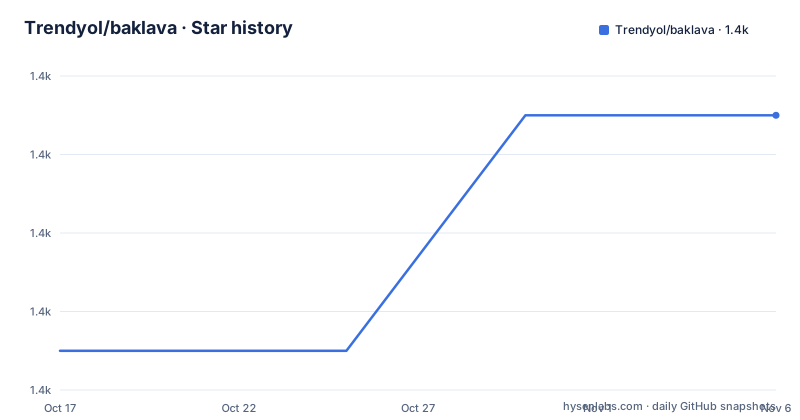
- Trendyol/baklava1,397 ★ · +6
| Repository | 2026-10-17 | 2026-11-06 |
|---|---|---|
| Trendyol/baklava | 1.4k | 1.4k |
6 Stars in the last 20 days, measured from the daily GitHub snapshot. Compare with other projects
Editorial analysis
Why Baklava Exists as Native Web Components
Baklava addresses the cost of designing and maintaining the same interface patterns separately across products. Trendyol describes it as a design system for creating a consistent UI/UX, with the web implementation expressed as native web components. That packaging choice separates the visual system from React, Vue, Angular, or any other application framework. A frontend team can therefore apply Baklava tags without adopting its rendering model as the framework's own component model.
The intended audience is web application developers working under the standards set by Trendyol's design language. Baklava can provide buttons, input-related interfaces, themes, and other documented design-system components while allowing the host application to retain its existing framework. The repository includes examples for React, Vue, plain web usage, and a Next.js App Router SSR case. Those examples are important because component markup alone does not prove that rendering, events, localization, or server-side rendering work correctly in a particular stack.
Baklava is not a complete application template. The repository data does not show that it supplies product flows, backend integration, state management, routing, or business logic. It is a UI layer intended to impose reusable interface decisions. Teams that need a fully integrated application framework should treat Baklava as one dependency among several rather than a replacement for architecture and product design.
Baklava's TypeScript and Custom-Element Architecture
The package metadata identifies `@trendyol/baklava` as an ES module whose runtime entry point is `dist/baklava.js`, with declarations published as `dist/baklava.d.ts`. Components use the `bl-` element prefix, as shown by the README's `<bl-button>` example. Loading the module registers the custom elements, after which the host page can place Baklava tags in its markup.
Styles are separate from JavaScript. The default theme is imported as `dist/themes/default.css`, while `dist/baklava.js` supplies the component implementation. This split gives applications control over when and where those assets load, but it also means adding the script without the stylesheet can produce unstyled or incomplete components. Package metadata also indicates that only `dist/` is included in the published package, so consumers receive compiled output rather than the complete source tree.
The project is written primarily in TypeScript and uses `tsc --emitDeclarationOnly` during its build before the JavaScript bundle is generated. Localization is also part of the build, through `lit-localize.json`, the `translations/` directory, and the `localize:build` script. The README does not enumerate every component, property, event, translation method, or accessibility behavior, so those details should be checked in Storybook before committing to the system.
The broader design process is visible in the linked Figma guide and Storybook documentation. Code, generated custom-element metadata, translations, examples, and design documentation appear to work together. However, the README does not describe a formal compatibility matrix between Figma versions, component releases, and frontend package versions. That relationship may matter in a governed design system.
CDN Setup for the First Baklava Button
The README names CDN delivery as the preferred usage method. Add the theme stylesheet before the module script, as shown below. The README strongly recommends its described manual version, using an explicit `@x.x.x` release in both URLs. The placeholder must be replaced with a selected release, but the README does not establish which release is correct for a particular application.
<link rel="stylesheet" href="https://cdn.jsdelivr.net/npm/@trendyol/baklava/dist/themes/default.css" />
<script type="module" src="https://cdn.jsdelivr.net/npm/@trendyol/baklava/dist/baklava.js"></script>
Once the browser loads the module, a first component can be placed in the page. The README uses a button whose label confirms the intended basic result.
<bl-button>Baklava works!</bl-button>The documentation says these imports make Baklava web components available to the web project. For a real first check, inspect the rendered button rather than treating successful asset delivery as sufficient. Confirm that the theme is applied, the custom element is upgraded, framework integration does not interfere with rendering, and any interactive behavior matches the component documentation.
The package links establish `@trendyol/baklava` as the npm distribution, but the README does not provide an npm installation command. Teams using a build-managed dependency should consult the npm package and their bundler documentation for the exact local setup rather than guessing at imports, version flags, or loader configuration.
React, Vue, Plain HTML, and SSR Integration Boundaries
Baklava's framework neutrality is based on standards rather than adapters for every framework. Browsers understand custom elements, and the repository includes examples for React, Vue, plain web components, and Next.js App Router SSR. That is evidence of intended compatibility, not documentation of identical behavior across all frameworks.
The React and Vue examples should be examined for how they import the bundle, register components, pass properties, and handle events. The Next.js example is especially relevant because it represents a rendering boundary that a simple CDN script cannot solve by itself. A page loaded entirely in a browser can execute the module normally, while server-rendered output may require the application to decide when custom elements become available. The README does not explain that boundary.
Teams should also distinguish compatibility from convenience. Using `<bl-button>` in HTML does not automatically mean the component has the same developer ergonomics as a framework-native button. Event naming, property assignment, form participation, ref handling, and server rendering are not documented in the README excerpt. Those details decide whether adoption saves work or introduces thin adapters.
The repository has a `.browserslistrc`, but its contents are not supplied. It would be inappropriate to claim support for specific browsers without reading that file and the relevant component implementation. Likewise, the `.browserslistrc` alone does not establish accessibility compliance. Baklava can fit many frameworks by design, but the final compatibility decision belongs to each application's supported browser, rendering mode, and test suite.
Release Channels and Maintenance Boundaries
The repository is not archived, and its last push was on 2026-10-05. Recent published tags include `v3.5.0` on 2026-06-30, followed by `v3.5.0-beta.9` on 2026-07-06 and `v3.5.0-beta.10` on 2026-07-20. This release sequence means adopters must distinguish the stable tag from subsequent prerelease tags rather than assuming every newer-looking version is the production choice.
The web repository also links to `baklava-react-native`. That is a separate implementation, so the web system's release history should not be treated as evidence about mobile compatibility or mobile upgrade timing. Likewise, `baklava-icons` is a separate linked repository.
Upgrade effort cannot be quantified from the README and repository metadata. The README does not provide a migration guide, breaking-change policy, browser support table, or long-term-support statement. The repository does contain release configuration and semantic-release references, but those files alone do not document the guarantees for a consuming application. Before an upgrade, inspect the target release notes and compare the components, theme assets, event APIs, and translation requirements used by the application.
Baklava is distributed under the MIT license. That permits use, modification, distribution, and sublicensing subject to the license conditions and preservation of required notices. Teams with formal open-source compliance processes should review the repository's `LICENSE` file and their own policy, but no bespoke legal conclusion can be drawn from the metadata alone.
When Baklava Is the Wrong Component Choice
Baklava is a poor fit when a team requires components that behave as first-class primitives in its framework's rendering and reactivity model, unless the team is prepared to build and maintain adapters. The README confirms framework compatibility in principle and includes several examples, but it does not document parity across React, Vue, Angular, and server-rendered applications.
It is also a poor fit when an organization cannot adopt Trendyol's design language. Baklava is explicitly a provider-defined system intended to create consistency. A project requiring substantially different interaction patterns, visual tokens, or component requirements may spend more effort overriding the system than composing its existing components.
The documentation is also too limited to treat Baklava as a complete accessibility or browser-support assessment. Storybook, the Figma guide, the project board, and the discussion board are linked, but the README does not enumerate audit results, conformance targets, keyboard behavior for each component, or production support commitments. Those omissions do not imply defects. They mean the adoption decision requires direct inspection.
Compared with a framework-specific component library, Baklava follows a standards-based distribution model. Native custom elements can cross framework boundaries and separate theme CSS from runtime JavaScript. A framework-specific library may offer tighter type and lifecycle integration but must be adopted within that framework. Compared with plain local styles, Baklava supplies a published component vocabulary and design governance, at the cost of adopting its tags, styles, versions, and release decisions.
Editorial conclusion
Adopt Baklava when a team wants a shared web component library and theme rather than a framework-specific component package. Do not adopt it without first checking browser compatibility, custom-element integration, and required documentation in Storybook. For production, verify whether the selected npm version is suitable because recent prerelease tags include v3.5.0 beta releases.
Frequently asked questions
How do I install and load Baklava in a web project?
The README calls CDN usage the preferred method and documents importing the theme CSS and the ES module `dist/baklava.js`. It also recommends replacing the unversioned package URL with an explicit `@x.x.x` release.
Does Baklava work with React and Vue?
The README says its native web components can be used with Vue, React, Angular, and other web frameworks. The repository also contains React, Vue, plain web, and Next.js App Router SSR examples, although the README does not detail the integration steps.
Can I use Baklava with server-side rendering?
The repository contains an `examples/next-app-router-ssr/` directory, which shows that SSR is an intended integration case. The README does not explain how component registration and rendering should be configured.
Which Baklava version should I use for production?
The release list includes `v3.5.0` and later tags marked `v3.5.0-beta.9` and `v3.5.0-beta.10`. The README does not recommend a specific production version, so adopters must review the target release before pinning it.
Official sources
Add this badge to your README
If you maintain this project, the badge below links readers to this analysis and shows its maintenance status from the daily GitHub snapshot. Paste the markdown into your README; add ?metric=license or ?metric=stars to the image URL for a different field.

[](https://hysenlabs.com/projects/trendyol-baklava)Star history chart for your README
[](https://hysenlabs.com/projects/trendyol-baklava)Was this useful?