URLCheck rewrites the link before Android opens it
Android app by TrianguloY: URLCheck
At a glance
- What is it?
- URLCheck sits in the middle of Android's link-opening path, trimming trackers, affiliate links and host clutter before a page loads. It is built for people who want one interception point on the device, and it punishes you for switching download channels.
- Who is it for?
- Adopt URLCheck if your link taps come from many Android apps and you want one interception point, and pick a single download channel before you install, because the channels carry three different certificates and any switch means an uninstall. Leave it alone if you need a desktop client, a server or rules you can read and audit, because the repository contains none of those.
- Can I use it commercially?
- Check first. The repository uses a licence we do not classify automatically, so read its LICENSE file before any commercial use.
- Is it still maintained?
- Yes. The repository last received commits 5 days ago.
- What is it written in?
- Mainly Java, according to GitHub's language statistics.
Answers come from the project's GitHub data, last synced on October 23, 2026, and from our analysis. They are not legal advice.
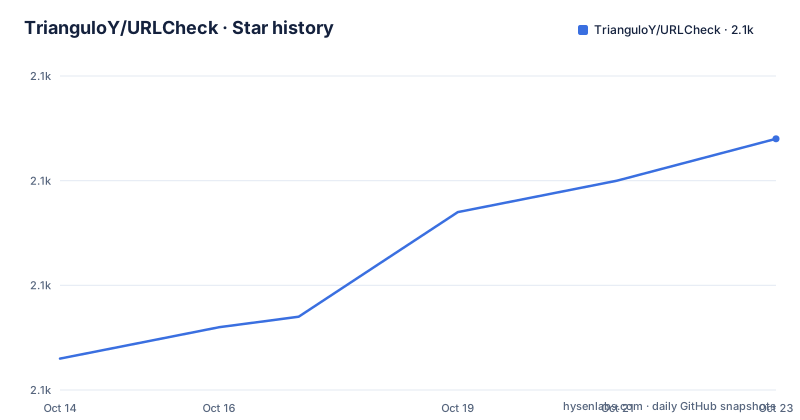
Star history
- TrianguloY/URLCheck2,124 ★ · +21
| Repository | 2026-10-14 | 2026-10-23 |
|---|---|---|
| TrianguloY/URLCheck | 2.1k | 2.1k |
21 Stars in the last 9 days, measured from the daily GitHub snapshot. Compare with other projects
Editorial analysis
The tap never reaches the browser directly
URLCheck installs itself between a tap and the app that would otherwise handle it. It is an Android application, package `com.trianguloy.urlchecker`, written in Java and assembled by a Gradle project rooted at `app/` alongside `build.gradle`, `settings.gradle` and the `gradlew` wrapper. The README calls it an intermediary that acts when a link is opened, and that one word carries the design: the trimming happens on the URL string while Android is still routing it, before a page exists, before any script runs, before a single byte of the destination comes back. That gives it reach over content which never renders, and it costs it everything that happens after the hand-off. The topic tags read android-application, fdroid, play-store and url-check.
The development version badge reads a build nobody can install
The badge row at the top of the README pins a development version by scraping `versionName` out of `app/build.gradle` on the `master` branch, so the string it renders is whatever someone typed into that Gradle file that day rather than a build anyone can download. The last push to that branch landed on 2026-09-14, five months after v3.5 shipped on 2026-04-07, which means master has travelled a long way past the newest release without a matching artifact. The two builds before it were no quicker: v3.4.1 on 2025-12-22, then v3.4 on 2025-05-30. Read that badge as a build-time signal. It tells you the source tree is alive and tells you nothing about what an installed copy contains.
Four download routes and no install command anywhere
There is no install command to copy out of this project. The README is a row of five store buttons and documents no `adb` line, no minimum Android version and no first-run setup, so getting URLCheck onto a phone means picking a channel and tapping through it. Those endpoints are stable enough to write down:
https://github.com/TrianguloY/URLCheck/releases/latest/
https://f-droid.org/packages/com.trianguloy.urlchecker
https://play.google.com/store/apps/details?id=com.trianguloy.urlchecker
https://apt.izzysoft.de/fdroid/index/apk/com.trianguloy.urlchecker
The Obtainium button in the same row adds a fifth route, pointed at the GitHub repository, so a device can pull new builds without a store account. After installing, the first real use is not a menu inside the app. It is opening a link from some other application and watching whether Android routes that open through URLCheck. Which handler wins that decision belongs to Android, and the README does not document the steps for making URLCheck the default, so the system chooser rather than the project decides the tap.
Three signing certificates mean uninstall before switching channels
The Apk details block publishes the `SHA-256` hash of the signing certificate for each channel, and the three lines are not variations of one key. Android refuses to replace an installed package with one signed by a different certificate, so moving between Play Store and F-Droid means uninstalling first, which means losing whatever the app stored locally. The README pairs that warning with a reminder to use the built-in backup and restore before touching anything. Read the grouping closely, because it is the part a skim misses: GitHub, Obtainium and IzzyOnDroid all share the third certificate, so hopping between those three is a same-key update path, while any of them against Play Store or F-Droid is not. Three hashes, and only two of them form a family you can move inside.
Play Store: `F9:A2:D8:D8:94:FA:FE:A1:4C:F6:05:C4:D7:22:AF:D0:49:4D:69:41:1F:60:6A:AA:0B:B1:F2:85:E7:A9:A6:60`
F-Droid: `93:D7:9B:1E:72:D5:A6:B0:BC:68:11:B9:BC:0A:83:18:1C:35:10:D5:8C:11:57:11:40:FF:3F:8A:63:F2:21:74`
GitHub/Obtainium/IzzyOnDroid: `BF:1B:69:C1:4D:A2:42:0C:A7:20:11:F7:2C:F4:83:74:58:EC:5D:3C:C4:B5:38:24:34:37:BC:17:C1:92:01:C6`
Switching channels is a migration, not a refresh, and the app is the only tool in the box that knows your data.
What gets stripped before the page ever loads
The description line lists what the intermediary does: remove trackers, remove affiliate links, drop unnecessary elements, check hosts, hold a link for later, share it, and protect against certain phishing techniques. Six of those are operations you could describe mechanically. The last is a security claim with no scope attached, and nothing in the tree narrows it: there is no threat model page, no list of phishing patterns it matches, no note about when that matching last changed. The same silence covers the removal rules. No settings schema, no rule file format and no host list appear anywhere in the listing, so there is no supported way to read back what the app decided to strip or to argue with the decision. A cleaner you cannot audit is a cleaner you have to trust.
Translation lives on Weblate, credits live in the README
A Weblate badge reports the translation percentage and points at a project hosted on Weblate instead of at files in this repository, so translator corrections do not arrive as diffs against Java sources and a string can be fixed without riding along with a code change. The README names special contributors including Ilithy, PabloOQ and anoop-b, then adds 404potato with the hedge 'maybe some more from Weblate'. That hedge is the honest part. The credit list is stitched from two different systems, a repository contributor graph and a translation platform, and neither is a complete picture of who has touched the app. The `fastlane/` entry at the top of the tree, with store metadata under `fastlane/metadata/android/en-US/`, shows that the listing images and copy the stores display are kept in the repository rather than typed into a web form.
An Android Gradle tree with no service to attach to
The top-level listing is short enough to read in one breath: `.github/`, `.gitignore`, `LICENSE`, `README.md`, `app/`, `build.gradle`, `docs/`, `fastlane/`, `gradle.properties`, `gradle/`, `gradlew`, `gradlew.bat`, `settings.gradle` and `tools/`. Every entry belongs to an Android build, and not one of them is a service, a command-line entry point or a scheduled job. Building from source is therefore within reach with the bundled wrapper, yet the README gives no Gradle or JDK version and no build steps, so the toolchain is whatever `gradle/` and `gradle.properties` happen to pin. If your plan involves scanning a list of links on a schedule, exporting verdicts to a dashboard or running checks in CI, this tree offers no hook. Everything the app does happens inside a live Android process, on a URL a person just tapped.
Where it sits decides how much of the link it sees
A cleaner that acts at hand-off time and one that acts after the request leaves the phone solve adjacent problems, and the real difference is position relative to redirects. URLCheck sees the URL string and nothing that follows: no redirect chain, no cookie, no tracking pixel fired on the rendered page, no script that rewrites the link after load. A browser-level cleaner sits downstream and can see requests the first one never will, but it only covers the browser. A network-level filter sits further out and can cover every application on the device, at the cost of DNS or VPN setup and a list somebody has to keep current. Pick URLCheck when the taps you care about arrive from many apps and you want a single decision point; since the README does not say whether it follows redirects, do not assume that 'checking hosts' means following where a shortened link lands.
Editorial conclusion
Adopt URLCheck if your link taps come from many Android apps and you want one interception point, and pick a single download channel before you install, because the channels carry three different certificates and any switch means an uninstall. Leave it alone if you need a desktop client, a server or rules you can read and audit, because the repository contains none of those. Verify the certificate hash of the channel you install matches the one already on the device, and export your data through the app's backup and restore before uninstalling anything.
Frequently asked questions
Can I switch URLCheck from the Play Store build to the F-Droid build without losing my data?
Not directly. Play Store, F-Droid and the GitHub/Obtainium/IzzyOnDroid group are signed with three different certificates, and Android will not update an installed package with one signed by a different key. The README tells you to use the app's backup and restore functionality before uninstalling.
What does URLCheck remove before a link opens?
Trackers, affiliate links and unnecessary elements, plus host checking, holding a link for later, sharing it, and protection against certain phishing techniques. The repository provides no rule format, settings schema or list that says what each term covers.
Is URLCheck's source under a standard open source licence?
GitHub reports the licence as Other, a custom licence it cannot classify, and points at the LICENSE file in the repository root for the actual terms. Read that file before embedding the app in anything you distribute yourself.
Can I build URLCheck from source or run it on a desktop?
The repository is an Android Gradle project with `gradlew` and `gradlew.bat` at the top level, so a source build is reachable, but the README gives no build steps and no Gradle or JDK version. No desktop or command-line build is mentioned anywhere in the repository.
Where does URLCheck get its translations and store listings?
Translations run through Weblate, hosted separately from the repository, and the README credits contributors from both places, naming Ilithy, PabloOQ, anoop-b and 404potato. Store listing images and copy are kept in the repository under `fastlane/metadata/android/en-US/` rather than entered in a web form.
Official sources
Add this badge to your README
If you maintain this project, the badge below links readers to this analysis and shows its maintenance status from the daily GitHub snapshot. Paste the markdown into your README; add ?metric=license or ?metric=stars to the image URL for a different field.

[](https://hysenlabs.com/projects/trianguloy-urlcheck)Star history chart for your README
[](https://hysenlabs.com/projects/trianguloy-urlcheck)Was this useful?