tridactyl: manual beta builds, ex-commands and four pages it will not touch
A Vim-like interface for Firefox, inspired by Vimperator/Pentadactyl.
At a glance
- What is it?
- tridactyl turns Firefox into a modal, Vim style browser where ex-commands are the interface and a .tridactylrc holds your bindings, but its releases are hand built betas, its stable channel is a frozen copy, and its most interesting feature depends on a native messenger that sandboxes fight.
- Who is it for?
- Tridactyl suits a browser user who already thinks in Vim and wants to script navigation rather than click it, and it is honest about its rough edges in a way most extensions are not: betas are hand built, stable is a freeze of the last beta, and the config stores of the two channels do not match. Before adopting it, decide whether you need edit-in-Vim, because that path requires a native messenger and turns into a permissions exercise inside Snap, Flatpak or Firejail.
- Can I use it commercially?
- Check first. The repository uses a licence we do not classify automatically, so read its LICENSE file before any commercial use.
- Is it still maintained?
- Yes. The repository received new commits within the last day.
- What is it written in?
- Mainly TypeScript, according to GitHub's language statistics.
Answers come from the project's GitHub data, last synced on October 23, 2026, and from our analysis. They are not legal advice.
Star history
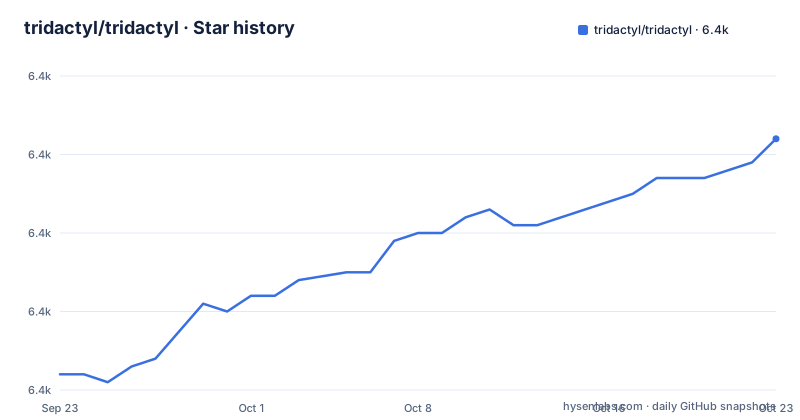
- tridactyl/tridactyl6,382 ★ · +30
| Repository | 2026-09-23 | 2026-10-23 |
|---|---|---|
| tridactyl/tridactyl | 6.4k | 6.4k |
30 Stars in the last 30 days, measured from the daily GitHub snapshot. Compare with other projects
Editorial analysis
Stable is a frozen beta, and beta is where development lands first
The two channels are not really different products, and the README is direct about that. Stable builds are described as essentially just frozen versions of the beta builds, and the beta builds are said to be not much less stable. Every developer uses the beta channel, along with about half of the users. The one real difference is documentation timing: stable builds get new features described in the changelog, while beta builds get new features before they are written up there. So a beta user is running code that works but is not yet explained anywhere, and a stable user is running a build whose features are all documented but which is older. Choosing stable means choosing an older codebase with better notes.
Beta artifacts are built by hand and checked once a day
How the beta channel is produced has changed, and the README says so plainly. Beta builds used to be updated with each commit to master, and are now built manually when one maintainer remembers, with issue 3605 tracking that arrangement. Firefox then picks the new artifact up automatically once a day. If you want updates faster, the setting is named directly: change extensions.update.interval in about:config to whatever interval you want, the example given being 15 minutes, written as 900 seconds. There is also a second beta build that ships without a new tab page, linked separately, which exists because some users replace that page and do not want the extension fighting them for it. No version number is attached to either artifact.
Installing means renaming a zip to an xpi, or using a package manager
The documented install path starts with clicking a link inside Firefox. If the download does not install on its own, the file has to be renamed from .zip to .xpi and then opened with Firefox. A route described as fool-proof goes through about:addons instead: open it, click the extensions tab, click the cog in the top right, then choose Install Add-on From File. On Arch Linux the package manager handles it and then Firefox is restarted twice:
pacman -S firefox-tridactylEvery other operating system, Windows, Macintosh and Linux included, is pointed at the Mozilla add-ons website for the stable build. The twice is not a typo in this summary: the Arch note says to restart Firefox twice, presumably because the first launch installs the native pieces and the second picks them up.
edit-in-Vim needs a native messenger that sandboxes complicate
The advanced features, edit-in-Vim named as the example, do not live in the extension alone. They need a native messenger or executable installed alongside, and the instructions for that are inside the browser itself: type :nativeinstall and press enter once Tridactyl is loaded. Arch users are pointed at an AUR package named firefox-tridactyl-native instead. Containerized installations are where this turns into work: for Snap and Flatpak, native messaging support is described as fairly recent and may require a beta Firefox of 106.0b6 or newer, a permission change, and a reboot that the text says may not even be enough:
flatpak permission-set webextensions tridactyl snap.firefox yesFirejail is said to require explicit path whitelisting. The recurring cause is permission to run the executable and to find the manifest json file.
Beta and stable keep their configuration in separate places
Switching channels does not carry your settings with you. Beta and stable store their configurations in different locations, and the fix is a wiki page titled Migration from stable to beta rather than anything automatic in the extension. That matters more than it sounds, because the settings worth carrying are not small: the normal-mode key bindings live in a .tridactylrc file, and an example of that file is checked into the root of this repository. So the bindings you have written are the thing at risk in a channel switch, and the reference for rebuilding them is the example file rather than a migration tool. Nothing in the README describes which keys are bound by default beyond the highlighted list, so the example file is also the honest place to look before trusting a key.
ex-commands are the interface, and :help key explains any binding
The design puts commands first and keys second. Tridactyl is modal with normal mode as the default, where many functions are available through keybindings, and command mode, shown when the command line is displayed, is where ex-commands run. All Tridactyl functionality can be reached through ex-commands, and any ex-command can be bound to a normal-mode shortcut, which means a binding is a small wrapper rather than a reimplementation. That arrangement makes the built-in help unusually useful: :help key takes you to the help section of the command that pressing key would run, so :help . lands on the entry for the repeat command. There is also :tutor for a friendly introduction and <F1> for the online help, plus an unofficial Memrise course for the shortcuts, which asks for a login.
Four page schemes the extension refuses to touch
There is a hard limit on where this can run, and it is stated without hedging. Tridactyl cannot run on any page on about:*, data:*, view-source:* and file:*, with an apology attached. That rules out a lot of the browser itself, including the settings pages a new user is most likely to visit first. The bindings respect the same realism elsewhere: ZZ closes all tabs and windows but only saves them if about:preferences is set to show your tabs and windows from last time, and Ctrl-v sends a single keystroke to the current website while bypassing bindings, which is the escape hatch for a page that swallows keys. Hint mode has its own rule, since hint characters should be typed in lowercase.
The manifest says 0.1.0 and three dependencies come from git
The package.json describes the project as the Vimperator/Pentadactyl successor and carries the version 0.1.0, which is not a release number you can use to identify a build; the repository publishes no GitHub releases at all. The dependency list explains a good deal about how it works. Three packages are pulled straight from git rather than a registry: cleanslate and editor-adapter both track master of the tridactyl organisation, and tridactyl-arg points at a tag, v5.1.0, in another author's repository. Two more come from abbreviated sources, csp-serdes by way of github and tridactyl-arg by way of a git URL, so a build depends on remote repositories staying reachable. The browser field disables url, fs, https, http, path and timers and polyfills stream instead, and devDependencies carry jest 29.7.0 with its jsdom and jasmine2 environments, geckodriver 5.0.0, selenium-webdriver types and eslint 8.57.1.
Editorial conclusion
Tridactyl suits a browser user who already thinks in Vim and wants to script navigation rather than click it, and it is honest about its rough edges in a way most extensions are not: betas are hand built, stable is a freeze of the last beta, and the config stores of the two channels do not match. Before adopting it, decide whether you need edit-in-Vim, because that path requires a native messenger and turns into a permissions exercise inside Snap, Flatpak or Firejail. Type :tutor before you decide anything else, and read privacy.md and the license yourself, since the manifest version reads 0.1.0 and no tagged release exists to pin against.
Frequently asked questions
what is tridactyl
Tridactyl is a Firefox extension that replaces the browser's default controls with a modal, Vim style interface: normal mode for keybindings, a command line for ex-commands, and a .tridactylrc file for your own configuration. It is the successor to Vimperator and Pentadactyl, and it is distributed as beta or stable builds.
how to use tridactyl
Install a build in Firefox, then type :help or press <F1> for the online help, or :tutor for a friendly introduction. Press : to open the command line, and use :help key to jump straight to the help entry for the command that key runs.
Is Tridactyl still actively developed?
The newest commit on the default branch master is dated 2026-09-29 and the repository is not archived, but it has no GitHub releases. Beta builds used to follow each commit and are now produced manually, which issue 3605 tracks, so build freshness depends on one maintainer remembering.
Official sources
Add this badge to your README
If you maintain this project, the badge below links readers to this analysis and shows its maintenance status from the daily GitHub snapshot. Paste the markdown into your README; add ?metric=license or ?metric=stars to the image URL for a different field.

[](https://hysenlabs.com/projects/tridactyl-tridactyl)Star history chart for your README
[](https://hysenlabs.com/projects/tridactyl-tridactyl)Was this useful?