midjourney-proxy puts an account pool and four speed paths in front of a Discord bot
The world's largest Midjourney drawing API, generating over 1 million drawings daily, with multi-account Discord support for Midjourney.
At a glance
- What is it?
- A C# service that exposes Midjourney's Discord channel as an HTTP API, with per-account task queues, four selection modes, five storage backends and six database choices. The feature list also includes channel sharing so work continues after an account is banned, and two paths for getting past a human verification challenge.
- Who is it for?
- Check the terms of service before anything else, because the mechanism this project is built on is a Discord bot driven by pooled user accounts, and operating that against a commercial generation service is outside what that service permits regardless of what the code does.
- Can I use it commercially?
- Yes, with conditions. GPL-3.0 is a copyleft licence: if you distribute software that includes it, you must release that software's source code under the same licence. Running it internally without distributing it does not trigger that obligation.
- Is it still maintained?
- Yes. The repository last received commits 5 days ago.
- What is it written in?
- Mainly C#, according to GitHub's language statistics.
Answers come from the project's GitHub data, last synced on November 15, 2026, and from our analysis. They are not legal advice.
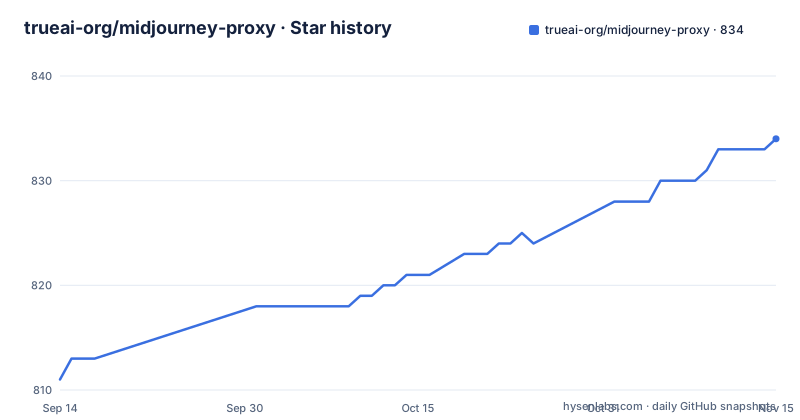
Star history
- trueai-org/midjourney-proxy834 ★ · +23
| Repository | 2026-09-14 | 2026-11-15 |
|---|---|---|
| trueai-org/midjourney-proxy | 811 | 834 |
23 Stars in the last 62 days, measured from the daily GitHub snapshot. Compare with other projects
Editorial analysis
The hosted endpoint takes no key, which is why the deploy note says to turn registration off
The project describes itself as a public welfare service: a free drawing API that proxies Midjourney's Discord channel, with the account pool supplied by sponsors and the hosted interface limited to the slower generation mode. Its management page takes no username or password and its interface takes no API key.
That combination is why the deployment guidance opens with a warning. If you are running this yourself, the instruction is to turn off demo mode, turn off registration and turn off guest access, so that the API cannot be abused. The author is telling operators the same thing a reader would conclude on their own, and putting it before the install commands.
The one-line summary claims to be the largest Midjourney drawing API in the world with more than a million drawings a day. No method, measurement window or source is given for either figure, so treat it as positioning rather than as a measurement.
The English summary also names image and video face swapping among the supported operations, with a compliance note attached in the feature list. That is a separate capability from drawing, it is the kind of feature whose legality depends entirely on the faces involved, and the document does not describe what it does with the input images.
The feature checklist runs to roughly ninety items. Only two are left unchecked: automatically joining a channel and automatically switching between channels.
An account pool with four selection modes and a queue per account
The core resource is a pool of Discord accounts, and the design assumes many of them rather than one.
Each account can carry its own task queue, and account selection has four named strategies: prefer the account that has been idle longest, choose at random, choose by weight, or poll. Beyond selection there is a separate layer of configuration for account ordering, parallelism, queue count, maximum queue count and the interval between task executions. The pool itself is persisted and maintained dynamically, so it survives a restart and can be edited while running.
Accounts can also be classified vertically, with keyword rules attached to each one so that a given account only ever produces a certain category of work, such as landscapes or portraits. That is a throughput optimisation with a quality consequence: each account accumulates a coherent history in one subject, which is what a generation service's own consistency features key off.
On top of that sit the account management endpoints: querying an account's info and settings, changing its settings, creating, editing and deleting accounts, synchronising account details, and setting per-account concurrency limits and validity periods. A sponsor account feature lets one account be funded by someone else.
Filtering reaches into task submission as well. You can require a specific instance to do the drawing, filter which accounts are eligible by generation speed, or exclude accounts sitting in remix mode, all exposed through a filter field in the generated Swagger documentation.
Five URL paths encode the generation speed and the quota fallback
Speed is expressed in the request path rather than in a body field, which is a design choice with consequences: the same operation has five addresses, and a client that hardcodes one gets one behaviour.
There is a default submission path, a turbo path, a relax path, a fast path, and a plain path that does not specify a mode at all. Separately, each account in the pool can be assigned one of three speed modes, so the pool can hold a mix of accounts with different quotas.
The fallback is the interesting part. When an account's fast-mode time is used up, the service can be configured to switch to the slower mode automatically, and it will return to fast when fast time is purchased or the subscription renews. Nobody has to notice the quota running out and reconfigure anything.
That fallback is also a rate-limit management tool. Each account has a queue, accounts are selected by strategy, and the interval between task executions is configurable, so the pool can be throttled below the point where the upstream service objects. A separate feature caps the number of drawings per day per account, and past that cap new drawings stop while variations and re-renders continue, which is a deliberate way to stay useful without consuming more quota.
Two other scheduling features sit alongside. Working-hour windows can be configured per account, with an example that includes an overnight span and a recommendation to rest for eight to ten hours because continuous drawing may trigger a warning. And a per-account idle mode disables creating new drawings while still allowing other commands, across multiple configured time windows.
The command list is wider than the interface, and two commands convert each other
The command surface goes past what the Discord interface exposes. Alongside Imagine and its action buttons, the service handles Blend for mixing images, Describe for image to text, Shorten for prompt analysis, Pan for moving the focal point in four directions, Vary Region for local repainting, custom Zoom, retrieval of an image's seed value, Remix with automatic submission of remix prompts, and the Bookmark command. There is also an image-to-text regeneration command with batch support that does not require the fast mode. Tasks carry a reference to their parent task, so a chain of variations can be traced back to the prompt that started it.
Two features convert between the two bots. One turns a Niji journey task into a Midjourney task automatically and appends the Niji flag to the prompt, with the claim that the rendered result is identical, which means a Niji-style drawing can be produced without the Niji bot present. The other does the reverse and routes a prompt containing that flag to the Niji bot. Translation for each bot is configured separately.
Prompt handling has its own two-stage setup. Chinese prompt translation needs a third-party translation service to be configured before it works, and prompts are screened for sensitive words beforehand, with the screening list adjustable by hand rather than fixed.
The feature list includes surviving a ban and passing a challenge
Two entries in the checklist describe behaviour that exists to work around enforcement rather than to work around a bug.
The first is shared channel drawing. The document states that drawing is allowed through a shared channel or subchannel so that even if an account is banned, previous drawing can continue, by treating a banned account's channel as a subchannel of a normal one. It saves the permanent invite link and the subchannel link and supports bulk modification. That is an explicit continuity plan across account bans.
The second is human verification, in two forms. Manual verification locks the account automatically when a challenge appears, so it can be completed through the management interface or confirmed by email notification. Automatic verification points the service at a verification server address, with the note that the automatic solver can only be deployed on Windows. Two related entries follow: a feature that passes the terms-of-service acceptance check automatically, and account auto-login that requires two-factor authentication to be enabled and a key for a third-party captcha-solving service.
The project is candid about the state of that last one. The hosted automatic login service has been suspended because of sustained attacks on it, and anyone who needs automatic login is told to deploy the solver themselves.
There is a fourth entry worth reading alongside them: non-official links inside prompts are rewritten to official ones, with domestic and custom reference links allowed, and the stated reason is to avoid triggering verification.
Taken together these are the features to weigh. They are the difference between a bot wrapper and a system engineered to continue operating when the upstream service objects.
Six databases and five storage backends, chosen by a row count
Persistence is the part of this project that is documented with the most precision, and the choice is driven by volume rather than taste.
For task data there are six options: a local database, MongoDB, SQLite, MySQL or MariaDB, SQL Server, and PostgreSQL. The document gives a threshold. If task data exceeds one hundred thousand records, MongoDB is advised, and the default retention is one million records with automatic data migration between backends.
For images there are five, plus a CDN: local storage, Alibaba Cloud object storage, Tencent Cloud storage, S3, and Cloudflare R2, which is noted as unmetered. Custom CDNs, custom styles and thumbnails are supported, and object storage is recommended over serving from the origin because it loads faster.
Migration is treated as a first-class operation. The service can take over from a competing implementation or another similar service in one click, moving accounts and task history along with the data, so switching is a configuration change rather than a fresh start.
The runtime has the matching controls. Incoming requests can be rate-limited by address and by address range, with a blacklist, a whitelist and automatic blacklisting. Registration and guest access are separate switches. The API documentation can be enabled independently of the service. A bot token is optional, since the service works without one. Private message identifiers are fetched automatically at startup so they need no configuration, and compressed streaming transport to the Discord gateway is supported.
The install is one script and the Kestrel tuning is an inbound rate limit
Deployment is a single download-and-run, twice. The first invocation fetches an upgrade script and runs it, the second runs the same script again to upgrade:
wget -O docker-upgrade.sh https://raw.githubusercontent.com/trueai-org/midjourney-proxy/main/scripts/docker-upgrade.sh && bash docker-upgrade.shsh docker-upgrade.shThe script is editable before it runs, and the comments name the settings it controls: paths, ports and memory, with a default port of 8086. The official image is described as needing at least two gigabytes of memory, because it is the full version supporting Discord, the third-party drawing service and official-site drawing, with more dependencies. A video walkthrough exists for two Chinese platforms, and separate wiki pages cover Compose deployment and container networking for databases and Redis.
The environment variables are two application settings and two web server settings. Node-level task parallelism and the host's private address are the application pair. The web server pair is the interesting one: a minimum request body data rate in bytes per second, defaulting to 240 with a recommended range of 10 to 1000, and an allowed buffering time in seconds, defaulting to 5 with a recommended range of 5 to 30. Those are inbound throttles on how fast a client may send a body, which in a service that fronts a paid API is a defence against a caller running the endpoint flat out.
The last item in that list is cut off mid-name in the document, so the full set of server variables is not written down. The repository itself is a Visual Studio solution with the sources under a single directory, and the solution carries its own licence header file, which is an editor artifact kept in version control rather than a build input.
Editorial conclusion
Check the terms of service before anything else, because the mechanism this project is built on is a Discord bot driven by pooled user accounts, and operating that against a commercial generation service is outside what that service permits regardless of what the code does. If a use case survives that check, the engineering here is real and worth reading: the account pool with four selection strategies, the four URL paths that encode generation speed, the fallback from a spent fast quota to relax mode, the six database choices with a row-count threshold, and the storage backends are all carefully documented. Two features deserve your attention before deployment rather than after. One lets drawing continue on a shared subchannel after an account is banned, which is designed to survive enforcement rather than avoid a technical failure. The other automates a human verification challenge, including a self-hosted solver you are pointed to because the public one was attacked. A private deployment should also follow the document's own instruction to turn off demo mode, registration and guest access.
Frequently asked questions
What does midjourney-proxy do?
It proxies Midjourney's Discord channel and exposes it as an HTTP API. It supports Imagine and its action buttons, Blend, Describe, Shorten, Pan, Vary Region, custom Zoom, seed retrieval and Remix, plus drawing through the official Midjourney site and through a third-party service called Youchuan, and it supports generating video. It also advertises image and video face swapping.
How does the midjourney-proxy account pool choose an account?
Each account can hold its own task queue and there are four selection strategies: prefer the longest idle account, choose at random, choose by weight, or poll. The pool is persisted and maintained dynamically, accounts can be restricted to a vertical subject such as landscapes or portraits by keyword rules, and account ordering, parallelism, queue counts and task intervals are all configurable.
What do the different midjourney-proxy URL paths mean?
The path selects the generation speed. There is a default submission path, a turbo path, a relax path, a fast path, and a plain path that does not set a mode. Each pooled account can independently be set to RELAX, FAST or TURBO, and when fast-mode time runs out the service can switch to the slower mode automatically and return to fast when the quota is renewed.
Which databases and image stores does midjourney-proxy support?
Task data can go to a local database, MongoDB, SQLite, MySQL or MariaDB, SQL Server, or PostgreSQL, with MongoDB advised past one hundred thousand records and a default retention of one million records with automatic migration. Images can be stored locally, in Alibaba Cloud object storage, Tencent Cloud storage, S3 or Cloudflare R2, with a custom CDN and thumbnails.
Does midjourney-proxy deal with Cloudflare verification?
It describes two paths. Manual human verification locks the account automatically so the challenge can be completed through the management interface or confirmed by email. Automatic verification points the service at a verification server, and the note says that solver can only be deployed on Windows. It also passes the terms-of-service acceptance check automatically and accepts two-factor authenticator codes, while the hosted automatic login service is suspended and must be self-hosted.
Official sources
Add this badge to your README
If you maintain this project, the badge below links readers to this analysis and shows its maintenance status from the daily GitHub snapshot. Paste the markdown into your README; add ?metric=license or ?metric=stars to the image URL for a different field.

[](https://hysenlabs.com/projects/trueai-org-midjourney-proxy)Star history chart for your README
[](https://hysenlabs.com/projects/trueai-org-midjourney-proxy)Was this useful?