SnapX is a cross-platform ShareX fork built on Avalonia and still being rewritten
SnapX is a free, open-source, cross-platform tool that lets you capture or record any area of your screen and instantly share it with a single keypress. Upload images, videos, text, and more to multiple supported destinations—all with ease. ShareX fork
At a glance
- What is it?
- SnapX takes the ideas of the Windows screenshot tool ShareX and rebuilds them on .NET 10 with Avalonia, so the same capture, annotate and upload workflow runs on Linux, macOS and Windows. It captures through the XDG screenshot portals, does OCR with PaddleOCR, stores its history in SQLite, and is in early access while a rewrite is under way.
- Who is it for?
- Adopt SnapX if you want ShareX style capture and upload on Linux or macOS and you are willing to tolerate a project in early access, because the capture and upload engines are described as experimental and a rewrite is in progress. Do not adopt it as a production screenshot service in a team that needs reliability today.
- Can I use it commercially?
- Yes, with conditions. GPL-3.0 is a copyleft licence: if you distribute software that includes it, you must release that software's source code under the same licence. Running it internally without distributing it does not trigger that obligation.
- Is it still maintained?
- Yes. The repository last received commits 45 days ago.
- What is it written in?
- Mainly C#, according to GitHub's language statistics.
Answers come from the project's GitHub data, last synced on November 7, 2026, and from our analysis. They are not legal advice.
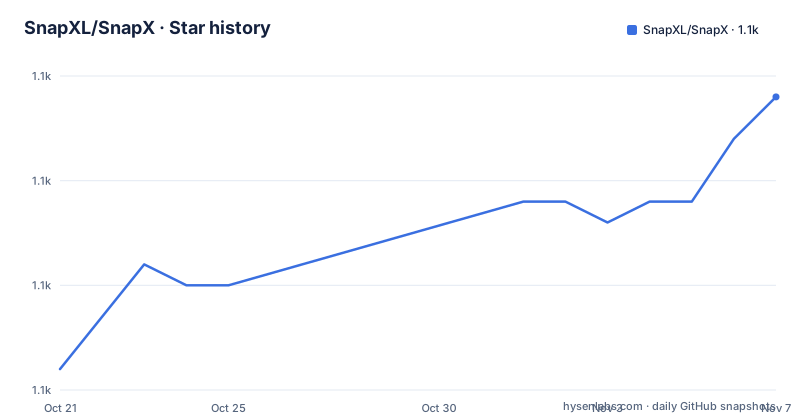
Star history
- SnapXL/SnapX1,069 ★ · +13
| Repository | 2026-10-21 | 2026-11-07 |
|---|---|---|
| SnapXL/SnapX | 1.1k | 1.1k |
13 Stars in the last 17 days, measured from the daily GitHub snapshot. Compare with other projects
Editorial analysis
ShareX's workflow, rebuilt for more than Windows
SnapX is a free, open-source, cross-platform tool that lets you capture or record any area of your screen and instantly share it with a single keypress, uploading images, videos, text and more to multiple supported destinations.
The lineage is stated in the readme, and it is the first thing to understand. SnapX is built on the foundations of ShareX, made cross-platform, and the repository description ends with the words ShareX fork.
That matters for what to expect. ShareX is a Windows tool with a very large configuration surface, dozens of upload destinations, a workflow automation editor and a long history of small features. SnapX is not that, it is a reimplementation of the core idea in a codebase that can be compiled for every desktop platform, and the readme's own framing, everything you love, engineered for speed, user-centric, native and powerful, is a claim about a smaller and sharper thing rather than a port.
The implementation is C# on Avalonia, with XAML in the topic tags alongside avalonia, dotnet, linux, macos and windows. The licence is GPL-3.0, the site is snapx.sh, and the default branch is develop, which tells you the project expects to be built from a moving branch.
The releases are v0.4.0 from 2026-02-20, v0.3.0 from 2025-06-26 and v0.2.1 from 2025-06-09, and the last push was on 2026-09-23, so the code is being worked on between releases.
Early access, and a rewrite that is going to change things
The readme carries a CAUTION block, and it is the most important paragraph in the file for anyone planning to depend on the tool.
SnapX is in Early Access. The core upload engine and capture engine are currently experimental. An ongoing rewrite will improve stability, add essential features like hotkey support, and reduce app size, and progress reports are done via the Discord.
Three things follow from that. The capture and upload paths, which are the two things you would use the tool for, are the parts that are explicitly experimental. The single keypress workflow, which is the headline of the description, is the feature the rewrite is supposed to add, so the thing the readme sells is not yet the thing the tool reliably does. And the application is expected to change shape, so a configuration you write today may not survive the next release.
There is a nice symmetry in that. ShareX's strength is its automation, the workflow editor where you bind a hotkey to a chain of actions. A cross-platform rewrite that starts from a clean design would have to rebuild that editor from scratch, and the readme is honest that hotkey support is on the list of things the rewrite will add.
So the sensible way to read the project is as early access software with a real plan behind it, rather than as a ShareX replacement you can switch to this afternoon.
Capture goes through the desktop portal, and only two desktops are tested
The way SnapX takes a screenshot is the part that makes a cross-platform tool hard, and the readme explains the approach.
This application relies on XDG portals to handle screenshots in a secure and desktop-agnostic way, and it is actively tested on KDE Plasma and GNOME. We also use direct X11 screenshot capture on X based environments.
The XDG portal route is the correct one on Wayland, where a process is not allowed to read another window's pixels without the compositor's consent. The portal asks the desktop, the user sees the same system screenshot dialog they see for any other application, and the application never touches the framebuffer. That is why the tool can be cross-platform at all, and it is also why the supported list is short.
The TIP below it is honest about the limits. Other desktop environments or Wayland compositors, like Budgie, Cinnamon, MATE, Hyprland and any others that have the right screenshot portal, should work, but they have not been officially tested.
That is a reasonable line to draw. A screenshot tool that does not work on your desktop is not usable, and a list of officially tested environments is a much stronger claim than a list of environments where the author believes it should work.
PaddleOCR for text, and a claim about HDR
The feature list is short and the OCR entry is the most specific.
Cross-platform OCR powered by PaddleOCR for industry-leading precision, with the claim that the accuracy outperforms PowerToys OCR, ShareX, Tesseract and the built-in OCR in Windows.
That is a competitive claim about four other tools, and it is worth taking at face value only after trying it on your own images, because OCR accuracy depends on the fonts, the resolution and the language of what you are capturing. The claim that it is cross-platform is the more robust part, since it means the same engine runs on every desktop rather than three different implementations.
The HDR claim is more carefully hedged. Screenshots on an HDR monitor aren't blown out, and the footnote says that when tested on KDE Plasma Wayland 6.2.90 with HDR, the resulting screenshot's colours were not blown out, and that your mileage may vary.
That footnote is an example of a claim made honestly. An HDR screenshot that clips to white is a real and common problem, and the fact that the readme states the exact test environment, the compositor version and the caveat is a better sign than an unqualified promise would be.
The rest of the feature list is supporting high DPI screens, and the feature-wise heading also carries a commented out note about separating essential settings from advanced or intermediate functionality, which reads as a design intention for the settings screen.
The stack: .NET 10, ImageSharp, SQLite and YAML
The technical details section is the most concrete part of the readme, and each entry answers a question.
It uses .NET 10 and ImageSharp, the cross-platform image library. The choice of ImageSharp over the platform imaging libraries is what makes the processing identical on every operating system, which matters for a tool whose output is the thing you share.
It uses SQLite for image metadata, with the specifics named as image hashes and history, and there is an issue in the repository about it. Storing hashes alongside the images is what lets a tool find a duplicate of what you just captured, and the history is what makes the interface browsable.
It uses YAML for a cleaner configuration supporting comments, with auto migration from JSON. That last clause is the interesting part, because a tool that is a ShareX fork will have existing JSON configuration, and a migration path means the lineage is preserved rather than discarded.
Then there are two quality points. The UI is GPU-accelerated, leading to a more responsive UI and less CPU usage while navigating it, with the parenthetical that it fixes low performance on 4K screens with a weak CPU. And it respects the XDG directory specification, with the sentence cut off in the available version.
Packaged for every distribution that matters
The packaging section is long, and it is a sign of how much attention goes into making the tool installable.
There is an AUR package named snapx-ui, a Snapcraft package named ui-snapx, a Homebrew tap at BrycensRanch/homebrew-repo, and a DEB and RPM repository with its own setup instructions. Flatpak is marked as pending, but the links for it are already there, with x86_64 and aarch64 builds from the nightly build workflow, and a general nightly builds page.
The cross-platform story is therefore complete for Linux, which is where a Windows tool like this has the most competition. A Snapcraft package, an AUR package, a Homebrew formula and deb and rpm packages cover the main Linux install paths, and the Flatpak entry is the one that was waiting on Flathub.
The readme also links a quick start testing guide, the wiki page about how to test SnapX, and a Discord, which is where the early access progress is reported. There is a Ko-fi link and a PayPal link for supporting the maintainer, and both are on the same screen as the download badges.
The default branch being develop is worth remembering when you install from source rather than from a package, because the packages carry a version and the branch carries whatever is current.
The solution is split into six projects
The top level listing shows a solution with a clear separation between the parts, and the names describe the design.
SnapX.Avalonia/ is the user interface project, SnapX.Core/ is the core logic, SnapX.CommonUI/ is the shared user interface code, SnapX.CLI/ is a command line front end, SnapX.NativeMessagingHost/ is the piece for native messaging, and SnapX.Secrets/ is the secrets handling.
That last pair is what a screenshot and upload tool needs. A native messaging host is how a browser extension or another application talks to a desktop application, which is the mechanism ShareX uses for its browser integration, and a dedicated secrets project is where credentials for the upload destinations are kept, separated from everything else so that they are not accidentally serialised into the configuration.
The build machinery is modern and cross-platform. There is a SnapX.slnx solution file, a Directory.Build.props for the shared properties, a global.json pinning the .NET SDK, and both build.ps1 and build.sh, so the same build runs from PowerShell and from a Unix shell. GitVersion.yml is the versioning configuration, and the packaging/ directory holds the packaging definitions, with build/ for the rest of the build tooling.
There is also a .idea/ directory and a .vscode/ directory checked in, and an .editorconfig and a .gitattributes, which tells you the project expects contributions from people with different editors and wants the same formatting from all of them.
Editorial conclusion
Adopt SnapX if you want ShareX style capture and upload on Linux or macOS and you are willing to tolerate a project in early access, because the capture and upload engines are described as experimental and a rewrite is in progress. Do not adopt it as a production screenshot service in a team that needs reliability today. Verify first that your desktop has a working screenshot portal, since the officially tested environments are KDE Plasma and GNOME, that your distribution has a package for it, and that you read the early access notice before you depend on the hotkey behaviour, which the rewrite is expected to add.
Frequently asked questions
What is SnapX?
It is a free, open-source, cross-platform tool that captures or records any area of your screen and shares it with a single keypress, uploading images, videos, text and more to multiple destinations. It is a ShareX fork, built on .NET 10 with Avalonia.
Is SnapX ready to use?
It is in Early Access. The readme states that the core upload engine and capture engine are currently experimental, and that an ongoing rewrite will improve stability, add essential features like hotkey support, and reduce app size, with progress reported on the Discord.
How does SnapX take a screenshot on Linux?
Through the XDG portals, so the capture is secure and desktop-agnostic. It is actively tested on KDE Plasma and GNOME, and it also uses direct X11 screenshot capture on X based environments.
Which desktop environments does SnapX support?
KDE Plasma and GNOME are the ones it is actively tested on. The readme says other environments and Wayland compositors such as Budgie, Cinnamon, MATE and Hyprland should work if they have the right screenshot portal, but they have not been officially tested.
How is SnapX packaged?
There is an AUR package named snapx-ui, a Snapcraft package named ui-snapx, a Homebrew tap at BrycensRanch/homebrew-repo, a DEB and RPM repository, and Flatpak builds for x86_64 and aarch64 with the Flathub listing marked as pending, plus nightly builds from the build workflow.
What does SnapX use for OCR and for storing history?
Cross-platform OCR powered by PaddleOCR, with the readme claiming it outperforms PowerToys OCR, ShareX, Tesseract and the built-in Windows OCR. Image metadata such as image hashes and history is stored in SQLite, and the configuration is YAML with auto migration from JSON.
Official sources
Add this badge to your README
If you maintain this project, the badge below links readers to this analysis and shows its maintenance status from the daily GitHub snapshot. Paste the markdown into your README; add ?metric=license or ?metric=stars to the image URL for a different field.

[](https://hysenlabs.com/projects/snapxl-snapx)Star history chart for your README
[](https://hysenlabs.com/projects/snapxl-snapx)Was this useful?