wol's broadcast precedence, its ping-based status, and a web console with no sign-in
🦭 Wake up your devices with a single command or click. A Wake-On-LAN tool that works via CLI and web interface.
At a glance
- What is it?
- A small Go program that sends Wake-on-LAN magic packets from a CLI or a browser. The interesting parts are the three layers that decide where the packet goes, the privilege flag behind the status panel, and a serve mode whose config has no key for authentication.
- Who is it for?
- wol fits a home lab or a single server closet: one binary, one small YAML file, and a broadcast precedence order documented well enough to debug the multi-interface hosts where other senders leave you guessing. Its weak points are equally clear.
- Can I use it commercially?
- Yes. MIT is a permissive licence: you can use, modify and sell software built on it, as long as you keep its copyright and licence notices.
- Is it still maintained?
- Yes. The repository last received commits 155 days ago.
- What is it written in?
- Mainly Go, according to GitHub's language statistics.
Answers come from the project's GitHub data, last synced on November 16, 2026, and from our analysis. They are not legal advice.
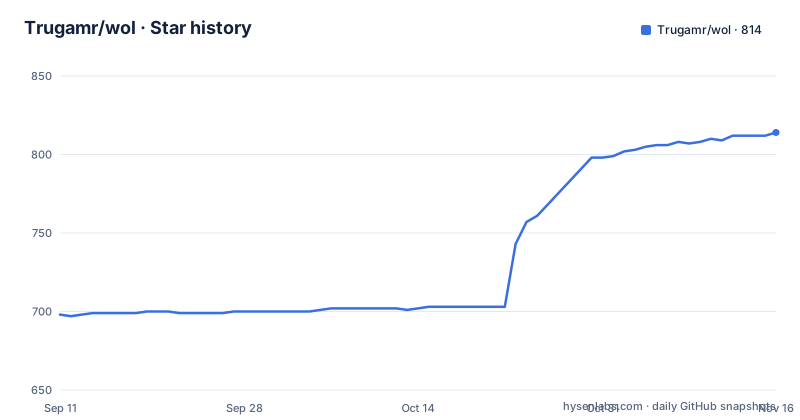
Star history
- Trugamr/wol814 ★ · +116
| Repository | 2026-09-11 | 2026-11-16 |
|---|---|---|
| Trugamr/wol | 698 | 814 |
116 Stars in the last 66 days, measured from the daily GitHub snapshot. Compare with other projects
Editorial analysis
Thirteen months, then two tags in one afternoon
wol is a small Go program, and its release history is short enough to read in one sitting. v0.1.0 landed on 2025-05-16. Nothing followed for about thirteen months. Then v0.2.0 appeared on 2026-06-13 and v0.3.0 on 2026-06-14, less than a day apart, and the repository's last push carries the same timestamp as v0.3.0, 11:34:38 UTC. Whatever is running on your machine is, by the repository's own record, one commit old.
Two root files explain that shape. release-please-manifest.json and release-please-config.json sit next to .goreleaser.yaml, so the version number and the packaged artifacts are decided by two separate configurations. A .golangci.yml is there as well.
Shipping is per platform, and the matrix is spelled out: Linux on x86_64, arm64 and armv7, macOS on x86_64 and arm64, Windows on x86_64 only. That covers current single board computers and both Mac architectures, and it leaves out arm64 Windows. Getting a build is a manual step, since the install section points at the releases page instead of offering a package manager recipe. Two paths skip the download: `go install github.com/trugamr/wol@latest`, and a container image published as ghcr.io/trugamr/wol.
Three layers decide where the magic packet leaves the box
wol sends magic packets, which are plain broadcast traffic, and the destination is the part that goes wrong in practice. The built-in target is 255.255.255.255 on port 9. That address is a limited broadcast, so the packet goes out whichever interface the operating system picks, and on a host with more than one interface, WSL2 or a machine with Docker bridges, the README says the packet can leave by the wrong door and the target never receives it. The fix it gives is to aim at the target's own subnet broadcast instead, 192.168.1.255 for a machine at 192.168.1.100/24.
There are three ways to set that target, consulted in a fixed order: a `--broadcast` flag on a single send, then a per-machine `broadcast` block, then the global `broadcast` key, then the built-in default. Any field a per-machine block leaves out falls back to the global value, so you can move just the address and leave the port alone.
  - name: server
    mac: "AA:BB:CC:DD:EE:FF"
    ip: "server.local"
    # Optional per-machine broadcast override, e.g. when this machine is on a
    # different subnet/VLAN. Unset fields inherit the global broadcast below.
    broadcast:
      address: "192.168.20.255"
That block is why a config can hold machines on two subnets at once. The one-off form does the same thing without touching the file:
wol send --mac "00:11:22:33:44:55" --broadcast 192.168.1.255 --port 9Config lookup walks three paths and stops at the first one that exists
A configuration file is optional in one sense and mandatory in another. wol looks for ./config.yaml first, then ~/.wol/config.yaml, then /etc/wol/config.yaml. The third path is the one the container image expects, which is why the mount in every Docker example points at exactly that path inside the container.
Passing `-c` or `--config` changes the rules rather than the order. An explicit path is authoritative: the file has to exist, wol exits with an error if it does not, and both the three default locations and the WOL_CONFIG environment variable are then ignored. On startup serve logs which config source it loaded, which is the quickest way to tell which file a running instance is really reading.
The other route is the environment variable, which carries the same YAML inline:
export WOL_CONFIG='
machines:
  - name: desktop
    mac: "00:11:22:33:44:55"
    ip: "192.168.1.100" # Optional, for status checking
  - name: server
    mac: "AA:BB:CC:DD:EE:FF"
    ip: "server.local"

server:
  listen: ":7777" # Optional, defaults to :7777
'
The top-level keys that appear there are `machines`, `server`, `broadcast` and `ping`, with `schedules` added when you want cron wake-ups. config.example.yaml at the repository root is the template to copy from. Machine names are what `--name` resolves against, which is the whole reason `wol send --name desktop` reads better than pasting a MAC address at a terminal every time.
The compose file's second method stops half a machine in
The Docker section offers two compose services, and they are not the same shape. Method 1 mounts ./config.yaml to /etc/wol/config.yaml. Method 2 passes configuration through the WOL_CONFIG environment variable and mounts nothing, yet the note printed under both examples says the config file should be mounted to /etc/wol/config.yaml inside the container. The two instructions sit side by side without being reconciled.
Method 2 is also unfinished. Its inline YAML stops right after a second machine name:
      environment:
        WOL_CONFIG: |
          machines:
            - name: desktop
              mac: "00:11:22:33:44:55"
              ip: "192.168.1.100" # Optional, for status checking
            - name: server
There is no MAC address for `server` and no `server:` block with a `listen` key, so pasted as printed it declares a machine that cannot be woken. The WOL_CONFIG example further down the configuration section shows the complete form, with both machines and a listen value. Both services also carry `command: serve` and `network_mode: "host"`, and the note explains the choice: host networking is recommended so the packets reach the local network directly instead of crossing a bridge.
Image tags split the same way as the releases. `latest` and `X.Y.Z` track named releases, with a pin available when you want one, and `edge` tracks the latest commit on `main` for trying changes that have no tag yet.
Status buttons depend on ping, and ping depends on privileges
The web interface lists machines and gives each one a wake button. Whether it also shows live state depends on the `ip` field, which the docs mark as optional and tie to status checking, and on a separate top-level key that the example config sets to `privileged: false`. Status is opt-in per machine. What setting that flag to true actually changes is not explained anywhere in the README.
The ping is not a shell out. go.mod pins github.com/prometheus-community/pro-bing v0.9.0, and the Known Issues section holds a single entry, Docker Container Ping Permissions. That entry says the ping based status may not work inside a container because of permission issues, names the library as the reason, and says it requires specific Linux kernel settings. That last sentence breaks off inside the phrase, so the requirement itself is never stated.
Two details around it are worth noting. The field is called `ip` yet the example fills it with `server.local`, a hostname, so it is doing a name lookup and not only parsing a literal address. And the rest of the dependency list is equally explicit about what the tool is: robfig/cron/v3 v3.0.1 for the scheduler, cobra v1.10.2 for the command line, koanf v2.3.5 for YAML arriving from a file, from raw bytes or from structs, and testify v1.11.1 for tests. The whole thing is one module, github.com/trugamr/wol, with a top-level magicpacket package sitting next to cmd/, config/, docker/ and main.go, so the packet building lives apart from the command line and the server.
Cron schedules are validated once, at startup, in the server's own timezone
An optional `schedules` section makes serve wake machines on a cron schedule, and it is off unless you add it. Each entry needs a `machine` name that exists under `machines` and a `cron` expression, either a standard five-field one or a descriptor such as `@daily` or `@every 1h30m`. A `name` is optional and only labels the log line, defaulting to the machine name.
The failure mode is the good part. Schedules are validated when serve starts, so a cron expression the parser rejects, or an entry naming a machine that is not in the config, makes wol exit with an error instead of a scheduler that quietly never fires. That is the difference between a typo you find at deploy time and a typo you find three weeks later.
Timezone is the sharp edge. Expressions are evaluated in the server's local time, and in a container that is usually UTC unless you set TZ yourself, so `0 7 * * *` in a compose file without a timezone fires at 07:00 UTC and not at 07:00 where you live. The note in the docs mentions the TZ environment variable, with America/New_York as the example.
One-off sends need none of this. `wol send --mac` carries the address on the command line and needs no config file and no machine entry at all, so it works on a host you have never configured, which is also why a cron job on some other machine can call it.
Nothing in the config signs a browser in
There is no documented key for authentication, TLS or a session secret. The keys the docs cover are `machines`, `server`, `broadcast`, `ping` and `schedules`, and under `server` the only field shown is `listen`. The one security control anywhere in the repository is examples/reverse-proxy.yml, a compose example for putting wol behind a reverse proxy with basic auth and https. Protection is something you add in front of the service; the service itself offers nothing to configure.
The listen address is the only lever inside the config, and it is documented only in its port-only form. The value `:7777` has no host part to edit, so narrowing the bind means writing an address yourself, and the README does not walk through that.
Anyone who can reach the port can list the machines and send to every one of them, and the status panel tells them which are already up. There is no per-machine permission model in the config to narrow that, and no rate limit or audit trail is documented for repeated sends. If you are putting serve on a shared segment, the reverse proxy example is the piece to copy, and binding to loopback is the piece to work out yourself.
Editorial conclusion
wol fits a home lab or a single server closet: one binary, one small YAML file, and a broadcast precedence order documented well enough to debug the multi-interface hosts where other senders leave you guessing. Its weak points are equally clear. The web interface is unsigned and the config cannot sign it, the ping based status depends on kernel behaviour the docs do not finish explaining, the compose environment example ends half a machine in, and the project is still at v0.3.0 after two tags in one afternoon. Before exposing serve past your own subnet, copy examples/reverse-proxy.yml and put basic auth and https in front of it. Pin the image to a version tag rather than `latest` if the environment has to stay predictable.
Frequently asked questions
Where does wol look for its configuration file?
In order: ./config.yaml, then ~/.wol/config.yaml, then /etc/wol/config.yaml. Passing -c or --config overrides that search, and that file must exist or wol exits with an error. The WOL_CONFIG environment variable is another route, but an explicit --config makes it ignored. On startup serve logs which source it loaded.
Does the wol web interface ask for a login?
No documented key for it exists. The config documents server.listen, machines, broadcast, ping and schedules, and nothing for credentials or TLS. The repository ships examples/reverse-proxy.yml for running wol behind a reverse proxy with basic auth and https, so protection has to be added in front of serve.
Why does my magic packet never reach the device?
wol defaults to 255.255.255.255 on port 9, and on a host with several interfaces such as WSL2 or a machine with Docker bridges the packet can go out the wrong one. Point the broadcast at the target's own subnet, 192.168.1.255 for 192.168.1.100/24, with --broadcast on one send, a per-machine broadcast block, or the global broadcast key.
Can wol wake machines on a schedule, and in which timezone?
An optional schedules section makes serve wake machines on a five-field cron expression or a descriptor such as @daily or @every 1h30m. Expressions run in the server's local time, so a container needs TZ set. An unknown machine name or an invalid expression makes serve exit at startup.
Does wol run inside Docker, and does the status display work there?
The examples use --network host and recommend host networking so packets reach the local network, with config mounted at /etc/wol/config.yaml. The machine status feature that uses ping may fail in a container over permissions, since the project uses pro-bing, which needs specific Linux kernel settings.
Which platforms does wol ship binaries for?
Linux on x86_64, arm64 and armv7, macOS on x86_64 and arm64, and Windows on x86_64 only, as downloads from the releases page. Two other routes exist: go install github.com/trugamr/wol@latest, and the ghcr.io/trugamr/wol image with latest, version and edge tags.
Official sources
Add this badge to your README
If you maintain this project, the badge below links readers to this analysis and shows its maintenance status from the daily GitHub snapshot. Paste the markdown into your README; add ?metric=license or ?metric=stars to the image URL for a different field.

[](https://hysenlabs.com/projects/trugamr-wol)Star history chart for your README
[](https://hysenlabs.com/projects/trugamr-wol)Was this useful?