tsukimi ships under three namespaces, and its build reads a secret out of a file in the tree
A simple third-party Jellyfin client for Linux
At a glance
- What is it?
- tsukimi is a third-party Jellyfin client for Linux, written in Rust on GTK4 with mpv for playback, and it is distributed through five different package routes, none of which is the project's own repository. Underneath, the build stack is five layers deep, and one of its commands reads a credential from a file inside the working directory and exports it to the compiler.
- Who is it for?
- Fit this if you run a Jellyfin server on Linux and want a native client rather than a browser, and pick the Flathub or Nix route if you want a channel the project controls. Read the build recipe before compiling from source, because it looks for a credential file in the working tree and injects it into the compile step, which is not something to have happen by accident on a shared machine.
- Can I use it commercially?
- Yes, with conditions. GPL-3.0 is a copyleft licence: if you distribute software that includes it, you must release that software's source code under the same licence. Running it internally without distributing it does not trigger that obligation.
- Is it still maintained?
- Yes. The repository last received commits 4 days ago.
- What is it written in?
- Mainly Rust, according to GitHub's language statistics.
Answers come from the project's GitHub data, last synced on November 22, 2026, and from our analysis. They are not legal advice.
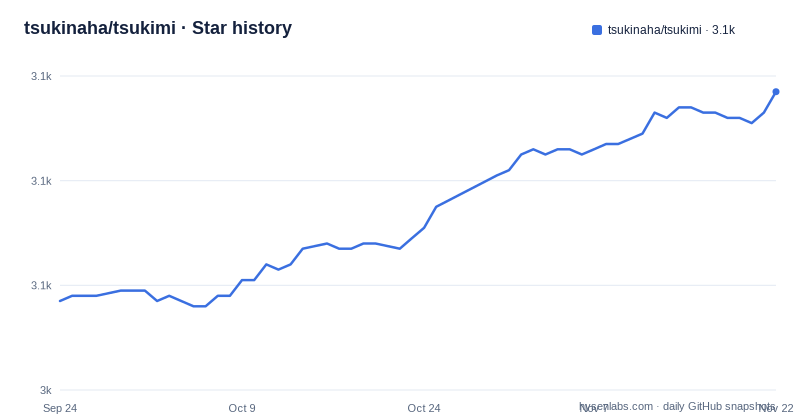
Star history
- tsukinaha/tsukimi3,097 ★ · +40
| Repository | 2026-09-24 | 2026-11-22 |
|---|---|---|
| tsukinaha/tsukimi | 3.1k | 3.1k |
40 Stars in the last 59 days, measured from the daily GitHub snapshot. Compare with other projects
Editorial analysis
Three namespaces, and three of five install routes borrow someone else's repository
The Gentoo route is three commands, and the first two are not about tsukimi at all:
sudo eselect repository enable gentoo-zh
sudo emerge --sync gentoo-zh
sudo emerge --ask media-video/tsukimi
Enable a third-party overlay, sync it, and only then emerge the package. The Fedora route is two commands with the same shape: enable a third-party package repository, then install. Arch is the extreme case, offering four parallel channels in a single block, two from a third-party user repository and two from a third-party binary repository, with the source and binary variants of each side by side. So of the five documented routes, three require trusting somebody else's repository to be current and untampered, one relies on the distribution's own curated set, and only the Flatpak listing is a channel the project appears to control. The README does not rank them or say which one to prefer.
The build step reads a credential out of the working tree
The task runner file is short and its build recipe is the interesting part. Before invoking the actual compile, it checks whether a file named secret/key exists in the repository root; if it does, it reads the first line into a shell variable, exports it under a specific name, and only then compiles. That is a build-time secret injection, and it is the one place in the repository where a credential is handled as a file path rather than as an environment variable the operator sets. The run recipe has a similar shape: it rewrites two standard directories to point at a local development prefix, then executes the application's source file directly out of the build directory rather than an installed binary. Neither the file nor the README says whether that secret path is ignored by version control.
Five packaging layers for one application
The root of the repository carries, in order of how much they matter: a Cargo workspace file, a Meson build definition with its own options file, a task runner that drives Meson, two RPM specification files, a Flatpak directory, a package-repository directory, a git-hooks directory, and a formatting configuration. So the actual build chain is three tools deep, where the task runner calls Meson and Meson calls Cargo, and around that sit three independent packaging routes for the same binary. Having both a release specification and a separate one for the latest commit is the detail that tells you the project supports a rolling channel alongside a stable one, and the presence of a git-hooks directory wired through a build dependency means hooks are installed by running a build step rather than by a separate command.
The workspace is a bundle of the author's other projects
The workspace declares six first-party crates, each with both a version and a local path, and only one of them is the application itself. The others are a prelude crate, a crate named after an anime streaming API plus a second named after its client, a library with a three-letter name the README never explains, and the embedder the project depends on. That last one connects to a line in the README's opening note: video embedding is done through a proxy library whose embedder lives in another person's repository, and the same person maintains a separate local player built on it. So a client for one media server depends on an embedder from a third party, and the workspace that builds it also carries that third party's API client and an unrelated library. The application identifier and the Fedora repository handle are different namespaces again, so there are three names for one project across its source, its Flatpak listing and its binary packages.
The release profile is where the project's priorities show. Link-time optimisation is on, symbols are stripped, the debug information is limited, and there is exactly one codegen unit, which is the slowest possible setting to compile and the smallest possible output. For a media client distributed through five package channels, that is a coherent trade, and it is the opposite of what the justfile does in development, where the debug profile turns on full debug information.
Three graphics stacks and a desktop media-player registration
For a client described as simple, the graphics and media surface is broad. Playback goes through a safe wrapper around the player library plus its raw foreign-function bindings. Alongside that sit bindings for a hardware-accelerated decoding framework, for OpenGL, and for Vulkan, plus a runtime dynamic-library loader. The toolkit layer binds both display-server backends, a Wayland one and an X11 one, which is what makes the single Linux claim credible rather than aspirational. And the crate list includes a server implementation of the desktop media-player interface, meaning the application registers itself with the session as something other systems can control.
A plotting library, fuzzy matching and a hash crate in a media client
Scanning the dependency list for things a media client would not obviously need turns up a plotting library, a fuzzy string-matching crate, an xxhash implementation, a byte-formatting utility, a builder-derive helper, a hostname resolver and a future-based concurrency crate. Fuzzy matching is defensible for search, and a hash for cache keys more so. A plotting binding is not, and nothing in the README mentions charts. That is the pattern across the whole manifest: the dependency set is broader than the documented feature set, and the file gives a reader no way to tell which of these are load-bearing and which are leftovers from the other projects in the workspace.
Configuration is one link to somebody else's manual
There is a heading for configuration and it contains a single link, to the configuration-files section of the player's own manual. So the application's own settings are documented entirely by reference to the embedded player, which is a defensible choice for a thin client and leaves the client's own preferences undocumented. The rest of the file is proportionate. A disclaimer states that the developers have no affiliation with the content providers available, which is the right thing to say about a media browser. Three other applications are thanked as references by name, one of which is itself a music player, and a credits list names the toolkit bindings, the player and the widget library. The screenshot section reserves three slots and the header reserves six links, none of which carry content.
Editorial conclusion
Fit this if you run a Jellyfin server on Linux and want a native client rather than a browser, and pick the Flathub or Nix route if you want a channel the project controls. Read the build recipe before compiling from source, because it looks for a credential file in the working tree and injects it into the compile step, which is not something to have happen by accident on a shared machine. Expect a stripped, single-unit, link-time-optimised release build from a workspace that contains six first-party crates, several of which have nothing to do with Jellyfin.
Frequently asked questions
What is tsukimi?
A third-party client for the Jellyfin media server, written in Rust for Linux, using the GTK4 toolkit with both Wayland and X11 backends and embedding the mpv player for playback. It is distributed through Flathub, Nix, Fedora, Arch, Gentoo and AOSC.
how to install tsukimi
Through Flathub or the Nix package set, or from a native package. Fedora requires enabling a third-party package repository first, Gentoo requires enabling and syncing a third-party overlay, and Arch offers four channels split between a third-party user repository and a third-party binary repository.
Does tsukimi run on Wayland?
Its toolkit bindings cover both a Wayland and an X11 display backend, which is what makes the Linux claim concrete. Video output is embedded through a proxy library for the player's next-generation video output, whose embedder is maintained in another repository.
How is tsukimi built from source?
Through a task runner that drives a Meson build, which in turn drives the Cargo workspace. The build step checks for a file named secret/key in the repository root and, if present, exports its first line as a build-time variable before compiling. The release profile enables link-time optimisation, strips symbols and uses a single codegen unit.
What licence is tsukimi under?
The GNU General Public License version 3, with a licence file at the repository root. The README also states that the developers have no affiliation with the content providers available through the application.
Official sources
Add this badge to your README
If you maintain this project, the badge below links readers to this analysis and shows its maintenance status from the daily GitHub snapshot. Paste the markdown into your README; add ?metric=license or ?metric=stars to the image URL for a different field.

[](https://hysenlabs.com/projects/tsukinaha-tsukimi)Star history chart for your README
[](https://hysenlabs.com/projects/tsukinaha-tsukimi)Was this useful?