Hive: a browser workbench that drives real CLI agents over a team command and a markdown task graph
Browser-native hive-mind for CLI coding agents — Claude Code, Codex, Gemini, and OpenCode collaborate as real PTY processes via a team protocol.
At a glance
- What is it?
- Hive runs Claude Code, Codex, Gemini, OpenCode, Qwen, Pi and other CLI agents as PTY processes on your own machine and gives them a browser workbench with an Orchestrator that delegates work. Coordination happens through a team command injected into each agent shell and a markdown task graph at .hive/tasks.md, not through a scripting layer of its own.
- Who is it for?
- Hive is worth a try if your bottleneck is coordination rather than model quality, because the design keeps the agents you already use and adds only the layer you are missing. That layer is unusually inspectable: the Orchestrator is a real agent process, the task graph is a markdown file in your workspace, and nothing about the delegation is hidden behind a proprietary protocol.
- Can I use it commercially?
- Check first. The repository uses a licence we do not classify automatically, so read its LICENSE file before any commercial use.
- Is it still maintained?
- Yes. The repository last received commits 1 day ago.
- What is it written in?
- Mainly TypeScript, according to GitHub's language statistics.
Answers come from the project's GitHub data, last synced on November 13, 2026, and from our analysis. They are not legal advice.
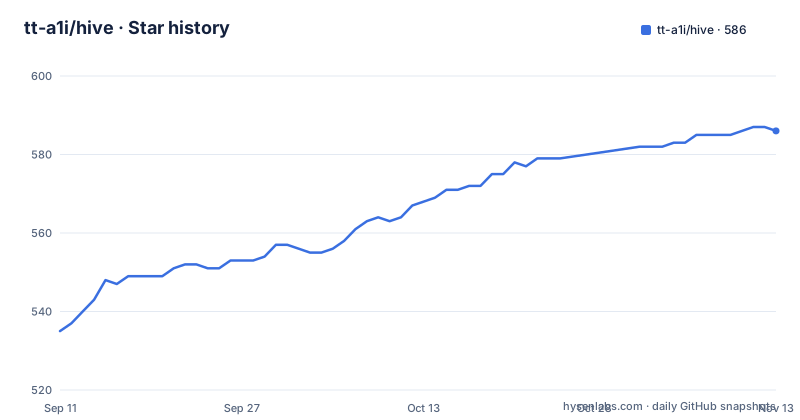
Star history
- tt-a1i/hive586 ★ · +51
| Repository | 2026-09-11 | 2026-11-13 |
|---|---|---|
| tt-a1i/hive | 535 | 586 |
51 Stars in the last 63 days, measured from the daily GitHub snapshot. Compare with other projects
Editorial analysis
The Orchestrator is a real agent process, not a scripted project manager
The claim Hive makes first is that it does not replace your CLI agents. The Orchestrator is a real process, and the list of what it can be runs to agy, claude, codex, opencode, gemini, hermes, qwen or pi, with the phrase real and not a scripted PM used to draw the distinction. Workers are real CLI agents too, running as PTY processes on the same laptop. What Hive adds is the coordination layer, and it names the four problems that layer solves: long-running sessions spread across terminals, splitting work across agents with no routing layer, worker progress disappearing into scrollback, and restart recovery that depends on each CLI's native session behaviour. The framing in the README is blunt about the audience: use Hive when one agent is not enough but a pile of terminal windows is not a workflow. Everything else follows from taking the agents as given. You keep the model, the tools and the authentication each CLI already has, and you add a browser surface where an Orchestrator plans and delegates while workers implement, review, test, research and report back.
Coordination is a team command in the shell and a markdown file in the workspace
The delegation mechanism is small enough to describe in one sentence, which is the most interesting engineering decision in the project. Hive injects a small team command into the agent shells, and that command is what lets the agents dispatch work, report results and maintain a shared task graph. The graph lives at <workspace>/.hive/tasks.md, so it is a markdown file inside your project rather than a database you have to trust or export. You can read it, diff it, edit it and put it in version control with the code it describes. The first-run flow makes the sequence concrete: create a workspace from a project folder, choose an Orchestrator preset, and Hive then creates the tasks file, starts the Orchestrator PTY and injects the team command into the agent session. You add workers from the Team Members panel, and then the Orchestrator sends tasks with a command of the form team send <worker-name> and a quoted task, while workers come back with a team report. The three worked examples in the documentation are all variations on this split: a coder and a reviewer before a merge, three workers on separate slices of one flaky behaviour, and a gatherer, a drafter and a fact-checker on a technical note.
hive update installs with --ignore-scripts and then probes itself before reporting success
The in-place upgrade path is the most carefully specified thing in the documentation, and the reason is that Hive ships native PTY binaries, so a careless upgrade breaks the thing that makes it work. hive update installs the new version with --ignore-scripts while preserving the original npm prefix, and it explicitly never changes your npm script policy. After npm exits successfully it does not stop there. It probes SQLite and a short-lived PTY in a fresh process, using the Node binary that is running the Hive CLI, identified as process.execPath. For the update only, that Node directory is prepended to PATH for the npm child, and the documentation is careful about what that implies: a custom --prefix is the package target and does not need to contain a Node binary of its own. The rule that follows is the one to hold on to, since it is the failure mode a user cannot see coming. If the probe fails, hive update will not print a successful update. A second rule covers package managers, because installing through pnpm or yarn and then upgrading with npm silently leaves two copies where the new one shadows the old. The command itself is one line:
hive updateThe PTY binary is an optional dependency, so npm needs optional dependencies on
Hive depends on two platform-level things and both are spelled out in the prerequisites. It uses Node's built-in SQLite, so there is no native database module to compile, and it uses platform-specific PTY binaries, which do have to arrive at install time. The consequence is the instruction to keep optional dependencies enabled so that npm can install the binary for your platform, and it is stated as an installation requirement rather than a troubleshooting note, because a global install with optional dependencies suppressed gives you a package that starts and cannot open a terminal. The other half of the install story is that no build tools or script approvals are required. First installation works with npm 12 defaults and also works with --ignore-scripts, which is the same property the updater relies on. The version floor is Node 22.18 or newer within the 22 line, or 24 and above, and the manifest states it as the engine range ^22.18.0 or >=24.0.0. On top of that you need at least one supported agent CLI, already installed, authenticated and available on PATH, because Hive starts real processes rather than simulating them. The install itself is two commands:
npm install -g @tt-a1i/hive
hive
The Try Demo path is a client-side replay that never touches the server
Hive offers a way to look before you install anything, and it is important to know what that way is. If you have no agent CLI installed, you can run hive, open the printed URL and choose Try Demo in the first-run wizard. What you get is described as a pure client-side replay: a fake terminal types through planning, then team spawn, then team send, then worker reports, and then the checkoffs in .hive/tasks.md. It needs no network access, no installed CLI and no sign-in, and it never calls the demo workspace server routes. That makes it a genuinely honest demo in one narrow sense, since it is not pretending to talk to a model, and a misleading one in the sense that matters to an evaluation, since none of the coordination you are watching actually coordinates anything. The parts that break in production, PTY binaries, SQLite, session recovery, the npm update probe, are all absent from the replay. Judge the interface from the demo if you like, and judge the runtime from the prerequisites. The default address is http://127.0.0.1:9483/, and hive --port 0 makes the operating system hand you a free local port instead.
The installable app is Chromium-only and each port becomes a separate app
Hive can install as a desktop app, and the details are specific enough to save you a support question. Open the local URL in Chrome, Edge or Brave and click the install icon at the right edge of the browser omnibox. The PWA then launches in its own dock-anchored window without browser chrome, with Add Workspace and Try Demo shortcuts in the dock right-click menu. Firefox and Safari do not implement the install-prompt protocol, so the omnibox icon only appears in Chromium-based browsers. Two consequences follow. The daemon must still be running for the app to do anything, and if the runtime is unreachable you get a Hive runtime is not running page that reloads itself once hive is back on 127.0.0.1. And the install scope is keyed by origin, so hive --port 9484 installs as a separate app from hive --port 9483, which means running Hive on a random port through --port 0 accumulates distinct app entries rather than one. There is also a small honest caveat about the close confirmation: modern browsers gate the beforeunload prompt on prior page interaction, so opening the app and immediately pressing the close shortcut still closes it cleanly, which the project attributes to browser policy rather than to a defect.
The manifest version and the published release are two different numbers
Hive ships from two places and they do not agree, which is worth understanding before you file an issue about a version mismatch. The package manifest in the repository declares version 2.2.1 for @tt-a1i/hive, declares pnpm as its package manager at 10.30.3, and names a single binary entry point that resolves to the built CLI. Against that, the repository publishes exactly one GitHub release, the tag v0.6.0-alpha.0, and it was published on 2026-05-13. The documentation addresses the gap rather than hiding it: development, issues, pull requests and releases are all maintained in this repository including the gateway source, the default branch can contain unreleased work, and npm installs the latest published release. So a number you read in the source tree is a statement about the tip of main, while the number on npm is a statement about what shipped. Two practical rules follow. Do not report a bug against a version number you copied from package.json, because your installed copy may be much older. And do not assume a git checkout equals your install, because the two can be different versions of the same tool. The repository layout supports that reading, with separate src/, web/, gateway/, bin/, vendor/, patches/, prototypes/, tests/ and scripts/ directories alongside the manifests.
BUSL-1.1 in the manifest, a BSL file and a separate trademark file
Hive splits its legal files three ways, and the split is visible at the top of the repository. The package manifest declares the license as BUSL-1.1, and the repository ships LICENSE, LICENSE.BSL, NOTICE and a TRADEMARK.md beside the readme files. The documentation adds one line about it at the top, stating that the BSL license is unchanged, which reads as a response to a question about whether the terms moved. The published file list gives you the practical boundary, because it is what npm actually ships: assets, the changelog, both licence files, the notice, all three readmes, the security and trademark files, the built binary directory, the built source, the vendored directory and the built web assets. A project that publishes a trademark file separately from its licence is telling you that the name is not part of what you get. Before building anything on top of Hive, read that file and the BSL terms together, and decide whether your use is inside them. The same caution applies to the gateway source, which the documentation says is maintained in this repository, so the component you would be most tempted to fork is the one whose terms you have not read yet.
Editorial conclusion
Hive is worth a try if your bottleneck is coordination rather than model quality, because the design keeps the agents you already use and adds only the layer you are missing. That layer is unusually inspectable: the Orchestrator is a real agent process, the task graph is a markdown file in your workspace, and nothing about the delegation is hidden behind a proprietary protocol. The costs are specific and worth naming before you commit. You need Node 22.18 or 24 and at least one authenticated agent CLI on your PATH, so it is not a standalone product. The demo replays a fake terminal client-side and tells you nothing about the runtime, so judging Hive from the Try Demo button is judging the interface rather than the thing. And the number in the source tree is not the number you installed, since the manifest sits at 2.2.1 while the only published release is the v0.6.0 alpha. If you try it, confirm three things first: that hive update on your machine passes the SQLite and PTY probe it promises, that your optional dependencies are enabled so the PTY binary actually installs, and that the BUSL-1.1 terms plus the separate trademark file fit what you intend to do with it.
Frequently asked questions
What does Hive add to CLI coding agents?
Hive does not replace them. The Orchestrator is a real agy, claude, codex, opencode, gemini, hermes, qwen or pi process and workers are real CLI agents, both running as PTY processes on your machine. Hive injects a small team command into their shells and keeps a shared markdown task graph at <workspace>/.hive/tasks.md.
What do I need installed before Hive will run?
Node.js 22.18 or newer within the 22 line, or 24 and above, at least one supported agent CLI that is installed, authenticated and on PATH, and optional dependencies left enabled so npm can install the platform PTY binary. Hive uses Node's built-in SQLite, so no database module has to be compiled.
How does hive update behave?
It installs with --ignore-scripts while preserving the original npm prefix and never changes your npm script policy. After npm exits successfully it probes SQLite and a short-lived PTY in a fresh process and refuses to report a successful update if that probe fails. If you installed with pnpm or yarn, upgrade through that same package manager or the npm copy will shadow it.
Can I try Hive before installing an agent CLI?
Yes, through the Try Demo button in the first-run wizard, and it needs no network access, no installed CLI and no sign-in. It is a pure client-side replay where a fake terminal types through planning, team spawn, team send, worker reports and the tasks.md checkoffs, and it never calls the demo workspace server routes.
Can I install Hive as a desktop app?
In Chromium-based browsers only. Open the local URL in Chrome, Edge or Brave and use the omnibox install icon; Firefox and Safari do not implement the install-prompt protocol. The PWA launches in its own dock-anchored window, the daemon has to be running for it to do anything, and each port installs as a separate app because the install scope is keyed by origin.
Official sources
Add this badge to your README
If you maintain this project, the badge below links readers to this analysis and shows its maintenance status from the daily GitHub snapshot. Paste the markdown into your README; add ?metric=license or ?metric=stars to the image URL for a different field.

[](https://hysenlabs.com/projects/tt-a1i-hive)Star history chart for your README
[](https://hysenlabs.com/projects/tt-a1i-hive)Was this useful?