tun2proxy: Route System Traffic Through HTTP and SOCKS Proxies
Tunnel (TUN) interface for SOCKS and HTTP proxies
At a glance
- What is it?
- tun2proxy is a Rust-based tunnel interface that connects TUN traffic to HTTP, SOCKS4, or SOCKS5 proxies on Linux, macOS, Windows, Android, and iOS. It is aimed at users and applications that need system-wide proxy routing, with documented virtual DNS, UDP, authentication, and platform-specific setup trade-offs.
- Who is it for?
- tun2proxy is suitable for engineers and users who need a cross-platform TUN-to-proxy bridge, especially when system-wide routing, virtual DNS, or authenticated proxy connections matter. It is less suitable when a local proxy client already provides the required routing, or when the target environment cannot create and configure a TUN interface.
- Can I use it commercially?
- Yes. MIT is a permissive licence: you can use, modify and sell software built on it, as long as you keep its copyright and licence notices.
- Is it still maintained?
- Yes. The repository last received commits 8 days ago.
- What is it written in?
- Mainly Rust, according to GitHub's language statistics.
Answers come from the project's GitHub data, last synced on November 7, 2026, and from our analysis. They are not legal advice.
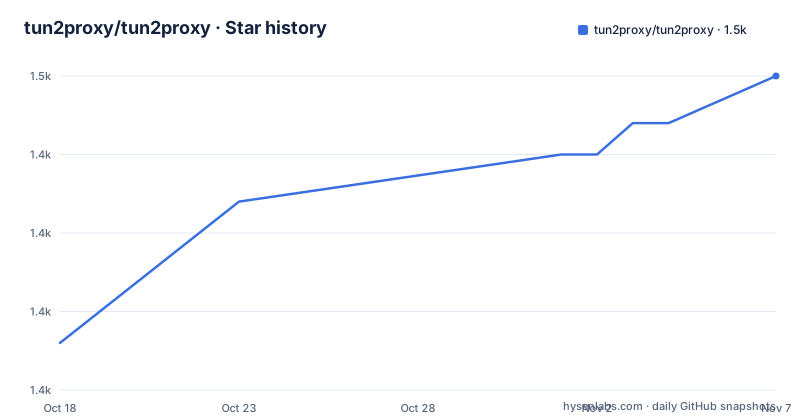
Star history
- tun2proxy/tun2proxy1,450 ★ · +17
| Repository | 2026-10-18 | 2026-11-07 |
|---|---|---|
| tun2proxy/tun2proxy | 1.4k | 1.5k |
17 Stars in the last 20 days, measured from the daily GitHub snapshot. Compare with other projects
Editorial analysis
tun2proxy's proxy bridge and supported targets
tun2proxy solves a specific networking problem: routing traffic originating from a system or application through an existing HTTP or SOCKS proxy when that application has no native proxy configuration. It creates a TUN-style tunnel interface and forwards the traffic from that interface to the configured proxy endpoint. The repository describes support for Linux, Android, macOS, iOS, and Windows.
The supported proxy protocols are broader than a single SOCKS mode. The README lists HTTP proxy support with unauthenticated, basic, and digest authentication. It also lists SOCKS4 and SOCKS5, including unauthenticated and username/password authentication. SOCKS4a and SOCKS5h are supported through the virtual DNS feature, while SOCKS5 UDP and a UdpGW gateway are also documented.
This puts tun2proxy between a local network interface and a proxy server. It is not a proxy server itself, and the repository does not describe it as a standalone VPN, content filter, or firewall. The user must already have a suitable HTTP or SOCKS proxy endpoint, or must deploy one separately. The project is therefore most relevant to local tunneling tools, embedded environments, mobile networking applications, and systems where application-level proxy settings are insufficient.
The package is primarily written in Rust. `Cargo.toml` identifies the crate as `tun2proxy`, version `0.8.4`, with a minimum Rust version of `1.85`. It produces a library as well as `tun2proxy-bin`, the command-line binary. A second binary, `udpgw-server`, is conditional on the `udpgw` feature, which is enabled by default.
How the TUN, routing, and virtual DNS path work
The documented data path starts with a tunnel interface that receives packets intended for the system. The interface sends traffic into tun2proxy, which translates the packet-oriented traffic into connections to the configured HTTP or SOCKS proxy. For proxy authentication, the selected protocol determines how credentials are handled. The README specifically identifies HTTP basic and digest authentication and SOCKS username/password authentication.
Routing is established by sending two IPv4 routes through the TUN interface, `128.0.0.0/1` and `0.0.0.0/1`. This splits the default IPv4 route without replacing it. The same approach is available for IPv6 with `::/1` and `8000::/1`. A route for the actual proxy server is added separately so traffic to the proxy does not loop back through the tunnel. In the manual setup, that route uses the system default route to select the gateway.
Virtual DNS is a distinct mechanism rather than ordinary DNS forwarding. With `--dns virtual`, tun2proxy detects DNS packets sent to port 53, selects an address in `198.18.0.0/15`, and maps that address to the queried name. A later connection to the synthetic address is sent to the proxy with the mapped name. The README explains that this allows DNS to work when the upstream proxy does not support UDP, without requiring a separate resolver in the common case. `--dns direct` disables this mapping, but the documentation warns that another DNS proxy may then be needed.
SOCKS5 UDP is a separate supported path, and the optional UdpGW feature can carry UDP over TCP. That distinction matters for applications that depend on UDP. A proxy capable of carrying TCP connections does not automatically provide the same UDP behavior.
Installing tun2proxy and starting a proxy route
The README offers two installation paths. A binary can be downloaded from the project releases and placed on `PATH`. Since version `0.2.23`, the repository also documents build provenance attestations, with the GitHub CLI command shown below. The command is intended for verifying a release archive rather than installing it.
For source installation, install a Rust toolchain and run the Cargo installer. On Windows, the README specifically requires copying the `wintun` DLL into the same directory as the binary. The default Cargo binary directory is `%USERPROFILE%\.cargo\bin` on Windows. The repository also documents building from a clone with `cargo build --release`.
The following commands install the published crate and build the repository checkout. The first places the `tun2proxy-bin` executable in Cargo's binary directory. The second produces release binaries under `target/release`.
cargo install tun2proxycargo build --releaseFor a first system-wide use on Linux, the README gives an automated setup command. It requires root because the tool configures the system and overlays `/etc/resolv.conf` with a bind mount. Replace the proxy address and port with the endpoint available in your environment. The resulting command starts `tun2proxy-bin` with `--setup` and a SOCKS5 URL.
sudo ./target/release/tun2proxy-bin --setup --proxy "socks5://1.2.3.4:1080"The README notes that a non-global proxy address, such as one on localhost, requires the public IP address of the tunnel server through `--bypass <IP/CIDR>` to prevent a routing loop. This warning matters because automated setup changes routing beyond the proxy endpoint itself.
Manual Linux routing and DNS configuration
Manual setup exposes the individual network changes that `--setup` performs. This is useful when the default automatic behavior is too broad or when an administrator needs to inspect the route table. The example creates `tun0`, brings it up, adds a bypass route to the proxy server, and sends the two IPv4 traffic ranges through the interface.
The sequence below is taken from the README. `PROXY_TYPE` can be `SOCKS5`, `SOCKS4`, or `HTTP`. `BYPASS_IP` must identify the next hop or tunnel server address that should not be sent into `tun0`.
PROXY_TYPE=SOCKS5
PROXY_IP=1.2.3.4
PROXY_PORT=1080
BYPASS_IP=123.45.67.89

sudo ip tuntap add name tun0 mode tun
sudo ip link set tun0 up
sudo ip route add "$BYPASS_IP" $(ip route | grep '^default' | cut -d ' ' -f 2-)
sudo ip route add 128.0.0.0/1 dev tun0
sudo ip route add 0.0.0.0/1 dev tun0
IPv6 routing is optional in the README and uses two corresponding routes. DNS is then configured separately, with the example writing a name server in `198.18.0.1`. This example assumes a writable `/etc/resolv.conf` and does not describe restoring the previous resolver configuration.
sudo ip route add ::/1 dev tun0
sudo ip route add 8000::/1 dev tun0
sudo sh -c "echo nameserver 198.18.0.1 > /etc/resolv.conf"
After the interface and routes exist, start the binary with the explicit interface and proxy URL. The `--dns virtual` behavior is available as a switch, while `--dns direct` selects direct DNS handling.
./target/release/tun2proxy-bin --tun tun0 --proxy "$PROXY_TYPE://$PROXY_IP:$PROXY_PORT"The manual approach is not limited to a desktop Linux distribution in principle, but the README only provides these commands for Linux-style routing tools. Other supported platforms need their own interface creation and permission model.
Android session metadata and proxy authentication details
tun2proxy includes an Android-specific feature for per-application routing. On Android 10 and later, the client can append `+info` to the SOCKS5 username. The proxy server then receives the protocol, source IP, and source port alongside the original username. The server can use that information to call `getConnectionOwnerUid()` and identify the application that initiated the connection.
The normal proxy URL and the metadata-enabled form are shown here.
tun2proxy --proxy "socks5://user:[email protected]:1080"
tun2proxy --proxy "socks5://user+info:[email protected]:1080"
The README specifies the wire format as four fields separated by literal `|` characters: `original_username|protocol|src_ip|src_port`. For example, `user+info` becomes `user|tcp|10.0.0.5|54321`. The server should parse exactly four fields and reject values that do not meet that requirement.
This format has a concrete constraint. The client does not escape `|` characters in the original username, including a `|` introduced through percent-encoding in the proxy URL. As a result, usernames using `+info` must not contain that delimiter. A server implementation that assumes arbitrary usernames can be used with the feature may parse the metadata incorrectly.
The feature also depends on a cooperating proxy server. tun2proxy can embed the metadata, but the server must implement the documented parsing and the Android ownership lookup path. The repository does not claim that every SOCKS5 server will understand or preserve this username format.
UDP support, feature flags, and operational limits
UDP behavior depends on the proxy path. SOCKS5 UDP is listed as a feature, and the `udpgw` feature provides a gateway for UDP over TCP. The Docker image builds with the default feature set, which includes both `udpgw` and `unshare`, although the visible Dockerfile entrypoint starts the binary with `--setup`. The repository does not document every command-line interaction between UDP gateway mode and ordinary SOCKS4 or HTTP proxy operation.
The README also mentions a GFW evasion mechanism for certain use cases and links issue `#35` for details. It does not provide enough information here to characterize the exact mechanism or promise that it applies to a particular network. It should be treated as a specialized option rather than a general performance or reliability setting.
The biggest operational limitation is routing ownership. Automatic setup requires root and changes system routing. Manual setup requires interface creation, route ordering, and DNS file changes. A proxy located on a local subnet or localhost needs an explicit bypass address to avoid sending proxy-server traffic into the tunnel. Incorrect route selection can therefore produce a connection loop.
The alternative to tun2proxy is usually not another Rust bridge. It is application-level proxy configuration, an operating-system VPN client, or a proxy client that already creates a virtual interface and installs routes. A local tunneling application may be a better fit when it owns both the proxy endpoint and the network configuration. tun2proxy is the more direct option when the proxy already exists and the missing piece is a TUN-to-proxy bridge.
Licensing, maintenance, and build choices
The repository is licensed under MIT. The license permits use and modification subject to its terms, but this article does not provide legal interpretation. `Cargo.toml` also records the MIT license for the Rust package, so the source and package metadata agree on the stated license.
The project is not archived. Its last push was on 2026-09-30, and recent releases include `v0.8.4` on 2026-09-30, `v0.8.3` on 2026-07-23, and `v0.8.2` on 2026-06-08. This indicates recent repository activity within the available history, but the README does not promise a support policy, long-term release guarantee, or compatibility window for every operating system.
The crate supports several build outputs. The Apple build script, `./build-apple.sh`, produces an XCFramework for macOS and iOS according to the README. The repository also contains Android build scripts and a `Dockerfile`. The Docker build has separate glibc and musl stages and provides a `tun2proxy-alpine` target that runs `tun2proxy-bin` with `--setup`.
For teams choosing between installation methods, the binary release is the shortest path, while `cargo install tun2proxy` is appropriate when Cargo and Rust are already part of the environment. The Apple and Android build paths are separate workflows, not ordinary CLI installation. Platform-specific privileges, DLLs, interface creation, and DNS changes remain part of deployment even when the executable is readily available.
When to choose a different proxy architecture
tun2proxy is the wrong choice when the application can already send requests directly through an HTTP or SOCKS proxy and does not need every local route redirected. In that case, configuring the application's proxy settings avoids changing system-wide routes, `/etc/resolv.conf`, or interface state.
It is also a poor fit for a system where the operator cannot create a TUN interface or grant the required privileges. The README's Linux automated setup explicitly requires root. Manual setup relies on `ip tuntap`, `ip route`, and direct modification of `/etc/resolv.conf`. While the project lists Windows, macOS, Android, and iOS as supported targets, the documented command sequence should not be assumed to apply unchanged to each platform.
A proxy client with built-in virtual networking may be preferable when it already handles the proxy connection, UDP, DNS, route exclusions, and platform permissions as one managed system. tun2proxy instead fits deployments where those concerns are intentionally managed separately. This distinction is important because its feature list spans many protocols and platforms, but the README's most concrete setup instructions are Linux-specific.
Before adoption, check the required Rust version, verify whether the proxy endpoint is global or local, decide whether UDP and virtual DNS are needed, and identify who will reverse the route and resolver changes. These checks are more concrete than judging the project by its cross-platform list alone.
Editorial conclusion
tun2proxy is suitable for engineers and users who need a cross-platform TUN-to-proxy bridge, especially when system-wide routing, virtual DNS, or authenticated proxy connections matter. It is less suitable when a local proxy client already provides the required routing, or when the target environment cannot create and configure a TUN interface. Verify first that the required Rust version is available, that the proxy URL is reachable, and that platform permissions and routing commands are understood before enabling automatic setup.
Frequently asked questions
How do I install tun2proxy and set up proxy routing?
Install the binary from GitHub releases and place it on `PATH`, or run `cargo install tun2proxy` after installing a Rust toolchain. On Linux, `--setup` configures routing automatically, while manual setup uses a TUN interface and `ip route` commands documented in the README.
Does tun2proxy support SOCKS5, HTTP, and UDP traffic?
The README lists HTTP, SOCKS4, and SOCKS5 proxy support, along with SOCKS5 UDP. The `udpgw` feature also provides a UDP gateway for carrying UDP over TCP, although gateway behavior requires additional configuration.
What is tun2proxy's virtual DNS mode?
With `--dns virtual`, tun2proxy detects DNS packets to port 53, maps the queried name to an address in `198.18.0.0/15`, and supplies that name when the mapped address is connected through the proxy. Use `--dns direct` to disable the mapping, and consider another local DNS proxy if required.
Official sources
Add this badge to your README
If you maintain this project, the badge below links readers to this analysis and shows its maintenance status from the daily GitHub snapshot. Paste the markdown into your README; add ?metric=license or ?metric=stars to the image URL for a different field.

[](https://hysenlabs.com/projects/tun2proxy-tun2proxy)Star history chart for your README
[](https://hysenlabs.com/projects/tun2proxy-tun2proxy)Was this useful?