This repository is Via's translation set, not the browser
Via is a simple browser, and this repository is set for localization.
At a glance
- What is it?
- The repository description for Via says plainly that it holds the localization, and the tree agrees: eleven README translations and an application directory where the string resources live. Everything else the project publishes about the browser is answers to questions, and the most revealing ones are about what the platform will not let it do, since the renderer is the system WebView rather than a bundled engine.
- Who is it for?
- This repository suits a translator who wants to add a language in four steps, and a reader trying to understand why the browser cannot save passwords. It does not suit anyone looking for a desktop build, since every download path in the file is an Android package.
- Can I use it commercially?
- Not without permission. GitHub finds no licence file in the repository, and without a licence all rights are reserved by default: you may read the code but not reuse it. Check the README, or ask the authors, before using it.
- Is it still maintained?
- Yes. The repository last received commits 2 days ago.
- What is it written in?
- GitHub does not report a main language for this repository.
Answers come from the project's GitHub data, last synced on November 15, 2026, and from our analysis. They are not legal advice.
Star history
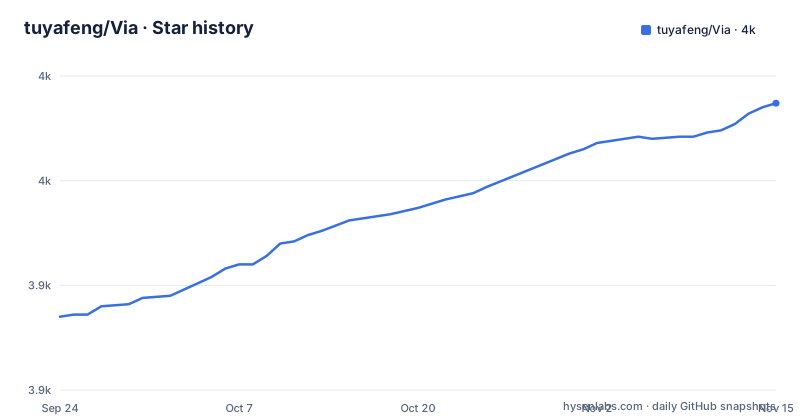
- tuyafeng/Via3,987 ★ · +102
| Repository | 2026-09-24 | 2026-11-15 |
|---|---|---|
| tuyafeng/Via | 3.9k | 4k |
102 Stars in the last 52 days, measured from the daily GitHub snapshot. Compare with other projects
Editorial analysis
The description says localization, and the tree agrees
The repository is not the browser distribution. Its description calls it a simple browser and then says this repository is set for localization, and the top level contains no source code beyond a single application directory. What fills the root instead is documentation: one README in English and ten translations, covering Simplified and Traditional Chinese, Portuguese, Spanish, Turkish, Japanese, Russian, Arabic, Bengali and Korean. So the code lives in the application directory and the root is a translation table of contents. That arrangement tells you where a new language goes, and it also tells you that the browser's own release artefacts are not built from what most contributors would see here, since the downloads in the README point at a store listing and two hosted package files rather than at a build.
Localization is four steps and one directory naming rule
The help section is the only piece of documentation in the file that is a procedure, and it is four steps long. Fork the repository. Copy the base string file into a new values directory whose name ends in a language code, and the code to use is the two letter one from the ISO standard, with a link to the registry list. Translate the strings in the copy. Open a pull request. The whole mechanism is the standard resource qualifier directory inside the application source tree, which means the app itself is an ordinary Android project and the translator is not doing anything exotic. What the project is protecting is the base file: because step two is a copy rather than an edit, a translator cannot accidentally remove strings that the default language still needs, and a reviewer can diff a language against its source with a plain file comparison.
Two translations exist in the tree but are not linked
There is a small inconsistency worth noting because it is the kind of thing a translation drive produces. The language links in the English README name nine translations, and the repository contains eleven README files besides the English one. The two that exist without being linked are the Bengali and the Korean ones, while the other nine are all present in both the link list and the tree. The practical effect is small: a visitor reading the English README cannot reach those two languages, and a translator looking for an existing Bengali or Korean file has to find it by browsing. Since the procedure in the help section is to copy the base strings, the same gap will eventually appear in the resource directories too, where a language can be half done without anyone linking to it.
The renderer is whatever WebView the device ships
The first frequently asked question answers the question most people have about a small browser, and the answer is that there is no engine of its own. Via uses the WebView renderer built into the Android platform. On devices from Android 5 onwards that implementation is usually a Google component with a package name of its own, and it can be updated through the Play Store, which the file recommends for a better browsing experience. That single fact explains most of the limitations in the rest of the file: the browser is a user interface over a system component, so anything Google changes upstream appears or disappears with the next WebView update. There is even a documented way to find out what you have, through the about screen in settings, where tapping the application logo reveals debugging information containing the renderer details.
Per-site settings hide behind one icon in the address bar
Three questions get the same answer, which is a good sign about the interface. To disable JavaScript for one site, or to give a site a different user agent, you open the site and tap the magnifying glass or the shield icon on the left of the address bar, and the configuration for that site opens. The same place turns off ad blocking for a site you want to see ads on. The alternative path is spelled out for anything you want to add rather than toggle: a site configuration page in the general settings, where configuration is entered by hand. So the design principle is per domain rather than global, and the shield icon is the same control as the ad blocker, which means a user who blocks ads globally has a per site escape hatch without opening settings at all.
Password saving is missing because Google removed it
One answer is a straight admission that the feature is not the author's decision. The browser cannot save passwords because Google removed that particular capability from the WebView component. The suggested workaround is an autofill application, with two named as examples, and it only applies if the device is on Android 8.0 or newer, which is the version where autofill services exist. That constraint is a good illustration of the project's position: it is a shell over a platform component, so it can only offer what the component exposes, and when the platform takes something away the answer is a redirect to another application rather than a reimplementation. It also means the browser's feature set can change under the user with no update to Via at all.
The QR code answer was struck through and replaced
This one is worth reading for the process rather than the feature. The original answer to why the browser could not scan a QR code was that too many applications can already do it, that the author did not want to add a repetitive function, and that you should use the phone's camera application. That entire paragraph is struck through in the file, and the replacement sentence says that from version 4.3.4 a built in scanner exists. So the maintainer changed his mind, added the feature anyway, and kept the old reasoning visible with a line through it rather than deleting it. It is a small thing, but it is the only place in the file where the history of a decision is visible, and it shows that the answers are maintained rather than written once.
Two hosted packages and a store listing, with weekly issue triage
The download section offers three routes: the Play Store listing under a package identifier, a hosted package file described as the global version, and a second hosted file described as the Chinese version, the two hosted files served from the same domain with different names. The project's own summary of the browser is four adjectives, pure and ad free, highly customizable, fast, and small, followed by an invitation to try it. Support runs through a social account, where the author says he replies as soon as possible, and through the issue tracker, where he says he checks and replies about once a week, with an email address offered as a last resort and an apology attached for the response time. The repository has no releases, declares no licence, and was last pushed on 2026-08-24.
Editorial conclusion
This repository suits a translator who wants to add a language in four steps, and a reader trying to understand why the browser cannot save passwords. It does not suit anyone looking for a desktop build, since every download path in the file is an Android package. Before contributing a translation, copy the base string file rather than editing it in place, use the two letter language code directory name the instructions give, and expect the maintainer to work through pull requests on a weekly cadence rather than continuously.
Frequently asked questions
Is the Via browser available for PC?
Nothing in the project points that way. Every download route in the README is an Android one: a Play Store listing and two hosted package files, one for the global version and one for the Chinese version. The renderer is described as the WebView included on the Android platform, so the browser is built for Android devices.
Is the Via browser safe?
The project describes the browser as pure and ad free, and it ships no engine of its own: rendering is done by the WebView component provided by Android, which on recent devices is a Google component that can be updated from the Play Store. One documented limitation is that the browser cannot save passwords because Google removed that capability from the WebView, so the project points users to an autofill application instead.
How do I add a new language to Via?
Fork the repository, copy the base string file from the default values directory into a new values directory whose suffix is the two letter ISO language code, translate the copy, and open a pull request. Copying rather than editing means the default language file is never changed by a translation.
Which rendering engine does Via Browser use?
The WebView renderer included in the Android platform. On devices running Android 5 or later the implementation is usually Google's own component and can be updated from the Play Store, and the current implementation and version can be seen by opening settings, going to about, and tapping the application logo.
How do I turn off ad blocking on one site in Via?
Open the site and tap the magnifying glass or shield icon on the left of the address bar, which opens that site's configuration, where ad blocking can be turned off and JavaScript disabled or a user agent changed. Configuration can also be added by hand in the site configuration page under general settings.
Official sources
Add this badge to your README
If you maintain this project, the badge below links readers to this analysis and shows its maintenance status from the daily GitHub snapshot. Paste the markdown into your README; add ?metric=license or ?metric=stars to the image URL for a different field.

[](https://hysenlabs.com/projects/tuyafeng-via)Star history chart for your README
[](https://hysenlabs.com/projects/tuyafeng-via)Was this useful?