minimal-twitter: a browser theme that deletes most of the X interface
Minimal Theme for Twitter - Refine and Declutter Your Twitter Web Experience
At a glance
- What is it?
- Minimal Twitter is a browser extension that strips the X web interface down to the timeline, with a long list of individually removable elements, and it is maintained by the Typefully team. The judgment is that it is a small, readable codebase with a clear purpose, whose real risk is not the code but the fact that it depends on another company's DOM and its own release tags are three years behind its last commit.
- Who is it for?
- Adopt minimal-twitter if you spend real time in the X web interface and want the timeline without trends, promoted posts, view counts or suggestions, and you are comfortable granting a browser extension access to that page. Do not adopt it if you need the trending or discovery surfaces, or if you would rather not have an extension rewriting another company's markup on every page load.
- Can I use it commercially?
- Yes. MIT is a permissive licence: you can use, modify and sell software built on it, as long as you keep its copyright and licence notices.
- Is it still maintained?
- Yes. The repository last received commits 18 days ago.
- What is it written in?
- Mainly JavaScript, according to GitHub's language statistics.
Answers come from the project's GitHub data, last synced on November 7, 2026, and from our analysis. They are not legal advice.
Star history
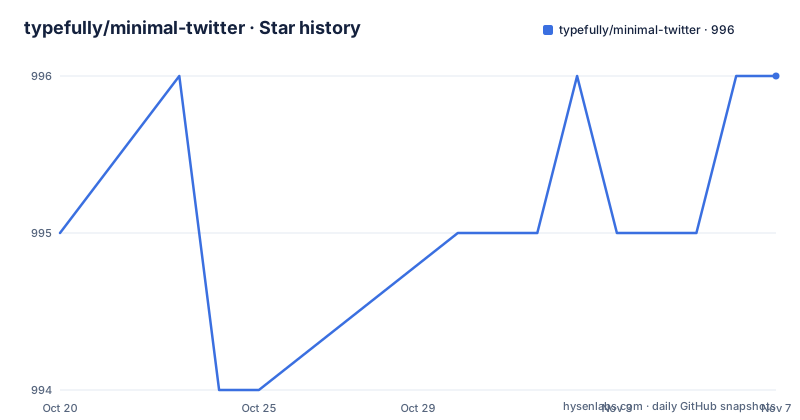
- typefully/minimal-twitter996 ★ · +1
| Repository | 2026-10-20 | 2026-11-07 |
|---|---|---|
| typefully/minimal-twitter | 995 | 996 |
1 Stars in the last 18 days, measured from the daily GitHub snapshot. Compare with other projects
Editorial analysis
A theme extension whose core feature is removal
Minimal Twitter, for Twitter and now X, is a browser extension described as refining and cleaning up the interface and letting you customise your experience. The project description says it refines and declutters your Twitter web experience, and the homepage is typefully.com/minimal-twitter.
The interesting thing is the shape of the feature list. Almost every entry is a deletion rather than an addition. The extension defaults to the Following timeline, hides the sticky timeline header, removes the new view counts, removes the distracting trends sidebar, removes timeline borders, hides view counts and vanity counts under tweets, removes promoted posts, removes Who to Follow and other suggestions, hides the search bar, hides the Tweet button, and hides Grok AI elements. The only items on the list that add something are the two customisation controls, timeline width and the left navigation.
That tells you who it is for and what it is not. It is for the person who reads on X and finds the surrounding product noisy, and it is explicitly not for discovery, for engagement mechanics, or for the parts of the platform that a business account needs. Hiding the Tweet button and the search bar is a stronger statement than hiding a sidebar. The extension is not a theme in the visual sense, despite the name. It is a removal tool with a preferences panel.
Originally by Thomas Wang, now maintained by Typefully
The README says the extension was originally made by Thomas Wang and is now developed by the Typefully team, and it points contributors to a contributing document under .github/CONTRIBUTING.md. The Typefully connection is also commercial. The README notes that Typefully helps you craft better tweets and threads and grow faster on Twitter, with a link and a logotype, so this is a free utility that advertises a paid product.
That does not make the extension a marketing wrapper, but it does change how you should read the maintenance record. A project whose code lives in the open but whose incentives sit with a scheduling tool is going to keep the extension working as long as it keeps Typefully in good standing with the platform, and it is going to react quickly when X changes the interface in a way that breaks the extension. There is no stated policy on either side of that, and the README says nothing about how the extension reacts when X ships a redesign.
The origin story matters for a different reason. An extension that began as one developer's personal fix and was later picked up by a company has an interface list that reflects what a heavy user disliked in 2023, not a fresh audit of what is annoying now. Some of the items, hiding the view counts and the Grok elements, are clearly responses to specific platform changes, and they are also the items most likely to become no-ops when the underlying markup changes.
One codebase, four browsers, and a manifest per target
The repository layout explains how a single codebase targets Chrome, Firefox, Safari and the Edge add-on stores. There is an extension-manifests.js file at the root, which is the obvious place to hold the per browser manifest, and the build script bundle-extension.js is what turns a source tree into the packaged extension. A bundle/ directory holds the built output, and assets/, css/, fonts/ and images/ hold the static pieces, including the icon used in the README header.
The behaviour lives in background.js at the root, in content-scripts/ for the code injected into the page, and in popup/ for the preferences UI that a user actually interacts with. A storage-keys.js file at the root is a good sign, because it means the storage keys used for the user's preferences live in one place rather than being typed inline across the content scripts, which is the difference between a preference you can migrate later and one you cannot.
The stack is small and modern. The package is private, typed as an ES module, and declares pnpm as its package manager with a Node engine requirement of 20 or newer. Runtime dependencies are minimal: fs-extra, node-cmd and zip-local, all of which exist to move and zip files during the build rather than to run in the browser. That is the shape you want in an extension, since every dependency shipped to the browser is code running on every page load. The dev dependencies are chokidar for file watching and web-ext, the Mozilla tool, which suggests the Firefox packaging path goes through it.
Building it: bundle, dev with Chrome, and the test runner
The package scripts are short enough to read in one go, and they describe the whole development loop. The build and the bundle are the same command, running the bundler script:
node ./bundle-extension.jsThe dev command starts a development script for Chrome, and there is a second variant that launches the browser as part of the run:
node ./scripts/dev-chrome.mjsThe fresh variant adds a flag, which is what you want when the extension manifest or build output has changed in a way that the browser will not pick up on reload:
node ./scripts/dev-chrome.mjs --launchTests use the Node built-in test runner, with no test framework dependency at all:
node --testThat combination tells you something about the project's priorities. There is no webpack configuration, no React in a preferences popup, and no browser automation library in the dependency list. The extension is plain JavaScript, the build is a Node script that copies and zips files, and the checks that exist are unit level. There is a workspace-setup.sh file at the root and a pnpm-workspace.yaml, so the repository is set up for a monorepo layout even though the current dependency set is small.
For users who do not want to go through a store, the README also points to MANUAL_INSTALLATION.MD in the repository root, which is the path for loading the built extension unpacked.
What the documentation does not tell you
Several things a careful adopter would want are simply absent from the README, and it is worth being explicit about which ones.
The repository contains a PRIVACY.md file, and the README does not describe what the extension collects, whether it makes any network requests, or what it stores and where. Since the extension injects code into a page that holds your session, that silence is a real gap in the evaluation, and reading PRIVACY.md directly is the only way to close it.
There is also no description of how the extension keeps up with changes to the X interface. Every item in the feature list is a selector against markup that another company owns and can rename at any time, and nothing in the repository describes a fallback behaviour when a selector stops matching. The presence of AGENTS.md, CLAUDE.md, a .codex/ directory and a .cursor/ directory suggests the project uses automated editing tools in its workflow, which is a plausible mitigation, but it is not a stability guarantee.
Finally, the store listings are the distribution path, not a build you run, so the code in this repository is the source, and the version you actually get is whatever the store serves. That is normal for an extension, and it means the version number in package.json and the version you installed are two different things to keep straight.
A 2023 release line with a 2026 commit
The maintenance record here needs reading carefully, because the two numbers disagree. The last push to the repository was on 2026-08-18, so the code is being touched. The published releases, however, are 6.0.1 on 2023-10-24, 6.0.3 and 6.0.4 both on 2023-10-30. Three releases in a single week in October 2023, and no tagged release since.
The most likely explanation is that store builds are versioned separately from the GitHub tags, which is common for extensions, but the consequence for a user is the same either way. You cannot tell from this repository which code is in the store today, and you cannot use the tags to work out whether a fix you read about is in the version you have. The version bump script, bump-version.js at the root, exists to keep a version number in step across the manifests, which is the kind of tooling that only makes sense if several manifests need to move together.
On licensing, the project is MIT, with a LICENSE file at the root, and the repository also carries a PRIVACY.md file and a CODE_OF_CONDUCT.md file. What applies to you as a user is the extension's behaviour. What applies if you fork it is the MIT terms, which are permissive enough to modify and redistribute, subject to the usual conditions.
The project is not archived, and the last push is recent enough that describing it as abandoned would be wrong. What is fair to say is that the public release line has not moved in three years while the repository has.
Editorial conclusion
Adopt minimal-twitter if you spend real time in the X web interface and want the timeline without trends, promoted posts, view counts or suggestions, and you are comfortable granting a browser extension access to that page. Do not adopt it if you need the trending or discovery surfaces, or if you would rather not have an extension rewriting another company's markup on every page load. Before you install it, read PRIVACY.md and MANUAL_INSTALLATION.MD, check that the version you install matches the X interface you use, and remember the last push was on 2026-08-18 while the published releases are still 6.0.x from October 2023.
Frequently asked questions
Which browsers does minimal-twitter support?
The README lists Chrome, Firefox and Safari, and the repository topics also include the Edge add-on. It can also be installed manually, and the README points to MANUAL_INSTALLATION.MD in the repository root for that path.
What does minimal-twitter actually remove from the X interface?
The listed items include the sticky timeline header, the new view counts, the trends sidebar, timeline borders, view and vanity counts under tweets, promoted posts, Who to Follow and other suggestions, the search bar, the Tweet button, and Grok AI elements. It also defaults to the Following timeline and lets you customise the timeline width and left navigation.
How do I build the minimal-twitter extension from source?
The package scripts show the loop: node ./bundle-extension.js builds and bundles the extension, node ./scripts/dev-chrome.mjs runs the development script for Chrome, the --launch variant starts the browser, and node --test runs the tests. The package requires Node 20 or newer and uses pnpm.
Official sources
Add this badge to your README
If you maintain this project, the badge below links readers to this analysis and shows its maintenance status from the daily GitHub snapshot. Paste the markdown into your README; add ?metric=license or ?metric=stars to the image URL for a different field.

[](https://hysenlabs.com/projects/typefully-minimal-twitter)Star history chart for your README
[](https://hysenlabs.com/projects/typefully-minimal-twitter)Was this useful?