Story-Iter: refining a long story frame by frame with reference cross-attention
[ICLR 2026] A Training-free Iterative Framework for Long Story Visualization
At a glance
- What is it?
- Story-Iter generates a long visual story without training, by generating each frame from the text alone and then repeatedly re-rendering every frame with a GRCA module that attends over all frames produced in the previous round.
- Who is it for?
- Adopt Story-Iter if you need long, visually consistent sequences of images from text and want to avoid training a model of your own, since the iterative scheme and the GRCA module are plug and play and the README reports a fast path that renders a 100-frame story over 10 iterations in about 20 minutes. Do not adopt it if you need a maintained, complete codebase, because the README states plainly that the code base is still not complete and the last push was on 2026-04-02.
- Can I use it commercially?
- Yes. MIT is a permissive licence: you can use, modify and sell software built on it, as long as you keep its copyright and licence notices.
- Is it still maintained?
- Activity is slowing. The repository last received commits 7 months ago.
- What is it written in?
- Mainly Python, according to GitHub's language statistics.
Answers come from the project's GitHub data, last synced on November 7, 2026, and from our analysis. They are not legal advice.
Star history
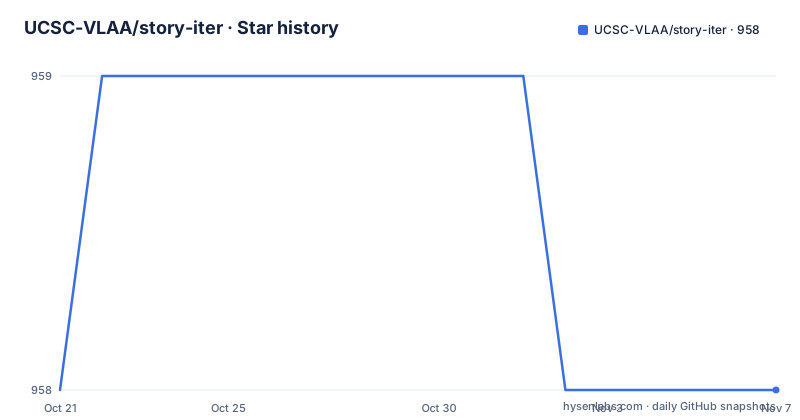
- UCSC-VLAA/story-iter958 ★ · +0
| Repository | 2026-10-21 | 2026-11-07 |
|---|---|---|
| UCSC-VLAA/story-iter | 958 | 958 |
0 Stars in the last 17 days, measured from the daily GitHub snapshot. Compare with other projects
Editorial analysis
The problem with making one hundred images that agree
Story visualization means generating a sequence of images from a narrative. The README sets out why that is harder than it sounds: with text-to-image models, and diffusion models in particular, maintaining semantic consistency, producing high quality fine-grained interactions, and keeping the computation feasible all remain challenging, and the difficulty grows with story length, which the README frames as up to 100 frames.
The failure mode is specific. A character described in frame one is a different character in frame twenty, because each frame is generated independently from its own prompt. The face drifts, the clothing changes, the setting shifts. Methods that exist to fix this typically rely on fixed reference images, chosen once, to construct the story.
Story-Iter takes a different route. It is described as a training-free iterative paradigm, and its distinguishing claim is an external iterative loop that goes beyond the internal iterative denoising steps a diffusion model already performs. Instead of fixing the references up front, the system keeps regenerating the whole story, and each generation round is informed by everything produced in the round before it.
The audience is research and applied work in generative imaging: people who want long sequences that stay coherent and cannot justify training a model, and who are willing to pay for extra diffusion passes to get there.
GRCA replaces fixed references with attention over every frame
The mechanism inside the loop is a module the README calls GRCA, global reference cross-attention. It is described as plug-and-play and training-free, which matters for adoption: it is inserted into SD, the Stable Diffusion pipeline, rather than requiring a retrained checkpoint.
Here is the specific thing it does. In the ith iteration of each image visualization, GRCA aggregates the information flow of all reference images during the denoising process through cross-attention. The reference frames are modeled with global embeddings, which is the mechanism the README credits for semantic consistency across long sequences.
Compare that with the approach it argues against. Existing methods rely on fixed reference images to construct a complete story, so the set of references is decided before generation and never widens. GRCA instead lets every frame in the current round see every frame from the previous round, aggregated into global embeddings during denoising rather than concatenated as a conditioning list.
That is also where the cost goes. Every iteration is a full pass of cross-attention over a growing reference set, for every frame in the story. The design buys coherence by spending denoising steps, which is the trade the paper is about.
Initialize from text, then refine the whole story each round
The framework has three named stages: initialization, iterations in Story-Iter, and the implementation of GRCA.
Initialization is deliberately dumb. Story-Iter first visualizes each image only based on the text prompt of the story. There is no reference at this point, no previous frame, no lookback. The output of this pass is a complete but inconsistent story.
That result then becomes the reference set. The README describes the iterative paradigm as inserting GRCA into SD, with all results from an iteration used as reference images to guide the dynamic update of the story visualization in the next iteration. So each round re-renders every frame, and each frame in the new round can attend over all frames from the previous round, while the text prompt continues to constrain the content.
The README frames the benefit as progressively incorporating the wider visual context and the text constraints together, which enables precise generation with fine-grained interactions, optimizing the story visualization step by step.
The practical consequence is that quality depends on how many iterations you run. One iteration gives you the text-only story with whatever drift the base model produces. Each further iteration repairs more of the inconsistency, at the cost of another full pass over the entire sequence.
The environment is pinned to one specific stack
The installation section states the stack the project was built with: Python 3.10.14, PyTorch 2.2.2, CUDA 12.1 and cuDNN 8.9.02. The requirements file pins the rest of the stack to exact versions, which is what you want for a research repository but also what makes it brittle if your driver differs.
git clone https://github.com/UCSC-VLAA/Story-Iter.git
cd Story-Iter

# create new anaconda env
conda create -n StoryAdapter python=3.10
conda activate StoryAdapter

# install packages
pip install -r requirements.txt
The pinned dependency list is short and explicit:
diffusers==0.27.2
einops==0.7.0
numpy==1.23.2
Pillow==10.1.0
safetensors==0.4.1
transformers==4.39.0
huggingface_hub==0.25.2
torch==2.2.2
torchvision==0.17.2
torchaudio==2.2.2
--extra-index-url https://download.pytorch.org/whl/cu121
diffusers 0.27.2 is the version GRCA is written against, and the extra index URL points at the cu121 wheel channel. Note that the environment name in the README, StoryAdapter, is inherited from an earlier adapter project rather than from this one, a small sign of the code's lineage.
A Colab notebook is linked from the project badges, which is the fastest way to see the method work without solving the CUDA setup yourself.
Three checkpoints and one command line
The demo needs three downloaded artefacts, and the README names the exact destination for each. RealVisXL_V4.0 goes into ./RealVisXL_V4.0, the clip_image_encoder from the IP-Adapter project goes into ./IP-Adapter/sdxl_models/image_encoder, and the ip-adapter_sdxl checkpoint goes into ./IP-Adapter/sdxl_models/ip-adapter_sdxl.bin.
Those paths are then passed explicitly to the script:
python run.py --base_model_path your_path/RealVisXL_V4.0 --image_encoder_path your_path/IP-Adapter/sdxl_models/image_encoder --ip_ckpt your_path/IP-Adapter/sdxl_models/ip-adapter_sdxl.binThe three arguments are the base diffusion model, the image encoder that produces the image embeddings GRCA consumes, and the IP-Adapter checkpoint. That the IP-Adapter pieces are required at all is worth noticing: the method extends an existing adapter machinery rather than replacing it.
For a custom story, the same command takes a list of prompts:
python run.py --base_model_path your_path/RealVisXL_V4.0 --image_encoder_path your_path/IP-Adapter/sdxl_models/image_encoder --ip_ckpt your_path/IP-Adapter/sdxl_models/ip-adapter_sdxl.bin
--story "your prompt1" "your prompt2" "your prompt3" ... "your promptN"
The README also recommends a prompt template of Character Definition plus Interaction Definition plus Scene Definition. The example given is a man wearing a yellow robe, dancing, in a palace hall, combined into the single prompt "One man wearing yellow robe dancing in the palace hall." Repeating that structure across frames is how you give the method something consistent to hold on to.
A style flag exists as well, with comic given as the example:
python run.py --base_model_path your_path/RealVisXL_V4.0 --image_encoder_path your_path/IP-Adapter/sdxl_models/image_encoder --ip_ckpt your_path/IP-Adapter/sdxl_models/ip-adapter_sdxl.bin --style comicFast mode and the ControlNet variant
The news section records two additions, both dated 2026-01-27. A fast version was released, and a ControlNet version was released with support for openPose skeletons as control signals.
The fast version is the interesting one for anyone planning to actually run this. The README states that visualizing a 100-frame story over 10 iterations takes only 20 minutes in that version. Taken with the iterative design, that figure describes the shape of the cost: ten full passes over a hundred frames.
The ControlNet variant changes what you can control. openPose skeletons as control signals means the pose of a figure in the frame can be constrained by a skeleton, rather than left to whatever the text prompt and the reference frames imply. For a story with physical interaction, which the paper treats as a separate axis of difficulty from semantic consistency, a pose signal is the kind of constraint that text alone struggles to express.
The repository reflects both variants in its entry points. Alongside run.py there are run_fast.py and run_controlnet.py, so the variants are separate scripts rather than flags on one command, and story_list.py sits alongside them for holding the story definition.
An implementation the README calls incomplete
The most consequential sentence in the README is a short one near the top: this code base is still not complete. It is stated plainly, which is better than a reader discovering it later, but it should shape any decision to build on this code.
What the repository does contain is an official implementation of Story-Iter, the code for the paper, with an ip_adapter/ directory holding the adapter code, docs/ holding the figures the README embeds, and the entry point scripts already named. The README asks for documentation contributions alongside feature work, which tells you where the project's own attention is going.
There is also a licensing and provenance angle to keep in view. The repository is MIT licensed, but the run depends on third party models: the RealVisXL base checkpoint and the IP-Adapter image encoder and adapter weights, each downloaded from Hugging Face under its own terms. The MIT licence covers this repository's code, not the weights you pull in to run it.
On maintenance, the repository is not archived and the last push was on 2026-04-02, and the repository publishes no GitHub releases. The README's own news list ends with the January 2026 entries for the fast and ControlNet versions, so the visible development record stops several months before the last commit, and there is no tagged release to fall back on.
Editorial conclusion
Adopt Story-Iter if you need long, visually consistent sequences of images from text and want to avoid training a model of your own, since the iterative scheme and the GRCA module are plug and play and the README reports a fast path that renders a 100-frame story over 10 iterations in about 20 minutes. Do not adopt it if you need a maintained, complete codebase, because the README states plainly that the code base is still not complete and the last push was on 2026-04-02. Before you run it, verify two things: that the exact pinned environment in requirements.txt installs on your CUDA 12.1 and cuDNN 8.9.02 setup, and that the three downloaded checkpoints land in the paths the script expects, since the demo command names each of them explicitly.
Frequently asked questions
What is Story-Iter and what does it do?
It is a training-free iterative paradigm for long story visualization, the task of generating coherent images from a narrative. It regenerates the whole story across rounds and uses a global reference cross-attention module to let each frame attend over all frames from the previous round.
What environment does Story-Iter need?
The project is built with Python 3.10.14, PyTorch 2.2.2, CUDA 12.1 and cuDNN 8.9.02. The README asks for a conda environment created with python=3.10 and a pip install -r requirements.txt, and the requirements file pins diffusers to 0.27.2 among others.
Which checkpoints does Story-Iter need to download?
Three: RealVisXL_V4.0 placed in ./RealVisXL_V4.0, the clip_image_encoder placed in ./IP-Adapter/sdxl_models/image_encoder, and the ip-adapter_sdxl checkpoint placed in ./IP-Adapter/sdxl_models/ip-adapter_sdxl.bin. The run command takes each of them as an explicit argument.
How should I write prompts for a custom Story-Iter story?
The README suggests the template Character Definition plus Interaction Definition plus Scene Definition, for example combining a man wearing a yellow robe, dancing, in the palace hall into the single prompt "One man wearing yellow robe dancing in the palace hall."
Is the Story-Iter code base complete?
No. The README states that the code base is still not complete, and it asks for documentation alongside new features. The repository has no GitHub releases, and the last push was on 2026-04-02.
Official sources
Add this badge to your README
If you maintain this project, the badge below links readers to this analysis and shows its maintenance status from the daily GitHub snapshot. Paste the markdown into your README; add ?metric=license or ?metric=stars to the image URL for a different field.

[](https://hysenlabs.com/projects/ucsc-vlaa-story-iter)Star history chart for your README
[](https://hysenlabs.com/projects/ucsc-vlaa-story-iter)Was this useful?