Ulixee Hero: A Scraping-Oriented Browser with W3C DOM Access
The web browser built for scraping
At a glance
- What is it?
- Ulixee Hero is a TypeScript monorepo for browser-based scraping, combining Chrome rendering with a W3C DOM interface and browser profile tooling. Its latest listed releases are alpha versions, and the last push was on 2026-05-16.
- Who is it for?
- Adopt Ulixee Hero when scraping code needs a W3C DOM, Chrome rendering, and browser-emulation features in one project. Do not choose it for a stable production release without checking compatibility with your target sites.
- Can I use it commercially?
- Yes. MIT is a permissive licence: you can use, modify and sell software built on it, as long as you keep its copyright and licence notices.
- Is it still maintained?
- Yes. The repository last received commits 176 days ago.
- What is it written in?
- Mainly TypeScript, according to GitHub's language statistics.
Answers come from the project's GitHub data, last synced on November 7, 2026, and from our analysis. They are not legal advice.
Star history
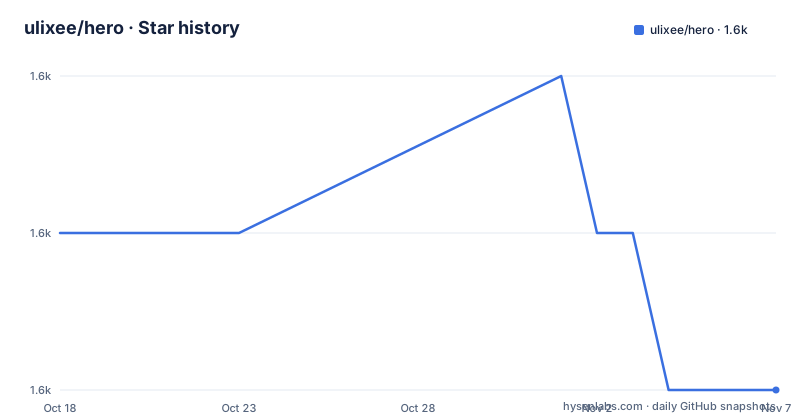
- ulixee/hero1,558 ★ · -1
| Repository | 2026-10-18 | 2026-11-07 |
|---|---|---|
| ulixee/hero | 1.6k | 1.6k |
-1 Stars in the last 20 days, measured from the daily GitHub snapshot. Compare with other projects
Editorial analysis
What Ulixee Hero Targets
Ulixee Hero is aimed at developers building web scrapers rather than browser-automation tests. The README says it is a headless browser designed specifically for scraping, and its primary language is TypeScript. That distinction matters because a scraper often needs to inspect rendered pages, query DOM nodes, and read page properties through a direct object model rather than repeatedly executing callbacks inside a browser context.
The package exposes a W3C DOM API in NodeJS. In the documented example, a page is opened with `hero.goto`, after which the script reads `hero.document.title` and calls `querySelector` on `hero.document`. The project also includes examples for sites such as example.org and news.ycombinator.com, plus examples involving proxies, session resumption, injected referrers, plugins, and extending Hero.
Hero is not presented as a general website viewer or a test assertion library. Its stated design centers on scraping, browser detection, evasion, and browser profiles. The repository description is concise, but the README and repository layout show a much larger system than a single browser wrapper. It includes agent, networking, profiling, plugin, specification, and testing areas.
How the Chrome and DOM Architecture Fits Together
The README identifies Chrome as the rendering engine beneath Hero. On top of that engine, Hero recreates a compliant DOM directly in NodeJS. The public example therefore uses `hero.document` as an ordinary-looking document object, including `title` and `querySelector`, without showing a Puppeteer-style `evaluate` callback.
The repository layout also shows a client, core, net, agent, and playground set of packages. That separation suggests that browser control, network behavior, the automated agent, and the user-facing playground are organized as distinct components. The README describes the broader Unblocked workflow as covering TCP, TLS, HTTP, DOM, user interactions, and operating-system markers. It also lists specifications for hooks around browser startup, page launch, and web workers.
A separate emulation and profiling path supports browser signatures. The repository includes Real User Agents, Browser Profile Data, Browser Profiler, and Emulator Builder. The README says this data supports profiles collected from real browsers and is used to emulate combinations of browsers and operating systems. That is a different design from changing only a user-agent string, although the exact implementation details are not documented in the README.
The practical consequence is that Hero treats scraping identity as a stack-level concern. The documentation explicitly claims detection avoidance across the stack and cites TLS fingerprints as part of the concern. The repository does not provide a universal guarantee that a site will allow a request, so the tooling should be evaluated against the particular sites and defenses involved.
Installing the Playground and Running the First Script
The quickest documented starting point is the one-use playground package. Install it with npm. The package is designed for quick scripts or testing and shuts down after one script has run. A first script can navigate to a page, read its title and first paragraph, and close the browser instance.
The install command is:
npm i --save @ulixee/hero-playgroundThe README's usage example uses CommonJS and creates one Hero instance. It opens `https://example.org`, reads the title and the first paragraph text, then calls `hero.close()`.
const Hero = require('@ulixee/hero-playground');

(async () => {
 const hero = new Hero();
 await hero.goto('https://example.org');
 const title = await hero.document.title;
 const intro = await hero.document.querySelector('p').textContent;
 await hero.close();
})();
The variables in this example are not written to a file or printed, so the documented script demonstrates the API rather than defining an output format. For a persistent deployment, the README points to the deployment documentation at `./docs/advanced-concepts/deployment`.
For repository development, the README requires Yarn workspaces, git submodules, and a TypeScript build. The repository's package.json defines the build script as follows. The documented command installs the frozen lockfile dependencies, compiles TypeScript, performs a build step, and synchronizes Double Agent configuration.
yarn buildThe repository package.json also defines a `build:docker` script for creating a Docker image.
The README does not provide the full deployment configuration, so a production setup cannot be inferred from the short example alone.
Monorepo Development and Browser Profile Data
The repository is not a single `src` directory. It contains `agent/`, `core/`, `net/`, `plugins/`, `double-agent/`, `double-agent-stacks/`, `browser-profiler/`, `browser-emulator-builder/`, `js-path/`, `examples/`, and `end-to-end/`. The package.json identifies the package as `@ulixee/hero-monorepo` and marks it private, which distinguishes the repository package from the installable playground package.
Developers who work on profiles need an additional data set. The README provides a workspace command for downloading BrowserProfiles data. It says the command clones data into a directory named `browser-profile-data` adjacent to the `unblocked` folder.
yarn workspace @ulixee/unblocked-browser-profiler downloadDataThis command is specifically relevant when updating Emulator Data or generating Double Agent probes. It is not presented as part of the basic playground example. A developer using the normal quick-start package may therefore not need the full monorepo setup.
The repository also offers a Nix-oriented devenv path. The README says Nix, devenv, and optionally direnv can provide an isolated development sandbox with consistent installed versions. That option is aimed at contributors and profile work, not merely running the first scraping script. The README does not document all commands for that environment, so the stated prerequisites should be followed in the linked installation guides.
Limits of the Alpha Package and Deployment Path
The release list contains `v2.0.0-alpha.34`, `v2.0.0-alpha.33`, and `v2.0.0-alpha.32`. The presence of the `alpha` label is a direct maintenance and compatibility warning. The README does not promise a stable API, a fixed support policy, or compatibility across future minor releases. A project that pins a version should treat the pinned version as part of its dependency contract.
The basic playground also has an intentional lifecycle constraint. It is described as a one-time-use Hero instance that shuts down after a single script. That model fits short experiments, but it does not fit an application that needs a long-lived process without moving to the deployment path. The README does not document a rollback procedure, resource limits, retry policy, or production sizing guidance.
The scraping claims are also not guarantees. Hero is designed to avoid detection and emulate modern browsers, but site defenses can inspect many signals, and the repository itself describes a continuing detection and evasion workflow. A page can fail because the requested URL changes, its content does not match the expected selectors, the site requires interaction, or its protection does not accept the generated profile. The documentation does not state a guaranteed success rate.
The MIT license permits reuse under its terms, but teams still need to review the license text and their own obligations. The README also links to contribution rules and a Code of Conduct, which matters for repository contributors but does not replace an operational review of dependencies.
Hero Compared with Puppeteer-Style Automation
Puppeteer is the clearest alternative mentioned by the README, although the project does not provide a detailed feature matrix against it. The stated difference is the programming model. Hero says it provides direct W3C DOM access without Puppeteer's complicated `evaluate` callbacks and multi-context switching. A Hero script can therefore read `hero.document.title` and query `hero.document` through the documented API.
That direct DOM model is useful when the scraper is organized around document traversal and DOM properties. It can also make the code easier to read for developers who want familiar selector calls. The trade-off is that the project is aimed at scraping and browser emulation, not at presenting itself as a drop-in replacement for every Puppeteer test workflow.
Hero also adds areas that a general automation wrapper may not own. The repository includes specifications, plugins, profile collection, emulation construction, Double Agent tests, and network-related packages. Those components make browser identity and detection part of the project design. The cost is a larger monorepo with more setup paths, profile data concerns, and alpha-version compatibility questions.
For a team that only needs ordinary scripted browser actions and already operates a Puppeteer-based stack, the added Unblocked components may not justify that surface area. For a scraper whose main problem is page access and browser-level identity, Hero's direct DOM API and profile-oriented repository layout are the more relevant reasons to try it.
Maintenance Signals and Upgrade Boundaries
The repository is not archived. Its last push was on 2026-05-16. The listed releases are alpha releases, with `v2.0.0-alpha.34` dated 2025-09-08. The repository is therefore not described here as actively maintained or stable; the concrete signals are the exact last-push date and the alpha release labels.
Upgrades can affect more than one package because this is a Yarn workspace monorepo. The package.json contains scripts for building, testing, producing a distribution, publishing all workspaces, and creating a Docker image. The repository also contains version-sensitive TypeScript, generated build output paths, profile data, and configuration synchronization. The README does not document a compatibility table for upgrading between alpha releases.
The practical upgrade boundary is therefore the installed package set. Pin versions, inspect the release notes or `CHANGELOG.md`, and check whether the selected deployment method depends on the full monorepo build. The license is MIT, but license acceptance does not resolve compatibility, operational, or target-site issues.
Editorial conclusion
Adopt Ulixee Hero when scraping code needs a W3C DOM, Chrome rendering, and browser-emulation features in one project. Do not choose it for a stable production release without checking compatibility with your target sites. Verify the package and deployment path first, then confirm that the alpha API and required browser profile data fit the operating model you need.
Frequently asked questions
What is Ulixee Hero used for?
Ulixee Hero is described as a web browser built for scraping. It combines Chrome rendering with direct W3C DOM access for tasks such as opening a page, reading its title, and querying paragraph text.
How do I install the Ulixee Hero playground?
The README documents `npm i --save @ulixee/hero-playground`. The playground is intended for one-time scripts or testing and shuts down after the script has run.
Does Ulixee Hero support direct DOM queries?
Yes. The documented example reads `hero.document.title` and calls `hero.document.querySelector('p').textContent`. The README presents this as W3C DOM access without Puppeteer-style evaluate callbacks.
How do I build Ulixee Hero from the repository?
The README says the monorepo requires Yarn workspaces, git submodules, and `yarn build`. Profile work also requires the documented `downloadData` workspace command.
Is Ulixee Hero stable?
The listed releases use alpha labels, including `v2.0.0-alpha.34`. The README does not provide a stable-release guarantee or a compatibility policy for those alpha versions.
Official sources
Add this badge to your README
If you maintain this project, the badge below links readers to this analysis and shows its maintenance status from the daily GitHub snapshot. Paste the markdown into your README; add ?metric=license or ?metric=stars to the image URL for a different field.

[](https://hysenlabs.com/projects/ulixee-hero)Star history chart for your README
[](https://hysenlabs.com/projects/ulixee-hero)Was this useful?