GlobalThreatMap's README asks for Node 18, its manifest requires 22.13, and compose reads a tracked file for your keys
Global threat map. Learn wars, conflicts, military bases and history of nations.
At a glance
- What is it?
- A Next.js OSINT map whose event layer is API-fed and whose military base layer is a bundled list, whose compose file points at an env file committed to the repository, and whose licence is a string in a manifest with no licence file behind it.
- Who is it for?
- This is a usable front end for browsing events and conflicts, and the code is small enough to read in an afternoon. Before you deploy it, three things need attention.
- Can I use it commercially?
- Not without permission. GitHub finds no licence file in the repository, and without a licence all rights are reserved by default: you may read the code but not reuse it. Check the README, or ask the authors, before using it.
- Is it still maintained?
- Yes. The repository last received commits 143 days ago.
- What is it written in?
- Mainly TypeScript, according to GitHub's language statistics.
Answers come from the project's GitHub data, last synced on November 22, 2026, and from our analysis. They are not legal advice.
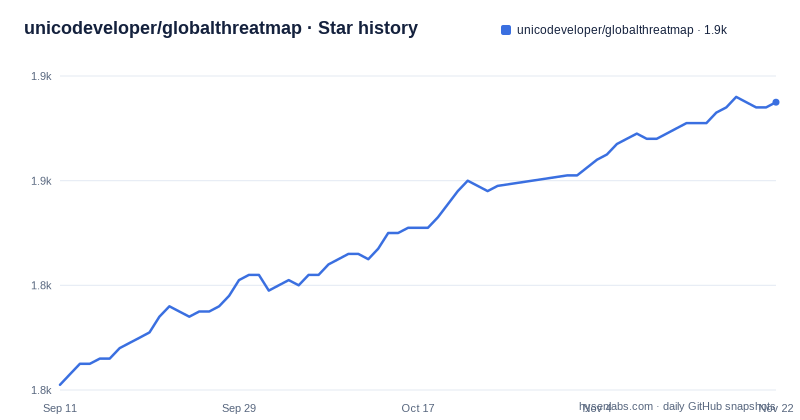
Star history
- unicodeveloper/globalthreatmap1,875 ★ · +54
| Repository | 2026-09-11 | 2026-11-22 |
|---|---|---|
| unicodeveloper/globalthreatmap | 1.8k | 1.9k |
54 Stars in the last 72 days, measured from the daily GitHub snapshot. Compare with other projects
Editorial analysis
The setup guide asks for Node 18 and the manifest requires 22.13
The prerequisites list three things: Node.js 18 or later, a Mapbox account with a token, and a Valyu API key. The manifest requires something else.
The engines field in the package manifest asks for Node 22.13.0 or later, and the container build starts from a Node 22 Alpine image. So the floor documented for a reader is four major versions and thirteen minor versions below the floor enforced by the toolchain.
The repository does carry an `.nvmrc` file at its root, which means a developer using a version manager gets the intended version without reading the README. That is exactly the case the prerequisites section does not help: the people who follow the written instructions are the ones who will not get the pinned version.
The same pattern shows up in the package manager. The manifest names a package manager and a version, the container enables corepack and prepares that exact version, and the lockfile is copied in alongside the workspace file before installing. The setup guide says to run a different package manager entirely, in the two commands it gives.
Three lockfile artefacts and a fallback that defeats the lockfile
The repository root holds a lockfile for two different package managers and a workspace definition for one of them. The manifest also declares which package manager is meant to be used, and the container build goes out of its way to pin that version through corepack.
Against that, the local setup guide tells you to install dependencies with npm. So there are three signals about which tool owns this repository, and the one aimed at a new user is the one no other file agrees with.
The install line in the container build is its own small story. It asks for a frozen lockfile install, and if that fails it retries without the freeze. That fallback is a reasonable way to survive a lockfile that has drifted out of date, but it also means a build that should have failed loudly instead succeeds with whatever the resolver decides today. The image it produces is the same either way, which is convenient for a deploy template and wrong for reproducibility.
The dependencies also name packages the tech stack section never mentions, including an OpenAI client, a streaming markdown renderer, a font package and an autoprefixer. The OpenAI one matters because it appears in the environment template as well.
The core features promise region alerts that the alerts section marks as coming soon
The core feature list describes an alert system for configuring keyword and region-based alerts with real-time notifications. The alerts section further down lists the criteria it accepts: keywords, with two examples given, and threat levels. Geographic regions are listed as coming soon.
So the headline capability of a feature is listed as ready in one section and as unbuilt in another, and no section states where the notifications go. There is no mention of email, web push, a desktop notification or an in-app inbox.
The rest of the feature list is more careful. Threat levels are enumerated as critical, high, medium, low and info, and event categories as conflict, protest, disaster and diplomatic among others, which is enough to build a filter. The event feed can be filtered by level, filtered by category, searched by keyword, and clicking an event flies the map to its location.
Auto-pan mode is described in the same level of detail: a play and pause control in the corner that pans the map continuously eastward, and a pause that stops it. It is the one interaction on the page described well enough to reproduce from the text alone.
Compose points your API keys at a file whose name is in the repository
The container compose file defines a single service built from the current directory, and it passes its environment from a file named `dot_env` rather than from a dotfile. The comment above it says in plain words that this is the file where you are supposed to put your API keys.
That file name appears in the repository's top-level listing. Whatever else it currently holds, the documented deployment workflow asks you to write credentials into a file the repository already knows the name of, while the environment example file at the root tells you to copy it to `.env.local` and warns not to commit that.
Two conventions, one repository, and the one aimed at deployers points at a tracked name. The environment example is otherwise good practice: it separates required from optional keys, gives the URL for each, and comments out the optional OpenAI key with an explanation of what it enables and what happens without it, which is a fallback to regex-based extraction when the key is absent.
If you deploy this, put the keys somewhere the build cannot reach by accident, and check what the ignore rules cover before the first commit of a filled-in file.
The manifest says ISC, the repository says nothing, and there is no licence file
Three statements of terms, none of which settle the question. The repository's licence field is empty. The package manifest carries the string ISC in its licence field. There is no licence file in the top-level listing of the repository at all.
For a project that a page invites people to deploy with a one-click template button, that is the first thing to resolve. An ISC string inside a manifest is what tooling reads when a package is published, and nothing prevents publishing here: the manifest has a name, a version, and no private flag, and its author field is an empty string rather than a person or an organisation.
The README does not discuss licensing at all, and the deployment link at the top of the page carries a referral code and campaign parameters, which means the easiest path into running this code is a third party's template rather than a fork you own.
If you intend to run this internally, that is a decision for whoever owns the deployment. If you intend to build on it, ask first, in writing, because nothing in the repository currently grants anything.
One layer is API-fed and the other is a bundled list of thirty-odd markers
The map is described as real-time throughout, but only one of its three data layers is described as fetched at runtime. Events come from an intelligence API through a server route, and country conflict data is synthesised by that same provider's answer endpoint with cited sources, with one explicit exclusion: Wikipedia is not used as a source for conflict information.
The military bases layer is different. United States bases appear as green markers, described as thirty or more worldwide, NATO installations appear as blue markers with no count at all, and the data loads when the map initialises. That is a bundled dataset rather than a feed, and nothing on the page says where it comes from or when it was last updated. For a map used to reason about global posture, a static list of thirty-odd points is a layer that will quietly go stale.
The third layer is generated on demand. Entity research places known locations as purple markers, which is the feature that turns the map from a viewer into a research tool: you name an actor and its locations appear on the same surface as the events.
That is the layer worth the key money, because it is the one where the provider is doing work rather than returning a lookup.
OAuth client settings are compiled into the bundle as public variables
The provider has two authentication paths and the documentation only covers one. The environment example states that the default mode is self-hosted, where a single API key is all you need, and that an alternative mode uses OAuth and is described as early access requiring contact with the provider.
The container build is where the second path shows up. Five build arguments are declared and exported as environment variables before the build runs, and three of them are prefixed for client-side exposure: an app mode flag, a redirect URI, a provider authentication URL, and a provider client identifier.
Any variable with that prefix is inlined into the client bundle at build time. A client identifier and an authorisation endpoint URL are meant to be public, so nothing sensitive is being baked into the image, but the effect is that they are fixed at build time rather than configurable at run time. One image, one provider client.
The local setup guide never mentions these variables. Someone following it will set an API key, get the self-hosted path working, and have no idea the OAuth path exists until they read the container file.
For reference, the whole environment the local path asks for is this short:
NEXT_PUBLIC_MAPBOX_TOKEN=your_mapbox_token_here
VALYU_API_KEY=your_valyu_api_key_here
NEXT_PUBLIC_APP_MODE=self-hosted

# Optional: Enable AI-powered location extraction for better accuracy
OPENAI_API_KEY=your_openai_api_key_here
Three keys, two of them required, and one of the two required ones is a secret while the map token is not.
Editorial conclusion
This is a usable front end for browsing events and conflicts, and the code is small enough to read in an afternoon. Before you deploy it, three things need attention. The build instructions and the manifest disagree on the Node version, the compose path asks you to put API keys into a file whose name is committed to the repository, and the only statement of terms is the string ISC inside a manifest with no licence file and no private flag. Fix the env handling first; it is the one that can leak a key.
Frequently asked questions
What is the Global Threat Map?
A Next.js application that plots security events, geopolitical developments and threat indicators on a dark Mapbox map, with country conflict tabs, a military bases layer, an alert system and deep research dossiers. The repository describes it as an open source intelligence command center.
What do I need to run it?
Node.js, a Mapbox access token and a Valyu API key, with an OpenAI key optional for AI-powered location extraction. The README says Node 18 or later, while the package manifest requires 22.13.0 or later and the container build uses a Node 22 Alpine image.
Which APIs does GlobalThreatMap call?
An intelligence client library for search, answer and deep research is the core dependency, and the OpenAI key is used only for location extraction, falling back to regex-based extraction when it is absent. Server routes cover event fetching, entity research, deep research reports, country conflicts and military base data.
Can GlobalThreatMap alert me by region yet?
Not according to its own page. The alerts section lists keywords and threat levels as the criteria and marks geographic regions as coming soon, even though the core feature list describes alerts as keyword and region based with real-time notifications.
What does a deep research dossier include?
An approximately fifty-page sourced report, a CSV data export, an eight-slide PowerPoint briefing and a downloadable PDF. The README states that these take five to ten minutes to generate and pull from hundreds of sources across the web, academic papers and proprietary databases.
Official sources
Where developers are discussing it
Posts on Hacker News, dev.to and Lobsters that link to this repository, found by our scan of those communities. 1 in the last 30 days; newest first.
- 10 Production Apps Built on Search API & DeepResearchdev.to · Oct 26, 2026 · 7 points · 0 comments
Add this badge to your README
If you maintain this project, the badge below links readers to this analysis and shows its maintenance status from the daily GitHub snapshot. Paste the markdown into your README; add ?metric=license or ?metric=stars to the image URL for a different field.

[](https://hysenlabs.com/projects/unicodeveloper-globalthreatmap)Star history chart for your README
[](https://hysenlabs.com/projects/unicodeveloper-globalthreatmap)Was this useful?