unifreq/openwrt_packit: Build ARM64 OpenWrt Images for Specific Boards
Flippy's openwrt packaged source code
At a glance
- What is it?
- unifreq/openwrt_packit is a collection of Shell scripts and supporting files for assembling Flippy-based ARM64 OpenWrt images for named TV boxes, development boards, KVM, and Docker targets. It suits builders who already have a compatible OpenWrt root filesystem and know which hardware image they need.
- Who is it for?
- Adopt unifreq/openwrt_packit if you need one of its named ARM64 targets, can supply a compatible armvirt root filesystem, and are prepared to diagnose Linux storage and filesystem-tool failures. Do not treat it as a general-purpose OpenWrt build system.
- Can I use it commercially?
- Not without permission. GitHub finds no licence file in the repository, and without a licence all rights are reserved by default: you may read the code but not reuse it. Check the README, or ask the authors, before using it.
- Is it still maintained?
- Yes. The repository last received commits 68 days ago.
- What is it written in?
- Mainly Shell, according to GitHub's language statistics.
Answers come from the project's GitHub data, last synced on November 6, 2026, and from our analysis. They are not legal advice.
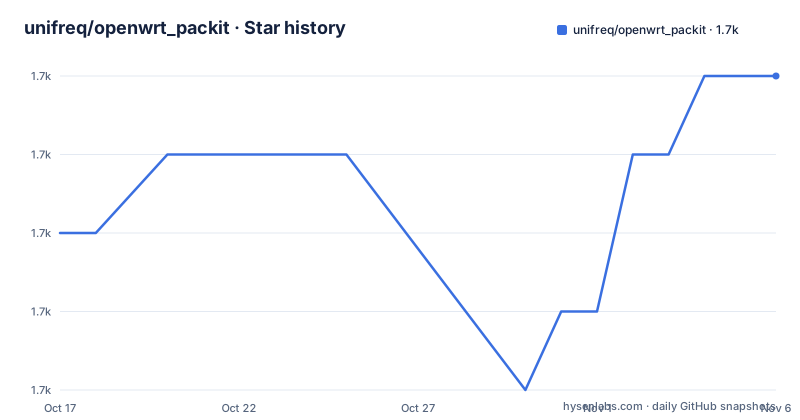
Star history
- unifreq/openwrt_packit1,692 ★ · +2
| Repository | 2026-10-17 | 2026-11-06 |
|---|---|---|
| unifreq/openwrt_packit | 1.7k | 1.7k |
2 Stars in the last 20 days, measured from the daily GitHub snapshot. Compare with other projects
Editorial analysis
What openwrt_packit Builds, and Who Needs It
unifreq/openwrt_packit solves a narrow image-packaging problem: combining a precompiled ARM64 kernel with an OpenWrt armvirt root filesystem and board-specific storage or boot assumptions. The repository is intended for people making firmware for supported ARM64 SoCs, including Amlogic S905D, S905X3, S912, and S922X systems; Rockchip RK3328, RK3399, RK3528, RK3566, RK3568, RK3576, RK3588, and RK3588S boards; and an Allwinner H6 target. Named examples include Phicomm N1, Beikeyun, WJY Cloud, FastRhino R66S and R68S, Radxa E25 and Rock 5B, Hlink boards, ZCube1-Max, and JP-TVbox.
The scripts are not interchangeable. Repository layout shows separate build entry points such as `mk_s905d_n1.sh`, `mk_rk3568_photonicat.sh`, `mk_rk3588_rock5b.sh`, and `mk_qemu-aarch64_img.sh`. That specificity is the point. A builder selects the script matching the target rather than asking one generic script to infer every device layout.
Beyond physical devices, the README describes ARM64 Docker and ARM64 QEMU KVM image targets. These alternatives follow a different approach from standard OpenWrt source compilation. The repository packages existing components into deployable images, so using it does not remove the need to compile an appropriate `openwrt-armvirt-64-default-rootfs.tar.gz` separately. The intended user is therefore a firmware builder with Linux administration experience, not someone seeking a one-click installer for an arbitrary ARM64 board.
Kernel, Root Filesystem, and Image Assembly Inputs
The documented data flow begins outside this repository. Flippy provides a precompiled ARM64 kernel, which must be uploaded to `/opt/kernel`. The builder supplies `openwrt-armvirt-64-default-rootfs.tar.gz` in `/opt/openwrt_packit`. A selected top-level script then invokes the packaging path in `openwrt_flippy.sh`, with shared behavior available through `public_funcs` and configuration in `make.env`.
The root filesystem is not a throwaway file. The README defines its target as QEMU ARM Virtual Machine, subtarget as QEMU ARMv8 Virtual Machine with Cortex-A53, and profile as Default, with a tar.gz image output. It lists dependencies needed so the produced system can write to EMMC and perform online upgrades. These include Perl components, disk and filesystem utilities, compression tools, Bash, and supporting core utilities. The required set is therefore part of the image contract, not merely a host-side build dependency.
The repository also carries device or feature assets under `files/`. Online upgrade scripts are stored there, while example OpenWrt configuration files are under `files/openwrt_config_demo/`. The README further states that wireless support can overwrite rootfs firmware with firmware included from Armbian and that Photonicat or DM router monitoring features require particular packages. These details mean that rootfs package selection, repository assets, and the selected board script must agree before a generated image is dependable.
Preparing a Linux Host for openwrt_packit
The documented host must run Linux on x86 or ARM64, either physically or in a virtual machine. Windows 10's bundled Linux environment is explicitly unsupported. Root access is required. The README names `losetup`, `lsblk` with version 2.33 or later, `blkid`, `uuidgen`, `fdisk`, `parted`, `mkfs.vfat`, `mkfs.ext4`, and `mkfs.btrfs`, while cautioning that the list may not be complete because missing commands are discovered when packaging fails.
Clone the repository under `/opt`. The URL and path below come directly from the documented setup sequence:
cd /opt
git clone https://github.com/unifreq/openwrt_packit
After cloning, upload the precompiled kernel to `/opt/kernel`, create that directory if necessary, and upload the compiled `openwrt-armvirt-64-default-rootfs.tar.gz` into `/opt/openwrt_packit`. The README does not provide a download command for the kernel or a rootfs build command in this repository. It points to external sources for the kernel and lists OpenWrt source repositories for producing the rootfs. This separation matters: openwrt_packit is the image assembly layer, not the documented source of either input.
The host also needs enough temporary storage and I/O capacity for `/opt/openwrt_packit/tmp`. The README says this directory can consume as much as 1 GB of memory if mounted as tmpfs, which may speed image work but changes the storage behavior and memory allocation of the host.
Running the First Board-Specific Build
After the inputs are in place, change to the repository and run the script for the desired firmware category. The documented example builds the Phicomm N1 image:
cd /opt/openwrt_packit
./mk_s905d_n1.sh
The script name must correspond to the device. Repository entries also include scripts for other boards and image forms, such as `mk_rk3399_generic.sh`, `mk_rk3588_h88k-v3.sh`, `mk_openwrt_dockerimg.sh`, and `mk_qemu-aarch64_img.sh`. No universal `make` command is documented, so choosing the wrong entry point would substitute another target's assumptions.
According to the README, a completed build produces a `.img` file under `/opt/openwrt_packit/output`. The expected first result is therefore that directory containing a board-specific image for inspection. The documentation says the image can then be downloaded and flashed, but it does not describe per-board flashing commands, partition restoration, bootloader recovery, or rollback. Those operations cannot safely be inferred from a generic output-file statement.
If temporary work should use memory rather than the disk, the README documents either an fstab entry or a direct tmpfs mount. The manual option affects the existing work directory:
mount -t tmpfs none /opt/openwrt_packit/tmpThe README warns that this approach can use up to 1 GB of memory. It also gives a persistent fstab variant:
echo "none /opt/openwrt_packit/tmp  tmpfs   defaults   0  0" >> /etc/fstab
mount /opt/openwrt_packit/tmp
That second form changes `/etc/fstab`, so it is more than a disposable build setting. The README does not document a matching cleanup procedure in the shown instructions.
OpenWrt Packages Required Inside the Rootfs
The rootfs configuration is where several operational constraints become explicit. Perl packages support the online-upgrade mechanism and EMMC writes. Disk tools include `blkid`, `fdisk`, `lsblk`, and `parted`. The filesystem list includes `attr`, zstd-capable `btrfs-progs`, `chattr`, `dosfstools`, `e2fsprogs`, F2FS and XFS tools, and `lsattr`. `bsdtar` or `p7zip`, `pigz`, `bash`, `gawk`, `getopt`, `losetup`, `tar`, and `uuidgen` are also listed. `acpid` is optional for KVM images.
Wireless support is optional and has a specific package shape. Broadcom SDIO support uses `kmod-brcmfmac`, `kmod-brcmutil`, `kmod-cfg80211`, and `kmod-mac80211` as shown in the README, along with `hostapd-common`, `wpa-cli`, `wpad-basic`, and `iw`. The README says firmware selection is unnecessary because files from Armbian in the packaging source automatically overwrite the rootfs firmware. That is convenient for the stated workflow, but it also means the generated system does not retain whatever firmware policy was previously configured in the rootfs.
Photonicat has a stricter dependency. `pcat-manager` is described as required because the device otherwise shuts down within one minute due to its hardware watchdog. Its optional Python stack enables the vendor-specific home page. DM router monitoring requires `luci-app-netdata` and either a Python package set with `lm-sensors` or `coreutils-timeout`. These conditions should be checked before building images that claim support for those devices.
Docker and KVM Image Targets in openwrt_packit
The repository does more than produce flashable device images. `mk_qemu-aarch64_img.sh` is documented as the build entry point for OpenWrt in an ARM64 KVM virtual machine, with instructions in `files/qemu-aarch64/qemu-aarch64-readme.md`. This target still uses the same general assembly concept, but it is not the physical-device path. The optional `acpid` package is tied to KVM support, and selecting it incorrectly would add an unneeded component to a non-KVM image.
There is also a separate `mk_openwrt_dockerimg.sh`. The repository Dockerfile gives a partial view of the container contract: it starts `FROM scratch`, adds `openwrt-armvirt-64-default-rootfs-patched.tar` at `/`, exposes ports 22, 53, 80, 443, and 7681, and uses `ENTRYPOINT ["/sbin/init"]` so `/sbin/init` becomes process 1. The comment points to procd documentation for that design.
openwrt_packit combines Flippy's kernel, a separately compiled armvirt rootfs, and repository scripts or assets. That approach is useful when the target is one of the explicitly supported boards or an image format defined by this project. It is a poor fit for an unlisted device because the repository provides no device-detection layer or documented mechanism to declare arbitrary partition layouts.
GitHub Actions and luci-app-amlogic Integration
For cloud builds, the README documents an Action sourced from `ophub`, with `openwrt_flippy.sh` as its main script. `action.yml` is present at the repository root, and `.github/` contains workflow-related files. The README.ACTION.md file is identified as the detailed guide, so the abbreviated example should not be treated as a complete cloud workflow definition.
The documented YAML fragment shows the principal inputs: `OPENWRT_ARMVIRT` locates the generated tar.gz, `PACKAGE_SOC` selects the target combination, and `KERNEL_VERSION_NAME` identifies the expected kernel artifact.
- name: Package Armvirt as OpenWrt
  uses: unifreq/openwrt_packit@master
  env:
    OPENWRT_ARMVIRT: openwrt/bin/targets/*/*/*.tar.gz
    PACKAGE_SOC: s905d_s905x3_beikeyun
    KERNEL_VERSION_NAME: 5.13.2_5.4.132
The repository also describes integration with `ophub/luci-app-amlogic`, which can update the kernel and complete firmware online. That is an integration boundary rather than a self-contained guarantee. The generated rootfs still needs the required packages, and the target image must match the board and kernel selected by the build.
Maintenance requires some attention to inputs. The repository's last push was on 2026-09-01 and it is not archived, but it has no GitHub releases. The documented third-party kernel source, OpenWrt source selection, and Action implementation can change independently, so a successful packaging script alone does not establish compatibility with a newly compiled rootfs. The repository information does not identify a license, so redistribution and derivative-image licensing cannot be assessed.
Editorial conclusion
Adopt unifreq/openwrt_packit if you need one of its named ARM64 targets, can supply a compatible armvirt root filesystem, and are prepared to diagnose Linux storage and filesystem-tool failures. Do not treat it as a general-purpose OpenWrt build system. Before the first image is flashed, verify the selected board script, kernel compatibility, required rootfs packages, image output, and the device-specific recovery path.
Frequently asked questions
What does unifreq/openwrt_packit need to build an OpenWrt image?
It needs Flippy's precompiled ARM64 kernel, a compatible `openwrt-armvirt-64-default-rootfs.tar.gz`, a supported Linux host with root access, and the commands listed in the README. The kernel and rootfs must be placed in `/opt/kernel` and `/opt/openwrt_packit`, respectively.
Where does openwrt_packit save the generated firmware?
The README says the generated `.img` file is stored in `/opt/openwrt_packit/output`. It does not document universal flashing commands for every supported board.
Can openwrt_packit build ARM64 Docker and KVM images?
The repository includes `mk_openwrt_dockerimg.sh` and `mk_qemu-aarch64_img.sh`, and the README identifies ARM64 Docker and QEMU KVM as supported image forms. The KVM details are directed to `files/qemu-aarch64/qemu-aarch64-readme.md`.
Does openwrt_packit compile the OpenWrt rootfs itself?
The README requires the builder to supply `openwrt-armvirt-64-default-rootfs.tar.gz`. It lists OpenWrt source repositories for that separate compilation and positions this repository primarily around packaging the rootfs with a Flippy ARM64 kernel.
Official sources
Add this badge to your README
If you maintain this project, the badge below links readers to this analysis and shows its maintenance status from the daily GitHub snapshot. Paste the markdown into your README; add ?metric=license or ?metric=stars to the image URL for a different field.

[](https://hysenlabs.com/projects/unifreq-openwrt-packit)Star history chart for your README
[](https://hysenlabs.com/projects/unifreq-openwrt-packit)Was this useful?