Unison: a codebase is a database, and names are hashes of implementations
A friendly programming language from the future
At a glance
- What is it?
- Unison is a statically typed functional language built on content addressing, so definitions are identified by a hash of their implementation rather than by a name. The compiler cache lives inside the codebase, there is no build step, and the tooling is written in Haskell with a web UI on the side.
- Who is it for?
- Unison fits a team that has been hurt by large Kotlin, Haskell or Scala build times and wants incremental compilation plus non-breaking renames as properties of the language rather than of a build tool. It does not fit a team that needs an existing toolchain, an IDE with mature Kotlin support, or a hiring pool: the project is small, the releases come from a trunk branch, and the licence metadata does not resolve to a named licence even though a LICENSE file exists.
- Can I use it commercially?
- Check first. The repository uses a licence we do not classify automatically, so read its LICENSE file before any commercial use.
- Is it still maintained?
- Yes. The repository last received commits 2 days ago.
- What is it written in?
- Mainly Haskell, according to GitHub's language statistics.
Answers come from the project's GitHub data, last synced on November 15, 2026, and from our analysis. They are not legal advice.
Star history
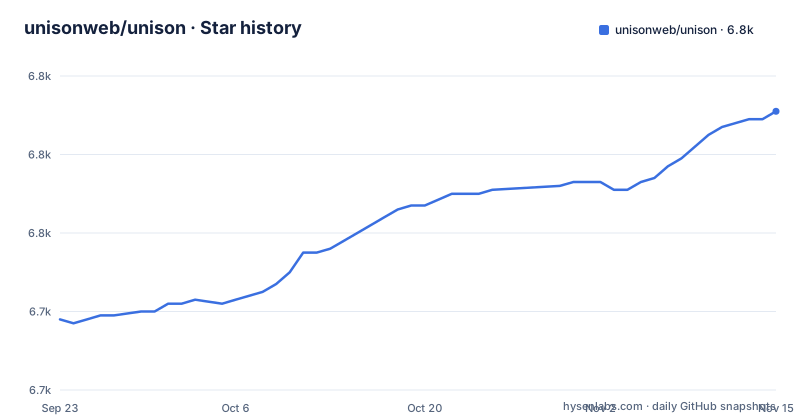
- unisonweb/unison6,791 ★ · +53
| Repository | 2026-09-23 | 2026-11-15 |
|---|---|---|
| unisonweb/unison | 6.7k | 6.8k |
53 Stars in the last 53 days, measured from the daily GitHub snapshot. Compare with other projects
Editorial analysis
A definition's name is a hash of its implementation
The central idea is content addressing. A function is identified by a hash of its implementation rather than by a name, and code is stored as its abstract syntax tree in a database rather than as files in a directory tree. Everything else in Unison follows from that one decision.
The consequences the project claims are concrete. Renaming a definition is instant and non-breaking, because a name is a reference to content and changing the reference cannot break the content. Merges become semantic: import order, whitespace and formatting differences cannot produce a conflict, because there are no text files to conflict over. Test results are cached per hash, so only deterministic tests whose dependencies actually changed get rerun.
The sample code shows what that looks like in practice. Signatures may be written before a definition, or omitted entirely and inferred, which is why the same transcript shows one function with a signature and one without.
There is no build step, and the cache ships inside the codebase
Unison has what the documentation calls perfect incremental compilation, with a shared compilation cache that is part of the codebase format. The claim that follows is that despite the strong static typing, you are almost never waiting for code to compile.
This is the part worth scrutinising, because it is unusual. In most languages the compiler output is a build artifact derived from source, and you can throw it away and rebuild. Here the cache is not derived, it is stored, and it is stored next to the code. There is no separate target directory to clean, no build cache to configure, and no configuration file to make incremental compilation work correctly.
The trade is that your codebase is no longer something you can inspect with a file browser or feed to an external tool that expects text. The repository layout shows how much Haskell sits underneath, with separate modules for the core, the runtime, the parser and typechecker, a merge engine, a second hashing implementation, and API packages for Unison Share.
Arguments take no parentheses, so calls read like definitions
Function arguments are separated by spaces instead of parentheses and commas. Loops are written with recursion, as the example shows: a local helper named go carries the accumulator and the remaining list, and List.map is written in terms of it. Pattern matching uses match <expr> with <cases>, and it works on lists as well as on user defined data types.
The transcript in the README is a worked example of the result rather than a description of it. Evaluating List.map (x -> x * 10) over a range gives back the scaled list, and mapping factorial over a small list gives the expected values.
The syntax is not the interesting part. Whether that feels natural after a few days is the actual adoption risk here, and it is not one a README can settle.
ucm serves a web UI on a random port with a per-session token
When the ucm executable starts, it starts a Codebase web server that the Unison Local UI connects to. Two details matter for anyone automating this. First, it picks a random port and a unique token, and both are required for the UI to connect correctly, so you cannot assume a fixed address. Second, all three values are overridable through environment variables when starting ucm: UCM_PORT, UCM_HOST and UCM_TOKEN.
The rest of the configuration lives in a documentation file in the repository rather than in the README.
The web UI itself is a separate repository, unison-local-ui, and the build script dev-ui-install.sh downloads the latest release of it and places it where the stack-built executable expects to find it. Note the word latest: a developer building from source gets whatever UI release is current, not necessarily one pinned to your commit. A regression in the UI is therefore a thing you can hit without changing any Unison code.
The container image hardcodes port 8080 and the token pub
The Dockerfile in the repository root shows how the maintainers expect the binary to be shipped in a container, and it is worth reading before you build your own image. It starts from debian:stable, creates a user called unison with no password, and installs git, libncurses5, less, locales and fzf, then regenerates the locale as en_US.UTF-8.
It then copies the compiled ucm binary from a tmp/ucm/ucm build directory into /usr/local/bin/ucm and the UI assets into /usr/local/share/ucm, sets UCM_WEB_UI to that path, and sets UCM_PORT to 8080 with UCM_TOKEN to pub. The binary is chmod 555, port 8080 is exposed, and the entrypoint is the binary itself with a default command of --codebase /unison.
That default token is fine for a local image and wrong for anything reachable. Anyone deploying this should treat UCM_TOKEN as a secret to set rather than a default to inherit.
Releases are tagged off a trunk branch with slash-prefixed names
The default branch is trunk, not main or master, and the release tags carry that into their names: release/1.5.0 published on 2026-10-02, release/1.4.0 on 2026-08-19, and a trunk-build development build on 2026-10-28. The repository was last pushed on 2026-10-28.
So there are two release streams visible in the tag list. The versioned ones move every few weeks, and a rolling development tag sits alongside them. If you pin a version in a reproducible build, pin the slash-prefixed tag rather than the branch, because the branch moves continuously.
The licence is the other thing to settle before you build anything on top of this. The repository carries a LICENSE file at the root, but the metadata does not resolve to a named licence, so read the file rather than trusting a badge. For a language whose whole pitch is content addressing, provenance questions about the implementation are worth asking rather than assuming.
Building from source runs the test suite before ucm starts
The build instructions assume Stack, and they tell you to install it first, with a brew hint for the impatient. The sequence is short and the last line is worth reading twice, because it builds, tests, and only then launches.
$ git clone https://github.com/unisonweb/unison.git
$ cd unison
$ stack --version # we'll want to know this version if you run into trouble
$ stack build --fast --test && stack exec unison
The --fast flag skips optimisations, which is what makes an iteration loop bearable on a codebase this size, and --test means the suite runs as part of the build rather than as a separate step you might forget. The stack --version call is there so that bug reports carry the toolchain version, and the README asks you to file an issue if these steps do not work.
A flake.nix and flake.lock are also present, so a Nix toolchain is an alternative to Stack, and development.md holds the list of build commands you will actually use day to day.
Editorial conclusion
Unison fits a team that has been hurt by large Kotlin, Haskell or Scala build times and wants incremental compilation plus non-breaking renames as properties of the language rather than of a build tool. It does not fit a team that needs an existing toolchain, an IDE with mature Kotlin support, or a hiring pool: the project is small, the releases come from a trunk branch, and the licence metadata does not resolve to a named licence even though a LICENSE file exists. Before adopting it, confirm three things: what UCM_TOKEN and UCM_PORT mean for how you deploy the built binary, whether the local UI script downloads a release that matches your build, and how much of your pipeline assumes source files on disk. That last one is the real cost, and it does not go away.
Frequently asked questions
how to use unison
Clone the repository and build it with Stack: git clone, cd unison, then stack build --fast --test && stack exec unison. The executable is called ucm, and running it starts a Codebase web server that the local UI connects to.
how to install unison
From source the route is Stack, and the build runs the test suite as part of it. A Dockerfile is also included, which installs the compiled ucm binary, sets UCM_PORT to 8080 and UCM_TOKEN to pub, and exposes port 8080.
What does Unison do differently from other functional languages?
Definitions are identified by a hash of their implementation rather than by a name, and code is stored as its AST in a database. That gives instant non-breaking renames, a compilation cache stored in the codebase format, and merges that ignore formatting and import order.
Which Unison version should I pin?
Pin a slash-prefixed release tag such as release/1.5.0, published on 2026-10-02. The default branch is trunk and moves continuously, and a separate trunk-build development tag is also published.
Official sources
Where developers are discussing it
Posts on Hacker News, dev.to and Lobsters that link to this repository, found by our scan of those communities. 0 in the last 30 days; newest first.
- Unison: A friendly programming language from the futureHacker News · Sep 14, 2026 · 1 points · 1 comments
Add this badge to your README
If you maintain this project, the badge below links readers to this analysis and shows its maintenance status from the daily GitHub snapshot. Paste the markdown into your README; add ?metric=license or ?metric=stars to the image URL for a different field.

[](https://hysenlabs.com/projects/unisonweb-unison)Star history chart for your README
[](https://hysenlabs.com/projects/unisonweb-unison)Was this useful?