OmniParser turns screenshots into element lists, and its weights carry mixed licenses
A simple screen parsing tool towards pure vision based GUI agent
At a glance
- What is it?
- OmniParser is a Microsoft screen parsing tool that detects interactive regions in a GUI screenshot and captions them, so a vision model can pick actions. The code, the weights and the repository each declare different licenses.
- Who is it for?
- Use OmniParser if you are building a vision-based GUI agent and want a detector plus captioner that you run yourself, and you can tolerate a dependency list with pinned old packages. Check the license of each weight you download before shipping, because the repository says CC-BY-4.0, the README badge says MIT and the older Ultralytics detectors are AGPL.
- Can I use it commercially?
- Yes, with credit. CC-BY-4.0 allows commercial use as long as you credit the authors and indicate what you changed. It is written for creative content, so check how it applies to any code.
- Is it still maintained?
- Yes. The repository last received commits 1 day ago.
- What is it written in?
- Mainly Jupyter Notebook, according to GitHub's language statistics.
Answers come from the project's GitHub data, last synced on November 25, 2026, and from our analysis. They are not legal advice.
Star history
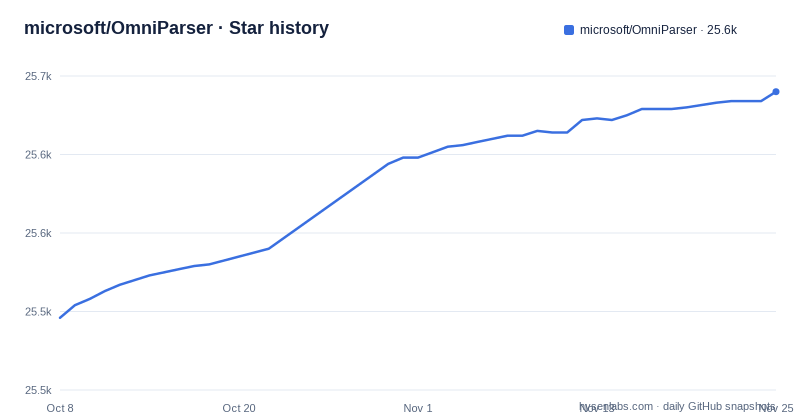
- microsoft/OmniParser25,640 ★ · +144
| Repository | 2026-10-08 | 2026-11-25 |
|---|---|---|
| microsoft/OmniParser | 25.5k | 25.6k |
144 Stars in the last 48 days, measured from the daily GitHub snapshot. Compare with other projects
Editorial analysis
OmniParser splits a screenshot into detected regions and captions
OmniParser parses user interface screenshots into structured, easy to understand elements. The stated aim is to help GPT-4V generate actions that are grounded in the right region of the interface. The pipeline has two model parts that show up in the install steps: an interactive region detector, stored under icon_detect_v3, and a caption model, stored under icon_caption_florence.
The requirements list shows what else is involved: easyocr, paddleocr and paddlepaddle for text, ultralytics 8.3.70, supervision 0.18.0, transformers, timm and einops. Text recognition, icon detection and icon description are separate steps that you combine into one list of elements.
The repository is mostly a demo.ipynb notebook, a gradio_demo.py script and an omnitool directory. There is no installable package or API server in the top level listing, so integrating it means calling the notebook's code from your own project.
The install is a conda environment on Python 3.12 plus manual weight downloads
Installation starts with a clone, then three commands:
cd OmniParser
conda create -n "omni" python==3.12
conda activate omni
pip install -r requirements.txt
The block is labeled python in the README, but these are shell commands. Weights are not part of pip install. The caption weights come from Hugging Face one file at a time:
for f in icon_caption/{config.json,generation_config.json,model.safetensors}; do huggingface-cli download microsoft/OmniParser-v2.0 "$f" --local-dir weights; done
mv weights/icon_caption weights/icon_caption_florence
The mv step matters. The code looks for the folder weights/icon_caption_florence, so skipping the rename leaves the caption model missing. The commented out section in the README about weights/icon_detect_v1_5, convert_safetensor_to_pt.py and icon_caption_blip2 is marked deprecated, so ignore the old v1 conversion instructions you may find elsewhere.
The YOLOv9-E detector comes from an unmerged Hugging Face pull request
The 2026/7 news item adds a YOLOv9-E interactive region detector, and its inference-only weight sits in Hugging Face PR #37 on the OmniParser-v2.0 repository. Until that pull request is merged, you download it with:
huggingface-cli download microsoft/OmniParser-v2.0 icon_detect_v3/model.pt \
  --revision refs/pr/37 --local-dir weights
OmniParser prefers this local weight when it is present. After the merge, the same weight is downloaded automatically on first use. The practical risk is that a pinned refs/pr/37 reference depends on a pull request that can change or close, so copy the file into your own storage once you have it.
The repository's last push was on 20 July 2026, and the newest tagged release is v.2.0.1 from 12 September 2025. The detector update arrived in the README without a new tag, so the weight in the pull request and the code at master are the way to get it. Earlier tags are v1.5.0 and v.2.0.0, both dated 13 February 2025.
Three licenses apply: CC-BY-4.0, an MIT badge, and AGPL for older detectors
GitHub lists the repository license as CC-BY-4.0. The README header carries an MIT badge. A Model Weights License section then splits it again: icon_detect_v3 is based on the MIT-licensed YOLOv9 implementation, earlier Ultralytics-based icon detectors retain their original AGPL license, and the caption models are under the MIT license.
For anyone shipping a product, the consequence is concrete. If you use an older detector built on Ultralytics, AGPL terms apply to that weight. The v3 detector is the way to avoid that, and it is the one that still depends on the pull request described above. Read the model card for each checkpoint you pull from microsoft/OmniParser, microsoft/OmniParser-v2.0 and the pull request, and keep a record of which one you shipped.
The requirements file also pins ultralytics==8.3.70, so the Ultralytics package is still installed even when you use the YOLOv9-E weight.
OmniTool controls a Windows 11 VM but the trajectory logging docs are unfinished
OmniTool, introduced in February 2025, controls a Windows 11 VM with OmniParser plus a vision model of your choice. It supports OpenAI (4o, o1, o3-mini), DeepSeek (R1), Qwen (2.5VL) or Anthropic Computer Use out of the box. The requirements file carries matching clients: openai==1.3.5, anthropic with bedrock and vertex extras, dashscope, groq, boto3, azure-identity, google-auth, pyautogui, uiautomation and screeninfo.
In March 2025 the project added local logging of trajectories, so OmniParser plus OmniTool can feed a training data pipeline for an agent in your domain. The README marks that documentation as work in progress. It also says multi agent orchestration and a better user interface are being added gradually. No dates are given for either, and the latest news entries since then are about the detector.
The pin on openai==1.3.5 is old. Mixing it with newer SDK code in the same environment is a conflict you will resolve yourself, since the requirements are one flat file for the parser, the demo and OmniTool.
Results claimed in the news are benchmark numbers the README does not reproduce
The news list makes several performance claims. OmniParser reached the best performance on Windows Agent Arena in September 2024. It was the number one trending model on the Hugging Face model hub starting 29 October 2024. V2 reached 39.5% on the Screen Spot Pro grounding benchmark, with details in docs/Evaluation.md. V1.5, released in November 2024, added finer grained detection of small icons and a prediction of whether each element is interactable, with examples in demo.ipynb.
The README itself holds no tables, latency figures or accuracy comparisons with other parsers. The question of how it compares with UI-TARS, or what alternative to use, is not answered in the repository text. The eval directory and docs/Evaluation.md are where to look for how the 39.5% was produced.
To try it without installing anything, the README links a Hugging Face Space demo, and locally the gradio demo starts with:
python gradio_demo.pyThe notebook demo.ipynb holds the simple examples.
If you plan to compare OmniParser against another screen parser, you will have to run both yourself on your own screenshots. Plan a small evaluation on the interfaces your agent actually drives, including dense toolbars and small icons, since V1.5 specifically targeted fine grained icon detection and that is where detector choice shows.
Editorial conclusion
Use OmniParser if you are building a vision-based GUI agent and want a detector plus captioner that you run yourself, and you can tolerate a dependency list with pinned old packages. Check the license of each weight you download before shipping, because the repository says CC-BY-4.0, the README badge says MIT and the older Ultralytics detectors are AGPL.
Frequently asked questions
What is OmniParser?
OmniParser is a Microsoft method and tool for parsing user interface screenshots into structured elements. It helps GPT-4V generate actions grounded in the right region of the interface.
How do I use OmniParser?
Clone the repo, create the conda environment and run pip install -r requirements.txt, download the detector and caption weights into the weights folder, then run python gradio_demo.py or open demo.ipynb.
Is OmniParser open source?
The code and weights are public, but licenses differ. GitHub lists CC-BY-4.0, icon_detect_v3 is based on MIT-licensed YOLOv9, caption models are MIT, and earlier Ultralytics-based detectors keep their AGPL license.
Official sources
Add this badge to your README
If you maintain this project, the badge below links readers to this analysis and shows its maintenance status from the daily GitHub snapshot. Paste the markdown into your README; add ?metric=license or ?metric=stars to the image URL for a different field.

[](https://hysenlabs.com/projects/microsoft-omniparser)Star history chart for your README
[](https://hysenlabs.com/projects/microsoft-omniparser)Was this useful?