NodeBB: A Real-Time Forum Platform That Still Looks Like a Bulletin Board
Node.js based forum software built for the modern web. NodeBB Forum Software** is powered by Node.js and supports either Redis, MongoDB, or a PostgreSQL database.
At a glance
- What is it?
- NodeBB is a Node.js forum system with web sockets, REST APIs, and a plugin ecosystem. It targets teams that want modern interaction patterns without abandoning the classic category-and-topic structure.
- Who is it for?
- NodeBB suits communities that need real-time updates, a REST API, and a plugin ecosystem, and that can accept a GPL-3.0 license and a Node.js runtime. It is not the right choice if you want a purely static or server-rendered forum, or if your team has no Node.js experience.
- Can I use it commercially?
- Yes, with conditions. GPL-3.0 is a copyleft licence: if you distribute software that includes it, you must release that software's source code under the same licence. Running it internally without distributing it does not trigger that obligation.
- Is it still maintained?
- Yes. The repository received new commits within the last day.
- What is it written in?
- Mainly JavaScript, according to GitHub's language statistics.
Answers come from the project's GitHub data, last synced on November 14, 2026, and from our analysis. They are not legal advice.
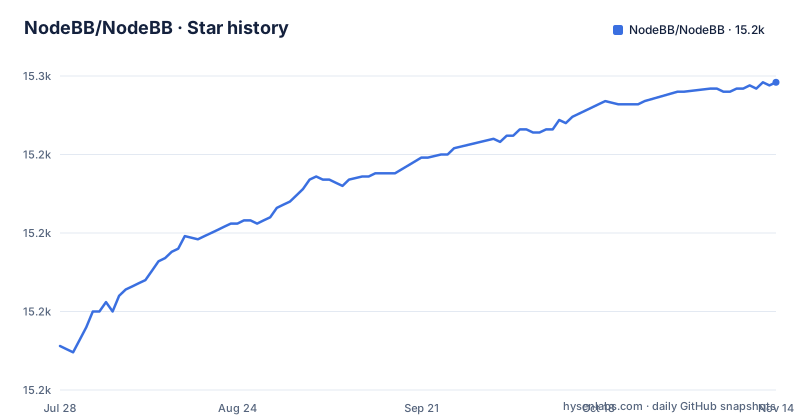
Star history
- NodeBB/NodeBB15,248 ★ · +84
| Repository | 2026-07-28 | 2026-11-14 |
|---|---|---|
| NodeBB/NodeBB | 15.2k | 15.2k |
84 Stars in the last 109 days, measured from the daily GitHub snapshot. Compare with other projects
Editorial analysis
What NodeBB Actually Solves
NodeBB addresses a specific mismatch: traditional forum software like phpBB often feels sluggish because page loads happen on every click. NodeBB moves the discussion layer onto web sockets, so new posts and notifications arrive without a refresh. The README states it "utilizes web sockets for instant interactions and real-time notifications." That is the core value proposition. It is for communities that want the familiar categorical hierarchy of a bulletin board, local user accounts, and asynchronous messaging, but with a modern interaction model. The target user is a forum administrator who wants real-time behavior without rebuilding the forum concept from scratch.
The Architecture: A Common Core Plus Plugins
NodeBB is not a monolithic application. The README describes a "common core" of basic functionality, with additional features and integrations enabled through third-party plugins. That means the base install covers categories, topics, posts, users, and real-time updates, and additional functionality and integrations come from third-party plugins. The project also exposes "rich RESTful read/write APIs," which is a concrete architectural detail: you can interact with the forum programmatically, not just through the web UI. The theming engine extends base templates and allows styling via SCSS or CSS, with Bootstrap 5 as the frontend toolkit. So the architecture is modular at three levels: plugins for behavior, themes for presentation, and REST APIs for external integration.
Database Choices and the Clustering Constraint
NodeBB supports three databases: Redis, MongoDB, or PostgreSQL. The README lists MongoDB version 5 or greater, Redis version 7.2 or greater, and PostgreSQL without a version number. That is a real decision point. If you already run PostgreSQL, you can use it, but the README adds a specific constraint: "If you are using clustering you need Redis installed and configured." That means horizontal scaling is tied to Redis, not to your primary database. If you pick MongoDB or PostgreSQL as your main store, you still need a separate Redis instance for clustered deployments. This is a trade-off worth noting before you commit to a database choice. For a single-node setup, you can skip Redis, but then you lose the clustering path.
Getting It Running: CLI Setup, Not npm Start
The README is explicit that NodeBB "uses a CLI-based setup and does not run via standard npm start." That is an important detail for anyone coming from a typical Node.js project. The native setup flow is: clone the repository, run ./nodebb setup, then ./nodebb start. During setup you configure the database, admin account, and port, which defaults to 4567. There is also a Docker path: docker-compose up starts NodeBB and required services at http://localhost:4567. The CLI approach means you need to learn the NodeBB CLI rather than relying on familiar npm scripts.
A Genuine Limitation: The Default Install Is Bare
NodeBB's "common core" is deliberately minimal. The README says additional functionality comes from third-party plugins. That means a fresh install gives you the forum skeleton, but not necessarily the features your community expects out of the box. For example, there is no mention of built-in WYSIWYG editors, spam protection, or social login. You will need to search the plugin directory and evaluate each plugin's maintenance status. That is a real limitation: the core is stable, but your feature set depends on third-party code. Also, the README's security section focuses on Redis and iptables, not on NodeBB's own application-level security. That suggests the project assumes you know how to secure a web server, which may be a hurdle for non-technical forum admins.
The Wrong Tool for Some Scenarios
NodeBB is not the right choice if you want a forum that works without a persistent Node.js process. The README does not mention any static export or serverless mode. You need a server that can run Node.js continuously, plus a database. That rules out simple shared hosting that only supports PHP. Also, if your community is small and you want the simplest possible setup, the requirement for Node.js 22 or greater and a separate database may be overkill. A single PHP file on shared hosting would be easier. NodeBB's real-time features matter most when you have concurrent users who expect instant updates. For a low-traffic forum, that benefit is marginal, and the operational cost is higher.
Alternatives and the Difference in Approach
The most direct alternative is Discourse, which is also a modern forum but built on Ruby on Rails and PostgreSQL. NodeBB offers a native CLI path as well as Docker. Another alternative is Flarum, a PHP-based forum. Flarum's approach is to keep the core minimal and rely on extensions, similar to NodeBB, but it runs on PHP and MySQL. The key difference is the runtime and the database ecosystem. If your team already runs Node.js and Redis, NodeBB fits naturally. If you are in a PHP or Rails environment, the alternatives reduce the number of new technologies you need to operate.
Maintenance, Upgrades, and License Implications
The repository shows active maintenance: the latest release is v4.16.7 from October 2026, and the default branch is master, which suggests a stable release line. The README points to dedicated upgrade instructions, which implies that upgrades are not a simple git pull. You need to follow a documented process, likely involving database migrations. The license is GPL-3.0, which is a strong copyleft license. That means if you modify NodeBB and distribute it, you must release your modifications under the same license. The README even mentions a commercial sublicense for non-free use, which is a clear signal that the GPL is not just a formality. For a community forum that you do not modify, GPL-3.0 is usually fine, but if you plan to embed NodeBB in a proprietary product, you need to consider that constraint carefully.
Editorial conclusion
NodeBB suits communities that need real-time updates, a REST API, and a plugin ecosystem, and that can accept a GPL-3.0 license and a Node.js runtime. It is not the right choice if you want a purely static or server-rendered forum, or if your team has no Node.js experience. Before adopting, verify that your target database version is supported (Redis 7.2+, MongoDB 5+, or PostgreSQL), confirm that your hosting environment can run a persistent Node.js process, and review the plugin list for the specific integrations you need, because the core is intentionally minimal.
Frequently asked questions
What is NodeBB?
NodeBB is forum software powered by Node.js that uses web sockets for instant interaction and real-time notifications. It takes real-time streaming discussions, mobile responsiveness and rich read-write APIs while keeping traditional forum structure, meaning categorical hierarchies, local user accounts and asynchronous messaging. A common core of basic functionality ships in the box and further features come from third-party plugins.
how to install nodebb
NodeBB requires Node.js 22 or newer, a database of either MongoDB 5 or newer or Redis 7.2 or newer, and optionally a reverse proxy and containers. Installation steps vary by operating system, so the platform-specific documentation is the route to follow. For local development you clone the repository, run the setup script from inside it, and start the application with the project's own command line tool.
is nodebb open source
Yes, under the GNU General Public License version 3. The front page also notes that a sublicense agreement is available for use in a non-free or restrictive environment, which is the standard arrangement for a GPL project that sells commercial terms, alongside a premium hosting option.
is nodebb free
The software is free under the GPL-3.0 licence. Two paid options are referenced on the front page: premium hosting, and a sublicense agreement for organisations that cannot comply with the copyleft terms. No pricing for either appears in the repository.
nodebb vs discourse vs flarum
The project makes no comparison with any other forum software, and names no alternatives. What it describes about itself is a Node.js forum using web sockets, support for Redis, MongoDB or PostgreSQL, a theming engine that permits extending base templates or styling with a stylesheet preprocessor, and a base theme built on a frontend toolkit.
Official sources
Add this badge to your README
If you maintain this project, the badge below links readers to this analysis and shows its maintenance status from the daily GitHub snapshot. Paste the markdown into your README; add ?metric=license or ?metric=stars to the image URL for a different field.

[](https://hysenlabs.com/projects/nodebb-nodebb)Star history chart for your README
[](https://hysenlabs.com/projects/nodebb-nodebb)Was this useful?