ipx: the release script publishes a beta under the latest tag
🖼️ High performance, secure and easy-to-use image optimizer.
At a glance
- What is it?
- An image optimizer built on sharp and svgo where every size, format and quality lives in the request URL, served by one command or embedded through a programmatic API. Its release script, its two-stage modifier validation and the generated half of its own readme are where it explains itself.
- Who is it for?
- Use ipx when you want image resizing and format conversion to be a URL concern rather than a build step, and when serving through Node with sharp already available is acceptable to you. Three things to know before you depend on it.
- Can I use it commercially?
- Yes. MIT is a permissive licence: you can use, modify and sell software built on it, as long as you keep its copyright and licence notices.
- Is it still maintained?
- Yes. The repository last received commits 1 day ago.
- What is it written in?
- Mainly TypeScript, according to GitHub's language statistics.
Answers come from the project's GitHub data, last synced on November 16, 2026, and from our analysis. They are not legal advice.
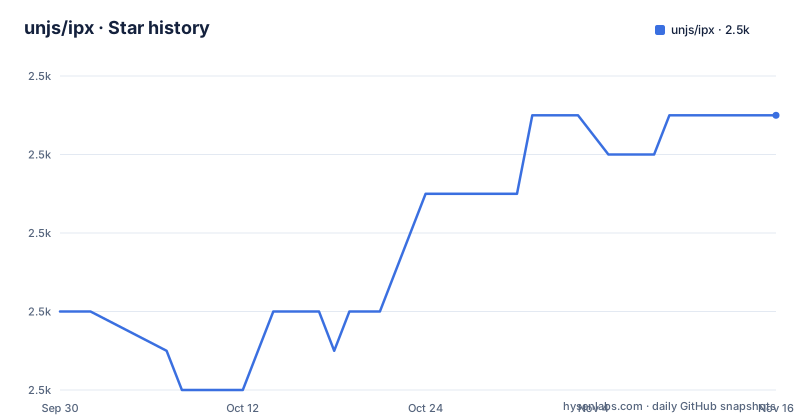
Star history
- unjs/ipx2,463 ★ · +5
| Repository | 2026-09-30 | 2026-11-16 |
|---|---|---|
| unjs/ipx | 2.5k | 2.5k |
5 Stars in the last 47 days, measured from the daily GitHub snapshot. Compare with other projects
Editorial analysis
The release script publishes a prerelease to latest
One line in the manifest covers the whole release process: pnpm test and pnpm build, then changelogen with the prerelease and push flags, and finally npm publish with the latest tag. The last part is the one to notice. Publishing a version whose name carries a beta suffix under the latest dist-tag means that tag, which is what an unqualified install resolves to, points at a prerelease. The tags themselves confirm that a prerelease is what has been shipping on this line: v4.0.0-alpha.1, v4.0.0-alpha.2 and v4.0.0-beta.1, with the beta dated 2026-07-28 and the manifest version matching it. So the difference between v3 and v4 for a new install is decided by that dist-tag, not by the semver range you write.
Three error codes, and one of them fires late
Modifier arguments are validated before anything reaches sharp, so a malformed request is a 400 rather than a failure. There are three distinct codes. An argument that is present but invalid gives IPX_INVALID_MODIFIER_ARG, a missing required argument gives IPX_MISSING_MODIFIER_ARG, and a third code exists because some arguments cannot be checked until libvips actually runs, which happens after the whole pipeline has been assembled. Those surface as IPX_INVALID_MODIFIER. The distinction matters when you are writing a client: the first two mean the URL is wrong and can be fixed at the call site, while the third means the URL parsed cleanly and the failure belongs to the image library. Trailing arguments may be omitted so that the sharp default applies, except where the table notes otherwise.
The _ character separates arguments, so multi-word values use a hyphen
The URL grammar is a modifiers list followed by the image id, with modifiers separated by a comma and their arguments by a _. A bare _ stands in when a modifier needs no argument, which is why the original image is requested as a path beginning with a _ and no modifier. That single character is a hard constraint on argument values, because it cannot appear inside one. The position modifier is where this shows: it accepts values like right top or gravity names or the strategy names entropy and attention, and those are written with a hyphen instead, as in pos_right-top. The numeric constants are also accepted, and the same rule applies to any future modifier with a value containing a space.
A hash cannot go in a colour argument
The background and tint modifiers accept any colour sharp understands, and the forms are spelled out. Hex is accepted as f00, ff0000 or ff000080, with an optional leading hash, and a CSS colour name such as red also works. The hash is the interesting part: it cannot be used inside a URL path, so it may be dropped. That is a real constraint on anyone generating these URLs by hand, since a background colour written the way it would be written in CSS has to lose its first character. Boolean arguments take true and false, and also the shorter 1 and 0, which matters because a bare _ is the placeholder for an empty argument and a digit is unambiguous where a word would collide with the separator.
The modifier table is generated into the readme
Two chunks of the readme sit inside generator markers. The badge row is wrapped in an automd badges block with a colour parameter, and the entire operations table is wrapped in a block labelled for IPX operations. The table itself is a two column HTML layout, one cell per modifier with its long name, its short name, an example URL and a description, and the descriptions link straight to the sharp documentation for resize, extend and so on. There is a manifest script that produces it, named for generating operations and running a TypeScript file through node, and the lint fix script runs automd first before eslint and prettier. The practical consequence is that editing a modifier description is not how that table changes, and that a documentation diff in the operations section may be a build output rather than an edit.
The start script points at a bin directory the tree does not have
The manifest defines a bin entry mapping the command to dist/cli.mjs, and there is a script that runs the TypeScript source of the command line directly through node for development. There is also a start script, and its body is node bin/ipx.js. There is no bin directory among the top level entries, and the file it names is a .js path in a package whose type is module and whose build output is .mjs. So the start script is a leftover from an earlier layout, and it will fail on a fresh checkout. The documented way to run the server does not use it:
npx ipx serve --dir ./The same command works through bunx if that is your runtime, and both forms start a server for the images in the current directory.
Two example URL forms for the same image
The quick start tells you to open the printed URL and add modifiers to an image path, giving http://localhost:3000/w_200/buffalo.png. The table of URLs then uses a different id shape, with every row reading /_/static/buffalo.png or /w_200/static/buffalo.png and so on. The extra static segment is not explained in the text that follows the table, which only says the URL style is configurable. The table is also where the composed example lives: a request with resize set to 200 by 200, fit set to contain and format set to webp, described as resizing to fit inside a 200 by 200 canvas with a background and converting the result. The fit modifier defaults to cover, so the canvas behaviour only appears when contain is asked for explicitly.
Two runtime dependencies and one optional peer
The published package is small. Runtime dependencies are sharp, which does the image work, and srvx, which serves it. One peer dependency is declared, unstorage, and it is marked optional, so a storage driver can be plugged in without forcing it on anyone. The rest of the manifest is build tooling: a bundler, a minifier, a changelog generator, eslint with the unjs config, prettier, typescript declared at a version 6 range, vitest with coverage, and svgo at a 4 range. Two of those dev dependencies exist for one feature each: an accept header negotiator, which is how the automatic format modifier picks between avif, webp and jpeg from what the browser asked for, and image-meta for reading dimensions. The examples directory holds three integration samples, for Express, for h3 and for the built-in server.
Editorial conclusion
Use ipx when you want image resizing and format conversion to be a URL concern rather than a build step, and when serving through Node with sharp already available is acceptable to you. Three things to know before you depend on it. The default branch is the v4 development line and its newest tag is a beta, so pin a version deliberately. The release script publishes with the latest dist-tag, which means a prerelease can become what new installs resolve to. And a large part of the modifier documentation is generated from source, so treat the table as a build artifact that can change without a documentation edit.
Frequently asked questions
How do I start the ipx server?
Run npx ipx serve --dir ./, or bunx ipx serve --dir ./ with bun. Then open the printed URL and add modifiers to any image path, for example http://localhost:3000/w_200/buffalo.png.
How does the ipx URL format work?
A request is /<modifiers>/<id>. Multiple modifiers are separated by a comma and their arguments by a _, with a bare _ used when a modifier needs no argument. The URL style itself is configurable.
What happens when an IPX modifier argument is invalid?
Input is validated before it reaches sharp, so a bad argument is rejected with 400 IPX_INVALID_MODIFIER_ARG, or 400 IPX_MISSING_MODIFIER_ARG for a missing required argument. Some arguments can only be validated once libvips runs, after the pipeline is set up, and those surface as 400 IPX_INVALID_MODIFIER.
How do I write a colour modifier in an IPX URL?
The background and tint modifiers accept any colour sharp understands: a hex value such as f00, ff0000 or ff000080, with an optional leading # that cannot be used inside a URL path and may be dropped, or a CSS colour name such as red. Booleans accept true and false as well as 1 and 0.
What does the f_auto modifier do in IPX?
It returns the best format for the client, avif, webp or jpeg, negotiated from the browser's accept header, with everything else kept as in the source image.
Has IPX v4 been released as stable?
Not on this branch. The tags are v4.0.0-alpha.1, v4.0.0-alpha.2 and v4.0.0-beta.1, the last dated 2026-07-28, and the README states that the default branch is the active development branch for v4 while the v3 documentation lives on the v3 branch.
Official sources
Add this badge to your README
If you maintain this project, the badge below links readers to this analysis and shows its maintenance status from the daily GitHub snapshot. Paste the markdown into your README; add ?metric=license or ?metric=stars to the image URL for a different field.

[](https://hysenlabs.com/projects/unjs-ipx)Star history chart for your README
[](https://hysenlabs.com/projects/unjs-ipx)Was this useful?