Uno Platform runs one XAML codebase through Skia shells or native controls
Open-source platform for building cross-platform native Mobile, Web, Desktop, and Embedded apps from a single C#/XAML codebase. Work from any IDE/CLI with Hot Reload, Visual Designer, MCPs, and Skills built for modern .NET workflows. 200M+ NuGet downloads. Desktop (Windows, macOS & Linux): Uno Platform uses Skia for rendering across all desktop platforms, ensuring high-performance, hardware-accelerated graphics and a
At a glance
- What is it?
- Uno Platform puts the WinUI 3 API surface on top of mobile, web, desktop, and embedded .NET apps. Rendering is either a Skia canvas or a translation to native controls, desktop heads sit on Win32, AppKit, X11, or the framebuffer, and the README and the repository description give different NuGet download totals.
- Who is it for?
- Adopt Uno Platform when a single C# and XAML codebase has to reach several of Windows, macOS, Linux, iOS, Android, and WebAssembly, and when reusing WinUI 3 knowledge is worth more than a native look on each platform. Decide the rendering mode early, because a canvas and a translated native control do not behave the same way and the difference is invisible while you write XAML.
- Can I use it commercially?
- Yes. Apache-2.0 is a permissive licence: you can use, modify and sell software built on it, as long as you keep its copyright and licence notices.
- Is it still maintained?
- Yes. The repository received new commits within the last day.
- What is it written in?
- Mainly C#, according to GitHub's language statistics.
Answers come from the project's GitHub data, last synced on November 13, 2026, and from our analysis. They are not legal advice.
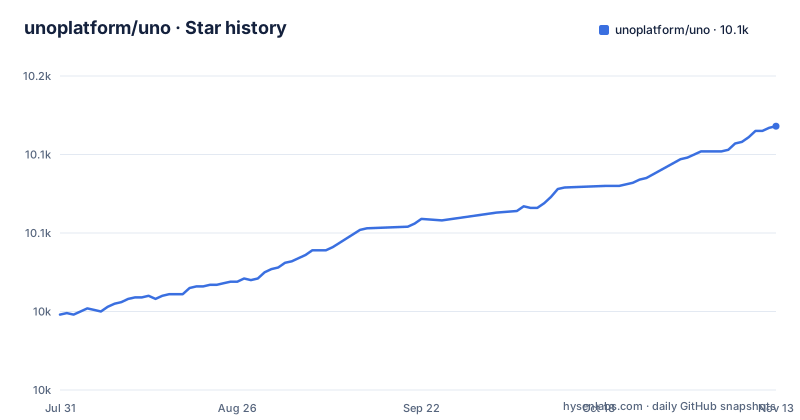
Star history
- unoplatform/uno10,118 ★ · +120
| Repository | 2026-07-31 | 2026-11-13 |
|---|---|---|
| unoplatform/uno | 10k | 10.1k |
120 Stars in the last 105 days, measured from the daily GitHub snapshot. Compare with other projects
Editorial analysis
Skia draws the desktop UI, but each desktop OS gets a different shell
Desktop rendering runs through Skia, and the shell underneath it is chosen per operating system. On Windows, Skia runs within a Win32 shell. On macOS it runs within an AppKit shell, with Metal when available. On Linux it runs within an X11 shell, or directly to the Framebuffer for embedded scenarios. The supported platform list repeats the same boundaries: Windows 10 and Windows 11, Windows 7 via Skia Desktop, macOS via Skia Desktop, and Linux via Skia Desktop with X11 and FrameBuffer.
The consequence is that there is no single desktop surface to reason about. A GPU assumption that holds on macOS through Metal may not hold on Windows, and on Linux you may not have a display server at all, since the framebuffer path writes to memory without X11 in front of it. For an embedded device that rules out anything which depends on a compositor, and it also means the same XAML can land on a surface with different capabilities on each target.
One knock-on effect is visual fidelity. Because the desktop UI is drawn on a canvas rather than composed from platform controls, desktop apps inherit the Skia rendering behaviour across all three operating systems, and any expectation of native desktop chrome has to come from theming rather than from the host.
There are two rendering modes, and they are not interchangeable
The rendering step offers two paths. Unified Skia Rendering uses a Skia based engine to draw the UI on a canvas, which the project describes as giving consistent performance, smooth animations, and pixel perfect visuals across all targets. Native Rendering translates the XAML UI into native platform controls, with UIKit on iOS named as the example, to get a platform native look and feel when that is what you want.
Both are legitimate, and choosing between them is a decision. The two paths produce different objects from the same XAML, so layout behaviour that depends on canvas measurement does not automatically carry over to a translated native control.
The practical consequence for review and for bug reports is that a defect can be real on one target and absent on another with identical markup, because the renderer realizes the markup differently. Teams shipping several platforms should record which renderer each target uses, since a stack trace or a layout bug reported without that context cannot be reproduced elsewhere. The deploy step then produces a native application package for each target from that same single codebase.
The README says 130 million downloads and the repository blurb says 200 million
The adoption figures in this project do not agree with each other. The promotional block inside the README states that with roughly 10,000 GitHub stars and 130+ million NuGet downloads it is a proven foundation for professional grade development, and the same block names over 300 contributors and enterprise clients including Toyota, Microsoft, and Kahua. The repository description, which is the short blurb shown on the code hosting page, claims 200M+ NuGet downloads for the same project.
The two figures differ, though '130+ million' is a lower bound and the texts may date from different times, and neither number is broken down by package, by platform head, or by time window.
The consequence for anyone citing the project is narrow but real: you cannot responsibly repeat a download total from this project's own pages, and if a number appears in a procurement document or a comparison article it has to be attributed to a specific source with the discrepancy noted. Contributors and named enterprise clients are the more checkable claims, since one is a count the repository publishes and the others are named parties.
Studio is a separate suite from the Apache 2.0 framework you install
The README divides its offering into two parts, and the distinction matters for what ends up in your build. Uno Platform is the free and open source Apache 2.0 foundation: the UI framework, the platform heads, and a set of developer experience enhancements, distributed as NuGet packages including `uno.sdk` and `uno.winui`. Uno Platform Studio is described separately as an AI native productivity suite spanning prompt to app generation in the browser, an AI development agent, design handoff, and a runtime visual designer for .NET that integrates with Visual Studio, VS Code, and JetBrains Rider.
Inside that second group sit the pieces a reader might assume are part of the open source framework. Hot Reload modifies XAML and C# on a running app without losing the app state. Hot Design is described as a patented runtime visual designer that turns a live app into a design surface with a single click. Design to Code exports Figma designs to XAML or C# markup. The Uno MCP gives agents structured access to the knowledge base and an App MCP lets agents interact with a live running app, and the Studio Agent ships more than 70 Uno specific skills through the `uno-platform-studio` plugin for Claude Code, GitHub Copilot, and OpenAI Codex.
The boundary is drawn at the suite level rather than feature by feature, so before promising a team that a given capability is free, confirm which side of the line it sits on.
Hot Reload is only useful when your state survives, and only some changes survive
The stated benefit of Hot Reload is instant modification of XAML and C# on a running app for rapid iteration without losing the app state. That qualifier is the mechanism and the limit at the same time.
Hot Design extends the same loop by turning the running app into a design surface with a single click, which means the design surface is the live instance rather than a preview, with the same consequence: what you see is the app as it is now, including whatever state it holds. Design to Code works in the opposite direction, exporting Figma designs to responsive XAML or C# markup.
The Studio Agent is where the cross target cost shows up. It is described as seeing your running app, knowing your design system, validating changes across every target, and grounding its answers in official documentation, all inside a human in the loop workflow. Validating across every target means a change can be accepted on one head and still need work on another, so a fast loop on a single target is not the same as a finished feature across six platforms.
Uno.Check is the only documented setup step, and the README prints no commands
The quick start has three parts. First, check your environment with the Uno.Check command line tool, which is described as automatically checking, installing, and configuring all required workloads and dependencies. Second, create your app with the Template Wizard in your IDE or on the command line, which quickly creates and configures new Uno Platform projects with the appropriate settings for your target platforms. Third, build and run, with the build step producing a native application package for each target.
The quick start section of the README gives no commands and defers the details to the official documentation.
Windows 7 and a framebuffer target are in the support list, and each head is a separate test surface
The supported platforms are listed as Windows 10 and Windows 11, Windows 7 via Skia Desktop, macOS via Skia Desktop, iOS and Android via .NET, WebAssembly through the .NET Runtime WebAssembly SDK, and Linux via Skia Desktop with X11 and FrameBuffer. Six entries, most of which name a different underlying technology.
That spread is the reason a single codebase claim needs care in practice. Windows 7 is reached through the Skia desktop head rather than through a modern Windows path, iOS and Android go through .NET, and the web target depends on a separate SDK from the .NET runtime rather than on the desktop stack. WebAssembly is the entry that diverges most, since it is neither a desktop shell nor a mobile platform, and the FrameBuffer and X11 alternatives on Linux cover two very different deployment shapes for the same head.
The consequence for planning is that your test matrix is set by the platform list, not by your code. A feature that renders text, measures layout, or handles input has to be checked on each head you actually ship to, because the renderer choice and the shell underneath it both differ. Shipping to an embedded framebuffer target narrows the environment further still, since there is no window manager to coordinate with.
version.json, Directory.Build.props, and two Azure Pipelines files drive the build
The repository root shows how the project is assembled. `version.json` and `Directory.Build.props` sit beside `global.json` and `NuGet.Config`, which is the usual set for controlling a version stamp, shared MSBuild properties, the pinned SDK, and package sources in one place. Continuous integration is defined by `.vsts-ci.yml` and a second documentation pipeline in `.vsts-ci-docs.yml`. `src/` holds the product code, `build/` the build logic, and `doc/` the documentation.
There is also a specification oriented layer: `specs/`, a `.specify/` directory, and `REVIEW.md` at the root, alongside `AGENTS.md`, `CLAUDE.md`, and a `.claude/` directory, which together indicate that agent instructions are versioned in the repository rather than kept elsewhere. Quality and automation are wired through `.codacy.yml` for analysis, `.mergify.yml` for merge automation, and `.globalconfig` for analyzer severity, with a `.devcontainer/` directory and `.gitpod.yml` for a prepared development environment.
Release numbering shows what that produces. The recent versions are 6.6.184, 6.6.176, and 6.6.166, and the last two were published on the same day, 2026-07-30, minutes apart. A build that pins a version is choosing among near identical numbers, and since the last push on the repository is dated later than the newest listed release, the default branch runs ahead of what the release list shows.
Editorial conclusion
Adopt Uno Platform when a single C# and XAML codebase has to reach several of Windows, macOS, Linux, iOS, Android, and WebAssembly, and when reusing WinUI 3 knowledge is worth more than a native look on each platform. Decide the rendering mode early, because a canvas and a translated native control do not behave the same way and the difference is invisible while you write XAML. Confirm which parts you are actually taking, since the Apache 2.0 framework and the AI tooling in Uno Platform Studio are described as separate things, and ignore the download counts until you know which figure applies to which page.
Frequently asked questions
What is platform UNO?
Uno Platform is an open source developer platform for building single codebase .NET applications that run natively on Web, Desktop, Mobile, and Embedded systems. It uses the WinUI 3 API surface so existing C# and XAML skills transfer, and it is released under the Apache 2.0 license as NuGet packages including uno.sdk and uno.winui.
Is the Uno platform free?
The framework is described as free and open source under Apache 2.0, covering the UI framework, the platform heads, and developer experience enhancements. Uno Platform Studio is presented separately as an AI native productivity suite that adds prompt to app generation, a development agent, and runtime visual design.
What is .NET cross-platform UI?
In Uno Platform it means one project written in C# and XAML, or C# Markup, in Visual Studio, Rider, or VS Code on Windows, macOS, or Linux. The UI is then rendered either by a Skia based engine drawing on a canvas, or by translating the XAML into native platform controls such as UIKit on iOS, before a native package is produced for each target.
Is there a cross-platform UNO game?
This project is a developer platform rather than a game. Nothing in its feature list, its supported platform entries, or its toolkit entries describes a game; the supported targets are Windows 10 and 11, Windows 7, macOS, iOS, Android, WebAssembly, and Linux.
Official sources
Add this badge to your README
If you maintain this project, the badge below links readers to this analysis and shows its maintenance status from the daily GitHub snapshot. Paste the markdown into your README; add ?metric=license or ?metric=stars to the image URL for a different field.

[](https://hysenlabs.com/projects/unoplatform-uno)Star history chart for your README
[](https://hysenlabs.com/projects/unoplatform-uno)Was this useful?