graphql-cli: one config file, and commands that live elsewhere
📟 Command line tool for common GraphQL development workflows
At a glance
- What is it?
- graphql-cli gives a GraphQL project one `graphql` binary and one GraphQL Config file to drive it, but most of the commands in its plugin list are packages maintained in other repositories, so the binary on its own leaves the setup unfinished.
- Who is it for?
- Adopt graphql-cli when one repository holds a GraphQL schema, client documents and several code generation targets, and you want every tool reading the same .graphqlrc.yml instead of a separate flag list per tool. Do not adopt it if you need one working command today, because installing the binary and then each @graphql-cli package, plus rewriting 3.x settings into the extensions field, are three separate steps.
- Can I use it commercially?
- Yes. MIT is a permissive licence: you can use, modify and sell software built on it, as long as you keep its copyright and licence notices.
- Is it still maintained?
- Yes. The repository last received commits 1 day ago.
- What is it written in?
- Mainly TypeScript, according to GitHub's language statistics.
Answers come from the project's GitHub data, last synced on October 23, 2026, and from our analysis. They are not legal advice.
Star history
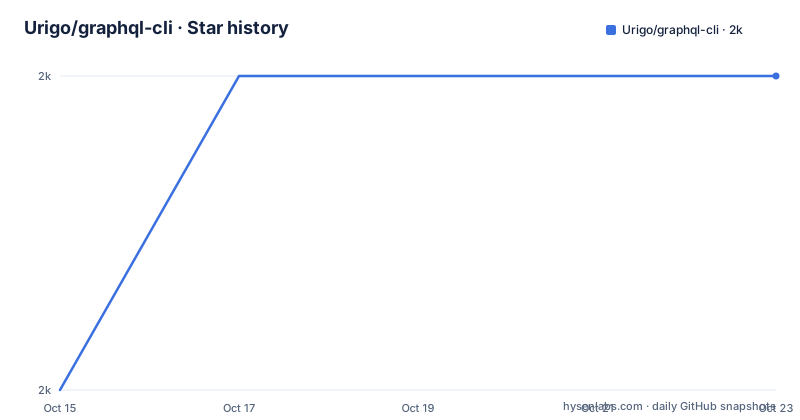
- Urigo/graphql-cli2,019 ★ · +1
| Repository | 2026-10-15 | 2026-10-23 |
|---|---|---|
| Urigo/graphql-cli | 2k | 2k |
1 Stars in the last 8 days, measured from the daily GitHub snapshot. Compare with other projects
Editorial analysis
One config file decides what every command can see
Every `graphql` subcommand starts in the same place: a GraphQL Config file in the workspace root, with the schema and the operations mapped to file paths before any command logic runs. The smallest version of that file holds two keys, and two keys are enough for the CLI and for editors and IDEs that read the same graphql-config format, so nobody has to tell two tools separately where the type definitions live.
Keeping those two sides apart is what makes the rest of the tooling usable. Commands that compare one schema against another ignore the documents key entirely, while code generation needs both halves of the map. A TypeScript monorepo with a server schema under `server/src/schema` and client operations under `client/src/documents` can state that split in two keys and let every plugin resolve the same paths.
There is a second form of the `schema` key, and it is the one that carries the toolchain assumptions this project makes about your repository. Nothing in that file names a package manager, a workspace layout, or a test command, so the config stays a description of where things are rather than a place to orchestrate builds.
Global install gives the binary, npx init gives the project
The documented install is a global add, and what lands on your path is the `graphql` binary rather than a command named after the package:
yarn global add graphql-cliThe equivalent npm global install does the same thing, so a CI image can use whichever package manager it already carries.
Creating a workspace is a separate step, and it does not need that global install, because the init command can be pulled straight from the registry:
npx graphql-cli initThat command asks a tree of questions and then writes a project whose GraphQL Config file points at the files and plugins chosen in the answers. One branch of the tree takes an OpenAPI or Swagger endpoint URL, which lets the schema come from a running API instead of from SDL you wrote by hand. Editing `.graphqlrc.yml` yourself works just as well when the layout is already known, and `init` will build on a config file that is already sitting there.
One detail about that entry point: `init` is itself one of the listed plugins, so a project bootstrapped this way depends from its first minute on the same package resolution that every later command needs.
A TypeScript schema glob carries its own require hook
When the schema is written in TypeScript instead of in `.graphql` files, the `schema` key stops being a plain string. In the full-stack template it becomes a map from a glob to the loader that makes those files executable:
schema:
  ./server/src/schema/**/*.ts:
    require: ts-node/register
documents: ./client/src/graphql/**/*.ts
extensions:
  codegen:
    generates:
      ./server/src/generated-types.d.ts:
        plugins:
          - typescript
          - typescript-resolvers
      config:
        withHooks: true
That `require: ts-node/register` line is the part a skim passes over. The hook is registered only under the schema glob, which is why the documents key below it can stay a bare glob over TypeScript files, and why a smaller project pointing at `server/src/schema/**/*.graphql` needs no loader at all. Move the schema into another folder and the hook moves with it or nothing loads.
The `extensions` field in the same block is where each installed command keeps its settings. Under `codegen`, a `generates` map names output files, and every output carries its own `plugins` list: `typescript` with `typescript-resolvers` for the server declaration file, `typescript-operations` with `typescript-react-apollo` for the React client, with `withHooks: true` in the shared `config` block.
Commands arrive as separate packages, not one bundled tool
The `graphql` binary is a dispatcher, and the eight commands in the plugin list are separate packages. Third party ones are installed under the `@graphql-cli/[COMMAND-NAME]` pattern, and the `extensions` key in `.graphqlrc.yml` is what switches each one on. Two of them do not even live in this repository: `codegen` comes from GraphQL Code Generator, while `coverage`, `diff`, `similar` and `validate` come from GraphQL Inspector, each pointed at its own directory inside that project.
That split has a cost at install time. The global add gives you the binary, but the list in the README is the union of what eight packages do rather than what one package contains, so a team that installs `graphql-cli` and then types `graphql diff` still has to work out who provides it. Wiring a command in takes two steps: install the package, then nest its key under `extensions`, the same field that already holds the schema loader map from the template.
Neither the plugin tutorial at `docs/CUSTOM_EXTENSION.md` nor the list itself says what the binary prints when a config file names a command whose package was never installed, so that first missing install is something you meet on its own.
The diff command reads its base schema from a git pointer
Schema comparison is the one command whose config carries a pointer to a second version of your schema. `diff` accepts a URL, a git reference or a local file, and that pointer can follow `graphql diff` on the command line or live in the config so every run compares against the same base:
# ...
extensions:
  diff:
    baseSchema: git:origin/master:schema.graphql
The `git:` prefix followed by a branch and a path means the base schema is read out of a branch of your own repository rather than from disk, which is how a pre-merge step compares a feature branch against `origin/master` without a second checkout on the machine. Nothing in the documentation covers the failure paths: what happens when the branch has moved the file, when the remote has not been fetched, or when the pointer names a path that no longer exists. `validate` and `coverage` need no pointer at all, since both take their inputs from the schema and documents keys.
The init link names a branch other than the default one
Read the plugin list closely and the URLs disagree with each other. The `init` entry points at `focs/packages/commands/init`, while `generate` points at `master/packages/commands/generate`, `serve` at `master/packages/commands/serve`, and the full-stack template at `templates/fullstack/.graphqlrc.yml` on that same `master` branch. Default branch here is `master`, and its top level carries `packages/`, `templates/` and `templates.json`, so the command directory sits exactly where the majority of those links say. One entry naming a different branch than the repository publishes from is a leftover that says nothing about the code underneath, and no part of the README gives a reason for it.
Two other referenced paths set the adoption cost. The migration guide lives at `docs/MIGRATION.md` and the serve documentation at `website/docs/command-serve.md`, so the guides ship inside this repository, with site docs under the `website` workspace rather than next to the migration guide. The root `test` script is `lerna run test`, spread across four workspace globs, one of which is `integration`.
A 3.x to 4.x jump moves settings into a new field
Version 4 is not a compatible continuation of the 3.x line, and the README says so without softening it: many aspects of the syntax and the structure changed, and the details sit in `docs/MIGRATION.md`. What can be reconstructed from a 4.x config is where the old loose pieces went. Project shape moved into one file, per command settings moved under `extensions`, and the commands themselves became installable packages named through the `@graphql-cli/[COMMAND-NAME]` pattern. Flags you used to pass on every invocation now have to be written down once.
The upgrade is therefore an editing pass over every workspace rather than a version bump. Two places in the repository show what you get at the end of it: the top level carries `templates.json` and a `templates/` directory, matching the project templates that `init` offers, and the `extensions` block in the full-stack template is the finished target shape. Nothing documents a rollback, so keep the old config file until the new one runs a real command.
Commits landed in 2026, numbered versions stopped in 2020
Maintenance has to be read from two dates that point in opposite directions. The last push was on 2026-09-03, while the recorded version list stops at 4.1.0 from 2020-10-07, with 4.0.0 from 2020-06-03 and a 4.1.0-beta.1 from 2020-09-04 behind it, so the default branch has been touched for years without a numbered tag following. Commit activity alone will not tell you that the package you install has not moved.
What the root `package.json` does describe is the shape of the build: TypeScript 4.4.4 as the compiler, `graphql` pinned to 15.7.2 through a `resolutions` entry so every workspace builds against one version, `lerna` 3.22.1 driving the workspaces, and prettier 2.4.1 formatting at a `printWidth` of 120. For a licence audit, that same file declares MIT and sets `publishConfig` access to public, while the monorepo root is marked `private` and never ships.
Editorial conclusion
Adopt graphql-cli when one repository holds a GraphQL schema, client documents and several code generation targets, and you want every tool reading the same .graphqlrc.yml instead of a separate flag list per tool. Do not adopt it if you need one working command today, because installing the binary and then each @graphql-cli package, plus rewriting 3.x settings into the extensions field, are three separate steps. Before committing, compare the version your registry serves against the 4.1.0 dated 2020-10-07, and open the plugin links on the master branch, since one of them still names a different branch.
Frequently asked questions
How do I install graphql-cli and create a project?
A global add of the package puts the `graphql` binary on your path, and `npx graphql-cli init` then walks a tree of questions before writing a workspace with a GraphQL Config file that references the files and plugins you chose.
Where does graphql-cli keep its settings?
In `.graphqlrc.yml` at the workspace root, with `schema` and `documents` keys holding file locations and an `extensions` key holding one nested block per installed command.
Does the global install include code generation and schema diffing?
No. Every command is a separate package installed under the `@graphql-cli/[COMMAND-NAME]` pattern, and `codegen`, `coverage`, `diff`, `similar` and `validate` are maintained in the GraphQL Code Generator and GraphQL Inspector projects rather than in this one.
Can graphql-cli read a schema from a running API?
Yes, one branch of the init question tree takes an OpenAPI or Swagger endpoint URL and builds the schema from it. The `serve` command works the other way around, serving a schema you define against an in-memory database.
Can graphql diff compare a branch rather than a file on disk?
Yes. The `diff` plugin takes a URL, a git reference or a local file, and `baseSchema: git:origin/master:schema.graphql` in the config points it at a schema file inside a branch of your own repository.
Official sources
Add this badge to your README
If you maintain this project, the badge below links readers to this analysis and shows its maintenance status from the daily GitHub snapshot. Paste the markdown into your README; add ?metric=license or ?metric=stars to the image URL for a different field.

[](https://hysenlabs.com/projects/urigo-graphql-cli)Star history chart for your README
[](https://hysenlabs.com/projects/urigo-graphql-cli)Was this useful?