mcp-nixos: seventeen tools cut down to two, and four of eleven sources are scraped
MCP-NixOS - Model Context Protocol Server for NixOS resources
At a glance
- What is it?
- mcp-nixos is a FastMCP server that answers questions about NixOS packages, options and functions so a model stops inventing package names. It has no Nix dependency for most of its work, but two of its eight actions require Nix anyway, four of its eleven sources are HTML scraped at query time, and the HTTP transport has five environment variables and no authentication.
- Who is it for?
- mcp-nixos earns its place for anyone whose agent hallucinates Nix attribute names, and the decision to expose two tools instead of seventeen is the right one for a context window. Three things to know before wiring it in.
- Can I use it commercially?
- Yes. MIT is a permissive licence: you can use, modify and sell software built on it, as long as you keep its copyright and licence notices.
- Is it still maintained?
- Yes. The repository last received commits 7 days ago.
- What is it written in?
- Mainly Python, according to GitHub's language statistics.
Answers come from the project's GitHub data, last synced on November 15, 2026, and from our analysis. They are not legal advice.
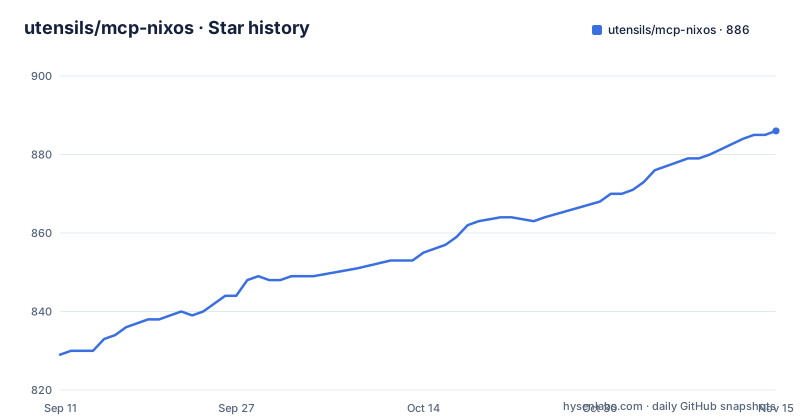
Star history
- utensils/mcp-nixos886 ★ · +57
| Repository | 2026-09-11 | 2026-11-15 |
|---|---|---|
| utensils/mcp-nixos | 829 | 886 |
57 Stars in the last 65 days, measured from the daily GitHub snapshot. Compare with other projects
Editorial analysis
Seventeen tools became two, and the budget is quoted as 1,030 tokens
The consolidation is the design decision everything else follows from. The page states that seventeen tools were merged into two because a model's context window is not infinite, and quotes the resulting cost as about 1,030 tokens for both.
One of the two is a single entry point with a fixed signature:
nix(action, query, source, type, channel, limit, version, system)Eight parameters for eight actions across eleven sources. The page explains only one of those relationships, that `version` and `system` are used by `action="cache"` and nothing else. Which parameters matter for `search`, `info`, `stats` or `browse` has to be inferred from the examples, where `type="packages"` and `type="package"` appear for search and info, and where browsing a prefix needs no type at all.
The eight actions are `search`, `info`, `stats`, `browse`, `channels`, `flake-inputs`, `cache` and `store`. The `browse` action still carries a legacy alias, `options`, which is the kind of leftover that suggests the tool surface changed shape at least once and old client configs were preserved.
The second tool is separate and much narrower: `nix_versions(package, version, limit)`, which returns historical versions with the nixpkgs commit hash for each, platform availability, and the attribute path.
Four of the eleven sources are documentation pages parsed at query time
The dependency list explains the shape of the data. Three runtime packages, `fastmcp`, `requests` and `beautifulsoup4`. There is no Nixpkgs JSON parsing library and no schema, which means the sources that are not already API-shaped are fetched as HTML and parsed.
Four of the eleven sources are documentation. The NixOS Wiki and the official nix.dev guides are both prose sites. Noogle supplies 2,000-odd Nix functions with type signatures, which is an HTML site as well. And NVF, 2,400-odd Neovim options, is read from a page its own author labels published unstable documentation, at a personal domain rather than an official one.
One more source is third-party in a different sense. Nixvim options are described as coming from a search project maintained outside the NixOS organisation, not from the module system that defines them.
The numeric claims sit in the same frame: 130,000-odd packages, 23,000-odd NixOS options, 5,000-odd Home Manager options, 1,000-odd nix-darwin settings, 5,000-odd Nixvim options, 600-odd FlakeHub flakes, 2,000-odd Noogle functions. Those are counts of what a source offers, not guarantees about what a query will find, and no query latency or failure rate is given for the scraped half.
Two of the eight actions need the thing the page says you do not need
The headline at the top of the project page is emphatic: no Nix or NixOS required, it works on any system because you are just querying APIs. Nine of the eleven sources support that claim, since they are remote services.
Two actions do not. `flake-inputs` explores local flake inputs from the Nix store, and `store` reads files or lists directories at an explicit `/nix/store` path. Both are annotated as requiring Nix.
That is not a contradiction so much as an unstated boundary, but it matters for anyone automating a tool list. A configuration that assumes one server call shape will get a different answer for those two actions, and the failure mode is presumably an error rather than an empty result.
There is a second boundary in the same area, in the other direction. The page says the project works on Windows, macOS and Linux, and the packaging carries a dedicated `win` extra holding `pywin32`, annotated as required for Windows-specific file operations and tests. So the claim of universal support is true of the query path and qualified on the platform-specific one.
Python support is declared as 3.11 and above, with classifiers for 3.11, 3.12 and 3.13, and the 3.14 classifier present but commented out.
The HTTP transport has five variables and no authentication
The server runs over stdio by default, which is what every client configuration in the page uses. It can also run over HTTP, and the whole configuration is environment variables:
MCP_NIXOS_TRANSPORT=http MCP_NIXOS_HOST=127.0.0.1 MCP_NIXOS_PORT=8000 mcp-nixosThe full set is the transport itself, the host, the port, a path that overrides the default endpoint, and a stateless flag:
MCP_NIXOS_TRANSPORT=http MCP_NIXOS_PATH=/api/mcp mcp-nixos
MCP_NIXOS_TRANSPORT=http MCP_NIXOS_STATELESS_HTTP=1 mcp-nixos
The endpoint defaults to `/mcp`, and the stateless mode disables per-client session state, which is the switch to reach for behind more than one worker.
What is absent is as informative as what is present. There is no token variable, no header and no authentication mode in the list, and the example binds to `127.0.0.1`. Anyone who points the same server at a routable address is exposing an unauthenticated query tool for NixOS metadata over the network, and the page does not warn about it.
Three install paths, and a claim of any operating system
Distribution is the easy part, with three one-liners and a package index for each ecosystem. The shortest is the Python one:
{
  "mcpServers": {
    "nixos": {
      "command": "uvx",
      "args": ["mcp-nixos"]
    }
  }
}
The Nix route runs the flake from GitHub, `nix run github:utensils/mcp-nixos --`, and the Docker route pulls a published image, `docker run --rm -i ghcr.io/utensils/mcp-nixos`. There is also a PyPI project page and a FlakeHub flake.
The repository ships both a `flake.nix` and a `flake.lock`, a `nix/` directory, an `.envrc` for direnv, and a `.mcp.json` that registers the server for its own development. So a project whose argument is that you do not need Nix is itself a flake with a lock file, and the Nix install path is one of the three documented routes rather than an afterthought.
The release cadence is fast. v3.0.1 on 2026-08-12, v3.0.2 on 2026-09-04 and v3.1.0 on 2026-09-05, so two of the three most recent releases arrived within about a day of each other, with a patch bump and a minor bump back to back.
The Pi integration adds a lifecycle key no other client uses
One client is handled separately, and the reason is stated: the Pi coding agent does not speak MCP natively. Two routes are offered.
The recommended one installs an adapter:
pi install npm:pi-mcp-adapterand then adds the usual server block to `~/.pi/agent/mcp.json`, with one extra key that no other configuration in the page uses:
{
  "mcpServers": {
    "nixos": {
      "command": "uvx",
      "args": ["mcp-nixos"],
      "lifecycle": "lazy"
    }
  }
}
A lifecycle of lazy means the process starts on first use rather than at launch, which matters for a package-manager invocation, and it is the one place where a config key is a project-specific extension rather than MCP itself.
The second route is a project-local extension. The repository ships `.pi/extensions/mcp-nixos.ts`, which Pi auto-loads when you run `pi` inside a clone, with an optional `npm install` in that directory for editor type resolution and nothing required at runtime. So a Python package that insists you need no Nix also carries a TypeScript extension for a client that cannot speak its protocol.
The documentation on the page stops twice, both times mid-example
Two boundaries are worth naming rather than papering over. The tool examples end partway through a call, at a search for the query `vim`, with the string unterminated and the closing parenthesis missing.
The installation section ends mid-word, at a sentence beginning with a claim that you do not need something, and stops there. That is the section that would have covered the manual install, any environment configuration, and whatever the page intends to say about running it as a service.
What survives above those cuts is still specific enough to be useful. The tool contract is given as a signature rather than prose, the action and source tables are complete, the transport variables are listed with a working example each, and the version tool's output fields are named: license, homepage and programs where available, platform availability per version, the nixpkgs commit hash for reproducible builds, and the attribute path for a Nix expression.
The remaining detail is the NVF path normalisation. Results come back as canonical `vim.*` option paths, and a query may use either the `programs.nvf.vim.*` shorthand or the `programs.nvf.settings.vim.*` module path, both normalised automatically. That is the kind of thing an agent gets wrong on its own, and it is the sort of correction that belongs in a schema rather than in prose.
Editorial conclusion
mcp-nixos earns its place for anyone whose agent hallucinates Nix attribute names, and the decision to expose two tools instead of seventeen is the right one for a context window. Three things to know before wiring it in. The token saving is not free, because a single tool carrying eleven sources and eight actions means the model has to get a source and action pair right, and the page documents the parameters only for the cache action. Four sources are documentation scraped with requests and BeautifulSoup, and one of them is a page its own author labels unstable. And if you run it over HTTP, the page lists five environment variables and no authentication variable, so bind it to loopback as the example does. Anyone expecting structured Nixpkgs data or offline operation should read the source table first.
Frequently asked questions
What is mcp-nixos and what does it let an AI do?
mcp-nixos is a Model Context Protocol server that answers questions about NixOS packages, NixOS options, Home Manager, nix-darwin, Nixvim, NVF, FlakeHub flakes, Noogle functions, the NixOS Wiki, nix.dev, historical package versions and binary cache status, so a model stops inventing package names.
How many tools does mcp-nixos expose?
Two. The page states that seventeen tools were consolidated into two, with a quoted cost of about 1,030 tokens. One is a unified query tool taking action, query, source, type, channel, limit, version and system across eleven sources, and the other returns package version history.
Do I need Nix installed to run mcp-nixos?
Not for most of it, since nine of the eleven sources are remote services. Two actions do require Nix: flake-inputs, which explores local flake inputs from the Nix store, and store, which reads files or lists directories at an explicit /nix/store path.
How do I install and configure mcp-nixos?
The three documented routes are uvx mcp-nixos, nix run github:utensils/mcp-nixos, and docker run --rm -i ghcr.io/utensils/mcp-nixos, with the server also on PyPI and FlakeHub. It runs over stdio by default, and HTTP mode is configured with MCP_NIXOS_TRANSPORT, MCP_NIXOS_HOST, MCP_NIXOS_PORT, MCP_NIXOS_PATH and MCP_NIXOS_STATELESS_HTTP.
Which data sources does mcp-nixos scrape rather than query through an API?
The NixOS Wiki, the nix.dev guides, the Noogle function index and the NVF options page, which its own author describes as published unstable documentation. Nixvim options come from a separate search project. The runtime dependencies are fastmcp, requests and beautifulsoup4, with no Nixpkgs parsing library.
Official sources
Add this badge to your README
If you maintain this project, the badge below links readers to this analysis and shows its maintenance status from the daily GitHub snapshot. Paste the markdown into your README; add ?metric=license or ?metric=stars to the image URL for a different field.

[](https://hysenlabs.com/projects/utensils-mcp-nixos)Star history chart for your README
[](https://hysenlabs.com/projects/utensils-mcp-nixos)Was this useful?