Proton builds inside a container, and the submodules decide whether it works
GitHub describes it as Compatibility tool for Steam Play based on Wine and additional components. The repository metadata lists C++ as its primary language. The metadata lists the NOASSERTION license. This article stays within the project description and details documented in the GitHub repository README.
At a glance
- What is it?
- Proton is Valve's Steam compatibility layer for running Windows games on Linux through Wine, and almost all of the build happens inside the Proton SDK container. Building it from source is justified when you need a changed Wine or a named local build, and the clone has to bring the submodules with it.
- Who is it for?
- Proton from source is for people who need a Wine change, a different SDK image, or a local build their Steam client can select by name, and for nobody else, since the README tells ordinary users to run the copies the Steam client provides.
- Can I use it commercially?
- Check first. The repository uses a licence we do not classify automatically, so read its LICENSE file before any commercial use.
- Is it still maintained?
- Yes. The repository last received commits 2 days ago.
- What is it written in?
- Mainly C++, according to GitHub's language statistics.
Answers come from the project's GitHub data, last synced on November 12, 2026, and from our analysis. They are not legal advice.
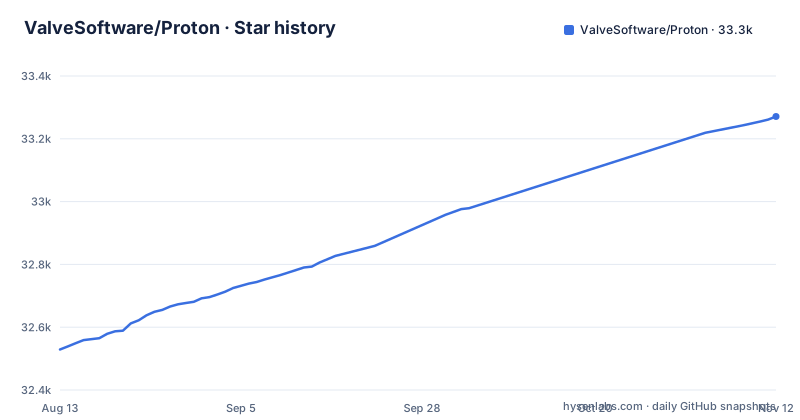
Star history
- ValveSoftware/Proton33,271 ★ · +742
| Repository | 2026-08-13 | 2026-11-12 |
|---|---|---|
| ValveSoftware/Proton | 32.5k | 33.3k |
742 Stars in the last 91 days, measured from the daily GitHub snapshot. Compare with other projects
Editorial analysis
The Steam client already ships Proton, and the source is for changing it
Read the opening paragraph before anything else. Proton is a tool for use with the Steam client that runs Windows-exclusive games on Linux, and it uses Wine to do it. The README states that most users should use the Proton the Steam client provides. The source is published so advanced users can alter Proton, and the example given is wanting a different version of Wine with a particular title.
That reframe matters, because the build is a large piece of machinery. Most of Proton builds inside the Proton SDK container, with very few dependencies on the host side. You need Docker or Podman available, since the build system uses one internally, and the project says you should never need to drive either container engine manually unless you are working on those parts of the build system directly. Rootless Podman is the recommended setup, with distribution documentation linked for setup.
The default branch is `proton_11.0` and the last push was on 2026-10-03. The recent releases are `proton-11.0-2e` on 2026-10-09, `proton-11.0-2` on 2026-08-21 and `proton-10.0-4b` on 2026-07-28.
Clone with --recurse-submodules, or the tree fails much later
The clone has to bring submodules with it.
git clone --recurse-submodules https://github.com/ValveSoftware/Proton.git protonSwitching branches is the second. The README gives two commands for it and the second one is not optional:
git checkout experimental_6.3
git submodule update --init --recursive
The repository root explains why. It holds `wine/`, `dxvk/`, `dxvk-nvapi/`, `vkd3d/`, `vkd3d-proton/`, `ffmpeg/`, `dav1d/`, `gstreamer/`, `gst-plugins-rs/`, `kaldi/`, `icu/`, `openfst/`, `openvr/`, `OpenXR-SDK/`, `FEX/`, `Vulkan-Headers/`, `SPIRV-Headers/`, `glslang/`, `graphene/`, `libsoup/`, `piper/`, `vosk-api/`, `lsteamclient/`, `steam_helper/`, `symstore/`, `vrclient_x64/` and `wineopenxr/`. Wine changes, the substitution the README names, go into the `wine/` directory.
make install derives its directory name from your git branch
Once the checkout is right, a top-level Makefile carries the build. One command builds and installs, and a host missing dependencies fails immediately with a clear error rather than part way through.
make installWhere it lands is decided by variables at the top of the Makefile, and two of them will bite you. `STEAM_DIR` is set to `$(HOME)/.steam/root`, and the build name becomes the directory: `BUILD_DIR` is `build-` followed by your name with spaces replaced by underscores. By default the name comes from `git symbolic-ref --short HEAD` with `-local` appended, and the Makefile has an error telling you to check out a branch or specify `build_name=...` if the name comes out empty. Characters outside `[:alnum:] ._-` are then stripped, so `my/proton` and `myproton` produce the same directory and one overwrites the other.
The name is also what Steam displays. After the build you may need to restart the Steam client to see the new tool, and `make help` covers the remaining targets.
configure.sh takes an SDK image, an engine and a relabel switch
The manual path starts with a build directory created for the purpose and a call to the configuration script:
mkdir ../build && cd ../build
../proton/configure.sh --enable-ccache --build-name=my_build
That script generates a Makefile, checks whether containers are functional, and prompts you if host-side dependencies are missing, which is why the README says to run it from a directory created specifically for the build. Three switches matter more than the rest. `--container-engine=<executable_name>` forces a specific engine when autodetection picks one you do not want. `--proton-sdk-image=registry.gitlab.steamos.cloud/proton/soldier/sdk:<version>` builds against a custom SDK image, and the top-level Makefile performs the same substitution with the sniper variant the moment you pass `protonsdk_version`.
On an SELinux host the build container can fail to reach your files because of filesystem labels, and `--relabel-volumes` to configure tells the container engine to relabel its bind mounts. The README calls that dangerous when used with system directories, and it is a switch you should not reach for by reflex.
The prose says --enable-cache, every command line says --enable-ccache
The configuration section names `--enable-cache` as the flag that turns on ccache, and the Makefile that ships with the repository says something different. It defines `enable_ccache := 1` and appends `--enable-ccache` to the configure command unless you pass `enable_ccache=0`, and every worked example in the documentation uses that longer spelling.
The README's own example commands use `--enable-ccache`, so that is the spelling to copy.
The README says enabling ccache mounts your `$CCACHE_DIR` or `$HOME/.ccache` inside the container.
A failed build buries the real error under thousands of lines
The build system invokes many subprojects in parallel, so when one fails the sub-builds that were already running keep printing. The README is blunt about the consequence: there can be thousands of lines from other sub-builds before the top level exits, which makes the actual reason hard to find.
The documented technique is to log everything and read from the bottom.
make 2>&1 | tee build.log
grep -n '] Error [0-9]' build.log
The sample output shows what you are looking for, a rule that failed and the make target that depended on it, in this case `.kaldi-i386-configure` returning Error 1 and a `deploy` target returning Error 2. Because the sub-build that actually failed is named in the line, this is also how you find out which of the subprojects in the root directory is responsible.
For anything you need to inspect in a debugger, add `UNSTRIPPED_BUILD=1` to the `make` invocation to prevent symbol stripping, and do it in a clean build directory.
mkdir ../debug-proton-build && cd ../debug-proton-build
../proton/configure.sh --enable-ccache --build-name=debug_build
make UNSTRIPPED_BUILD=1 install
The top-level Makefile also has a lowercase `unstripped` variable that appends `_unstripped` to the deploy directory name.
redist, deploy and module produce three different artifacts
The targets are not interchangeable,. `make install` puts Proton into your user's Steam directory. `make redist` creates a redistribute build in `redist/` that can be copied to `~/.steam/root/compatibilitytools.d/`, which is the path a local tool has to live under. `make deploy` creates a deployment build in `deploy/`, and the README states plainly that this is what Valve uses to deploy Proton to Steam users through Steamworks.
`make module=<module> module` builds both the 32-bit and 64-bit versions of one Wine module, for fast iteration, and it is only useful after Proton itself has been built. The Makefile works out the extension from the name you pass: a module containing `.drv` or `.sys` becomes a `.so` on one side and keeps its original extension on the other, anything else becomes a `.dll` paired with a `.so`. There are also `make dxvk` and `make vkd3d-proton` for rebuilding those two pieces on their own.
The top-level goal list is short: `all`, `any`, `clean`, `configure`, `deploy`, `downloads`, `help`, `install`, `module`, `proton`, `protonsdk` and `redist`.
An ARM64 build cannot be dropped into x86 Steam running FEX
Cross-architecture work is explicitly walled off. An ARM64 build needs an ARM64 build machine and `--target-arch=arm64` passed to `configure.sh`, and the README states that it is not possible to use the resulting builds in x86 Steam running via FEX. The repository ships both tool manifests, `toolmanifest_arm64.vdf` and `toolmanifest_x86_64.vdf`, plus a `compatibilitytool.vdf.template` and a `FEX_Config.json`.
Licensing needs the same attention before you redistribute anything. The root directory holds `LICENSE`, a separate `LICENSE.proton` and `dist.LICENSE` side by side, and a redistributable build assembled by `make redist` combines code from many of those subprojects, each carrying its own terms. The repository's license field does not resolve to a single identifier, so read those files rather than assuming one applies to the whole build.
A few Python helpers sit alongside the C++: `default_pfx.py`, `filelock.py`, `steampipe_fixups.py` and `user_settings.sample.py`.
Editorial conclusion
Proton from source is for people who need a Wine change, a different SDK image, or a local build their Steam client can select by name, and for nobody else, since the README tells ordinary users to run the copies the Steam client provides. Verify three things before you start: that rootless Podman or Docker works, because the whole build runs in the Proton SDK container; that your submodules came down, because the README says to update submodules when switching branches; and whether you need `redist/` or `deploy/`, since only the first is meant to be copied into `~/.steam/root/compatibilitytools.d/`.
Frequently asked questions
How do I use Proton on Linux?
Steam ships several versions of Proton, which games use by default or which you can select in Steam Settings' Steam Play page, and the README says most users should use that copy. Building your own from source additionally requires a working Docker or Podman setup and a top-level `make install`.
Why would I build Proton instead of using the Steam client version?
The source is provided so advanced users can alter Proton, and the example given is running a different version of Wine with a particular title. Local builds also let you name the tool yourself through the `build_name` variable, since the default name is derived from the checked out branch.
What is the difference between `make redist` and `make deploy` in Proton?
`make redist` creates a redistribute build in `redist/` that can be copied to `~/.steam/root/compatibilitytools.d/`, which is where a local tool has to live for Steam to find it. `make deploy` creates a deployment build in `deploy/`, and that is the one Valve uses to ship Proton to Steam users through Steamworks.
How do I build Proton for ARM64?
You need an ARM64 build machine and must pass `--target-arch=arm64` to `configure.sh`. The README states that the resulting builds cannot be used in x86 Steam running via FEX.
Official sources
Add this badge to your README
If you maintain this project, the badge below links readers to this analysis and shows its maintenance status from the daily GitHub snapshot. Paste the markdown into your README; add ?metric=license or ?metric=stars to the image URL for a different field.

[](https://hysenlabs.com/projects/valvesoftware-proton)Star history chart for your README
[](https://hysenlabs.com/projects/valvesoftware-proton)Was this useful?