youwee packs a downloader, a subtitle workshop and a SponsorBlock toggle into one Tauri app
A beautiful, cross-platform downloader for YouTube, TikTok, Instagram, and 1800+ sites (yt-dlp GUI) with AI video summaries and post-processing
At a glance
- What is it?
- A cross-platform yt-dlp front end with twenty listed features, a browser extension bridge, a signed plugin store and a download table whose links resolve through releases/latest, so the version you install is whatever was newest when you read the page.
- Who is it for?
- Read youwee as a media processing workbench rather than a download button, because that is what the feature list describes. The download table is unpinned by design, since every artifact URL routes through releases/latest, so an auditor who needs to name the exact binary must read the manifest instead and match it against the v0.20.4 tag.
- Can I use it commercially?
- Yes. MIT is a permissive licence: you can use, modify and sell software built on it, as long as you keep its copyright and licence notices.
- Is it still maintained?
- Yes. The repository last received commits 9 days ago.
- What is it written in?
- Mainly TypeScript, according to GitHub's language statistics.
Answers come from the project's GitHub data, last synced on November 22, 2026, and from our analysis. They are not legal advice.
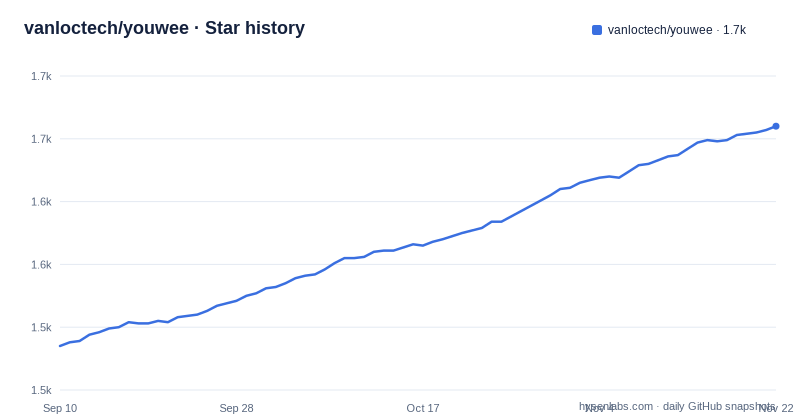
Star history
- vanloctech/youwee1,660 ★ · +175
| Repository | 2026-09-10 | 2026-11-22 |
|---|---|---|
| vanloctech/youwee | 1.5k | 1.7k |
175 Stars in the last 73 days, measured from the daily GitHub snapshot. Compare with other projects
Editorial analysis
The legal notice is two sentences and it sits above twenty features
The terms come first, and they are short. Youwee is described as a local utility for downloading and processing media from URLs supplied by the user, not affiliated with YouTube or any other platform. Users are told to use it only with content they own, have permission to use, or are legally allowed to access and store, and that they are responsible for the applicable laws, platform terms, copyright rules and permissions, with the project and its maintainers not responsible for misuse.
That is a one-paragraph notice, and it is doing real work, because the feature list underneath it is considerably more than a downloader. It includes automatic segment removal, audio extraction in three formats, subtitle creation and refinement with Whisper generation and AI translation, waveform and spectrogram subtitle pages with shot-change sync, natural-language video editing, and summaries from three different model providers. The notice does not distinguish between any of those.
Two more surfaces widen the surface area further. A Telegram bridge accepts add, download, queue, status and stop commands for remote control while the app is running, and the plugin system adds notifications, uploads and third-party integrations around each job. Neither is mentioned in the legal notice. Anyone writing an internal policy for this tool has to write those parts themselves.
SponsorBlock is a subscriber feature reimplemented on the client side
One line in the feature list reads: SponsorBlock, automatically skip sponsors, intros, outros and self-promotions, with remove, mark and custom modes. SponsorBlock is the skip-segment feature YouTube offers as part of its paid subscription. A local downloader that recognises the same segments and cuts or marks them is doing that work outside the subscription, and the entry sits in the same list as theme selection and speed limits with no further comment.
The neighbouring entries belong to the same family. Audio extraction in MP3, M4A and Opus turns a video into a track. Time Range Download takes a start and end time and produces only that segment. AI Video Processing edits by natural language, cutting, converting, resizing and extracting audio. AI Video Summary runs against Gemini, OpenAI or Ollama, which means two hosted providers with keys and one local model. Subtitle Workshop goes furthest, with SRT, VTT and ASS editing, auto-fix, AI grammar fix, AI translate and Whisper generation, plus a subtitle page built around waveform, spectrogram, shot-change sync and style profiles.
None of these require a network service to run once the media is local, and that is the honest architectural summary: this is a post-processing suite bolted onto an extractor. The reason to care about that framing is that most of the capability here would be just as useful on media you produced yourself, and none of it is scoped to it.
Every download URL routes through releases/latest, so the install table has no version in it
The platform table offers a Windows x64 `.msi` and a `.exe`, a macOS `.dmg` for Apple Silicon, a separate macOS `.dmg` for Intel, and three Linux x64 packages: `.deb`, `.flatpak` and `.AppImage`, the last with a note that it may require FUSE. Each of those seven links has the same shape, ending in `releases/latest/download/Youwee-...`.
That is the weakest part of the distribution story. `latest` is a moving target, so the artifact a user downloads from the README is whatever was published most recently at the moment they click, and two people reading the same page a week apart get different binaries from the same URL. It also means the table cannot be used to verify anything. An auditor who wants to name the exact file they approved has to read `package.json` and match it against the release list instead, where the manifest says `0.20.4` and the newest tag is `v0.20.4`, published on 2026-09-20, twenty minutes after the last push to `main` on the same day. Those three agree today.
The architecture gap in the matrix is arm64. Linux is offered for x64 only, and macOS is split into two x64-or-arm64 images rather than one universal binary. Whatever silicon a user has, the closest artifact is a translation layer.
The tree has a snap directory and the download table has no snap entry
Packaging lives in the tree rather than in the build scripts. The top level contains `flatpak/`, `snap/`, `docker/`, `scripts/`, `extensions/`, `plugin-store/`, `sdk-js/` and `src-tauri/`, alongside the React front end in `src/`. The download table offers a `.flatpak` and nothing for snap, and the README's build section covers the Tauri app, the browser extension and the JavaScript SDK but says nothing about either packaging format.
So the repository knows how to build a snap and does not document it, or does not publish it. Either way the answer to whether Youwee is on Flathub or the Snap Store is not written down where a user would look, and the extension packages are handled the same way: the tree has `extensions/youwee-webext/scripts/` with build and package steps, and the README links two zip or archive files into the same `releases/latest/download/` pattern as the desktop installers.
The pattern across all of it is that the build pipeline is public and the release naming is not. The plugin store has its own validator, `scripts/validate-plugin-store.mjs`, wired to a `plugin-store:validate` script, so the store contents are checked at build time even though nothing checks the mapping between a store plugin and a published release.
The Firefox extension ships signed and the Chromium one ships as a zip
The browser bridge comes in two forms. Firefox gets `Youwee-Extension-Firefox-signed.xpi`. Chromium gets `Youwee-Extension-Chromium.zip`, and the README names the seven browsers it is meant for: Chrome, Edge, Brave, Opera, Vivaldi, Arc and Coc Coc.
The asymmetry is not an oversight in packaging, it is the two stores' different rules, and it has a direct consequence. The Firefox file is signed and installs through the normal add-on path. The Chromium zip is an unpacked extension you load yourself, because a zip cannot be signed in the way Firefox requires. That means the extension half of the bridge has a weaker distribution guarantee on the more widely used browser family, and it explains why the app's own macOS build carries a signing caveat in the same README.
What the bridge does is narrow. A floating button on the page offers Video or Audio plus a quality picker on supported sites, the popup works on any valid HTTP or HTTPS tab, and the two actions are Download now and Add to queue, which hand the current page to the running app. The security note is the one that matters: the extension's job is to hand a URL to a local process, and that process has shell and filesystem access.
Shell, filesystem, process and updater plugins ship in the same dependency list as the UI
The visible Tauri v2 entries in the manifest are these:
"@tauri-apps/api": "^2.11.1",
"@tauri-apps/plugin-deep-link": "^2.4.9",
"@tauri-apps/plugin-dialog": "^2.7.1",
"@tauri-apps/plugin-fs": "^2.5.1",
"@tauri-apps/plugin-notification": "^2.3.3",
"@tauri-apps/plugin-opener": "^2.5.4",
"@tauri-apps/plugin-process": "^2.3.1",
"@tauri-apps/plugin-shell": "^2.3.5",
"@tauri-apps/plugin-updater": "^2.10.1",
For a desktop app that writes files to disk that is a normal set. For one that also runs a signed third-party plugin after every download it is the trust boundary. Plugins are `.ywp` files described as signed, they can be assigned to download workflows, and `PLUGINS.md` plus a published `youwee-sdk` on npm exist to make them easy to write. A plugin that adds uploads, notifications and integrations runs with whatever the host process has, and the host has `plugin-shell`, `plugin-fs` and `plugin-process`.
`plugin-updater` closes the loop: the app can replace its own binaries. Combined with unpinned `releases/latest` download links and a macOS build that is not signed with an Apple Developer certificate, the update path is the part of this project where the trust assumptions deserve the most attention, not the least.
Twelve scripts build four TypeScript projects and one bundled extension
The manifest is where the shape of the repository shows up. `private: true` and `type: "module"`, version `0.20.4`, and twelve scripts:
"scripts": {
  "dev": "vite",
  "test": "bun test",
  "build": "tsc -b && vite build",
  "build:sdk": "tsc -p sdk-js/tsconfig.json",
  "lint": "biome check .",
  "preview": "vite preview",
  "tauri": "tauri",
  "tauri:dev": "tauri dev",
  "tauri:build": "tauri build",
  "plugin-store:validate": "bun run scripts/validate-plugin-store.mjs",
  "ext:build": "bun run extensions/youwee-webext/scripts/build.mjs",
  "ext:package": "bun run ext:build && bun run extensions/youwee-webext/scripts/package.mjs"
}
Four build targets live in one package: the Tauri app, the browser extension, the JavaScript SDK and the plugin store. That is why the root carries `tsconfig.json`, `tsconfig.app.json`, `tsconfig.node.json` and `tsconfig.sdk.json`, while `build:sdk` points at `sdk-js/tsconfig.json` instead of the root `tsconfig.sdk.json`, so the SDK has two TypeScript configurations with different names for what looks like one job.
The rest of the stack is current and opinionated: Bun as package manager and test runner, with `bun.lock` committed and `bun test` rather than a separate test framework. Biome for linting in place of ESLint and Prettier. Tailwind through `tailwind.config.js` and `postcss.config.js`, with `components.json` marking a shadcn/ui component setup, and FontAwesome 7 plus the Radix primitives for the interface. Building from source needs Bun 1.3.5 or later, Rust 1.70 or later, and the Tauri CLI.
The 1800+ figure and the yt-dlp label have no support in the visible manifest
The repository describes itself as a cross-platform downloader for YouTube, TikTok, Instagram and 1800+ sites, and calls itself a yt-dlp GUI. The feature list repeats the 1800+ figure and names YouTube, TikTok, Facebook, Instagram, Bilibili and Youku by name. Nothing in the visible text says where the number comes from or which extractor produces it, and no version or provenance is attached to it.
The dependency list is the place to look, and it is where the answer stops. The entries you can read run from FontAwesome 7 and the Radix primitives through class-variance-authority, and no extractor binding, no yt-dlp wrapper and no yt-dlp binary reference appears in that portion. So the label is unconfirmed by anything visible, not contradicted. If the extraction engine is bundled inside `src-tauri/` or fetched at build time, that arrangement is not written down in the manifest text shown here.
Two other claims sit in the same register. Fast and Lightweight is stated as designed for minimal resource usage with no figure attached, and 6 Beautiful Themes lists Midnight, Aurora, Sunset, Ocean, Forest and Candy by name. Those are harmless. The 1800+ is the number to ask about, since it is the one a user would plan capacity around.
Editorial conclusion
Read youwee as a media processing workbench rather than a download button, because that is what the feature list describes. The download table is unpinned by design, since every artifact URL routes through releases/latest, so an auditor who needs to name the exact binary must read the manifest instead and match it against the v0.20.4 tag. Three things deserve a decision before this runs on a work machine. The terms paragraph is two sentences long and the SponsorBlock entry reimplements a behaviour YouTube sells to subscribers, so confirm that your use is covered rather than relying on the legal notice. The desktop side ships shell, filesystem, process and updater plugins together with a signed plugin format that adds post-download automations, so the plugin supply chain is the real trust boundary, not the extractor. And the macOS build carries no Apple Developer signature, which is why the README opens with a quarantine workaround. Anything mission-critical should stay on a maintained command-line tool with a verifiable release stream.
Frequently asked questions
Is youwee a yt-dlp GUI?
The repository description calls it a cross-platform downloader for YouTube, TikTok, Instagram and 1800+ sites and labels it a yt-dlp GUI. The readable portion of the package.json dependency list runs from FontAwesome and Radix through class-variance-authority, with no extractor binding in it, so the label is not confirmed by the visible manifest.
Which platforms does youwee ship builds for?
Windows x64 as an .msi and an .exe, macOS as separate .dmg images for Apple Silicon and Intel, and Linux x64 as .deb, .flatpak and .AppImage, the last of which may require FUSE. Every download link resolves through the releases/latest path, so none of them pins a version.
What does the SponsorBlock feature in youwee do?
It automatically skips sponsors, intros, outros and self-promotions, with remove, mark and custom modes. The entry appears in the feature list alongside theme selection and speed limits, with no further explanation of the mechanism.
Does youwee have a browser extension?
Yes, for Chromium-family browsers and Firefox. A floating button offers Video or Audio with a quality picker on supported sites, and Download now or Add to queue hands the current page to the running app. Firefox receives a signed .xpi and Chromium receives a .zip.
Can youwee plugins run code on my machine?
The plugin format is described as signed .ywp files that can be assigned to download workflows and add notifications, uploads and third-party integrations. The host app ships the Tauri shell, filesystem and process plugins, so a plugin inherits that access.
Official sources
Add this badge to your README
If you maintain this project, the badge below links readers to this analysis and shows its maintenance status from the daily GitHub snapshot. Paste the markdown into your README; add ?metric=license or ?metric=stars to the image URL for a different field.

[](https://hysenlabs.com/projects/vanloctech-youwee)Star history chart for your README
[](https://hysenlabs.com/projects/vanloctech-youwee)Was this useful?