quiver's Makefile puts KaTeX and Workbox in curl commands, and GitHub Pages runs on a fifth branch
A modern commutative diagram editor for the web.
At a glance
- What is it?
- A browser editor for commutative and pasting diagrams that exports to LaTeX through tikz-cd and to Typst through fletcher. Every example in the file travels as a base64 payload in the link itself. The build vendors two dependencies by hand, and the deployment is a five branch choreography the README never mentions.
- Who is it for?
- quiver fits a mathematician or category theorist who wants a diagram on screen now and LaTeX or Typst source afterwards, and who is willing to read `tutorial.md` rather than the README, since every operational detail lives there. Check three things first.
- Can I use it commercially?
- Yes. MIT is a permissive licence: you can use, modify and sell software built on it, as long as you keep its copyright and licence notices.
- Is it still maintained?
- Yes. The repository last received commits 3 days ago.
- What is it written in?
- Mainly JavaScript, according to GitHub's language statistics.
Answers come from the project's GitHub data, last synced on November 25, 2026, and from our analysis. They are not legal advice.
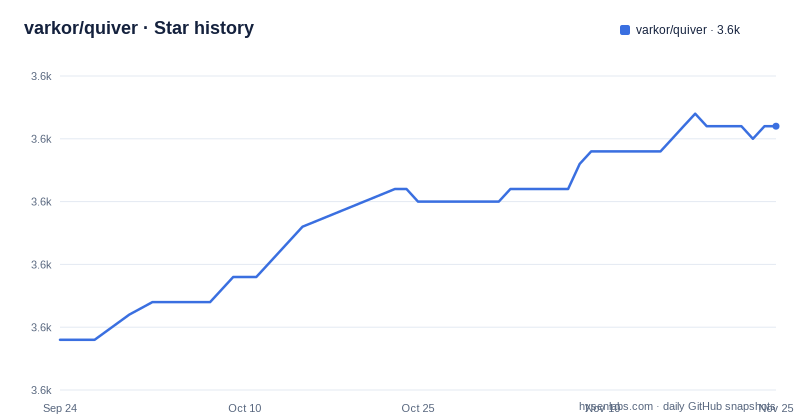
Star history
- varkor/quiver3,641 ★ · +17
| Repository | 2026-09-24 | 2026-11-25 |
|---|---|---|
| varkor/quiver | 3.6k | 3.6k |
17 Stars in the last 62 days, measured from the daily GitHub snapshot. Compare with other projects
Editorial analysis
The opening argument is a speed claim with nothing measured behind it
The README's second paragraph is the pitch: creating and modifying diagrams with quiver is orders of magnitude faster than writing the equivalent LaTeX or Typst by hand, and with a little experience it competes with pen-and-paper. There is no timing, no comparison table, no test method and no denominator behind either half of that sentence. The same pattern runs through the export claim, which is that the exported LaTeX and Typst look as close as possible to the original diagram, again with nothing to compare against. The one goal the file states plainly is visual: quiver is intended to look good for screenshots as well as to export. For a tool whose entire value is that its output drops into someone else's document, both of its headline claims are left for the reader to verify by eye.
Every example diagram rides in the link itself
Each screenshot in the file is a q.uiver.app address with a `q` parameter carrying base64. Decoding one gives a plain JSON array with no compression: the second number is the entry count, objects carry three leading numbers, a label and a three-number box, and arrows carry two endpoints, a label and an options object holding a `curve` value, a three-number `colour` and a `style` block, where the body style appears as `dashed` and a separate `corner` name shows up on its own entry. The smallest example decodes to five entries. So a document is a URL, which makes sharing a diagram a matter of copying the address, and makes the editor's state legible to anyone who opens the link. Nothing in the file says how long those addresses get, whether the service keeps a copy, or what happens to a diagram large enough to hit a length limit somewhere else.
A complete set of keyboard shortcuts, none of them listed
Diagrams may be created and modified with the mouse, by clicking and dragging, or with the keyboard, and the file promises a complete set of keyboard shortcuts for performing any action. Not one shortcut appears in it. The same claim is made twice in a different register, with a parenthetical about creating and modifying diagrams entirely using the keyboard, and both times the answer is the same link: the tutorial, `tutorial.md`, which is a file in the repository root and is referenced more often than anything else in the README. That file is where the real instructions live, which is a reasonable arrangement for an application with a full keyboard mode. It does mean the README on its own describes what quiver is for and not how to do any of it.
A grid that resizes to its labels, and a vocabulary list
The one layout mechanism the file explains is object placement, which is based on a flexible grid that resizes according to the size of the labels. Everything else in the features section is a claim about coverage rather than a description of how it works. The list runs: pullbacks and pushouts, adjunctions, higher cells, a wide range of composable arrow styles, and full use of colour for labels and arrows. Each of the first three arrives as its own short paragraph with a screenshot beside it, broken out of the sentence that introduces them, so the file reads as a sequence of examples rather than a feature list. The vocabulary is specific enough to tell you the intended audience, and the mechanism paragraph is short enough to fit in a tweet, which is roughly the level of detail on offer for either.
The build vendors two dependencies with curl instead of npm
There is no install command anywhere in the README, so the build story lives in the Makefile. Its first target fetches KaTeX from a GitHub release zip:
# Vendor KaTeX dependencies.
src/KaTeX:
	set -e
	curl -L -O "https://github.com/KaTeX/KaTeX/releases/download/v0.18.1/katex.zip"
	unzip katex.zip
	rm katex.zip
	mv katex src/KaTeX
A sibling target does the same for Workbox, pulling `workbox-window` from the workbox CDN at release 7.0.0 along with its source map. The default target is those two vendored paths plus two icons generated from `src/icon.png` with ImageMagick, which the file's own comment flags as a requirement. A `.ONESHELL` directive is there so that `cd` inside a recipe behaves, with the reason written next to it. The consequence for a fork is that KaTeX 0.18.1 and Workbox 7.0.0 are pinned in shell commands, not in a lockfile, and upgrading either means editing a Makefile.
Five branches stand between master and the hosted page
The hosted demo is not the default branch. A comment block in the Makefile names the whole arrangement: `master` is the main development branch, `release` is the branch used for hosting on GitHub Pages, `dev` is the branch hosted under /dev on GitHub Pages, `squash` is a temporary branch containing squashed versions of `release` and `dev`, and `gh-pages` is the branch that is actually hosted directly. The recipes match: `make dev` checks out `dev` and rebases `master` onto it, `make release` rebases `dev` onto `release` and builds the service worker. So a change reaches the public site through at least three rebases and two intermediate branches. The repository publishes no GitHub releases, so the word release here names a branch rather than a tag, and the README never mentions any of the five.
A citation file, a service worker, and a last line that stops mid-word
The repository root holds eight entries: `.gitignore`, `CITATION.cff`, `LICENSE`, `Makefile`, `README.md`, `tutorial.md` and three directories, `package/`, `screenshots/` and `service-worker/`, plus `src/`. A citation metadata file at the root of a browser drawing tool is an unusual thing to find, and it says the author expects the software to be cited rather than used as a passing reference. The front end is built from `src/`, the package manifest sits in `package/` rather than the more usual `packages/`, and `service-worker/` has its own build script driven by the Makefile through Node 20 loaded from nvm. The README, for its part, ends in the middle of its export discussion: the last line reads `When you expo` and nothing follows it.
Editorial conclusion
quiver fits a mathematician or category theorist who wants a diagram on screen now and LaTeX or Typst source afterwards, and who is willing to read `tutorial.md` rather than the README, since every operational detail lives there. Check three things first. The speed claim in the opening paragraph has no measurement attached, and so does the fidelity claim, so judge the export by eye on your own notation. The link carries the whole diagram, which is convenient for sharing and means you should check how a long diagram behaves in a chat client or an email. And the hosted page is not `master`: five branches are involved, and the release unit is a branch rather than a tag, since the repository publishes no GitHub releases. If you fork it, the Makefile is where the pinned KaTeX and Workbox versions live, not a lockfile. The project is MIT licensed and its documentation site is q.uiver.app.
Frequently asked questions
What formats can quiver export to?
LaTeX through tikz-cd, and Typst through the fletcher package. The README says the export is intended to look as close as possible to the original diagram, and that the editor is meant to look good for screenshots as well.
What kinds of diagram does quiver handle?
Commutative diagrams and pasting diagrams, with the features section calling out pullbacks and pushouts, adjunctions and higher cells, a wide range of composable arrow styles, and colour for labels and arrows. Object placement uses a flexible grid that resizes according to the size of the labels.
How is a quiver diagram stored?
In the link. Each example in the README is a q.uiver.app address whose `q` parameter is base64, and decoding one gives a plain JSON array whose second number is the entry count, with objects carrying coordinates, a label and a box, and arrows carrying two endpoints, a curve value, an RGB colour and named styles such as `dashed`.
What does it take to build quiver?
The Makefile vendors dependencies with curl instead of npm: a KaTeX v0.18.1 zip from GitHub releases, and a Workbox 7.0.0 file from the workbox CDN. Icons are generated from `src/icon.png` with ImageMagick, and the service worker target sources nvm.sh when `NVM_DIR` is set, then runs `nvm use 20` before installing and building.
Which branch serves the quiver demo site?
Not `master`. A comment in the Makefile names five: `master` as the main development branch, `release` as the branch used for hosting on GitHub Pages, `dev` as the branch hosted under /dev, `squash` as a temporary branch with squashed versions of `release` and `dev`, and `gh-pages` as the branch that is actually hosted directly.
Official sources
Add this badge to your README
If you maintain this project, the badge below links readers to this analysis and shows its maintenance status from the daily GitHub snapshot. Paste the markdown into your README; add ?metric=license or ?metric=stars to the image URL for a different field.

[](https://hysenlabs.com/projects/varkor-quiver)Star history chart for your README
[](https://hysenlabs.com/projects/varkor-quiver)Was this useful?