the @signpdf packages split PDF signing into readable steps
Simple signing of PDFs in node.
At a glance
- What is it?
- node-signpdf is now a family of npm packages under the @signpdf scope, and the splitting is deliberate: one package integrates, one signs, and each placeholder helper knows how to insert a signature placeholder into the kind of PDF you already have. The project states its purpose as demonstrating the signing flow in readable code, and it is the clearest Node.js reference for how detached PDF signatures work.
- Who is it for?
- Adopt the @signpdf family when you generate or receive PDFs in Node and need a detached digital signature, and pick the placeholder helper that matches how the document is produced, since the plain string based helper only works on PDF version 1.3 or below and does not support streams.
- Can I use it commercially?
- Yes. MIT is a permissive licence: you can use, modify and sell software built on it, as long as you keep its copyright and licence notices.
- Is it still maintained?
- Yes. The repository received new commits within the last day.
- What is it written in?
- Mainly JavaScript, according to GitHub's language statistics.
Answers come from the project's GitHub data, last synced on November 7, 2026, and from our analysis. They are not legal advice.
Star history
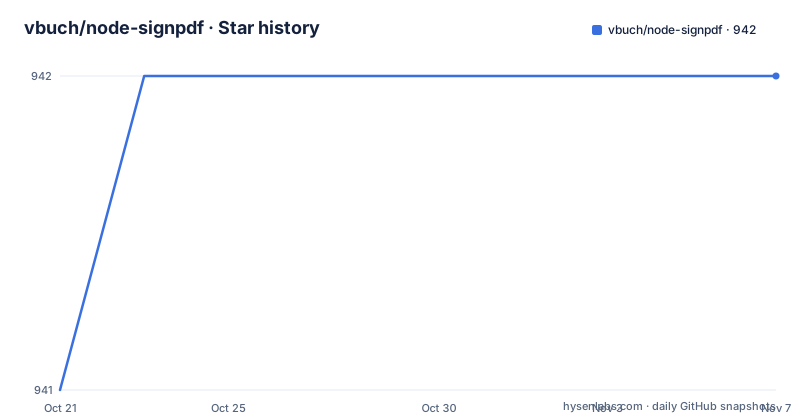
- vbuch/node-signpdf942 ★ · +1
| Repository | 2026-10-21 | 2026-11-07 |
|---|---|---|
| vbuch/node-signpdf | 941 | 942 |
1 Stars in the last 17 days, measured from the daily GitHub snapshot. Compare with other projects
Editorial analysis
A placeholder first, then a detached signature
PDF signing has an unusual shape, and understanding it is the reason this project exists. The stated purpose is to demonstrate the way signing can be achieved in a piece of readable code, as it can take a lot of hours to figure out.
A PDF signature is not applied over the finished document. The document has to contain a signature placeholder first, a reserved region that says in effect that a signature belongs here. The signing tool then computes a detached signature, which is the cryptographic bytes produced from the document content without embedding the document itself, and writes that signature into the placeholder. The result is a document that carries its own signature and can be verified later.
The project describes the placeholder as the e-signature equivalent of the label Sign here: on a paper document, and calls it a required part of the process. Once the placeholder is in place, the signing step is a single call.
That is why the packages are split the way they are. The integration package refuses to do anything useful on a PDF that has no placeholder, and the placeholder helpers exist because different projects acquire their PDFs in different ways. The documentation makes the point directly: depending on your use case you may need different combinations of packages, and it lists three starting points, for PDFs that already have placeholders, for PDFs generated with PDFKit, and for PDF files that come from somewhere else.
The audience is therefore a developer who wants to sign documents in a Node service, and who will benefit from reading how the pieces fit rather than from a single opaque call.
One package integrates, another signs
The package layout is small and the division of labour is clean.
@signpdf/signpdf is the main package, the integrating one, the one that wraps everything up. It uses a Signer implementation that provides cryptographic signing to sign a well-prepared PDF document, and a PDF document is well-prepared if it has a signature placeholder. If your PDF does not have one, the documentation points you at a placeholder helper.
@signpdf/signer-p12 is the signer. With the help of its peer dependency node-forge, the P12 signer provides the actual cryptographic signing of a Buffer using a P12 certificate bundle, and it does this in detached mode as required for PDF. That peer dependency matters at install time: node-forge is not bundled, you add it yourself, and the P12 file is a PKCS#12 bundle that carries the key and the certificate.
The signers are deliberately described as small libraries that the integrating package will call with a PDF, and that will know how to provide an e-signature in return, with the output fed as the signature in the resulting document. If you need a different kind of credential, the split means the signing part is replaceable without touching the integration part.
The repository is a monorepo rather than a single package. The root manifest declares yarn workspaces over the packages directory, uses lerna to run build, lint and test across them, installs husky for git hooks, and the tooling includes babel and a shared jest configuration. The root package is marked private, so nothing is published from the root itself.
The placeholder helper you pick decides how fragile the result is
Four placeholder helpers exist, and they differ in how much they know about the PDF structure. This is the decision that matters most in practice.
@signpdf/placeholder-plain uses the process and knowledge from placeholder-pdfkit010 on how to add a placeholder, but implements it with plain string operations such as indexOf, replace and match. Because of the lack of semantics it is rather fragile. It additionally does not support streams and only works on PDF version 1.3 or below. The documentation notes that despite those disadvantages this helper seems to be the most popular among users of @signpdf. It is also described as the quickest and lightest of the options, in theory, though that is explicitly not benchmarked.
@signpdf/placeholder-pdfkit works on top of PDFKit 0.11.0 or newer, and @signpdf/placeholder-pdfkit010 works on top of PDFKit 0.10.0. Each takes a PDFDocument that is in the works, meaning the document has not ended yet, and adds an e-signature placeholder. The two packages exist because PDFKit changed its API between those versions, so a project on 0.10.x cannot use the newer helper.
@signpdf/placeholder-pdf-lib is the fourth option, and the documentation singles out PDF-LIB for providing a tremendous PDF API that is very well documented and well supported.
So the honest summary is this. The helper that is most popular is also the most fragile, and it only applies to old PDFs. If you control the document generation, use a PDFKit or pdf-lib helper, because the placeholder is then placed with real knowledge of the document rather than by string surgery.
Signing a PDF that already has a placeholder
This is the simplest case and the shortest example in the documentation.
Install the integrating package, the signer, and node-forge:
npm i -S @signpdf/signpdf @signpdf/signer-p12 node-forgeThen read the file, build a signer from the P12 certificate, and sign:
import signpdf from '@signpdf/signpdf';
import { P12Signer } from '@signpdf/signer-p12';
...
const signer = new P12Signer(fs.readFileSync(PATH_TO_P12_CERTIFICATE));
const signedPdf = await signpdf.sign(fs.readFileSync(PATH_TO_PDF_FILE), signer);
What should see is a signedPdf value that holds the signed document. The two inputs are the PDF file and the certificate bundle, and there is no configuration object in between, which is the point of the design. The example source lives in the repository under packages/examples, in the with-placeholder.js file.
For a PDF that you do not have a placeholder in yet, the plain helper is the lightest option:
npm i -S @signpdf/signpdf @signpdf/placeholder-plain @signpdf/signer-p12 node-forgeWith PDF-LIB instead:
npm i -S @signpdf/signpdf @signpdf/placeholder-pdf-lib pdf-lib @signpdf/signer-p12 node-forgeThe dependency lists are the same shape each time, integrating package, placeholder helper, signer and node-forge, with pdf-lib added when that helper is used. That consistency is what makes the family easy to adopt, even though the choice of helper is a judgement call rather than a preference.
Generating and signing a document in one flow
The second documented scenario covers the case that started the library, which was a need to sign a document being generated on the fly.
The command for that case:
npm i -S @signpdf/signpdf @signpdf/placeholder-pdfkit010 @signpdf/signer-p12 node-forgeThe order of operations matters and is the same in every scenario. You create the document with your PDF library of choice, and while the document is still in the works, you add the placeholder, because the placeholder helpers need a PDFDocument that has not ended yet. Once the document is complete and the placeholder is inside it, the signing step can proceed.
This is where the PDFKit version split shows up. A project on PDFKit 0.10.0 needs placeholder-pdfkit010, and a project on 0.11.0 or newer uses placeholder-pdfkit. Upgrading PDFKit therefore means changing the placeholder package, and pinning the old helper in a project that has moved on is a common source of confusion.
The documentation also points to a JavaScript example and a TypeScript example under packages/examples, so the same flow is shown in both languages, and the repository carries a tsconfig.base.json and a jest.config.base.js, which means the packages are written in TypeScript and tested with Jest.
One asymmetry is worth noting. The placeholders are added by the helper packages, not by the integrating package, so an application that builds its own PDFs has to call the helper itself before calling sign. If your pipeline already produces signed PDFs through another route, the placeholder step is where the two would have to meet.
Licence, releases and the shape of the project
The family is released under the MIT licence, declared in the root manifest and with a LICENSE file at the repository root. The individual packages carry their own manifests under the packages directory, and the root manifest is marked private so that only the scoped packages are published to npm.
The release history is busy. Version 3.3.0 was published on 2025-12-29, and both 3.4.0 and 4.0.0 were published on 2026-10-19, the last one only minutes after the other. The last push was on 2026-10-19 as well, and the default branch is develop rather than main, which is a sign of a project that works with a staging branch and promotes from it.
The repository also carries a RELEASE-CHECKLIST.md, a CHANGELOG.md, a CONTRIBUTING.md, an eslint configuration and a husky directory for commit hooks, so releases are a defined procedure rather than an ad hoc publish. The funding field points at an individual sponsorship page, which is worth knowing if you are judging the project's long-term viability, since a single maintainer is responsible for a signing library that has to keep pace with the PDF spec and with node-forge.
The environment requirement is explicit in the root manifest, which requires Node 22 or newer, so an older Node 18 or 20 service would need to change before it can install the family.
Editorial conclusion
Adopt the @signpdf family when you generate or receive PDFs in Node and need a detached digital signature, and pick the placeholder helper that matches how the document is produced, since the plain string based helper only works on PDF version 1.3 or below and does not support streams. Verify first that your PDF already carries a placeholder or that your generator supports one, and note that the 4.0.0 and 3.4.0 releases both landed on 2026-10-19 while Node 22 or newer is required.
Frequently asked questions
How do I sign a PDF in Node.js with the @signpdf packages?
Install @signpdf/signpdf, @signpdf/signer-p12 and node-forge, create a P12Signer from your PKCS#12 certificate, then call signpdf.sign with the PDF buffer and the signer. The PDF must already contain a signature placeholder.
What is the difference between @signpdf/placeholder-plain and the PDF-LIB helper?
The plain helper adds the placeholder with string operations such as indexOf, replace and match, which the documentation calls rather fragile, and it does not support streams and only works on PDF version 1.3 or below. The PDF-LIB helper works through the PDF-LIB API, which the project describes as very well documented and well supported.
Why do I need node-forge to sign a PDF with @signpdf?
node-forge is a peer dependency of @signpdf/signer-p12, and with its help the signer performs the actual cryptographic signing of a Buffer using a P12 certificate bundle in detached mode, as PDF requires.
Which placeholder package should I use with PDFKit?
It depends on your PDFKit version. @signpdf/placeholder-pdfkit010 works on top of PDFKit 0.10.0, and @signpdf/placeholder-pdfkit works on top of PDFKit 0.11.0 or newer. Both require a PDFDocument that is in the works, meaning not yet ended.
What Node.js version does the @signpdf family need?
The root manifest requires Node 22 or newer. The project is released under the MIT licence, and versions 3.4.0 and 4.0.0 were both published on 2026-10-19 with the default branch being develop.
Official sources
Add this badge to your README
If you maintain this project, the badge below links readers to this analysis and shows its maintenance status from the daily GitHub snapshot. Paste the markdown into your README; add ?metric=license or ?metric=stars to the image URL for a different field.

[](https://hysenlabs.com/projects/vbuch-node-signpdf)Star history chart for your README
[](https://hysenlabs.com/projects/vbuch-node-signpdf)Was this useful?