d3k (dev3000): one dev server, one browser, and a root certificate authority
Captures your web app's complete development timeline - server logs, browser events, console messages, network requests, and automatic screenshots - in a unified, timestamped feed for AI debugging.
At a glance
- What is it?
- d3k is an agent-first local debugging runtime from the vercel-labs/dev3000 repository: it starts your dev server, puts a persistent Chrome profile behind a stable portless HTTPS URL, and merges server output, browser errors and network activity into one timeline an agent can read. The cost of that stability is administrator rights, a trusted local certificate authority and a service on port 443.
- Who is it for?
- This is a runtime worth trying if your debugging already happens through an agent and you can live inside its constraints: one dev server per session, one browser identity, one origin for every project on the machine. Three things decide it.
- Can I use it commercially?
- Yes. MIT is a permissive licence: you can use, modify and sell software built on it, as long as you keep its copyright and licence notices.
- Is it still maintained?
- Yes. The repository last received commits 3 days ago.
- What is it written in?
- Mainly TypeScript, according to GitHub's language statistics.
Answers come from the project's GitHub data, last synced on November 13, 2026, and from our analysis. They are not legal advice.
Star history
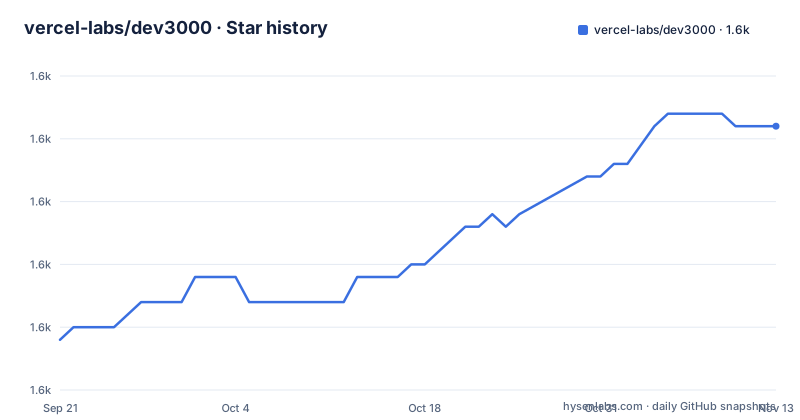
- vercel-labs/dev30001,596 ★ · +17
| Repository | 2026-09-21 | 2026-11-13 |
|---|---|---|
| vercel-labs/dev3000 | 1.6k | 1.6k |
17 Stars in the last 53 days, measured from the daily GitHub snapshot. Compare with other projects
Editorial analysis
Two command names for one binary, with the tree ahead of its newest tag
Everything a user types is `d3k`, while everything the registry sees is `dev3000`. package.json names the package `dev3000` and maps two executables onto the same file, with `dev3000` and `d3k` both pointing at `./bin/dev3000`. The page opens with the title `d3k (dev3000)`, the homepage is `dev3000.ai`, the skill installer is called with `--skill d3k`, and not one example uses the package name on the command line. The name you install and the name you type differ, and the only place `dev3000` appears as a command is the install line itself.
Version identity is loose in the same way. The working tree reads `0.0.181-canary`, one step ahead of the newest tag v0.0.180, and the three most recent tags are v0.0.177 on 2026-06-19, v0.0.178 on 2026-07-09 and v0.0.180 on 2026-09-14. The line is still three digits long, which is not a stability promise, and the newest tag and the last push on the default branch sit four seconds apart in the published metadata, so the tag was cut at push time rather than at a release.
The default path asks for administrator rights and a service on port 443
Portless is the default, and Portless is not a free abstraction. `d3k portless setup` performs one-time administrator authorization to generate and trust the local HTTPS certificate authority and to install a root-owned startup service on port 443. After that, every server a project starts registers behind the proxy, and the managed browser opens the Portless URL. The ordinary path on a laptop therefore means a certificate authority the machine now trusts, plus a service that comes up with the system and holds port 443.
The failure behavior is deliberate and stated plainly: d3k fails before starting the app when canonical Portless is unavailable. The escape hatch is `--no-portless`, and the page restricts it to the case where direct localhost routing is specifically required, which in practice means anyone behind a locked-down workstation or a managed profile ends up on it. Before any of this, Node.js 24 or newer is required. Installing the runtime and installing the agent skill are two separate steps:
bun install -g dev3000
npm install -g dev3000bunx skills add vercel-labs/dev3000 --skill d3k --agent '*' -g -yPortless buys URL stability by taking the port out of the URL
Every project gets a stable Portless URL by default, and the example given is `https://my-app.localhost`. The reason is stated in one line: browser state and callbacks do not move when the underlying development port changes. Framework dev servers pick an arbitrary port when their preferred one is taken, and that breaks OAuth callbacks, origin-scoped cookies and any bookmark a tester has saved, so a hostname that resolves through the local proxy without a port removes the problem, with the certificate authority from setup providing the HTTPS half. `-p, --port <port>` exists for the opposite case, forcing the detected port when a project insists on one.
Stability is bought with a narrower URL shape. The example carries the project name in the host and nothing in the port, so all projects on the machine share one hostname space rather than one per port, and a callback URL registered as `localhost:3000` will not match what the browser actually visited. The page also says Portless only counts as ready when it provides a genuinely port-free URL, and `d3k portless status --json` is the check an agent runs before it is allowed to reuse a session.
A persistent Chrome profile per project, holding live login state
Each project gets its own Chrome profile under `~/.d3k/<project>/chrome-profile/`, and the page states plainly that login state, cookies and local storage survive across debugging sessions. That is the feature that makes repeated sign-in flows bearable, and it is also the largest security surface in the tool: a persistent authenticated browser profile, one per project, sitting at a predictable path on disk, with `--profile-dir <dir>` available to move it. Artifacts are laid out per project as well.
| Artifact | Location | | --- | --- | | Active session | `~/.d3k/<project>/session.json` | | Consolidated log | `~/.d3k/<project>/d3k.log` or `logs/` | | Screenshots | `~/.d3k/<project>/screenshots/` | | Chrome profile | `~/.d3k/<project>/chrome-profile/` | | Crash log | `~/.d3k/crash.log` |
Four of those five are scoped per project. The crash log is not, so it is the one file that mixes output from every project on the machine and the one worth checking before pasting it anywhere.
One dev server per session, and the browser is not interchangeable
The instruction is blunt: do not run `npm run dev` or `bun run dev` alongside d3k, because d3k is the dev-server owner for the session. The seven-step agent workflow explains why. The agent is told to check Portless readiness, run `d3k status --json`, reuse only a ready Portless project session, start `d3k -t` in a retained background tool session, wait for a port-free HTTPS URL and managed browser, then either hand the headed browser to the user or drive it.
The commands used to drive it are these:
# Drive the exact browser d3k is monitoring
d3k agent-browser snapshot -i
d3k agent-browser click @e2
d3k agent-browser fill @e3 "text"
d3k agent-browser --require-d3k-browser open https://my-app.localhost
`--require-d3k-browser` on the `open` call is the guard: the command refuses to go anywhere unless the target is the browser d3k already monitors. The element references such as `@e2` and `@e3` come from a snapshot, so the agent addresses the page the way a person reading the tree would. Paired with the warning that a separate Playwright session, a browser MCP, raw Chrome or a custom `agent-browser --profile` run counts as a different browser identity and can break sign-in flows, the design is coherent: one server, one profile, one browser for the length of the session.
d3k fix and d3k crawl are named without being explained
The diagnostic section is a bare catalogue:
d3k errors
d3k errors --context
d3k errors --all

d3k logs
d3k logs --type browser
d3k logs --type server
d3k logs --json

d3k fix
d3k fix --focus build

d3k crawl
d3k crawl --depth all
`errors` and `logs` are self-describing: one collects failures with optional context or all sessions, the other filters by source and can emit JSON. The two commands at the bottom get one flag each and no explanation. Nothing says what `fix` changes, whether it writes to the working tree, or what it does when the failure is not in the build; nothing says what `crawl` walks or how far `--depth all` goes. The contrast with the rest of the file is sharp, since the agent workflow above is numbered step by step and the reasoning behind the browser rules is given at length.
For a tool whose selling point is autonomous investigation, a command called `fix` with an undocumented write behaviour is the one line you would want described rather than discovered. The repository scripts hint at the shape of the testing around it, since there is a canary smoke test and a skill runner install smoke test, but neither says what `fix` is allowed to touch.
Twelve flags to override a detector the page tells you to trust
The options table is long: `-p, --port`, `-s, --script`, `-c, --command`, `--app-url`, `--profile-dir`, `--no-portless`, `--headless`, `--servers-only`, `--tui`, `--no-agent`, `-t, --tail` and `--debug`. The guidance over it is a single sentence: prefer auto-detection, and use overrides only when the project has an unusual dev command, port or target URL. Detection is claimed to cover Next.js, Vite, React, Vue, Svelte and Astro, then Django, Flask, FastAPI and Rails, plus custom servers supplied through `--command`.
Three of those flags change what is watched rather than what is launched. `--servers-only` intentionally disables browser monitoring, `--headless` runs Chrome headlessly for CI, and `--no-portless` drops the stable URL. Two more change the interface rather than the plumbing, with `--tui` turning on the dashboard that is off by default and `--no-agent` skipping the agent selection prompt. Three invocation shapes result: bare `d3k` opens the dashboard, `-t, --tail` streams the consolidated log instead, and an agent can sit beside the dashboard:
d3k --with-agent claude
d3k --with-agent codex
d3k --with-agent opencode
That split screen needs tmux; the background agent workflow does not.
The published package is dist plus a single tsx file
package.json publishes exactly four paths: `bin/`, `dist/`, `src/tui-interface-impl.tsx` and `README.md`. The build runs the TypeScript compiler, creates `dist/src`, copies `src/loading.html` and `src/tui-interface-impl.tsx` into it, then deletes `dist/skills` and copies `src/skills` back in. So an installed copy is compiled output plus exactly one TypeScript source file, the TUI interface implementation, which is the only piece of `src/` a consumer receives. The skill itself ships only as the copy placed inside `dist`.
The install-time check is arranged so it cannot fail an install: `_postinstall` is `node scripts/check-install.js || exit 0`. A failure is swallowed by the trailing `|| exit 0`, and the leading `_` keeps the name off npm's list of lifecycle hooks, so it runs when something asks for it rather than on every install. `_prepare` is `husky` in the same style, and the tree holds both a `.husky/` directory and a bare `husky` entry. Around the package sits a repository considerably larger than it: `packages/`, `src/`, `skills/`, `docs/`, `www/`, `example-apps/`, `extensions/` and `test-tui/`, alongside `AGENTS.md`, `CLAUDE.md`, a `.agents/` directory, `turbo.json`, `biome.json` and `vitest.config.ts`.
Editorial conclusion
This is a runtime worth trying if your debugging already happens through an agent and you can live inside its constraints: one dev server per session, one browser identity, one origin for every project on the machine. Three things decide it. First, `d3k portless setup` wants administrator rights to trust a local certificate authority and install a root-owned service on port 443, so check whether your workstation allows that before anything else, and remember that `--no-portless` is the documented fallback. Second, the persistent profile at `~/.d3k/<project>/chrome-profile/` holds live logins and the agent is handed commands to click and type inside it, so treat that directory as credential storage and keep it out of shared machines and image snapshots. Third, `d3k fix` and `d3k crawl` are documented by their flags alone, so read them in the source before letting an agent run them unattended. For anyone who only wants logs and a screenshot, this is a large amount of machinery.
Frequently asked questions
What does d3k do that starting a dev server by hand does not?
It starts the dev server, opens a monitored Chrome with a project-stable profile, and merges server output, browser console messages, network activity, interactions and screenshots into one evidence stream that `d3k status --json` reports as a session manifest.
Does dev3000 need administrator permissions to install?
`d3k portless setup` performs one-time administrator authorization to generate and trust the local HTTPS certificate authority and install a root-owned startup service on port 443. The `--no-portless` flag disables the stable Portless URL.
Why does d3k refuse to start when Portless is not ready?
Portless is required by default, and d3k fails before starting the app when canonical Portless is unavailable. The page says to use `--no-portless` only when direct localhost routing is specifically required.
Should I type dev3000 or d3k on the command line?
Both work: package.json maps the `dev3000` and `d3k` executables to the same `./bin/dev3000` file. The installed package is named `dev3000`, while every documented example uses `d3k`.
Can I use d3k next to my own Playwright or browser session?
The page warns that a separate Playwright, browser MCP, raw Chrome or custom `agent-browser --profile` session is a different browser identity and can break sign-in flows, and it says not to run `npm run dev` or `bun run dev` alongside d3k.
What does d3k need from Node.js?
Node.js 24 or newer is required. The runtime installs globally with `bun install -g dev3000` or `npm install -g dev3000`, and the agent skill is a separate install step.
Official sources
Add this badge to your README
If you maintain this project, the badge below links readers to this analysis and shows its maintenance status from the daily GitHub snapshot. Paste the markdown into your README; add ?metric=license or ?metric=stars to the image URL for a different field.

[](https://hysenlabs.com/projects/vercel-labs-dev3000)Star history chart for your README
[](https://hysenlabs.com/projects/vercel-labs-dev3000)Was this useful?