The Reviewer sees the branch, never the Implementer's reasoning
Meet Foreman, an eve Software Factory.
At a glance
- What is it?
- A Vercel deployment template that wires four separate agents onto one issue tracker, so a task moves from triage through planning to implementation to an independent review before a draft pull request reaches you. The configuration surface is six environment variables and two connectors. The access problem is deliberately deferred to the first task rather than the deploy, and the manifest carries an eval command and a schema library that the readme never mentions.
- Who is it for?
- eve Software Factory is worth reading as a template even if you never deploy it, because the separation between the implementing agent and the reviewing agent is enforced structurally rather than by instruction: the reviewer is given a branch and nothing else, so a reviewer that agrees with bad work cannot see the reasoning that produced it. Three things to check before you clone it.
- Can I use it commercially?
- Yes. MIT is a permissive licence: you can use, modify and sell software built on it, as long as you keep its copyright and licence notices.
- Is it still maintained?
- Yes. The repository last received commits 11 days ago.
- What is it written in?
- Mainly TypeScript, according to GitHub's language statistics.
Answers come from the project's GitHub data, last synced on November 13, 2026, and from our analysis. They are not legal advice.
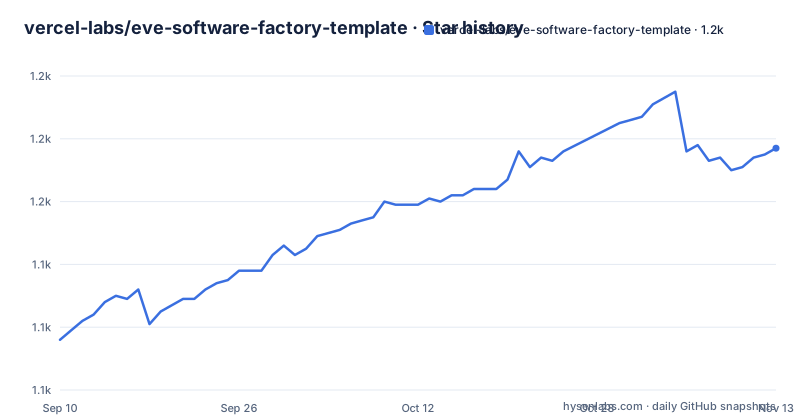
Star history
- vercel-labs/eve-software-factory-template1,177 ★ · +61
| Repository | 2026-09-10 | 2026-11-13 |
|---|---|---|
| vercel-labs/eve-software-factory-template | 1.1k | 1.2k |
61 Stars in the last 64 days, measured from the daily GitHub snapshot. Compare with other projects
Editorial analysis
Four agents, and the reviewer is shown only the result
The pipeline is four stations, and each one is a separate agent with its own instructions, its own sandbox and its own tools.
The first triages. It classifies the incoming task by type, priority and complexity, and decides whether it is actionable at all. The stated behaviour when it decides a task is not actionable is that the system asks the requester rather than building the wrong thing, which is the cheapest possible failure.
The second turns the task into a plan with acceptance criteria, working from a live checkout of the repository rather than from a description of it. The third executes that plan inside its own sandbox, verifies the work using the repository's own checks, and pushes a branch. The fourth judges the result against the actual diff and produces evidence for each verdict.
The sentence that makes the design work is the constraint on the last station: the reviewer sees only the pushed branch and never the implementer's reasoning. So an approval cannot be a rationalisation of intent, because the intent is not in its input. Between runs the system also keeps a set of notes about the repository that every run starts from, which is what stops each task from rediscovering the same project facts.
What arrives at the end is a draft pull request. The merge decision is yours.
Six ways in, and two of them wait for you
The trigger list is the part of the page that tells you what kind of system this is.
Four routes are unattended. Labelling an issue with the factory label starts the pipeline, which posts progress as each station finishes and ends with a draft pull request linked back to the issue. A red build on a factory pull request starts it again, and the fix is pushed to the system's own branches and never to yours, which is a specific and unusual boundary. Delegating from a ticket tracker runs the same pipeline and reports progress back where the request came from.
Two routes are interactive. Mentioning the bot on an issue or a pull request starts a session, restricted to repository owners, members and collaborators. And a local terminal interface takes a task directly, where changes aimed at GitHub wait for approval in that interface.
The sixth route is the most deflationary and the most honest. If a person opens a pull request with no mention and no label, the system's contribution is one orienting comment for the reviewers, described as a summary and explicitly not a review. It declines to review work it was not asked about.
That combination, four autonomous entry points and two supervised ones, is the actual scope of the system, and the readme does not soften it.
The access check happens on the first task, not the deploy
The configuration table has six rows and one required value, but the interesting part is when the failure arrives.
The repository variable must name an existing repository in the usual owner and name format, and the app behind the selected connector must be installed with access to it. The page then says something that most templates would not say: a station's sandbox clones the repository on its first session, not at deploy time. So a repository the app cannot reach does not fail the deployment. It fails on the first task you hand it, with a named error naming the repository it could not access.
That is a deliberate trade. Deferring the check means the deploy button can provision connectors before anyone has picked a target repository, which is what makes a one-click flow possible. The cost is that the first run is the smoke test rather than the install.
The optional variables are the ones worth reading closely. A setup command runs once per session inside the sandbox checkout, which is how a repository's dependencies get installed before the implementer's checks are expected to pass. A label variable, defaulting to the word factory, decides what hands work to the system. A branch prefix variable, defaulting to a factory slash, marks the branches the system owns, and the page says those are the only branches an automated build fix will touch. A bot name variable defaults to the connector's own slug.
The example environment file ships the connector values as a path-like form rather than the opaque identifiers the table calls them, which is the one place the two descriptions differ.
The deploy link carries the whole configuration in its query string
The one-click link is worth looking at, because a deployment template that needs configuration can either ask politely or encode it.
This one encodes it. The query string names the two environment variables to prompt for, carries a default for the label, and includes a human-readable description of what each variable does. It also embeds the connector configuration as structured data: which connectors to create, which environment variables they populate, whether they should subscribe to events, and the trigger path for each. It requests a blob store with public access. It names the template's own image and the page to land on afterwards.
So a reader can see every decision the deploy makes before clicking, including the store's access level. That is unusual transparency for a button, and it also means the configuration is a URL that can be copied, edited and shared, which is how a team would standardise it internally.
The two trigger paths in that configuration are the system's own webhooks rather than the platform's generic ones, with a version segment in each path. A system that owns its event intake is not relying on the platform's dispatch for its routing.
An eval command and a schema library that the readme does not mention
The manifest is small and mostly boring, with two entries that the documentation leaves out.
Runtime dependencies number six: the template platform itself, the GitHub tools extension, a blob client, a connector client, a model SDK and a schema library. The last of those is pinned to an exact version rather than a range, which is the only exact pin in the whole list.
The schema library is the first surprise. Nothing on the page describes what is validated or against what, in a template whose entire configuration surface is environment variables and two connectors.
The second is an eval script in the manifest, sitting alongside build, dev, start, check, fix and typecheck. The readme's local development section documents exactly one command. The repository also carries an evals directory and an import alias that maps a prefix straight into it, so evaluation cases are part of the project's structure rather than a leftover.
A template that ships an eval suite but does not mention it is telling you something. Either the evaluations are for the agents rather than the code, in which case the missing documentation matters, or they are a starting point a user is expected to discover and extend.
The rest of the tooling is two surfaces for one formatter and linter: a configuration file for the underlying tool, and commands that call a wrapper around it.
One workspace, two source trees, two agent instruction files
The tree is fourteen entries and can be read end to end.
There are two source directories and they are mirrored by the manifest's import map: one prefix resolves into the agent directory and a second into the evals directory, so a case file and an agent file can be imported without a relative path. Both use a subpath import pattern rather than a package name, which is the modern approach and means the two trees are not separately publishable.
There is also a workspace definition file for a project that contains exactly one package. And a lock file.
Two agent instruction files sit at the root under different names, which is the usual convention for serving two different assistants from one repository rather than two different projects.
The rest is conventional: an example environment file, ignore files including one specific to the deployment platform, a source configuration file, a lint and format configuration, a license, a contributing file, and a changelog is notably absent from the tree even though the releases page is linked in the page header. There are no GitHub releases to point at either.
Local runs are treated as untrusted and deployed runs are not
The local path is three commands and one example prompt, and the trust model differs from the deployed one in a way worth reading twice.
You link the project, pull its environment, and start the local interface:
vercel link
vercel env pull
pnpm dev
Then you hand the agent a task in plain language, the example given being a bug report about a password reset email arriving twice, and the four stations fire in order, ending in a draft pull request on the configured repository.
The difference is stated in one sentence: local runs are treated as untrusted, so changes aimed at GitHub wait for your approval in that interface.
Read alongside the trigger list, the asymmetry is deliberate. A labelled issue starts the pipeline unattended. A local session does not, because the person at the keyboard is the one who cannot see what the implementer reasoned. The same reasoning that keeps the reviewer from reading the implementer's thoughts keeps a local operator from auto-merging, without needing a separate mechanism for the second case.
What the page does not say is what happens to a task that starts locally and finishes into the deployed pipeline, or whether the notes about the repository carry across the two.
Editorial conclusion
eve Software Factory is worth reading as a template even if you never deploy it, because the separation between the implementing agent and the reviewing agent is enforced structurally rather than by instruction: the reviewer is given a branch and nothing else, so a reviewer that agrees with bad work cannot see the reasoning that produced it. Three things to check before you clone it. The repository access failure is by design deferred to the first task rather than the deploy, so your first run is the smoke test. The bot writes pull requests and can push fixes to its own branches when CI turns red, so decide what the branch prefix lets it touch. And the template ships with an eval command and a schema dependency that the readme does not cover, which suggests the deployed factory has its own testing story that a template user inherits without being told.
Frequently asked questions
What does the eve Software Factory template actually deploy?
A pipeline of four agents that takes a task, triages it, plans it from a live checkout, implements it in a sandbox, and reviews the pushed diff independently, then opens a draft pull request. Deployment provisions a GitHub connector, a Linear connector and a blob store, and prompts for the repository and the issue label.
What environment variables does the eve Software Factory template need?
One required value naming an existing repository in owner/repo format, plus the two connector variables the deploy flow sets for you. Four optional ones override the label, the branch prefix, the bot name and a setup command that runs once per session inside the sandbox checkout.
Why does my first eve Software Factory task fail with a repository access error?
Because the app behind the connector is not installed on the target repository. The page says a station's sandbox clones the repository on its first session rather than at deploy time, so a repository the app cannot reach surfaces as a Cannot access error on the first task rather than during the deployment.
Official sources
Add this badge to your README
If you maintain this project, the badge below links readers to this analysis and shows its maintenance status from the daily GitHub snapshot. Paste the markdown into your README; add ?metric=license or ?metric=stars to the image URL for a different field.

[](https://hysenlabs.com/projects/vercel-labs-eve-software-factory-template)Star history chart for your README
[](https://hysenlabs.com/projects/vercel-labs-eve-software-factory-template)Was this useful?