Zero.graph is the program: inside the Zerolang checked patch loop
The Programming Language for Agents
At a glance
- What is it?
- Zerolang puts the semantic graph in charge and demotes text to a projection, so agents edit through the compiler instead of guessing at line ranges. It is an experimental C compiler with a small fixed command surface, and what it leaves undocumented matters as much as the graph model.
- Who is it for?
- Zerolang fits agent tooling that wants compiler-checked edits instead of text diffs, and it does not fit a production service that needs a stable language today. Before you build on it, pin the compiler version you install, keep the workspaces isolated as the project asks, and confirm your agent really calls zero query and zero patch rather than writing .0 files by hand.
- Can I use it commercially?
- Yes. Apache-2.0 is a permissive licence: you can use, modify and sell software built on it, as long as you keep its copyright and licence notices.
- Is it still maintained?
- Yes. The repository last received commits 58 days ago.
- What is it written in?
- Mainly C, according to GitHub's language statistics.
Answers come from the project's GitHub data, last synced on November 13, 2026, and from our analysis. They are not legal advice.
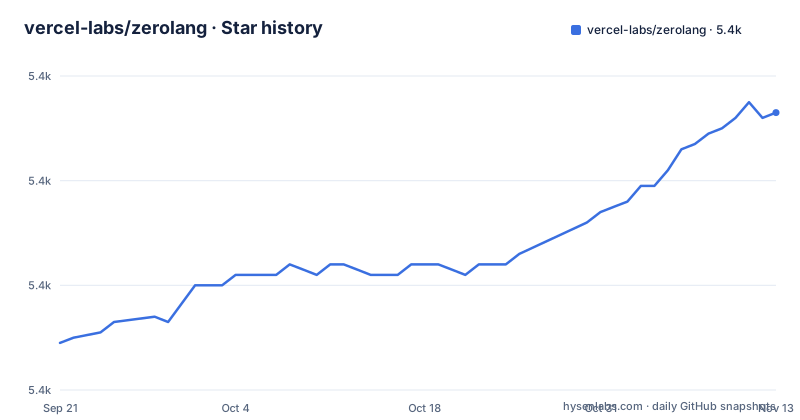
Star history
- vercel-labs/zerolang5,413 ★ · +44
| Repository | 2026-09-21 | 2026-11-13 |
|---|---|---|
| vercel-labs/zerolang | 5.4k | 5.4k |
44 Stars in the last 53 days, measured from the daily GitHub snapshot. Compare with other projects
Editorial analysis
zero.graph is the store and every .0 file is a projection of it
Zerolang moves the agent to the compiler side of the loop. The claim is that the semantic graph is the program database, so the structure a program lives in is the structure the compiler reasons about. Instead of handing an agent a text editor and a checker, the design hands it handles: symbols, node IDs, graph hashes, types, effects, ownership facts, capabilities, imports, call edges, and target facts. Edits aim at that semantic structure rather than line ranges, which removes the failure where an agent rewrites the wrong span after an earlier edit shifted everything below it.
The trusted file is the graph. A `.0` file is a projection, a readable rendering a human can review and occasionally edit, while the normal agent authoring surface stays on `zero query` and `zero patch`. Every example in the repository ships the pair: `examples/add.0` beside `examples/add.graph`, `examples/countdown.0` beside `examples/countdown.graph`, and the same pairing through `examples/cli-config`, `examples/cli-file`, `examples/codec-varint`, `examples/const-arithmetic`, and `examples/config-shape`. Four example directories hold cases needing more than one file, among them `examples/agent-repair-demo/` and `examples/c-interop/`. Keep only the `.0` copy in version control and you have kept the projection, not the thing the compiler checks.
Stale graph hashes and type errors fail before the store is written
A patch is checked before anything is stored, and the failure list is specific: stale graph hashes, unexpected field values, invalid shapes, and type errors. The graph hash is what makes a patch safe to submit from an agent that has been thinking for a while. If the store moved underneath it, the hash no longer matches and the write is refused instead of merged.
The edit vocabulary is named operations rather than free text. Creating a main function and a checked write takes two op flags on one command:
zero patch --op 'addMain' --op 'addCheckWrite fn="main" text="hello from zero\n"'`fn=` says which function receives the write and `text=` carries the string, so the payload is a structured field the compiler can type rather than a line it has to parse. The consequence for a reader is direct: an agent cannot fake progress by editing a file it does not understand. It has to name something the graph already knows, and when it guesses wrong the compiler stops it at submission time.
Install is one piped script that lands in the home directory
Installation is a single shell pipeline that drops the compiler under your home directory:
curl -fsSL https://zerolang.ai/install.sh | bash
export PATH="$HOME/.zero/bin:$PATH"
zero --version
Notice what is absent. The install carries no version flag, and there is no package for your application to declare. The workspace manifest inside the repository is marked private, so this is a compiler you put on a machine, not a dependency your build resolves.
The agent side has its own line:
npx skills add vercel-labs/zerolangThe compiler also bundles its own copies of that guidance, matched to the version you just installed:
zero skills
zero skills get agent
zero skills get graph
zero skills get language
zero skills get stdlib
First use is three commands. The default input is the current directory, so `.` is only for when you want to be explicit:
zero init
zero patch --op 'addMain' --op 'addCheckWrite fn="main" text="hello from zero\n"'
zero run
What comes back is the projection, and it reads like ordinary code:
pub fn main(world: World) -> Void raises {
    check world.out.write("hello from zero\n")
}
Two lines carry the model. The signature ends in `raises`, so failure is declared rather than discovered, and the body uses `check`, so the write is a checked effect instead of a bare call.
The daily loop is a fixed command list rather than a flag surface
`zero patch` is the command that changes the graph, and `zero query`, `zero inspect`, `zero check`, `zero test`, and `zero run` are the ones that expose compiler facts. For most package work the loop is the same every time:
zero query
zero patch --op help
zero patch --op 'addMain'
zero check
zero test
zero run -- <args>
`zero patch --op help` is the step that keeps an agent honest, because operation names are the interface and the set can move. `zero run -- <args>` is the only place in the walkthrough where arguments reach the program, and `-- <args>` is a placeholder you fill in. `zero check` and `zero test` hand the agent validation it can act on instead of a build log it has to interpret.
Beyond `--op`, `-- <args>`, and `--version`, the walkthrough documents no flags. There is no machine-readable output mode, no verbosity switch, and no documented way to aim the tools at a package root other than passing `.` where the current directory is assumed. A pipeline that needs structured results will be parsing text, with nothing in the documentation telling you that text is a stable contract.
zero export and zero import are the price of a readable projection
The projection boundary is explicit and each direction has a command. When a human wants to read the program as text:
zero export
zero verify-projection
When a human deliberately edits that text, the edit has to come back through the compiler:
zero import
zero check
That ordering is the point. Edit a `.0` file and stop, and the graph and the text are two different programs. `zero import` followed by `zero check` turns an edit into a checked change, and `zero verify-projection` is the read side of the same check.
The cost is real: two representations of every program, agreeing only if you run both commands. Agents are steered away from this path onto `zero query` and `zero patch`, which means the text your reviewers read is generated output. They can read it, and the project says they can occasionally edit it, but the graph stays the thing the compiler trusts.
The project calls itself experimental and says where not to run it
Zerolang's own warning comes before anything else: it is experimental, it expects breaking changes, rough edges, and security issues, and it belongs in isolated workspaces rather than against production systems or sensitive data. That is an instruction, not a disclaimer badge, and it should decide where you put it.
The version numbers agree with it. The workspace manifest reports version 0.3.4, private, Apache-2.0, and the three most recent releases landed three days apart: v0.3.2 on 2026-06-10, v0.3.3 on 2026-06-12, and v0.3.4 on 2026-06-13. The repository is not archived and the last push is dated 2026-09-16, so the code is moving, which is precisely why a 0.x series with releases days apart is poor ground for a deployment.
For a reader the effect is narrow and clear. Operation names you automate against can shift in a patch release, the compiler installs through a script with no version in the command line, and the project asks you not to aim it at production. Use it where a mistake costs a directory, not an afternoon.
Six runtime goals and no figure attached to any of them
The runtime section is a list of intentions, not measurements: token-efficient inspection, low memory usage, fast startup and builds, low runtime latency, explicit capabilities, and small dependency-free artifacts. Read them as targets the compiler is being pushed toward. A `benchmarks/` directory sits at the top level of the repository, but the walkthrough never says what it measures, on which machines, or what the numbers came out as.
So a decision that depends on startup time, resident memory, or artifact size cannot be made from what is written down. Measuring it yourself starts with a native build, not a one-liner:
pnpm install
make -C native/zero-c
bin/zero --version
That path assumes pnpm, which the manifest pins at 11.1.3, Node 24 or newer, and a working C toolchain with make, because the compiler is C, lives under `native/zero-c`, and launches through `bin/zero`. Turning a target into a number costs a full native build before the first data point exists.
No undo command, no platform list, no shape for compiler output
A careful reader will look for several things that are not written down. There is no rollback command. The documented set is init, patch, query, inspect, check, test, run, import, export, verify-projection, and skills, and none of them reverses a patch, so an accepted change you cannot live with leaves you restoring your own copy of the graph file.
There is no platform list either. The install is a shell pipeline that assumes a POSIX environment, the source build calls make, and neither line says whether Windows, macOS, and Linux are all supported or only some of them. And the handles that make the model appealing, node IDs, graph hashes, effects, capabilities, ownership facts, are named as things an agent can hold, with no documented layout for what a query returns or what a rejection looks like. Tooling that must read compiler output programmatically is left to discover the format.
None of that makes the project unusable. It makes it a compiler to try in a scratch workspace, where an unresolvable patch costs you a directory.
Editorial conclusion
Zerolang fits agent tooling that wants compiler-checked edits instead of text diffs, and it does not fit a production service that needs a stable language today. Before you build on it, pin the compiler version you install, keep the workspaces isolated as the project asks, and confirm your agent really calls zero query and zero patch rather than writing .0 files by hand.
Frequently asked questions
What is the source of truth in Zerolang, the .0 file or the graph?
The graph file is the checked compiler input and the .0 file is a human-readable projection of it. Agents normally stay on `zero query` and `zero patch`, while a human text edit goes back through `zero import` so the two representations do not silently diverge.
Is Zerolang safe to point at production data?
The project says no. Its safety warning calls Zerolang experimental, expects breaking changes, rough edges, and security issues, and asks for isolated workspaces rather than production systems or sensitive data.
Why does a Zerolang patch get rejected instead of applied?
Checks run before the store is written. Stale graph hashes, unexpected field values, invalid shapes, and type errors all fail first, so an agent working from an outdated view of the graph is sent back rather than merged.
How much does adopting the Zerolang compiler cost?
One piped shell script installs it into `~/.zero/bin` and the agent bootstrap skill comes from `npx skills add vercel-labs/zerolang`. The workspace manifest in the repository is marked private, so it is a compiler you install, not a dependency your application declares.
What does building Zerolang from source require?
The manifest pins pnpm 11.1.3 and asks for Node 24 or newer, and the build is `pnpm install`, `make -C native/zero-c`, then `bin/zero --version`. Checks around it are `pnpm run conformance`, `pnpm run native:test`, and `pnpm run command-contracts`.
Official sources
Add this badge to your README
If you maintain this project, the badge below links readers to this analysis and shows its maintenance status from the daily GitHub snapshot. Paste the markdown into your README; add ?metric=license or ?metric=stars to the image URL for a different field.

[](https://hysenlabs.com/projects/vercel-labs-zerolang)Star history chart for your README
[](https://hysenlabs.com/projects/vercel-labs-zerolang)Was this useful?