versus-incident: a self-hosted AI SRE agent that opens its own incidents
The self-hosted AI SRE agent. You don't have to monitor your systems alone. Versus Incident will keep track of your services, applications, and systems, detect new or unexpected problems, and provide your team with the evidence needed to investigate.
At a glance
- What is it?
- Versus Incident is an MIT licensed Go service that watches your logs, metrics, traces and Kubernetes, learns what normal looks like, and raises incidents for anything new, while also accepting webhook alerts from the tools you already run. The judgement is that the agent is the interesting part and the shadow mode is the honest part, since it lets you measure the agent's judgement before it pages anyone.
- Who is it for?
- versus-incident fits a team that already runs Kubernetes, has logs and metrics in a shape an agent can read, and wants incident detection that does not require anyone to maintain alert rules, especially one that keeps its reasoning with the incident so the on-call engineer starts with a summary and a severity instead of a blank page.
- Can I use it commercially?
- Yes. MIT is a permissive licence: you can use, modify and sell software built on it, as long as you keep its copyright and licence notices.
- Is it still maintained?
- Yes. The repository received new commits within the last day.
- What is it written in?
- Mainly Go, according to GitHub's language statistics.
Answers come from the project's GitHub data, last synced on November 7, 2026, and from our analysis. They are not legal advice.
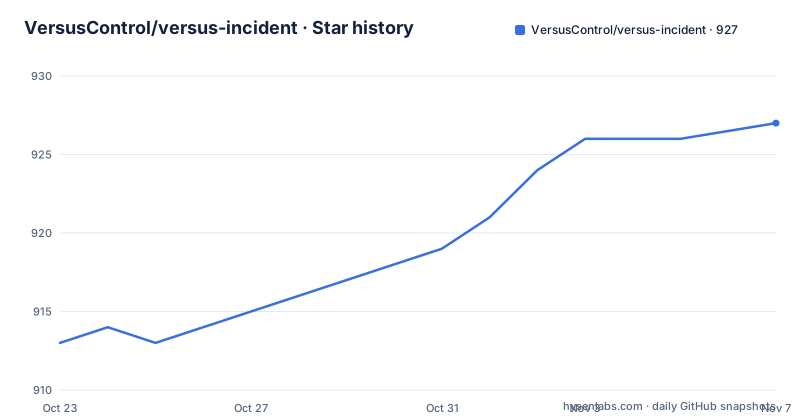
Star history
- VersusControl/versus-incident927 ★ · +14
| Repository | 2026-10-23 | 2026-11-07 |
|---|---|---|
| VersusControl/versus-incident | 913 | 927 |
14 Stars in the last 15 days, measured from the daily GitHub snapshot. Compare with other projects
Editorial analysis
Two front doors, one incident pipeline
Incidents reach Versus two ways, and the README is explicit that both are handled by the same notification, templating and on-call logic. The first is the AI SRE agent, where you point the agent at your logs, metrics, traces and Kubernetes, it learns your normal patterns, and it raises an incident automatically when a brand new error or anomaly appears, with no alert rules to maintain. The second is webhook alerts, where any tool that can POST a webhook sends incidents straight to Versus, formatted with your own templates, and the README names Alertmanager, Grafana, Sentry, CloudWatch SNS, FluentBit and your own scripts as candidates. Whichever source raises the incident, the same thing happens next. It is templated, fanned out to every channel you enable, and escalated to on-call if it is not acknowledged in time. The two are not mutually exclusive, so a sensible setup is the agent watching what your rules miss, and your existing rules still delivering the alerts you trust. That combination is the design point of the whole product.
Training, shadow, detect: the agent has to earn its pages
The agent has three modes, and the naming is the safety mechanism. In training mode it just watches and learns, and it never sends an alert. In shadow mode it watches and learns, and it writes a would have alerted log entry every time a line would have triggered an alert, still with no real alerts, which the README describes as good for checking the agent's judgement before going live. In detect mode it can create incidents for previously unseen patterns that pass configured filters, and an AI SRE triages each one, writing the summary, the severity and the suggested next steps before the incident is sent through every configured channel. Detection combines configured filters and pattern novelty, which is a genuinely different design from rule based alerting, and it is why the shadow mode exists. The README also notes that Redis is used to remember where the agent left off in each log source, so a restart does not make it re-learn what it already knows, and the get started instructions say to start in training mode and only then move from training to shadow to detect when you trust it.
Running the agent with Docker
The getting started path is a pair of container runs. The first one is Redis, which holds the agent's position in each log source:
docker run -d --name versus-redis -p 6379:6379 redis:7The second starts Versus itself in training mode, with the config and data directories mounted from the working directory so they survive a container restart:
docker run -p 3000:3000 \
  -e GATEWAY_SECRET=change-me \
  -e AGENT_ENABLE=true \
  -e AGENT_MODE=training \
  -e REDIS_HOST=host.docker.internal \
  -e REDIS_PORT=6379 \
  -v $(pwd)/config:/app/config \
  -v $(pwd)/data:/app/data \
  ghcr.io/versuscontrol/versus-incident
The example's `change-me` secret is a placeholder: replace it with a strong secret and restrict access to the dashboard and Redis port before using real data. The image is published on GitHub Container Registry under ghcr.io/versuscontrol/versus-incident, and the port mapping is 3000 to 3000. The agent needs a config.yaml and an agent_sources.yaml that point it at your logs, and once it is running you review the patterns it has learned on the admin dashboard at http://localhost:3000/ before changing AGENT_MODE.
The webhook endpoint and the two routes Versus exposes
Versus listens on port 3000 by default and exposes two routes. POST /api/incidents is the webhook endpoint for monitoring tools, and GET / is the embedded admin dashboard that you open in a browser. The second run in the README is the webhook path, and it shows the same image with a Slack configuration instead of the agent variables:
docker run -p 3000:3000 \
  -e GATEWAY_SECRET=change-me \
  -e SLACK_ENABLE=true \
  -e SLACK_TOKEN=your_token \
  -e SLACK_CHANNEL_ID=your_channel \
  ghcr.io/versuscontrol/versus-incident
The security model around the admin surface is worth reading in the configuration rather than the docs. A shared secret is required for all admin endpoints under /api/admin/* and /api/agent/*, API clients send it in the X-Gateway-Secret header, and the dashboard exchanges it once for an opaque HttpOnly session cookie. That is a small but deliberate design, since an operator interface that creates incidents and reads your log patterns should not be reachable with a cookie that a page script can read.
Configuration, and a storage backend that is only half there
Configuration is YAML based with environment variable support, and the shape of the file is visible in the agent configuration file. The top of that file names the instance, the bind address and the port:
name: versus
host: 0.0.0.0
port: 3000
Further down, the storage section carries a comment that is the most important line in the file for anyone planning a deployment, because it says plainly that only the file backend is implemented today and that redis and database are config stubs:
storage:
  type: file              # file | redis | database (env: STORAGE_TYPE)
That storage backend holds the pattern catalog, the shadow log and the incident history, so the file backend is where your learned patterns and your incident record live. The rest of the configuration covers the notification channels, the on-call integrations, and custom templates, which the feature list describes as Go templates, so an alert message can be written in your own format. The configuration itself is read with Viper, which is why environment variable substitution works, and the gateway secret is written as an environment reference rather than a literal value.
Kubernetes context, notification channels and on-call
The pieces around the incident pipeline are what turn a detection into a workflow. The Kubernetes Harness Dashboard is described as a way to explore your Kubernetes environment in one place, covering cluster health and capacity, workloads, resource relationships, recent changes, Helm releases and GitOps status, which is a lot of context to have next to an incident rather than in a separate tool. Notifications fan out to Slack, Microsoft Teams, Telegram, Viber, Email and Lark, and the README says more channels are coming. On-call integrations cover PagerDuty, Opsgenie, incident.io and ServiceNow, and the escalation rule is that an incident not acknowledged in time is escalated. There is also a DevOps Agent Chat, which the README describes as the shipped web experience being Chat in the Versus UI, designed to enhance understanding of the system. The repository backs all of this with a helm directory for Kubernetes deployment, plus a docker compose deployment, a high availability setup and a metrics source.
A Go service with a web UI built inside the same image
The implementation tells you how the project is run and who works on it. The module is github.com/VersusControl/versus-incident, it declares go 1.26.0 with toolchain go1.26.9, and the dependency list shows the shape of the product. The web layer is Fiber, configuration is Viper, Slack notifications use slack-go, Redis access uses go-redis, PostgreSQL access uses pgx, and CloudWatch Logs is read through the AWS SDK. The AI layer is built on the Eino framework, with model components for Claude, DeepSeek, Gemini, Ollama, OpenAI and Qwen, and embedding components for Gemini and Ollama, so the model provider is a configuration choice rather than a hard coded dependency. The Dockerfile is a three stage build that compiles a Node front end, cross compiles the Go binary with CGO_ENABLED=0 and drops the built assets into the final Alpine image so that the binary can embed them, which is why the admin dashboard ships inside the same container. The licence is MIT, the releases move quickly at patch level with v1.4.29, v1.4.30 and v1.4.31 landing in the first half of October 2026, and the last push was on 2026-10-19.
Editorial conclusion
versus-incident fits a team that already runs Kubernetes, has logs and metrics in a shape an agent can read, and wants incident detection that does not require anyone to maintain alert rules, especially one that keeps its reasoning with the incident so the on-call engineer starts with a summary and a severity instead of a blank page. It is the wrong choice if you need the file storage replaced by a database, since the redis and database backends are described as configuration stubs with only file implemented, and it is a poor fit if you want a fully autonomous pager, since the shadow mode exists precisely to prove the agent's judgement first. Before you turn on detect, run training and then shadow against real traffic, read the patterns the agent has learned on the admin dashboard at port 3000, and confirm which model provider you are willing to have read your logs.
Frequently asked questions
What are the AI SRE agent modes in versus-incident?
There are three. In training mode the agent only watches and learns and never sends an alert, in shadow mode it also writes a would have alerted log entry for anything that would have fired, and in detect mode it creates real incidents for lines it has never seen before. The README recommends starting in training and moving to shadow and then detect.
How do I forward alerts from my existing monitoring to versus-incident?
POST them to the webhook endpoint at /api/incidents on port 3000. Any tool that can send a webhook works, and the README names Alertmanager, Grafana, Sentry, CloudWatch SNS and FluentBit, with your own scripts as another option. The forwarded incidents flow through the same templates, channels and on-call logic as the agent's own detections.
How is the versus-incident admin dashboard protected?
A shared secret is required for all admin endpoints under /api/admin/* and /api/agent/*. API clients send it in the X-Gateway-Secret header, and the dashboard exchanges it once for an opaque HttpOnly session cookie, so the browser never holds the secret itself.
Official sources
Add this badge to your README
If you maintain this project, the badge below links readers to this analysis and shows its maintenance status from the daily GitHub snapshot. Paste the markdown into your README; add ?metric=license or ?metric=stars to the image URL for a different field.

[](https://hysenlabs.com/projects/versuscontrol-versus-incident)Star history chart for your README
[](https://hysenlabs.com/projects/versuscontrol-versus-incident)Was this useful?