Video.js v10: a modular player framework for Web and React, with an installer that only prints instructions
GitHub describes it as Video.js - open source HTML5 video player. The repository metadata lists JavaScript as its primary language. The metadata lists the NOASSERTION license. This article stays within the project description and details documented in the GitHub repository README.
At a glance
- What is it?
- Video.js v10 is a rebuilt, stable media player framework published under the @videojs npm scope, with separate packages for providers such as YouTube and Wistia. This guide covers how you install it, how its packages are versioned, and what is still open to change.
- Who is it for?
- Video.js v10 suits teams building a web or React player who are happy to compose it from @videojs packages and follow version-matched docs. It is a weaker fit if you need a frozen API surface today, since the maintainers are still collecting feedback on skins, component APIs and package exports.
- Can I use it commercially?
- Check first. The repository uses a licence we do not classify automatically, so read its LICENSE file before any commercial use.
- Is it still maintained?
- Yes. The repository last received commits 2 days ago.
- What is it written in?
- Mainly JavaScript, according to GitHub's language statistics.
Answers come from the project's GitHub data, last synced on November 15, 2026, and from our analysis. They are not legal advice.
Star history
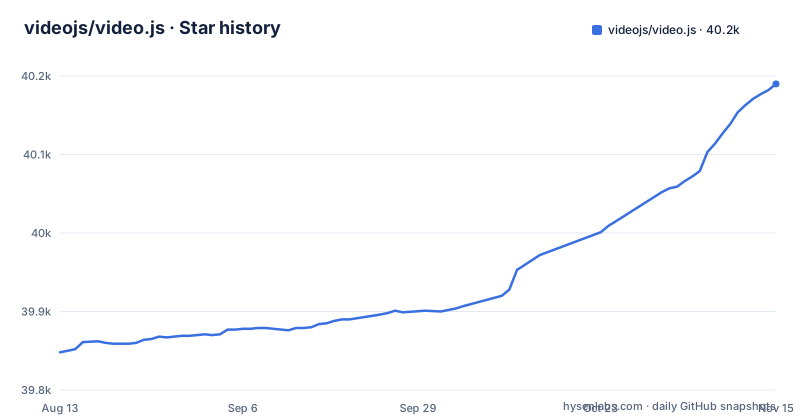
- videojs/video.js40,190 ★ · +342
| Repository | 2026-08-13 | 2026-11-15 |
|---|---|---|
| videojs/video.js | 39.8k | 40.2k |
342 Stars in the last 94 days, measured from the daily GitHub snapshot. Compare with other projects
Editorial analysis
Version 10 is a composable framework, not a single player file
Video.js v10 presents itself as a modern, modular and composable media player framework for Web and React, and the maintainers declare it stable. The core package is @videojs/core on npm, and the repository is a monorepo named @videojs/monorepo with packages/, apps/ and site/ directories. Design decisions are written up as RFCs in the rfc/ folder, and the wider v10 conversation runs in GitHub Discussions topic 9035.
For a reader arriving from search, the practical point is that "Video.js" now means a set of packages you assemble rather than one script. Instructions written for an earlier major version do not map onto that structure, so start from the v10 documentation at videojs.org/docs rather than from an old tutorial.
Provider packages ship in lockstep with the core
The latest release, [email protected], was tagged on 2026-10-22. In the same minute the project also tagged @videojs/[email protected] and @videojs/[email protected]. Playback from those services lives in its own packages, each carrying the same version number as the core.
That has two consequences. You only download the provider code you install, which suits the modular design. But you also have more version numbers to keep aligned. If you upgrade @videojs/core without upgrading the provider packages that were released alongside it, you end up mixing versions the project did not publish together. Treat every @videojs package in your lockfile as one unit and bump them at the same time. The CHANGELOG.md at the repository root and the GitHub releases page record what changed in each tag.
The installer prints instructions and leaves your project untouched
Video.js v10 does not offer one universal install line. Instead it provides a CLI that prints the installation choices matched to your framework and the current version:
npx @videojs/cli agents initThe command returns instructions without modifying your project. That is safer than a generator that rewrites files, but it means the install is still a manual step: you read the output, choose the option that fits, and add the packages yourself. The command name reflects its other audience. For AI coding agents, the project publishes a Video.js skill at github.com/videojs/skills so the agent reads the docs that match your installed version before writing code. If you work without an agent, the same CLI output and the website docs are the route in.
Skins, component APIs and package exports are still taking feedback
Stable does not mean finished. The maintainers ask for feedback on four areas: player skin designs, component structures and APIs, package structure and exports, and the repository, workspace and contributor guides. Three of those are the surfaces your application code touches directly.
The consequence for adopters is that the shape of imports and component props is the part of v10 most open to revision. Pin exact versions in production, read the changelog before each upgrade, and keep your player wrapper thin so that a change to an export path or a component API is a small edit in one place. If you have strong opinions on any of these areas, the Discord server and GitHub Discussions are where the team says it wants to hear them.
The license field reads Apache-2.0, but GitHub reports no assertion
GitHub's license detection does not assign this repository a recognised license; it reports NOASSERTION. The root package.json of the monorepo, on the other hand, declares "license": "Apache-2.0" with Video.js Contributors as the author. There is a LICENSE file at the top level.
The gap matters to anyone shipping Video.js in a commercial product or running a license scanner in CI. An automated tool reading GitHub's metadata will flag the repository as unknown, while one reading package metadata will see Apache-2.0. Before release, open the LICENSE file and check the license field of every @videojs package you actually install, rather than relying on the monorepo root or on GitHub's summary.
Contributors work in a vp driven pnpm monorepo
The repository uses pnpm workspaces, with a pnpm-workspace.yaml and pnpm-lock.yaml, and runs its tasks through a vp command. Node versions are pinned through .node-version, .nvmrc and mise.toml. A postinstall step runs build/scripts/link-aliases.mjs.
The build scripts separate the CDN bundle and the shadcn skins from the normal package build:
    "build:packages": "vp run --fail-if-no-match --filter='./packages/**' --filter='!@videojs/cdn' build",
    "build:cdn": "vp run @videojs/cdn#build:cdn",
    "build:shadcn": "vp run @videojs/skins#build:shadcn",
There is also a create:skin script that calls the @videojs/cli package, and a sandbox app with dev and dev:https variants for trying changes in a browser. The dev scripts use shell syntax such as ${NODE_OPTIONS:-} and redirect from /dev/null, so they assume a POSIX shell. CONTRIBUTING.md covers local setup.
The repository is configured for AI coding agents
Video.js v10 leans into agent assisted development more than most player projects. Besides the published skill and the agents init command, the repository root carries AGENTS.md, CLAUDE.md, an .mcp.json file and .agents/ and .claude/ directories, along with editor settings for VS Code and Zed. The lint scripts include one named lint:anti-slop.
For users this shows up as tooling that tries to keep generated code tied to the installed version. For contributors it means agent configuration is part of the codebase you will see in diffs and reviews. Help for both groups goes through the Discord server and GitHub Discussions. The repository is not archived and its last push was on 2026-11-02.
Editorial conclusion
Video.js v10 suits teams building a web or React player who are happy to compose it from @videojs packages and follow version-matched docs. It is a weaker fit if you need a frozen API surface today, since the maintainers are still collecting feedback on skins, component APIs and package exports. Before adopting it, run npx @videojs/cli agents init to get the install choices for your framework, keep all @videojs packages on the same version, and confirm the license of each package you ship.
Frequently asked questions
What is Video.js?
Video.js is an open source HTML5 video player. Version 10 is a modern, modular and composable media player framework for Web and React, and the maintainers describe it as stable.
How do I install Video.js?
Run npx @videojs/cli agents init to print the version-matched installation choices for your framework; it does not modify your project. The core package is @videojs/core on npm.
How do I use Video.js in React?
Video.js v10 is built for both Web and React. The npx @videojs/cli agents init command prints the installation choices for your framework, and the documentation is at videojs.org/docs.
Official sources
Add this badge to your README
If you maintain this project, the badge below links readers to this analysis and shows its maintenance status from the daily GitHub snapshot. Paste the markdown into your README; add ?metric=license or ?metric=stars to the image URL for a different field.

[](https://hysenlabs.com/projects/videojs-video-js)Star history chart for your README
[](https://hysenlabs.com/projects/videojs-video-js)Was this useful?