IPython: the interactive shell behind Jupyter, and when to use it directly
Official repository for IPython itself. Other repos in the IPython organization contain things like the website, documentation builds, etc.
At a glance
- What is it?
- IPython is the Python interactive shell that supplies introspection, magic commands and history, and it still ships as a standalone terminal tool. Here is how it installs, what the pyproject dependencies imply, and where it is the wrong choice.
- Who is it for?
- Adopt IPython if you work in a terminal and want introspection, magics and persistent history without a browser, and install it with pip or run it from a checkout via python -m IPython. Do not adopt it if you need a notebook document format or a shared web UI; that work now lives in Jupyter.
- Can I use it commercially?
- Yes. BSD-3-Clause is a permissive licence: you can use, modify and sell software built on it, as long as you keep its copyright and licence notices.
- Is it still maintained?
- Yes. The repository last received commits 5 days ago.
- What is it written in?
- Mainly Python, according to GitHub's language statistics.
Answers come from the project's GitHub data, last synced on November 14, 2026, and from our analysis. They are not legal advice.
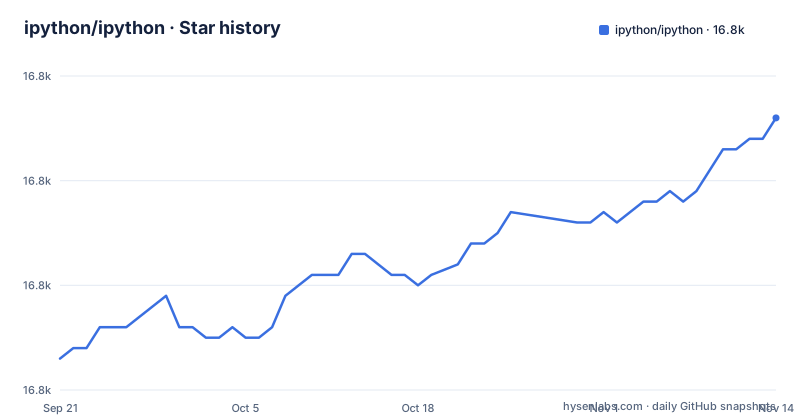
Star history
- ipython/ipython16,806 ★ · +23
| Repository | 2026-09-21 | 2026-11-14 |
|---|---|---|
| ipython/ipython | 16.8k | 16.8k |
23 Stars in the last 54 days, measured from the daily GitHub snapshot. Compare with other projects
Editorial analysis
What IPython solves, and who it is actually for
The plain Python REPL gives you a prompt and almost nothing else. IPython adds object introspection, input history that persists across sessions, cached output references, tab completion for variables, keywords, filenames and function keywords, a magic command system, session logging and reloading, and integrated access to pdb and the profiler. The README calls it "a command shell for interactive computing in multiple programming languages, originally developed for the Python programming language."
The audience is narrower than it was a decade ago. Anyone who wants a notebook now installs Jupyter, and the README says so directly: "The Notebook, Qt console and a number of other pieces are now parts of Jupyter." What remains in this repository is the shell itself and the embedding API. If you live in a terminal, debug by poking at live objects, and want the same session history tomorrow, this is the tool. If you want a shareable document with saved outputs, it is not.
The mechanism: a traitlets-configured shell with an embeddable core
IPython is a Python package with a console entry point. pyproject.toml declares two scripts, ipython and ipython3, both pointing at IPython:start_ipython. Under that entry point sits a configuration layer built on traitlets, which is what makes the README's claim about "easy switching between different setups" work: profiles are configuration, not environment variables, so you can keep separate setups side by side.
The runtime dependencies tell you what the interactive experience is assembled from. prompt_toolkit drives the line editing, jedi does completion and static analysis, pygments and ipython-pygments-lexers handle syntax colouring, stack_data formats tracebacks, matplotlib-inline wires plots into inline backends, and pexpect handles system shell interaction on non-Windows platforms. psutil is pulled in everywhere except emscripten, cygwin and android. That is a real dependency surface, and the prompt_toolkit constraint is pinned below 3.1.0, so it can collide with other tools that want a newer release.
Embedding is a first-class use case, not an afterthought. The repository ships examples/Embedding/ and an examples/IPython Kernel/ directory, and the README lists "easily embeddable in other Python programs and GUIs" among the main features. The kernel in the Jupyter stack is this same core wrapped in a messaging protocol.
Installing IPython and running a first real session
The package is on PyPI as ipython, so a normal pip install works. The minimum Python version is enforced: pyproject.toml sets requires-python to >=3.11, and setup.py exits with an error message listing the version history if you are below that. Install it into an environment that already meets the requirement.
pip install ipython
ipython
The second command starts the shell. You should see the IPython banner with version and Python information, then an In [1]: prompt. Type an expression and press Enter; the result is bound to Out[1], which you can reference later in the session.
If you want to try the development tree without installing it system-wide, the README gives the direct route from a checkout.
python -m IPythonTo see the introspection that distinguishes this from the stock REPL, put a question mark after a name.
import os
os.path.join?
IPython prints the signature and docstring inline. Two question marks (os.path.join??) show the source when it is available. History is written to a SQLite database under your profile directory, so the next session can recall it; the README describes this as "input history, persistent across sessions."
Where IPython is the wrong tool
The most common mistake is installing IPython expecting a notebook. It will not give you one. The README states plainly that the Notebook and Qt console are now parts of Jupyter, and points at the Jupyter installation docs instead. If your deliverable is a document with embedded outputs that someone else opens in a browser, you want Jupyter, and IPython is a dependency of it rather than a substitute.
The second limitation is the dependency footprint. A shell that pulls in jedi, prompt_toolkit, pygments, stack_data, matplotlib-inline, pexpect and psutil is not a lightweight addition to a minimal container or a constrained embedded target. On emscripten, pexpect and psutil are excluded by environment markers, and psutil is also excluded on cygwin, so behaviour differs by platform rather than being uniform.
The third is version churn. The setup.py error text documents a steady march of minimum versions: IPython 8.13+ required Python 3.9, 8.19+ required 3.10, and 9.x requires 3.11. The README notes that after 8.16 the project follows SPEC-0 for determining the minimum supported Python version. If you pin IPython in a long-lived environment, plan for that floor to move.
Finally, the README itself concedes the taste question: "IPython may not be to your taste." It then lists alternatives rather than arguing the point, which is an honest position for a project that has been the default for so long.
How IPython differs from bpython, ptpython and the stock REPL
The README names five alternatives: the classic Python REPL, bpython, mypython, ptpython/ptipython and Xonsh. The meaningful split is between shells that are libraries you can embed and shells that are applications.
bpython and ptpython are terminal front ends. They aim at a better interactive experience in the terminal and stop there. IPython's distinguishing feature is that the same core is embeddable and is what the Jupyter kernel is built on, which is why examples/Embedding/ exists in this repository. If you need to drop a Python prompt into your own application, IPython lists that as a main feature and ships examples for it.
The stock REPL is the honest baseline. It has no third-party dependencies and starts instantly. It also has no output caching, no magic commands and no completion beyond what CPython ships. For a one-off calculation in a fresh container, the stock REPL wins on weight. For a session you will return to, it does not.
Xonsh is a different proposition: it is a shell language that integrates Python, so the comparison is only partial. If your problem is shell scripting with Python syntax, IPython is not the answer.
Maintenance, licensing and the cost of upgrading
The repository is not archived, and the last push was on 2026-11-02. That is recent enough to treat the project as live, though the GitHub release list is not: the most recent release listed is 7.18.1 from 2021-01-30, which is far behind the 9.x line that setup.py references. Treat the release list as stale metadata rather than as the current state of the project, and check PyPI directly for what is actually installable.
The licence is BSD-3-Clause, declared in pyproject.toml as license = "BSD-3-Clause" with license-files pointing at LICENSE and COPYING.rst. That is a permissive licence, and the practical implication for most teams is that bundling or modifying it carries few obligations beyond retaining the notice. This is not legal advice; read COPYING.rst if you are redistributing.
Upgrade cost is dominated by the Python floor. Because the project follows SPEC-0, the minimum supported Python version moves on a published schedule, and setup.py prints the version history explicitly when the check fails. An environment pinned to an older interpreter will not install a current IPython at all. The second cost is the prompt_toolkit constraint, which is capped below 3.1.0; if another package in the same environment needs a newer prompt_toolkit, resolution will fail and you will be choosing between them.
Configuring git blame to survive formatting commits
One detail in the README is aimed at contributors rather than users, and it is worth knowing before you open a pull request. Formatting changes normally destroy git blame, because every line gets a new commit. As of git 2.23, a blame ignore file fixes that, and the repository ships one at the top level as .git-blame-ignore-revs.
The README gives the configuration step: install git 2.23 or newer, then run the script for your platform from the repository root. On POSIX systems that is tools/configure-git-blame-ignore-revs.sh; on Windows it is tools\configure-git-blame-ignore-revs.bat. After that, blame skips the commits listed in the ignore file and attributes lines to the change that actually introduced them.
This matters because the repository also ships .pre-commit-config.yaml and a .flake8 configuration, which means formatting is enforced rather than optional. If you contribute without running the blame configuration, you will see your own history flattened by reformatting commits and may misread who changed what.
Editorial conclusion
Adopt IPython if you work in a terminal and want introspection, magics and persistent history without a browser, and install it with pip or run it from a checkout via python -m IPython. Do not adopt it if you need a notebook document format or a shared web UI; that work now lives in Jupyter. Before committing, verify your Python version against the >=3.11 requirement in pyproject.toml and check whether the prompt_toolkit pin conflicts with anything else in your environment.
Frequently asked questions
What is the difference between IPython and Python?
Python is the language and its standard interpreter; IPython is an interactive shell built on top of it. The README describes IPython as a command shell for interactive computing that adds introspection, tab completion, persistent history, magic commands and integrated access to pdb and the profiler.
What is IPython used for?
It is used for interactive work in a terminal: inspecting live objects, running code with cached output references, and keeping history across sessions. The README also lists embedding it in other Python programs and GUIs as a main feature, and the same core underlies the Jupyter kernel.
What are the differences between IPython and Jupyter?
The Notebook, Qt console and other pieces are now part of Jupyter rather than this repository, and the README points at the Jupyter installation docs for them. IPython remains the interactive shell and the embeddable core; if you want a notebook, install Jupyter instead.
How do I install IPython?
Install the ipython package with pip, then run ipython to start the shell. The project requires Python 3.11 or newer, and setup.py exits with an error listing the version history if your interpreter is older.
How do I use IPython in a terminal?
Run the ipython command after installing the package, or run python -m IPython from a checkout without installing it system-wide. You get an In [1]: prompt where results are bound to Out[1] and history persists across sessions.
How do I install IPython on Windows?
Install the ipython package with pip on a Python 3.11 or newer interpreter. On Windows the package declares a colorama dependency and excludes pexpect through an environment marker, so system shell integration differs from POSIX systems.
Official sources
Add this badge to your README
If you maintain this project, the badge below links readers to this analysis and shows its maintenance status from the daily GitHub snapshot. Paste the markdown into your README; add ?metric=license or ?metric=stars to the image URL for a different field.

[](https://hysenlabs.com/projects/ipython-ipython)Star history chart for your README
[](https://hysenlabs.com/projects/ipython-ipython)Was this useful?