VisionDepth3D ships as an installer, and the repository is the download page
Generates 3D from 2D videos in multiple output formats using AI-powered depth mapping.
At a glance
- What is it?
- VisionDepth3D turns 2D footage into stereoscopic video on the desktop, with a free tier capped at 1080p and a $59.99 one-time Pro tier. The application source is private, the licence forbids derivatives, and only installer builds count as current.
- Who is it for?
- Buy VisionDepth3D when you shoot in 2D and need SBS, VR180 or anaglyph output this week, when occlusion artefacts are the reason your pipeline stalls, and when a one-time $59.99 beats maintaining your own depth stack. Do not buy it to read, audit or extend the code, because the protected source is private and the no-derivatives licence closes that door, and do not buy the Pro tier for a clip under three minutes at 1080p, since the free build already covers that.
- Can I use it commercially?
- Check first. The repository uses a licence we do not classify automatically, so read its LICENSE file before any commercial use.
- Is it still maintained?
- Yes. The repository last received commits 26 days ago.
- What is it written in?
- GitHub does not report a main language for this repository.
Answers come from the project's GitHub data, last synced on October 21, 2026, and from our analysis. They are not legal advice.
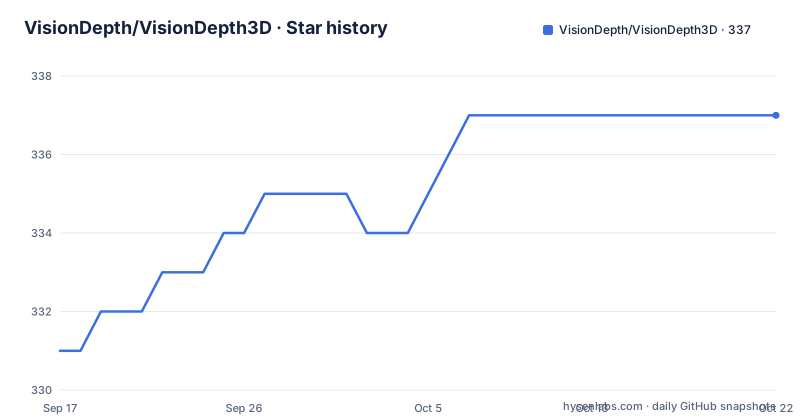
Star history
- VisionDepth/VisionDepth3D337 ★ · +6
| Repository | 2026-09-17 | 2026-10-21 |
|---|---|---|
| VisionDepth/VisionDepth3D | 331 | 337 |
6 Stars in the last 34 days, measured from the daily GitHub snapshot. Compare with other projects
Editorial analysis
The repository is a release page with no source in it
The Notice at the top of VisionDepth3D's README is unambiguous about what this repository is. VisionDepth3D is distributed through official installer builds, and the repository serves as the public release, documentation, legal notice, installer download, issue tracking and bug reporting page. Current protected application source code is maintained privately and is no longer distributed as public source.
The tree matches that description exactly: CHANGELOG.md, LICENSE.txt, README.md, UserGuide.md, VisionDepth3D_Method.md, an assets folder and a legal folder. There is no source directory, no build script and no dependency manifest, so nothing here can be installed with a package manager or compiled from a checkout.
The licence is described as proprietary and no-derivatives. Forking, copying, redistributing, modifying, repackaging, publishing or creating derivative works is not permitted without express written permission from Johnathan Carpenter / VisionDepth. Older public source snapshots, forks and archived copies are stated not to represent current official builds, which matters if you still have a v4-era copy: the code you are reading is not the code behind v5.2. The repository's license field reads NOASSERTION, consistent with terms that live in LICENSE.txt and the legal folder rather than in an OSI identifier.
Free stops at 1080p with a watermark and a three-minute clip
The Free tier is the honest way to try this. It covers the core local 2D-to-3D workflow on a single clip: video conversion up to three minutes, single image conversion, depth generation for images and video, Half-SBS, Full-SBS and Anaglyph output, the basic 3D Assistant controls, basic depth previews, the image side of the Depth Blender workflow, RIFE frame interpolation up to 2x, frame extraction, and processing that stays on your machine.
Two limits define what Free is for. Exports are capped at 1080p output height, and every export carries a VisionDepth3D watermark. The README also reserves advanced models, batch workflows, rendering formats and production tools for Pro, so the free build is a single-clip demonstration rather than a working pipeline.
Pro costs $59.99 once, with no subscription, and removes the length limit, the watermark and the height cap. It adds VR and VR180 output, passive interlaced output, Live 3D, batch processing over video and image folders, advanced depth inference controls, a wider set of official depth models, the full Depth Blender video and frame-folder workflows, high FPS RIFE, AI super-resolution, scene detection and extraction, accelerated RIFE plus SR, advanced encoding controls, 4K and higher workflows, and a job queue.
Two clauses in that section are worth reading twice. The licence is granted to individual creators for professional and commercial work provided they hold the necessary rights to the media, and a Pro purchase enables software features without transferring any right in FFmpeg, RIFE, Real-ESRGAN, the AI models or the media itself. Team, studio, resale, redistribution, hosted service and custom business use may need separate written permission.
Two renderers decide how a depth map becomes parallax
Depth estimation is only half the job. VisionDepth3D ships two stereo rendering methods, and the difference between them is where output artefacts come from.
The Subpixel Z-Splat Renderer arrived in v5.1 and is described as a depth-aware stereo projection with smoother subpixel displacement and improved handling around depth boundaries and occlusions. The Classic Stereo Warp is the older path, using GPU-accelerated per-pixel, depth-aware parallax shifting. Boundary handling is the reason to care: the pixels where a foreground object meets its background are exactly where a depth map is least certain, and the two renderers disagree most there.
Both are built on what the project calls the VisionDepth3D Method, documented in its own repository file. The named pieces are depth shaping and pop controls, subject-anchored convergence, scene-aware stereo scaling, edge-aware masking and feathering, floating-window edge protection, and occlusion healing plus edge repair. In plain terms the pipeline predicts depth, decides how far each image should shift, masks the regions where that shift would tear, and repairs the torn pixels.
The first pair of controls is what you will actually touch. The 3D Assistant offers ready-made styles with adjustable 3D strength, foreground pop-out, viewing comfort, stereo stability, screen depth and subject screen plane. Subject-anchored convergence keeps the person in shot on one plane instead of letting the background drift behind them.
Heatmaps and clip ranges exist so you do not render the whole take
Rendering a stereo clip is expensive, and the diagnostics here are built around that cost. The live preview and diagnostics panel offers anaglyph preview, side-by-side preview, heatmaps, edge and mask inspection, and stereo difference views.
Anaglyph preview is the cheapest useful check: red and cyan glasses are not needed, the ghosting you see on a monitor is roughly the discomfort a viewer will feel. Stereo difference views do the same job numerically, showing the per-pixel displacement between the left and right images so a bad background region is visible as a hard edge in the difference rather than as vague blur.
The other lever is clip-range rendering, described as a way to test difficult scenes before committing to full renders. For a shot with a foreground face against a busy street, you can render the ten seconds where the occlusion healing either holds or fails, adjust the masks, and only then queue the take. Combined with the FFmpeg encoding pipeline, which uses CPU and hardware encoders when available, that is the difference between a two-minute feedback loop and an overnight one.
None of this is documented as an API. The controls live in the desktop application, and VisionDepth3D_Method.md is the only technical description of the algorithm in the repository, which is one more reason the source being private limits what anyone outside the project can verify.
Five depth models behind four inference backends and a local cache
The depth engine is where the compute cost lives. VisionDepth3D lists five AI depth models: Depth Anything V1, Depth Anything V2, Distill Any Depth, Video Depth Anything, and Depth Anything 3 (DA3). Switching between them is one click, with automatic local model caching so the weights are downloaded once rather than per render.
Four inference backends sit behind that switch: PyTorch, TorchHub, Diffusers and ONNXRuntime. Video Depth Anything is the model aimed at moving footage, and the engine adds video-aware depth estimation for temporal consistency plus depth normalization and temporal stabilization, both of which exist to stop frame-to-frame flicker. Per-frame depth flicker is the defect that survives everything else, because a still frame looks correct while the video swims.
Depth generation accepts a single image, a video, or a folder of frames, which matters for workflows that already extract frames elsewhere. The project's table of contents names two more stages the Free tier only partly exposes: Depth Blender as multi-source depth fusion, and an FPS and Upscale Enhancer built on RIFE plus Real-ESRGAN. Expanded access to the official depth model list is a Pro feature, so the free build ships with a narrower set than the full list.
The RIFE ceiling in Free is 2x interpolation. Pro raises it to high FPS RIFE and adds accelerated RIFE plus SR processing, which is where the hardware requirement starts to matter.
Two builds, one version number, dated the same day
The release list is short and it splits by compute path rather than by feature. Version 5.2 shipped twice on 2026-09-25, once as DirectML-v5.2.0 and once as CUDA-v5.2.0, and the repository's last push is dated 2026-09-26. The default branch is Main-Stable, so the public tree is the stable line rather than a development head.
DirectML is the build for machines without an NVIDIA CUDA stack, and CUDA is the build for those with it. That choice is made at download time, not at runtime, and it is the first thing to check before installing anything, because a CUDA build on a DirectML-only machine and the reverse both cost you the afternoon.
There is no install command in the README, and there could not be one. The project distributes installer builds through its official release channels, and the same page links an itch.io download listing. Expect a desktop installer rather than a wheel: the docs live in UserGuide.md, the algorithm write-up in VisionDepth3D_Method.md, and the licence and third-party notices in LICENSE.txt and the legal folder.
Because the app is closed source, the CHANGELOG.md is the closest thing to a technical history. For a paid desktop tool that is a thin substitute for release notes you can read in the source, and it is one of the reasons to weigh the free tier carefully before committing.
Building the same pipeline yourself is the real alternative
Every heavy component VisionDepth3D uses is named in its own documentation, which makes the alternative unusually concrete. Depth Anything, Video Depth Anything or Distill Any Depth can produce the depth map. RIFE interpolates frames, Real-ESRGAN upscales, FFmpeg muxes and encodes, and an ONNXRuntime or PyTorch backend runs the model. The parts VisionDepth3D does not hand you are the stereo compositor, the mask and edge logic, the occlusion repair, the diagnostics, and the desktop workflow around them.
That is the difference in approach, and it cuts both ways. Assemble it yourself and you own every stage: no watermark, no 1080p cap, no three-minute limit, no $59.99, and the output height is whatever your machine allows. You also take on temporal flicker across frames, per-pixel parallax shifting, edge feathering at occlusion boundaries, and an encoder pipeline, which is the work the Classic Stereo Warp and the occlusion healing pass exist to do.
For a studio already running a render farm, that trade usually favours the DIY route. For one person who needs a VR180 master of a finished take before a client review, buying the tool is cheaper than rebuilding the compositor. The deciding factor is not quality, since neither route runs a model you cannot download, but whether your deadline can absorb the debugging time on depth boundaries.
Editorial conclusion
Buy VisionDepth3D when you shoot in 2D and need SBS, VR180 or anaglyph output this week, when occlusion artefacts are the reason your pipeline stalls, and when a one-time $59.99 beats maintaining your own depth stack. Do not buy it to read, audit or extend the code, because the protected source is private and the no-derivatives licence closes that door, and do not buy the Pro tier for a clip under three minutes at 1080p, since the free build already covers that. Verify three things before paying: run the same difficult shot through both tiers, check whether your machine matches the build you download (DirectML or CUDA, dated 2026-09-25), and confirm you hold the rights to every frame you feed it, since the Pro licence covers the software and transfers nothing from FFmpeg, RIFE, Real-ESRGAN or the depth models.
Frequently asked questions
How do I use VisionDepth3D?
It is a desktop application, not a library. The project distributes official installer builds through its GitHub releases and an itch.io page, and the README contains no pip or command line install. The user guide lives in UserGuide.md in the repository.
Is VisionDepth3D open source?
No. The README states that current protected application source code is maintained privately and is no longer distributed as public source. It carries a proprietary, no-derivatives licence that forbids forking, copying, redistributing, modifying or repackaging without written permission from Johnathan Carpenter / VisionDepth.
What does VisionDepth3D Pro cost and what does it remove?
Pro is $59.99 USD one-time with no subscription. It removes the video length limit, the output height cap and the watermark, and adds VR180, passive interlaced, Live 3D, batch processing, high FPS RIFE, AI super-resolution, scene detection, 4K workflows and a job queue.
Does the free version of VisionDepth3D add a watermark?
Yes. Free exports are limited to 1080p output height and include a VisionDepth3D watermark, and RIFE interpolation is capped at 2x. A single video conversion runs up to three minutes in Free.
Which depth models does VisionDepth3D use?
Five are listed: Depth Anything V1, Depth Anything V2, Distill Any Depth, Video Depth Anything, and Depth Anything 3 (DA3). They run through PyTorch, TorchHub, Diffusers and ONNXRuntime backends, with one-click switching and automatic local model caching.
Official sources
Add this badge to your README
If you maintain this project, the badge below links readers to this analysis and shows its maintenance status from the daily GitHub snapshot. Paste the markdown into your README; add ?metric=license or ?metric=stars to the image URL for a different field.

[](https://hysenlabs.com/projects/visiondepth-visiondepth3d)Star history chart for your README
[](https://hysenlabs.com/projects/visiondepth-visiondepth3d)