jshookmcp puts 733 tools behind a token budget and a fifty tool activation cap
js hook toolkit that all you need
At a glance
- What is it?
- vmoranv/jshookmcp is an AGPL-3.0 TypeScript MCP server that gives an AI agent browser automation, network interception, WASM disassembly, APK triage, and process instrumentation in one process. Its interesting design choice is that the schema cost is budgeted, and its interesting default is that artefacts land in your working tree.
- Who is it for?
- This fits someone doing authorised research on software they own or have permission to test, where the work spans a page, a bundle, a WASM module, and an APK and no single tool covers that. Check five things.
- Can I use it commercially?
- Yes, with strict conditions. AGPL-3.0 is a network copyleft licence: if people use a modified version over a network, for example as a hosted service, you must offer them its source code under the same licence.
- Is it still maintained?
- Yes. The repository last received commits 1 day ago.
- What is it written in?
- Mainly TypeScript, according to GitHub's language statistics.
Answers come from the project's GitHub data, last synced on November 22, 2026, and from our analysis. They are not legal advice.
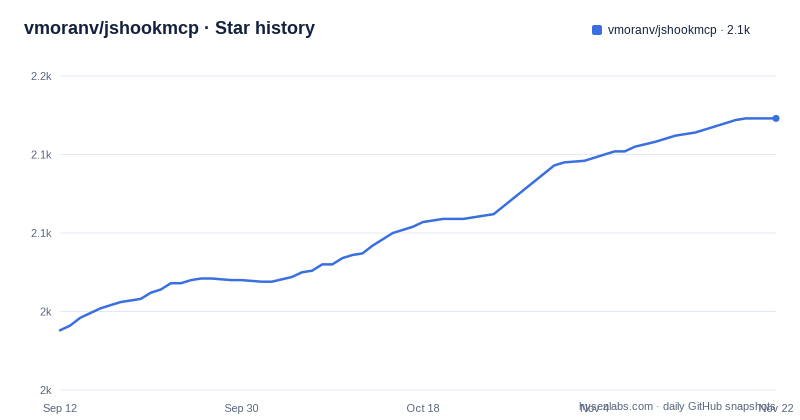
Star history
- vmoranv/jshookmcp2,123 ★ · +135
| Repository | 2026-09-12 | 2026-11-22 |
|---|---|---|
| vmoranv/jshookmcp | 2k | 2.1k |
135 Stars in the last 71 days, measured from the daily GitHub snapshot. Compare with other projects
Editorial analysis
Two command names, one entry file, and three public exports
The manifest registers two binaries, `jshook` and `jshookmcp`, and both resolve to the same file, dist/index.mjs. There is one implementation and two names for it, so which one you type is a preference rather than a difference in behaviour. The exports map is more informative, because it has three entries where most servers have one. The root export is the server itself. `./plugin-api` exposes a plugin interface, which is the surface a hot reload extension is written against. `./fleet-api` exposes a fleet interface, matching the multi-agent coordination the capability list advertises. So the package is built to be extended from outside its own release cycle, and the published files list carries what that needs: the built output, a workflows directory, the native scripts directory, and a postinstall script. The repository root carries a server manifest and an OpenAPI document, so the HTTP surface and the registry entry are both described outside the code.
The published package includes a postinstall script
The files array in the manifest is short and worth reading closely. Alongside dist and workflows it lists `src/native/scripts`, which means source scripts rather than built output ship to the registry, and `scripts/postinstall.cjs`, which means the package runs code at install time on the machine that installs it. Neither is unusual for a package with native helpers, and neither is free of consequence: an install step executes before you have run any of the tooling, and the package's own description makes clear that this server's job includes attaching to browsers, processes, and memory. The scope argument in the other direction is that the native helpers are what the disassembly and instrumentation features need to work at all, so a package that could not install them would ship a tool that does not run. What is worth doing is reading that script, the same way you would read any postinstall, before letting it execute. The license is declared as AGPL-3.0-only in the manifest, the strictest of the AGPL variants in the sense that it grants no alternative licensing path.
The schema cost is the design unit: three thousand tokens or forty thousand
The central claim is that most MCP servers for JavaScript analysis expose a handful of hand-rolled tools, and that this one is closer to an operating system for front-end reverse engineering: 36 self-discovered domains and a search-first meta tool that keeps token cost under control. The numbers are given. The `search` profile loads roughly three thousand tokens of tool metadata and uses BM25 with hybrid vector ranking. The `full` profile exposes all 733 tools at around forty thousand tokens. A `workflow` profile sits between them with composite scripts. Agents are expected to move up the ladder as a task grows rather than starting inside forty thousand tokens of schema. Supporting that are four meta tools: `describe_tool`, `call_tool` with argument validation, `coverage_report`, and `search_tools`. So a model that does not know a tool exists is expected to find it by search rather than by having been handed the list, which is also why `search_tools` is the first step in most of the documented workflows.
The server bounds the agent with a token budget, a tool cap, and a loop threshold
Three settings do the containing, and they are the most interesting part of the configuration surface. `MCP_TOOL_ACTIVATION_BUDGET_TOKENS` defaults to 30000, which is the ceiling on schema the server will activate in one session, sitting between the three thousand of the search profile and the forty thousand of the full one. `MCP_TOOL_MAX_ACTIVE_TOOLS` defaults to 50, which is a hard count on how many tools can be live at once out of the 733. `MCP_DOOM_LOOP_THRESHOLD` defaults to 5, which is an agent-behaviour circuit breaker on repeated identical calls. Alongside those are the gates an operator writes: `MCP_TOOL_ALLOW_TOOLS` as an explicit allowlist, and `MCP_TOOL_RULES_JSON` for rules. So the project has thought about the two failure modes that matter for an agent with this much capability, which are spending the whole context on schemas and looping. What it has not built is a per-target authorisation check, so the boundary of what this server touches is still whatever URL, host, or file the model decides to hand it.
Every artefact directory defaults to a relative path, TLS keylog included
The runtime paths are all relative to the project root, and the defaults are visible as a list: screenshots to `screenshots`, CAPTCHA screenshots to `screenshots/captcha`, debugger sessions to `debugger-sessions`, the extension registry to `artifacts/extension-registry`, the registry cache to `.jshookmcp/cache`, and the TLS keylog to `artifacts/tmp`. The last one is the one to notice. A TLS keylog is session key material, and by default it is written into a subdirectory of your working tree, which is a directory that is usually under version control. Two other defaults sit alongside: screenshots land in the tree too, and the cache directory is not ignored by default unless the ignore file says so. In authorised work on your own traffic this is convenient, because the artefacts sit next to the analysis. Against a host you do not control it is a different picture, and the honest reading is that the defaults are tuned for the first case.
A twenty four hour keepalive sits next to a thirty second request timeout
The transport defaults are mostly conservative and one is not. `MCP_TRANSPORT` defaults to stdio, `MCP_HOST` to 127.0.0.1, `MCP_ALLOW_INSECURE` to false, and `MCP_TRUST_PROXY` to false, so the server starts on loopback over a pipe and refuses both an insecure mode and spoofed proxy headers. Rate limiting is on by default with a sixty second window and a maximum of sixty requests, which works out to one per second. Body size is capped at ten megabytes, concurrency at sixty-four in-flight requests, and there are separate timeouts for the request at thirty seconds and for headers at ten. The keepalive timeout is 86400000 milliseconds, which is twenty four hours, against that thirty second request ceiling. A day-long idle socket is longer than most proxies and load balancers hold open, so on anything but a loopback or stdio deployment this is the default worth changing first.
The CAPTCHA solver takes your answer and refuses to probe the page
One capability is bounded by design and the document says so in a parenthetical: an explicit-input CAPTCHA solver, with no built-in page or feature probing. That is a scope decision, not a missing feature. The solver does not inspect the challenge to work out an answer on its own; a person supplies it and the server replays it, which is why the documented workflow is to drive a Camoufox page, take a screenshot, solve with explicit input, and replay. The wider capability list is where the boundary matters more, because in one server you have Chromium and Camoufox through CDP with anti-detection presets, an intercepting proxy that generates its own certificate authority on demand, WebSocket capture, GraphQL introspection and replay helpers, a Burp Suite bridge, TLS keylog and session tooling, Frida and Ghidra and IDA bridges, syscall hooking, hardware breakpoints, live process attach, and memory read and write with region guards. Nothing in that list is wrong for authorised research, and nothing in the configuration asks who authorised it.
Editorial conclusion
This fits someone doing authorised research on software they own or have permission to test, where the work spans a page, a bundle, a WASM module, and an APK and no single tool covers that. Check five things. Where your artefacts land, because every runtime path defaults to a relative directory in the project root and one of them is the TLS keylog, so a session you capture on a host you do not control is written into your working tree by default. Which profile you run, since the full profile is around forty thousand tokens of schema and the search profile around three thousand, and the activation budget defaults to thirty thousand. What you point it at, since there is no per-target authorisation check in the configuration and the boundary is the allowlist of tools plus the rules file you write yourself. Whether the CAPTCHA solver's design is acceptable to you, because it takes an answer you supply and explicitly does not probe the page. And what the native bridges reach, since Frida, Ghidra, IDA, live process attach, and hardware breakpoints are all in the same server as the browser tools.
Frequently asked questions
What is jshookmcp and how many tools does it have?
An AGPL-3.0 TypeScript MCP server described as a search-first, profile-aware reverse-engineering workspace for AI agents, with 733 tools across 36 auto-discovered domains covering browser automation, network interception, WASM, process instrumentation, and APK analysis.
What are the tool profiles in jshookmcp?
Three. `search` loads roughly 3K tokens of tool metadata with BM25 and hybrid vector ranking, `workflow` exposes composite scripts, and `full` exposes all 733 tools at around 40K tokens. The default is the search profile, and the activation budget defaults to 30000 tokens with at most 50 active tools.
Where does jshookmcp write its files?
Into relative directories under the project root by default: screenshots, screenshots/captcha, debugger-sessions, artifacts/extension-registry, .jshookmcp/cache, and artifacts/tmp for the TLS keylog. Each has an environment variable override, and the example file says to copy it only when you need to change a default.
What are the network defaults for the jshookmcp HTTP transport?
Transport defaults to stdio, host to 127.0.0.1, insecure mode is off, proxy headers are not trusted, rate limiting allows 60 requests per 60 second window, body size is capped at 10MB, and the request timeout is 30 seconds. The keepalive timeout defaults to 86400000 milliseconds, or 24 hours.
How does jshookmcp handle a dropped session?
Streamable HTTP sessions restore activated domains, browser attach state, and coverage state after a reconnect, and per-client browser-side state is isolated so two agents cannot trample each other's CDP sessions. There is a documented workflow for recovering a dropped browser session alongside the analysis workflows.
Official sources
Where developers are discussing it
Posts on Hacker News, dev.to and Lobsters that link to this repository, found by our scan of those communities. 1 in the last 30 days; newest first.
- Embedding model in tool search is A LIEHacker News · Nov 16, 2026 · 2 points · 0 comments
- Jshook: Open-source MCP server for runtime reverse engineeringHacker News · Oct 17, 2026 · 2 points · 0 comments
- Jshookmcp – instrument your real signed-in Chrome via CDPHacker News · Oct 11, 2026 · 5 points · 0 comments
Add this badge to your README
If you maintain this project, the badge below links readers to this analysis and shows its maintenance status from the daily GitHub snapshot. Paste the markdown into your README; add ?metric=license or ?metric=stars to the image URL for a different field.

[](https://hysenlabs.com/projects/vmoranv-jshookmcp)Star history chart for your README
[](https://hysenlabs.com/projects/vmoranv-jshookmcp)Was this useful?