Two released versions ran the wrong tests without warning
Sonobuoy is a diagnostic tool that makes it easier to understand the state of a Kubernetes cluster by running a set of Kubernetes conformance tests and other plugins in an accessible and non-destructive manner.
At a glance
- What is it?
- sonobuoy is a Kubernetes diagnostic tool that runs conformance tests as plugins inside your cluster and hands you the results. Its own known-issues section records two released versions that ran the wrong test set without any action from you, its log and retrieve commands do not work on a Docker Desktop cluster, and it wants cluster-admin on the cluster it measures.
- Who is it for?
- sonobuoy suits anyone who needs to answer what state a cluster is really in, and its plugin model is the reason: conformance is only the default plugin, and anything else runs the same way. Three things to weigh before you point it at a production cluster.
- Can I use it commercially?
- Yes. Apache-2.0 is a permissive licence: you can use, modify and sell software built on it, as long as you keep its copyright and licence notices.
- Is it still maintained?
- Yes. The repository last received commits 17 days ago.
- What is it written in?
- Mainly Go, according to GitHub's language statistics.
Answers come from the project's GitHub data, last synced on November 23, 2026, and from our analysis. They are not legal advice.
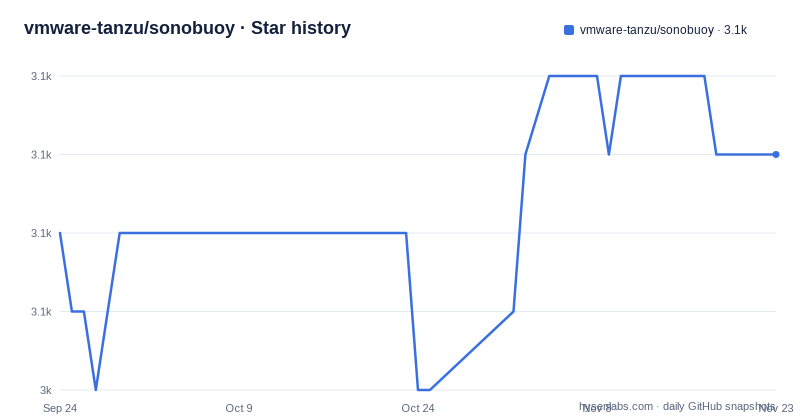
Star history
- vmware-tanzu/sonobuoy3,052 ★ · +1
| Repository | 2026-09-24 | 2026-11-23 |
|---|---|---|
| vmware-tanzu/sonobuoy | 3.1k | 3.1k |
1 Stars in the last 60 days, measured from the daily GitHub snapshot. Compare with other projects
Editorial analysis
A released version ran the wrong tests and reported it as conformance
The known-issues section has an entry for a specific pair of versions, and it is the one you would want a conformance tool to never have.
It says those two versions of the tool have a bug that runs the wrong set of tests without additional actions. Not a crash, not a partial run: the wrong test set, silently, and the output still looks like a conformance report.
sonobuoy run --waitresults=$(sonobuoy retrieve)The guidance is to update past them, and the entry names the version to move to.
The reason it is worth its own paragraph is what this tool is for. If you run conformance to decide whether a cluster meets a standard, a version that quietly runs a different suite and prints a green result is worse than a version that refuses to start. The project documented it, which is to its credit, and the fact remains that two artifacts on the package index produced a certificate that meant nothing.
So the habit worth forming with this tool is to read the results rather than the exit status, and to record the tool version next to the result.
Two of its own commands do not work on a Docker Desktop cluster
There is a known-issues entry for people running against a local cluster created with Docker Desktop, and it is not a list of minor annoyances.
The entry opens by saying the project does not recommend running against a cluster set up that way, then lists four things that break. The logs command for its own containers does not function. The client-side logs command does not function. The command that retrieves the results does not function. And a plugin that collects system logs hangs.
Retrieve being on that list is the serious one. Retrieve is how the results get off the cluster, so the tool's primary output channel is among the things that do not work.
The entry attributes most of it to a proxy component on Docker Desktop and asks anyone who knows how to fix it to get in touch.
This matters because of the order in which people meet these tools. The natural first step is a throwaway local cluster, and the natural local cluster is the one with a desktop installer. The prerequisites do recommend a lightweight container-based cluster instead, and there is a cluster configuration file at the repository root, so the warning is avoidable, but only if you read past the quick start.
The registry rate-limit workaround points at a mirror nobody here controls
One section of the readme exists entirely because of a constraint outside the project, and it is the most practically important thing on the page.
The problem: a container registry started rate limiting image pulls, and this tool's default behaviour is to pull its own image from that registry, while the upstream end-to-end conformance suite pulls several more images from it as part of running the tests. The readme says a better interface for working around this is planned for a future release, and until then offers a manual approach.
The manual approach is to write a small registry manifest file locally that redirects the library images to a different mirror, and pass it to the run command along with an explicit tag for the tool's own image.
The caveat is in the project's own words: another registry that pulls from the same place is technically in the same category, but is not part of the conformance suite at the moment, so overriding the one setting should be enough. Should be, at the moment, is doing real work in that sentence.
The practical consequence is that your conformance run's images come from a mirror the project does not control, and if that mirror's contents change, the run silently tests something different. Pin and verify what you mirror.
It asks for administrative permissions, and the documented fix grants exactly that
The permission story is stated in three places and it does not soften itself anywhere.
The prerequisites ask for an administrative kubeconfig file. The overview says the tool creates resources and expects to run in its own namespace, and that deleting it means removing that namespace plus a handful of cluster-scoped resources, so the blast radius is larger than one namespace from the start. And there is a flag, in the getting started section, for the case where you have permission problems but still want to run it.
The known-issues entry for one managed cloud service spells out the practical consequence: permissions there are not automatic, and you must create an administrative role for the user you will run as, binding that account to the cluster-admin role.
So the honest cost of this tool is that it runs with the widest permissions in a cluster and creates objects outside its own namespace. Nothing here is unusual for a conformance runner, and nothing here is optional either. The thing to take away is that this is a debugging tool you point at a cluster, not a read-only observer.
The client library is three minor versions behind its compatibility claim
The project made a deliberate decision about versioning and documented it near the top of the readme.
From a particular version onward, the tool supports a minimum Kubernetes version, and its releases are independent of Kubernetes releases, while the intent is that new releases keep working across Kubernetes versions. There is a blog post about the new release cycle.
The dependency file is where that story gets interesting. The Kubernetes client libraries are pinned together at one minor version, three minors behind the tool's own current line. So the binary is compiled against a client from that generation while claiming to work against anything from the stated minimum onwards.
For a tool that talks to an API server, that gap is the interesting one: forward compatibility across Kubernetes minors is exactly what a pinned client library does not give you for free.
There is also an escape hatch, stated as a note: the version check can be skipped with a flag. So the enforcement is real, and so is the override, and which side of that line you sit on is a decision rather than an accident.
The bulk delete removes every namespace with one prefix
One of the troubleshooting entries describes a cleanup command, and it is worth reading twice.
The entry says some of the upstream end-to-end tests may leak resources, and that the tool can help clean those up by deleting all namespaces sharing a given prefix.
Delete all namespaces with that prefix. In a cluster where somebody has created a namespace beginning with the same word for legitimate reasons, that command will remove it along with everything in it.
This is a different command from the ordinary teardown one described earlier, which removes the tool's own namespace and its cluster-scoped resources. Two delete commands, one narrow and one prefixed, in a tool that people run when something has already gone wrong.
The reason it is worth flagging in a review rather than a code comment is that the tool is explicitly positioned as non-destructive, which sets an expectation that a prefix-wide namespace delete sits uncomfortably against.
The documented build is local-only, on purpose
The build file is four targets long, and the first one explains its own limits.
It says it builds the binary for your own system, and that this is for local use, and that for other systems and architectures you should use the functions in a shell script directly instead. So the make target deliberately does not cross-compile, and the cross-compilation logic lives one level down in a script the make file does not call.
That is a reasonable design for a project that ships its own binaries, and it explains the release configuration at the repository root: a release tool, two image files including one for Windows, and a website configuration, all in one tree.
The other two targets are worth noting for what they are. The test target sources that same shell script and calls a function in it, so the tests and the cross-build share one code path. And the third target is not a test at all: it generates version information and tells you to look at the diff, which is a golden-file update in a target named after the files rather than after the action.
The help target is a single line of shell reading the make file's own comments, with no extra tooling.
An encrypted file from the original company is still in the root
The repository root has one entry that needs explaining, and it has been there a long time.
There is a JSON file with an encrypted extension, named with the word images and a commit hash. It sits alongside the source directory, the design documents, and the build files.
The commit hash in the name and the wording tell you it dates from the original incarnation of the project, and the image file's copyright header says the same: it is attributed to the company whose name is in the module path's history rather than the current organisation. The main module path still carries the old organisation's name, which is normal for an acquired project.
What is interesting is an encrypted configuration file committed to a repository root since that era. It is encrypted, which means the author treated its contents as sensitive, and it has been versioned all the same. Whether that was the right trade is not something the repository answers, and it is the kind of entry a reviewer should ask about rather than assume.
Editorial conclusion
sonobuoy suits anyone who needs to answer what state a cluster is really in, and its plugin model is the reason: conformance is only the default plugin, and anything else runs the same way. Three things to weigh before you point it at a production cluster. It asks for administrative permissions and creates cluster-scoped resources, so decide that deliberately rather than granting cluster-admin by reflex. Check your local cluster type against its known-issues list, because on one common local setup two of its own commands do not work at all. And pin the version past the two that produced a wrong conformance result, then read the result rather than the exit status.
Frequently asked questions
what is sonobuoy
In this repository, Sonobuoy is a diagnostic tool for Kubernetes clusters. It runs a set of plugins inside the cluster, including the upstream end-to-end conformance tests, and produces reports and selective data dumps about cluster state, described as accessible and non-destructive. Its releases are decoupled from Kubernetes releases, with a stated minimum supported version.
How does a sonobuoy work?
The naval device is not covered here. This tool launches its plugin pods inside its own namespace, waits for them to finish, then retrieves the results, which you pass to a second command that lists how many tests failed and their names. You can check progress with a status command and read the containers' logs with another.
How long do sonobuoys last?
Not answered in this repository, which is about the cluster tool rather than the naval one. Its own release facts: the newest release is from July 2026 on a 0.57 line, and the two before it are from February 2025 and August 2024, so the line has been slow moving for years.
Is there an alternative to sonobuoy?
The repository names none. What it offers instead is a plugin system, so a test or tool outside the upstream end-to-end suite can be run through a plugin of your own, plus a strategy document and a roadmap linked at the end of the readme for where the project is going.
Official sources
Add this badge to your README
If you maintain this project, the badge below links readers to this analysis and shows its maintenance status from the daily GitHub snapshot. Paste the markdown into your README; add ?metric=license or ?metric=stars to the image URL for a different field.

[](https://hysenlabs.com/projects/vmware-tanzu-sonobuoy)Star history chart for your README
[](https://hysenlabs.com/projects/vmware-tanzu-sonobuoy)Was this useful?