vonage-php-sdk-core: the install command points at a different package
Vonage REST API client for PHP. API support for SMS, Voice, Text-to-Speech, Numbers, Verify (2FA) and more.
At a glance
- What is it?
- The PHP client for Vonage's API needs PHP 8.1, splits its URL overrides across two hostnames, returns a list of message parts from a single send, and already ships migration notes for a 5.0 nobody has released. Careful REST plumbing with three seams worth reading before you paste anything.
- Who is it for?
- vonage-php-sdk-core is a sensible choice for a PHP service that has to talk to Vonage over REST, and the three things that will cost you an afternoon are all visible before you write code. Install the core library directly rather than the wrapper if you already have an HTTP client, so the transport stays your choice.
- Can I use it commercially?
- Yes. Apache-2.0 is a permissive licence: you can use, modify and sell software built on it, as long as you keep its copyright and licence notices.
- Is it still maintained?
- Yes. The repository last received commits 26 days ago.
- What is it written in?
- Mainly PHP, according to GitHub's language statistics.
Answers come from the project's GitHub data, last synced on November 15, 2026, and from our analysis. They are not legal advice.
Star history
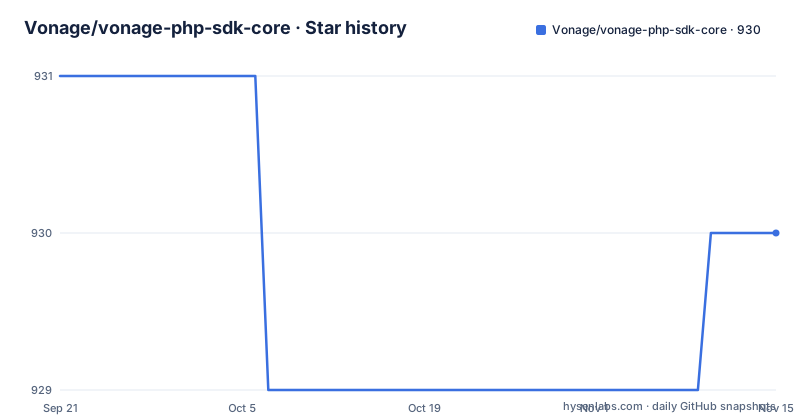
- Vonage/vonage-php-sdk-core930 ★ · -1
| Repository | 2026-09-21 | 2026-11-15 |
|---|---|---|
| Vonage/vonage-php-sdk-core | 931 | 930 |
-1 Stars in the last 55 days, measured from the daily GitHub snapshot. Compare with other projects
Editorial analysis
The documented install command does not install this repository
The install line in the file points at a different package than the one you are reading. `composer require vonage/client` resolves to a wrapper that pulls in an HTTP client as well as this core library, and the note directly underneath says you can install the core library from Composer instead if you would rather choose the HTTP client your project already uses. The same note adds that you never need to clone this repository to use the library in your own project.
So there are two dependency graphs behind one command, and the documented one hides the choice. Take the wrapper and you inherit whichever HTTP client it picked for you. Install the core library directly and the transport becomes a decision you make, which is the arrangement you want when the application already has an HTTP layer, and the arrangement you want to avoid if you have never had to make that decision.
The one hard requirement sits in italics near the top of the file: a minimum PHP version of 8.1. Everything after the autoloader line in your bootstrap depends on it, so that is the first thing to check when porting an older application onto this client.
The file also links the Packagist page for the package, states that a Vonage account is needed before any of this is usable, and offers two links aimed at people who have not used Composer before: the Composer's Getting Started page and a beginner's guide hosted on Scotch.io. That is a fair signal about the audience the usage section assumes, and it is the only place the file tries to teach anything rather than show a call.
Two base URLs, because the API still answers on two hostnames
The client exposes a separate override for each domain it talks to, and both go in the same options array. `base_api_url` redirects the requests that would otherwise go to `api.vonage.com`, and `base_rest_url` redirects the ones that would go to `rest.nexmo.com`. Same constructor, same array, two keys.
$client = new Vonage\Client(
    new Vonage\Client\Credentials\Basic(API_KEY, API_SECRET),
    [
        'base_api_url' => 'https://example.com'
    ]
);
That older nexmo.com hostname is the tell. Part of the surface still lives there, so a single URL override leaves some of your calls pointing at production while the rest go to your stand in. Any test harness, recording proxy or local double has to cover both keys, and the missing one produces no error at startup. It produces traffic you did not mean to send.
The constructor itself is the client, and the credentials are its first argument:
require_once "vendor/autoload.php";$client = new Vonage\Client(new Vonage\Client\Credentials\Basic(API_KEY, API_SECRET));Two credential shapes exist for that argument. Basic takes an API key and secret. The signing variant takes a key, a signature secret and an algorithm instead.
The constructor options array is the only place URL configuration is documented, and no later example in the file touches it again. Anyone who wants a different transport for one endpoint alone has no documented hook for it.
One send can return a list of message parts, not a single result
A long text is split into several messages on the way out, and the response is shaped to match: one object per generated message, held in a container rather than returned bare. The accessors are the standard traversable ones. `current()` hands back the first part, `count()` reports how many parts were generated, and a foreach walks them with an index.
$data = $response->current();
$data->getRemainingBalance();
foreach($response as $index => $data){
    $data->getRemainingBalance();
}
The first send example pairs the same call with an echo of the recipient and the remaining balance, so the account balance is read off one of those per part objects. Anything you log after a send is therefore logged once per generated message, and one logical text can produce a burst of lines that read like duplicated traffic. The client ref is attached to the message object before sending, with a call of the form `$text->setClientRef('test-message')`, so that one application level identifier travels with the message and can surface on several generated messages. Count the parts before you raise an alert on a failed send.
The GSM-7 example tests a variable the snippet never creates
Encoding is chosen on your side by a static method on the message class, and the snippet that shows it has a defect to know about before you copy it. The block creates a message object into a variable named `$sms`:
$sms = new \Vonage\SMS\Message\SMS('123', '456', 'is this gsm7?');

if (Vonage\SMS\Message\SMS::isGsm7($text)) {
    $sms->setType('text');
} else {
    $sms->setType('unicode');
}
The condition tests `$text`, a name the block never creates. Higher up the same file `$text` is the variable holding a message object in the send example, so the call either reads a variable that does not exist in this scope or hands the method an object where the text belongs. Either way, the string you care about is the third constructor argument on the line above.
The decision itself is real and yours to make. `setType` takes `text` or `unicode`, and it is an explicit call, so this single static check is what decides how your text is encoded. Passing it the message object instead of the string is the kind of mistake that shows up as a wrong encoding rather than an exception.
Signing has its own secret, and two of the five algorithms are MD5
Message signing is a separate mechanism from authentication, with its own secret and its own algorithm list. Five entries are supported: `md5hash1`, `md5`, `sha1`, `sha256` and `sha512`. Two of the five are MD5 based. Which one applies is an account setting under API Settings in the dashboard, and both your application and the service have to agree on it.
The credential object is where that agreement is written down:
$client = new Vonage\Client(new Vonage\Client\Credentials\SignatureSecret(API_KEY, SIGNATURE_SECRET, 'sha256'));Inbound verification is a step you perform yourself. With signing enabled for incoming messages, the SMS webhook carries the fields `sig`, `nonce` and `timestamp`, and confirming them means building a Signature object from the incoming data, your secret and the method, then comparing it against the value that arrived:
$signature = new \Vonage\Client\Signature($_GET, SIGNATURE_SECRET, 'sha256');

// is it valid? Will be true or false
$isValid = $signature->check($_GET['sig']);
The check hands back a boolean rather than rejecting the message, so a handler that skips it accepts unsigned input with nothing in the log to show for it. Note also that the signature secret is not your API secret, and nothing in the client catches a mix up between the two for you.
Inbound messages arrive through PHP globals and an exception type
Receiving an SMS means letting the library read the current request for you. The factory takes no arguments at all:
try {
    $inbound = \Vonage\SMS\Webhook\Factory::createFromGlobals();
    error_log($inbound->getText());
} catch (\InvalidArgumentException $e) {
    error_log('invalid message');
}
Two properties of that shape matter. The input is ambient: the factory pulls from globals rather than from something you pass in, so the same call in a test, a queue consumer or a CLI run has no request to read. And malformed input is reported as `\InvalidArgumentException`, which is exactly the type the printed handler catches, so a webhook with missing or unexpected fields lands in the same log line as anything else that throws.
The text itself is reached through `getText()`. The catch branch logs a fixed string instead of the exception, so the log shows that something was invalid without recording the reason. If you need to know which field failed, you have to log it yourself, and you have to widen the catch if the library signals other problems as different types.
UPGRADE-5.0.md is already in the tree while the release line stops at 4.14.0
The root listing says more than the file count. `.phpactor.json`, `phpcs.xml`, `phpstan.neon` and `phpstan-baseline.neon` sit next to each other, and the baseline file is the interesting one: it records the static analysis findings the project has accepted rather than fixed, which is how a library of this size keeps its checks green without pretending the debt is gone. `phpunit.xml.dist` is the test configuration, and the suite lives under `test/`. Alongside them sit `.editorconfig`, `.gitattributes`, CHANGELOG.md, CONTRIBUTORS.md, CODE_OF_CONDUCT.md and an Apache-2.0 LICENSE.txt, a small style and conduct layer that a library consumed by other teams needs more than a compiler does.
Then there is `UPGRADE-5.0.md`. The newest release is 4.14.0, published 15 July 2026, so the migration notes for the next major version are written and committed ahead of any 5.0 release. Reading them before you start is the cheapest way to find out whether the calls you plan to make survive the next major, and it costs one file read.
The release naming is not consistent either. The 4.14.0 release is titled v4.14.0, while 4.13.0 and 4.12.0 carry no v, so anything that parses release names needs to cope with both forms. The last commit on the default branch is 15 July 2026 at 04:28:44 UTC, one second before 4.14.0 was published at 04:28:45, which puts the branch exactly on the released state rather than ahead of it.
The Messages API narrows to text and image on Viber and six types on WhatsApp
The newer Messages API is a separate surface from the SMS API used in the earlier examples, and it is where multi channel coverage lives. Five channels are listed as supported: SMS, MMS, WhatsApp, Messenger and Viber.
What you can send is not uniform across them, and the comparison the file gives is the useful part. WhatsApp accepts text, an image, audio, video, a file or a template. Viber accepts only a text or an image. So the message object is channel specific, and any fan out that treats one message type as universal runs into the wall at the narrow end of that list.
The line that would enumerate every sendable message type per channel ends partway through its first sentence, so the full matrix is not written down here. The WhatsApp and Viber comparison is the extent of it. The endpoint reference for messages also lives at its own Olympus address on the developer site, separate from the older paths the client knows how to reach, which is worth keeping in mind when you are mapping library calls to documentation. Everything in this path depends on a Vonage account, which the file flags before it shows a single call.
Editorial conclusion
vonage-php-sdk-core is a sensible choice for a PHP service that has to talk to Vonage over REST, and the three things that will cost you an afternoon are all visible before you write code. Install the core library directly rather than the wrapper if you already have an HTTP client, so the transport stays your choice. Override both base URL keys in any test harness, because the API still answers on two different hostnames and a half pointed mock looks exactly like a working one. And read UPGRADE-5.0.md now, while it costs nothing, since the migration notes for the next major are already in the tree and the current line stops at 4.14.0.
Frequently asked questions
What PHP version does vonage-php-sdk-core require?
The library states a minimum PHP version of 8.1, in italics near the top of its own documentation. The usage path starts with the Composer autoloader and credential constructors, so check that requirement before anything else when porting an older application.
Does composer require vonage/client install vonage-php-sdk-core directly?
Not on its own. That package is a wrapper that includes an HTTP client along with this core library. You can install the core library directly from Composer instead, which lets you choose the HTTP client your project uses, and you never need to clone the repository to use it.
How do I point vonage-php-sdk-core at a different API host?
Pass an options array as the second constructor argument. base_api_url changes the requests that would go to api.vonage.com, and base_rest_url changes the ones that would go to rest.nexmo.com. Both keys are needed to move every request away from production, because the service answers on two hostnames.
Which message signing algorithms does vonage-php-sdk-core support?
md5hash1, md5, sha1, sha256 and sha512, two of which are MD5 based. The choice is made in the dashboard under API Settings and passed to the SignatureSecret credential along with the API key and the signature secret, which is a different secret from your API secret.
How does vonage-php-sdk-core verify an inbound SMS signature?
The SMS webhook carries sig, nonce and timestamp when signing is enabled for incoming messages. You build a Signature object from the incoming data, your signature secret and the method, then call check() with the signature value that arrived, usually $_GET['sig'], and act on the boolean it returns.
Official sources
Add this badge to your README
If you maintain this project, the badge below links readers to this analysis and shows its maintenance status from the daily GitHub snapshot. Paste the markdown into your README; add ?metric=license or ?metric=stars to the image URL for a different field.

[](https://hysenlabs.com/projects/vonage-vonage-php-sdk-core)Star history chart for your README
[](https://hysenlabs.com/projects/vonage-vonage-php-sdk-core)Was this useful?