ant-design-vue: the npm package is two years behind the branch
🌈 An enterprise-class UI components based on Ant Design and Vue. 🐜
At a glance
- What is it?
- Ant Design Vue is the Vue implementation of Ant Design, published with CommonJS, ES module, unpkg and typings entry points and an ecosystem of add-on packages. Its release history and its commit history have drifted apart, and that gap is the first thing to check before depending on it.
- Who is it for?
- Ant Design Vue fits teams already standardised on the Ant Design visual language who need desktop applications and server-side rendering, and it is a poor fit for anyone who reads a recent commit date as a recent release.
- Can I use it commercially?
- Check first. The repository uses a licence we do not classify automatically, so read its LICENSE file before any commercial use.
- Is it still maintained?
- Yes. The repository last received commits 4 days ago.
- What is it written in?
- Mainly Vue, according to GitHub's language statistics.
Answers come from the project's GitHub data, last synced on November 15, 2026, and from our analysis. They are not legal advice.
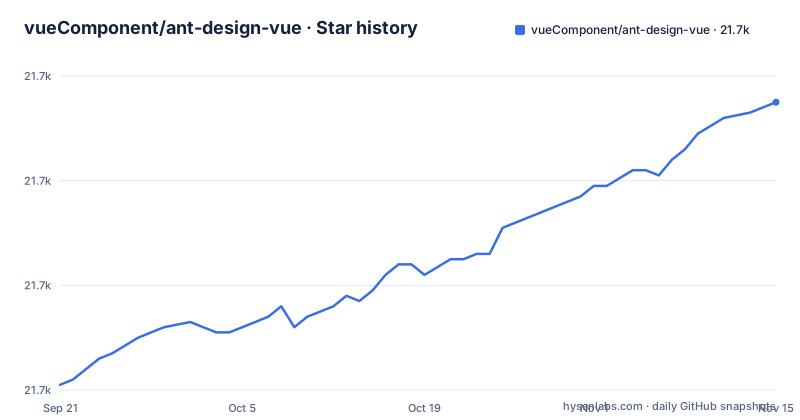
Star history
- vueComponent/ant-design-vue21,715 ★ · +54
| Repository | 2026-09-21 | 2026-11-15 |
|---|---|---|
| vueComponent/ant-design-vue | 21.7k | 21.7k |
54 Stars in the last 55 days, measured from the daily GitHub snapshot. Compare with other projects
Editorial analysis
The newest release predates the newest commit by almost two years
The three most recent releases in vueComponent/ant-design-vue are 4.2.6 on 2024-11-11, 4.2.5 on 2024-09-19, and 4.2.3 on 2024-06-10. The version field in package.json still reads 4.2.6, so the manifest and the newest tag agree with each other. The last push to the default branch main, however, is dated 2026-10-22, which is close to two years after that release. The consequence is direct. The two install commands the project gives you are:
$ npm install ant-design-vue --save$ yarn add ant-design-vueWhichever one you run, what lands in your lockfile is 4.2.6, the build with the fixes from November 2024, not the state of the source tree. Commit activity on a component library is easy to mistake for released work, and here the two have been running on separate clocks. If you need something fixed after 2024-11-11, the published package will not have it.
The browser table has a header and one row that disagree
The Environment Support section states modern browsers, server-side rendering, support for Vue 2 and Vue 3, and Electron. Beneath that sits a table whose header names six columns, IE / Edge, Firefox, Chrome, Safari, Opera, and Electron, but whose single data row begins with the word Edge rather than an Internet Explorer version. The remaining five cells all read last 2 versions. Read literally, the table promises current Edge and current Firefox, Chrome, Safari, Opera, and Electron, and states nothing at all about Internet Explorer in that row. Internet Explorer appears only in the sentence above, which scopes it to v1.x and attaches polyfills. So the two statements do not conflict, but the table you would check first does not mention the browser that needs the polyfills.
Four root entry files and four published entry points
The repository root carries index.js, index.esm.js, index-with-locales.js, and index-style-only.js, which are four different ways into the same component set. The published package expresses the same idea through fields: main points at lib/index.js, module at es/index.js, unpkg at dist/antd.min.js, and typings at es/index.d.ts. Your bundler picks one of those fields on its own, which means the choice between a CommonJS require, an ES module import, a single browser bundle, and type declarations is made by tooling rather than by you. The files array shows what actually ships: dist, lib, es, scripts, vetur, typings/global.d.ts, and locale. Shipping a vetur folder ties the component metadata to editor tooling. The root also holds test.html as a single page harness and wrangler.jsonc, a Cloudflare configuration file, so the documentation site and the distributed package have different deployment targets.
The publish script backgrounds its own prerequisites
Look at how the lifecycle hooks are chained. The predev, precompile, prebuild and pub entries join their early steps with a single ampersand, so npm run version and npm run collect-token-statistic are launched as background jobs; predev and pub then chain their final command with a double ampersand, while precompile and prebuild use single ampersands throughout. The prepublishOnly step is different: node antd-tools/cli/run.js guard runs alone and blocks. The publish path raises the heap ceiling for the reason you would expect, with node --max_old_space_size=8192 antd-tools/cli/run.js pub. Reading these lines tells you that a failure in the backgrounded version or token-statistic steps does not stop the pipeline at the point where it happened, since the next command starts regardless. Two more scripts expose the rest of the workflow. Tests run as cross-env NODE_ENV=test jest --config .jest.js, and both dev and fast-dev run npm run routes before vite serve site, so a generated routes file is a prerequisite for bringing the local site up. Editor type metadata comes from generator-webtypes, which compiles a TypeScript project under antd-tools/generator-types and then runs its generator.
The README calls it MIT while the repository metadata stays silent
In the donation section the project describes ant-design-vue as an MIT-licensed open source project, and a LICENSE file sits at the repository root next to SECURITY.md and the two changelogs. The repository metadata itself records the license as unasserted rather than as MIT, which is what happens when a license field is not resolved. None of this changes the terms you get from the package, but it does change what an automated check will report. A procurement tool that reads repository metadata can hand back no license while a human reading the README sees MIT. The README also links the backers file through a master path even though the default branch is main, so the backers link points at a branch other than the default.
The ecosystem table marks the gaps the core package leaves
Seven related projects are named, and several of them cover a gap you would otherwise hit. vue-ref exists so you can obtain a component reference through a callback in the style of React. @ant-design-vue/nuxt is a Nuxt module, and vue-cli-plugin-ant-design is described specifically as a Vue CLI 3 plugin, which dates it to that generation of the Vue toolchain. vue-dash-event handles the case where a library function implemented in a DOM template needs the component's own custom event, which it notes is camelCase. @formily/antdv pairs the components with Formily, and ant-design-x-vue is described as a Vue AI interface built on the Ant Design X design specification. None of these is bundled, so each is a separate dependency with its own version and its own release cycle. The table also mixes ownership. Four sit under the vueComponent organisation on GitHub and ant-design-vue-helper is a VS Code Marketplace extension, while @formily/antdv lives under formilyjs and ant-design-x-vue under wzc520pyfm, so choosing one of those means tracking a second project with a maintainer you have no relationship with.
Funding is donation-based and the docs are bilingual
The README routes support through Patreon, opencollective, paypal, and a raw ETH address, and names mentorbook.ai plus the pireel repository as sponsors. Sponsor slots are offered in exchange for a logo and a link on the README, with a further note listing money from Patreon, alipay, wechat, and paypal on the backers file. For a library that teams fork and vendor into internal design systems, the funding surface is worth noting before anyone builds a dependency timeline around it. The documentation side is split by language, with README-zh_CN.md alongside README.md and two changelogs, CHANGELOG.en-US.md and CHANGELOG.zh-CN.md, and the English header offering a 简体中文 link. Release announcements arrive by starring the repository on GitHub, which is stated in the README as the way to get them without delay.
Editorial conclusion
Ant Design Vue fits teams already standardised on the Ant Design visual language who need desktop applications and server-side rendering, and it is a poor fit for anyone who reads a recent commit date as a recent release. Before adopting it, check which version the npm registry actually serves against the version your lockfile pins, decide deliberately between the ES module and unpkg bundle entry points, and confirm your build works on the browsers you support, since the support table documents modern browsers and keeps Internet Explorer 9 to the v1.x line with polyfills.
Frequently asked questions
What is Ant Design used for?
In this project Ant Design is the source of the design system that ant-design-vue implements for Vue. It is presented as an enterprise-class UI design system for desktop applications, a set of Vue components out of the box, and shared Ant Design of React design resources.
install ant design vue
The README recommends npm or yarn and gives two commands, npm install ant-design-vue --save and yarn add ant-design-vue. On a poor network it points to other registries and tools such as cnpm.
Why use Vue instead of React?
Nothing here argues the framework choice. The only documented relationship to React is that ant-design-vue shares Ant Design of React design resources, and that the vue-ref package lets you obtain a component reference through a callback in the style of React.
What exactly is Vue?
This repository does not explain Vue itself. It states that Environment Support covers Vue 2 and Vue 3, and links https://vuejs.org/ as the Vue home page in its links section.
ant design vue drag and drop
Drag and drop is not addressed anywhere in the README. What it does cover is installation with npm or yarn, browser and rendering support, and a table of seven ecosystem packages.
Official sources
Add this badge to your README
If you maintain this project, the badge below links readers to this analysis and shows its maintenance status from the daily GitHub snapshot. Paste the markdown into your README; add ?metric=license or ?metric=stars to the image URL for a different field.

[](https://hysenlabs.com/projects/vuecomponent-ant-design-vue)Star history chart for your README
[](https://hysenlabs.com/projects/vuecomponent-ant-design-vue)Was this useful?