VueFire's install line says npm and its own workspace says pnpm
🔥 Firebase bindings for Vue.js
At a glance
- What is it?
- The official Firebase bindings for Vue ship as a single MIT package with dual module output and a Node 20 floor, out of a repository that is at the same time a pnpm workspace, a VitePress documentation site and a deployed Firebase app carrying four rule files.
- Who is it for?
- VueFire fits a Vue 3 or Vue 2.7 application on Node 20 or newer that has already chosen Cloud Firestore or the Realtime Database, and the compatibility contract it states is narrow enough to check in an afternoon. Verify four things before adopting it.
- Can I use it commercially?
- Yes. MIT is a permissive licence: you can use, modify and sell software built on it, as long as you keep its copyright and licence notices.
- Is it still maintained?
- Activity is slowing. The repository last received commits 7 months ago.
- What is it written in?
- Mainly TypeScript, according to GitHub's language statistics.
Answers come from the project's GitHub data, last synced on November 13, 2026, and from our analysis. They are not legal advice.
Star history
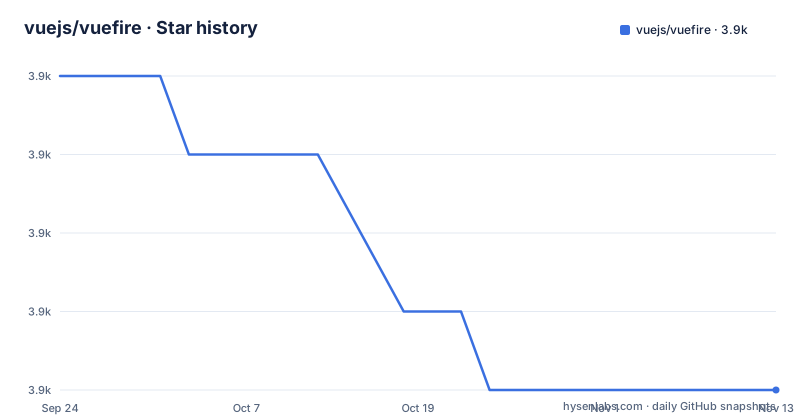
- vuejs/vuefire3,904 ★ · -4
| Repository | 2026-09-24 | 2026-11-13 |
|---|---|---|
| vuejs/vuefire | 3.9k | 3.9k |
-4 Stars in the last 50 days, measured from the daily GitHub snapshot. Compare with other projects
Editorial analysis
The install line names npm and the repository is a pnpm workspace
The Installation section gives one command and it is not the one this repository uses for itself:
npm install vuefire firebaseThe manifest in the same tree says something different. It declares packageManager [email protected], the root holds an .npmrc, a pnpm-lock.yaml and a pnpm-workspace.yaml, and a packages directory is there to be resolved as a workspace. Every script in the manifest is written the same way, running lint through pnpm run, building the docs by chaining pnpm run docs:api:build before vitepress, and testing by calling pnpm run lint && pnpm run test:types && pnpm run build. So the library is developed in a pnpm workspace and its own documentation tells you to install it with npm. Both work, because the published package is a normal tarball, but a team that standardises on the repository's own tooling will find the README contradicting the manifest, and the Nuxt variant is not covered by that line at all, since its instructions are deferred to a documentation URL instead of being given as a command.
Two packages publish from one repository under one tag namespace
The tree is a workspace and the release record shows it. Two different package names were tagged from the same repository within a minute of each other: v3.2.3 and [email protected], both on 15 April 2026. The version field in the manifest reads 3.2.3, so for the main package the manifest and the newest tag agree exactly. The gap behind them is the interesting part. The release before that, v3.2.2, is dated 20 July 2025, which puts roughly nine months between the two most recent versions of the core package, and the manifest records that pause without comment. Two consequences follow for anybody tracking this dependency. First, a lockfile pin to a VueFire version is a statement about code that is between nine months and a year old, whatever the patch number suggests. Second, a version range that spans 3.2.2 and 3.2.3 spans the entire gap, so an unpinned range is picking up whatever the maintainer changed in that window.
Node 20 is the floor and 24.14.1 is what the build runs on
Two version statements sit next to each other in the manifest. The engines field asks for Node 20 or newer. The volta field pins 24.14.1. The gap between a floor and a development version is ordinary, and the floor is the one that matters to a consumer, since 20 is what an installing project has to satisfy. What that floor buys is visible further down the same file. The package is type module, and its exports map is written out twice over, once as an import condition resolving to ./dist/index.mjs with types at ./dist/index.d.mts, and once as a require condition resolving to ./dist/index.cjs with types at ./dist/index.d.cts, with a matching pair of entries under a ./server key. So a single package ships four module shapes across two module systems, plus main, module and types fields that all point into the same dist directory. sideEffects is false, which is what lets the modular Firebase requirement be met by tree shaking rather than by importing a namespace object.
The package ships dist and no source at all
The files field decides what reaches npm, and it is a short list: dist, server.d.ts, LICENSE and README.md. No src directory, no tests, no examples, no documentation. Everything a consumer can read is the build output that unbuild produces, driven by a build.config.ts at the root, and the type declarations that ship alongside it. The consequence is ordinary for a compiled library and worth stating plainly, because it changes what a bug report can be. A consumer who finds a defect in the reactive layer cannot read the TypeScript that produced it, only the bundled output, and a consumer who needs a one line fix has to fork and rebuild rather than patch. The server.d.ts entry is the one loose end in that list, a hand written declaration at the root sitting next to generated ones, and the ./server export exists so the SSR side has a public entry of its own. A project that vendors its dependencies for review will find nothing here to review.
One repository is also a deployed Firebase app with four rule files
Alongside the library sources the tree carries a Firebase project in full. There is a .firebaserc, a firebase.json, and three rule files: database.rules.json, firestore.rules and storage.rules, plus a functions directory and a script named firebase:emulators that runs firebase emulators:start. Those rules are the project's own, for whatever the demos and the documentation site read and write, and they are the reason the emulators script exists, so the test environment and the shipped rules are the same two artifacts. Hosting is configured twice over. netlify.toml sits at the root, while firebase.json is also present, and the documentation is a VitePress site whose dev script is vitepress dev docs --port 3000. A repository whose published artefact is a library can still be a deployed application with live rules and a functions directory, and here it is one. The practical effect for a contributor is that a change to a rule file is a change to something running, not a change to a fixture.
The test entry point builds the package before it tests anything
The test script is a chain rather than a command, and its order is worth reading. It begins with the format check, continues to the type build, and reaches the package build before any test runner appears, with the manifest showing an unfinished pnpm invocation where the rest of the chain would continue. The individual pieces are visible even where the chain is not. The lint step is prettier run in check mode with the typescript parser over a glob covering src, __tests__ and e2e, which makes formatting the gate rather than a separate chore, and there is no ESLint configuration anywhere in the top level of the tree. The type check is tsc --build tsconfig.json, so it is a project build with references rather than a single file pass. The unit step is vitest with coverage, a dev variant runs the same runner with a UI, and both vitest.config.ts and vitest.workspace.ts are present. Coverage is reported to a service the README links as a badge, and a size-checks directory suggests bundle size is tracked as its own gate.
The compatibility promise is duck-typed on a single Vue primitive
The feature list is five bullets and the one that does the most work is the third: VueFire supports Vuex, Pinia, and anything that gives you a Vue ref(). That is a structural contract rather than an integration list, and it is the reason a store this project has never heard of can still work, provided it hands back a ref. The first two bullets cover Vue 2.7 alongside Vue 3 and both the Composition API and the Options API, and the repository backs the older claim with an actual examples/vue-2 directory rather than leaving it as a promise. The examples for the database side are the opposite shape: examples/firestore.html and examples/rtdb.html are plain HTML files rather than single file components, which matches the Related section pointing at Cloud Firestore and the Realtime Database and nothing else. The package itself is TypeScript, with tsconfig.json at the root, a type test wired into the chain, and a separate ./server export with its own declaration file for the server side.
The status is one line, the roadmap is one issue, and the sponsors are the file
Two short sections carry the whole forward story. Status says that VueFire and Nuxt VueFire are both currently stable, one sentence covering two packages. Roadmap points at a single GitHub issue, number 1241, as the place to follow progress and future plans. Everything else in the file above them is presentation: a centred logo block, three badge links, and a sponsor section that is the largest single part of the README by volume. Four silver sponsors, Route Optimizer and Route Planner Software, Prefect and VueMastery. Four bronze, Storyblok, Nuxt UI Pro Templates, a community site at vuejs.de credited to Antony Konstantinidis, and stormier.ninja credited to Stanislas Ormières. The author field names Eduardo San Martin Morote and the funding link points at a single sponsor page, and the same handle owns all three demo repositories the Usage section recommends, a Vite example and two Nuxt examples for the Spark plan and the Blaze plan. So the maintainer wrote the bindings, wrote the documentation, and hosts the demos.
Editorial conclusion
VueFire fits a Vue 3 or Vue 2.7 application on Node 20 or newer that has already chosen Cloud Firestore or the Realtime Database, and the compatibility contract it states is narrow enough to check in an afternoon. Verify four things before adopting it. The branch was last pushed on 15 April 2026, so check whether that is recent enough for your team. The install line in the README uses npm while the repository is a pnpm workspace, so pick one package manager deliberately. The published tarball contains dist, server.d.ts, LICENSE and README.md and no source, so a bug you have to patch means a fork. And the forward plan lives in a single issue, number 1241, so there is no schedule in this file to plan against.
Frequently asked questions
What does VueFire need installed alongside it?
The firebase package as well as vuefire itself, which the README installs with npm install vuefire firebase. The Nuxt variant is not covered by that line and its instructions are deferred to the documentation site.
Which Vue versions and APIs does VueFire support?
Vue 2.7 and Vue 3, with both the Composition API and the Options API. The requirement is stated as Vuex, Pinia, and anything that gives you a Vue ref(). The repository carries an examples/vue-2 directory for the older line.
Which Firebase products does VueFire bind?
Cloud Firestore and the Realtime Database, which are the two the Related section links to. The examples directory holds a firestore.html and an rtdb.html as plain HTML files rather than single file components.
Is VueFire considered stable?
The Status section says that VueFire and Nuxt VueFire are both currently stable. That is the whole of it, one line covering two packages, and the forward plan is a link to a single roadmap issue, number 1241.
What is in the published VueFire package?
dist, server.d.ts, LICENSE and README.md, under the MIT license. No source directory is published, so a consumer reads the build output that unbuild produces rather than the TypeScript behind it.
What Node version does VueFire require?
Node 20 or newer, stated in the engines field of the manifest, while the volta field pins 24.14.1 for development. The package is type module and ships both import and require conditions with separate declaration files.
Official sources
Add this badge to your README
If you maintain this project, the badge below links readers to this analysis and shows its maintenance status from the daily GitHub snapshot. Paste the markdown into your README; add ?metric=license or ?metric=stars to the image URL for a different field.

[](https://hysenlabs.com/projects/vuejs-vuefire)Star history chart for your README
[](https://hysenlabs.com/projects/vuejs-vuefire)Was this useful?