cg-monitor collects W3C Community Group activity and renders it as a dashboard
Dashboard of activity from Community Groups
At a glance
- What is it?
- cg-monitor is a Node.js pipeline that pulls W3C Community Group activity from five source types, writes one JSON file per group, then builds a report, a popularity ranking, and SVG charts for the CG Activity Dashboard. The value for contributors is a single place to see participation; the catch is that the token and Node version requirements are stated with almost no explanation.
- Who is it for?
- cg-monitor suits contributors and editors who want the participation picture for a set of W3C Community Groups in one place, and it is a reasonable read-only starting point for anyone curious about standards community activity. It is not a monitoring tool for hardware, and the short name makes that a live problem.
- Can I use it commercially?
- Not without permission. GitHub finds no licence file in the repository, and without a licence all rights are reserved by default: you may read the code but not reuse it. Check the README, or ask the authors, before using it.
- Is it still maintained?
- Yes. The repository last received commits 1 day ago.
- What is it written in?
- Mainly JavaScript, according to GitHub's language statistics.
Answers come from the project's GitHub data, last synced on October 22, 2026, and from our analysis. They are not legal advice.
Star history
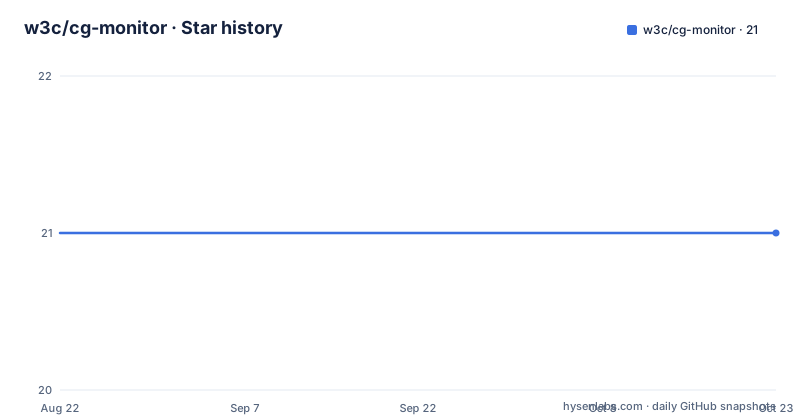
- w3c/cg-monitor21 ★ · +0
| Repository | 2026-08-22 | 2026-10-22 |
|---|---|---|
| w3c/cg-monitor | 21 | 21 |
0 Stars in the last 61 days, measured from the daily GitHub snapshot. Compare with other projects
Editorial analysis
Five source types feed one JSON file per group
The collection step is one command and it is deliberately broad. It pulls from the W3C API, from GitHub repositories, from mailing list archives, from RSS feeds, and from wikis, then writes one JSON file per group into data/. Passing W3C API IDs narrows that to specific groups.
node monitor.js
node monitor.js 12345 67890
The second form takes the numeric W3C API identifiers directly, so the unit of selection is the API ID rather than a group name. What lands in data/ is the raw end of the pipeline, and it is worth noting that data/ is a tracked top level entry in the repository, which means a collection run writes into a directory that is part of the checkout rather than a scratch location. The README does not say whether a run overwrites those files, whether it merges into what is already there, or whether removing a file by hand is safe, so treat the data/ contents as something to check after the first run rather than assume.
Three separate scripts do the reporting, and each writes something different
Collection and reporting are not the same command. Three scripts run after the fact, and each produces a distinct artifact, which means you can rerun one without redoing the others.
node prepare-data.js        # builds report.json for the dashboard
node export-popularity.js   # computes group popularity rankings
node generate-activity-graphs.js  # generates SVG charts in viz/
prepare-data.js is the one the dashboard depends on, since it builds report.json. export-popularity.js is separate and writes to popularity.json, and generate-activity-graphs.js is also separate, writing SVG charts into viz/. The last comment is the most specific piece of documentation about any output path in the project, and it is the only one that names a directory. What is not stated anywhere is whether report.json is regenerated from scratch or patched into whatever was there before, and what determines the ordering of keys in it. The separation does mean a broken chart can be regenerated without touching the report, and a stale report can be rebuilt without re-running collection.
config.json.dist carries exactly one documented key, and the rest are unlisted
Setup is two commands and an edit, and the edit is the part that is underdocumented.
npm install
cp config.json.dist config.json
# Edit config.json and add your GitHub token:
# { "ghapitoken": "ghp_xxxxxxxxxxxx" }
Only one configuration key is ever named, and that is ghapitoken, shown with a ghp_ placeholder. What the remaining keys in config.json.dist actually are is not written down anywhere, which is a real cost for anyone who wants to change behavior rather than just add a credential. The token itself is described as needing no special scopes and being used only for higher API rate limits, so an unprivileged token is the intended case. Two operational consequences follow. The copy step is mandatory, because the repository tracks config.json.dist and not config.json, so your local file is not something you are supposed to commit. And the token is a secret sitting in a plain JSON file in a working tree, so if you add a group to a fork or share the directory, that file goes with it.
The dependency list explains what the pipeline does without a word of prose
package.json lists eight runtime dependencies and the single script that runs them, which is mocha for tests. Read as a group they describe the pipeline better than any paragraph would. rss-parser accounts for the RSS feeds, parse-link-header accounts for paginated API responses, jsdom and undici provide a DOM and an HTTP client, fetch-filecache-for-crawling is what lets a repeated crawl be served from disk, and web-specs supplies the spec data that the monitor reports against.
"dependencies": {
  "@mdn/browser-compat-data": "^5.6.32",
  "fetch-filecache-for-crawling": "^5.1.1",
  "jsdom": "^22.1.0",
  "mocha": "^10.2.0",
  "parse-link-header": "^2.0.0",
  "rss-parser": "^3.13.0",
  "undici": "^5.28.4",
  "web-specs": "^3.37.0"
}
The one entry with no obvious counterpart in the README is @mdn/browser-compat-data, a browser compatibility dataset that is not mentioned in the prose at all, so if you were wondering how this connects to browser support, that dependency is the only trace of it. A test suite does exist: the test/ directory is present at the top level and .mocharc.json configures the runner, so npm test is a real check rather than a formality.
cg-monitor and continuous glucose monitors collide on the same abbreviation
The shortest and most useful thing to know about this project is that almost nobody finds it by searching its name. The search terms attached to it are overwhelmingly about hardware: continuous glucose monitors, CGM prices, whether a prescription is needed, how long a sensor lasts, and brands. That is not a near miss, it is a different product category with a coincidental initialism, and the queries carry no hint of W3C, standards, or JavaScript. Two of the searches do try cg monitor on its own, one of them with a year attached, which suggests people testing whether the acronym has a dated meaning. The practical upshot is that the dashboard, the repository, and the W3C API identifiers will not surface for the queries most people type, so finding this tool means searching for the Community Group side of it rather than the initials.
The checkout holds spec-tracking data and a live dashboard, not just a collector
The top level of the repository carries more than the pipeline, and it changes what the project is. Alongside the four scripts and lib/ there are annotation and tracking files: annotations.json, cg-transitions.json, charter-links.json, spec-annotations.json, spec-implementations.json, and spec-reports.json. There is also w3c.json, plus a set of visualization assets such as funnel.svg and group.svg, a second entry point in spec-monitor.html paired with spec-monitor.mjs, and two auxiliary collection scripts, collect-charter-links.mjs and list-closure-candidates.js. Read together, these say the repository is not only pulling activity data but also curating structured records about specs, charters, and groups, and it appears to do that by running the tool over its own site, which is what collect-charter-links.mjs and the config.json.dist template suggest. The GitHub Actions workflow is wired to a test target rather than to publishing, so the automated part of the loop is verification, not deployment.
Editorial conclusion
cg-monitor suits contributors and editors who want the participation picture for a set of W3C Community Groups in one place, and it is a reasonable read-only starting point for anyone curious about standards community activity. It is not a monitoring tool for hardware, and the short name makes that a live problem. Before running it, confirm you are on Node.js 20.x, get a GitHub token if the default rate limit is not enough for you, and read the config.json.dist file carefully, since its keys are not enumerated anywhere and the collection step writes into the tracked data/ directory.
Frequently asked questions
What is a cg monitor, and is this tool about glucose devices?
No. cg-monitor is a W3C tool that collects Community Group activity and powers the CG Activity Dashboard. The name collides with continuous glucose monitors, which is why the searches for it are about hardware and medication costs.
Can I buy a CGM over the counter, and does cg-monitor have anything to do with that?
This project has no connection to a purchasable device. It is JavaScript that runs on Node.js 20.x and needs a GitHub personal access token, with no special scopes, used only for higher API rate limits.
How much does a CGM device cost, and is cg-monitor something you pay for?
It is not a product and carries no price. The pipeline runs locally with npm install, then node monitor.js collects from the W3C API, GitHub repositories, mailing list archives, RSS feeds, and wikis, writing one JSON file per group into data/.
Is a CGM more accurate than a glucometer, and does cg-monitor measure anything?
It measures nothing physical. The output is a report: prepare-data.js builds report.json, export-popularity.js computes group popularity rankings, and generate-activity-graphs.js produces SVG charts in viz/.
Do I need a prescription for a CGM, and what does cg-monitor ask for before it runs?
The only prerequisite beyond Node.js 20.x is a GitHub personal access token, which needs no special scopes and is used only for higher API rate limits. You add it as ghapitoken in a copy of config.json.dist.
Official sources
Add this badge to your README
If you maintain this project, the badge below links readers to this analysis and shows its maintenance status from the daily GitHub snapshot. Paste the markdown into your README; add ?metric=license or ?metric=stars to the image URL for a different field.

[](https://hysenlabs.com/projects/w3c-cg-monitor)Star history chart for your README
[](https://hysenlabs.com/projects/w3c-cg-monitor)