HTTP Shortcuts for Android: Requests, Scripts, and Device Actions
Android app to create home screen shortcuts that trigger arbitrary HTTP requests and more
At a glance
- What is it?
- HTTP Shortcuts is an open-source Android app for turning HTTP requests, scripts, MQTT messages, and network actions into home screen shortcuts. It suits people who want direct access to home automation and device-control workflows without opening a separate app for each task.
- Who is it for?
- HTTP Shortcuts fits Android users who want repeatable HTTP, MQTT, Wake-on-LAN, scripting, and automation actions on the home screen. It is less suitable for people who need a documented command-line deployment process or a narrowly scoped request client without JavaScript and automation features.
- Can I use it commercially?
- Yes. MIT is a permissive licence: you can use, modify and sell software built on it, as long as you keep its copyright and licence notices.
- Is it still maintained?
- Yes. The repository last received commits 5 days ago.
- What is it written in?
- Mainly Kotlin, according to GitHub's language statistics.
Answers come from the project's GitHub data, last synced on November 7, 2026, and from our analysis. They are not legal advice.
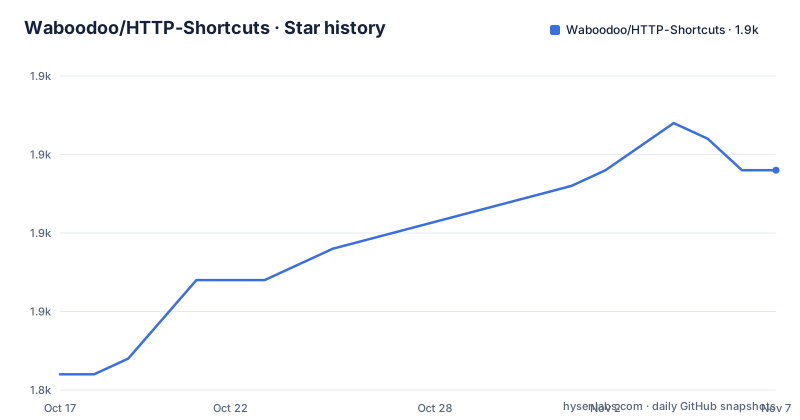
Star history
- Waboodoo/HTTP-Shortcuts1,859 ★ · +13
| Repository | 2026-10-17 | 2026-11-07 |
|---|---|---|
| Waboodoo/HTTP-Shortcuts | 1.8k | 1.9k |
13 Stars in the last 21 days, measured from the daily GitHub snapshot. Compare with other projects
Editorial analysis
HTTP Shortcuts as an Android automation layer
HTTP Shortcuts solves a specific Android workflow problem: giving a network action a place on the home screen and making it run with one tap. A shortcut can send an HTTP or HTTPS request, process the response, and display the result as a toast, window, dialog, image, HTML-formatted text, or web page. It can also run silently. The target audience includes users of home automation systems, people who operate local network services, and Android users who want to connect shortcuts to Tasker, MacroDroid, Termux, WireGuard, or BinaryEye.
The project is broader than an HTTP client. Browser Shortcuts open a URL, MQTT Shortcuts send MQTT messages, Wake-on-LAN Shortcuts wake a network device, and Scripting Shortcuts define custom logic in JavaScript. Shortcuts can appear as home screen widgets, quick settings tiles, or device controls. This makes the app a small automation interface on Android rather than a single-purpose request sender.
The README describes support for GET, POST, PUT, DELETE, PATCH, HEAD, OPTIONS, and TRACE. A shortcut can include custom headers, a static or file-based request body, camera content, form-data file uploads, and authentication mechanisms including Basic, Digest, and Bearer Authentication. These features are relevant when a request needs more than a URL and a method.
Request flow and response handling
The documented flow starts when a user creates a shortcut, configures its request, and places it on an Android surface such as the home screen. Tapping the shortcut triggers the configured HTTP request. The app can then handle the response according to the shortcut's display settings, including showing response content or suppressing visible output.
The app also records an event history for recently executed HTTP requests and responses. The README specifically lists viewing details about recent executions as a feature, although it does not describe retention periods, storage limits, filtering controls, or export behavior for that history. Those details should be checked in the app or official documentation before relying on history for auditing.
Scripts can run before and after execution. The documented scripting capabilities include generating timestamps, random numbers, UUIDs, hashes, HMACs, and base64 values, parsing JSON, HTML, or XML, showing messages, vibrating, playing notification sounds, and triggering other shortcuts. Triggering other shortcuts creates a chaining mechanism. A script can also send TCP or UDP packets, execute SSH commands, publish MQTT messages, or use Wake-on-LAN. The exact runtime permissions, error handling, and available JavaScript APIs are delegated to the linked scripting documentation and are not specified in the README.
Installation through Android distribution channels
The README does not provide a command-line installation procedure, Gradle build sequence, or package-manager command. It directs users to install the app through Google Play or F-Droid. It also provides a link to obtain the latest APK from the repository's releases page. A first real use therefore begins with installing one of those Android packages, rather than building the Kotlin project from source.
After installation, create a shortcut and configure the URL, HTTP method, authentication, headers, body, and response display mode. A minimal first action would be a GET request against a service the user controls or an endpoint whose response can be safely displayed. The README does not provide a sample endpoint, so there is no documented command or request body that can be copied as a guaranteed tutorial example.
Once the shortcut works from the editor or app interface, add it to the Android home screen. The app supports widgets and quick settings tiles as alternative entry points. Users who want to edit a larger collection from a computer can use the web editor, which the README describes as remote editing support. The repository also documents import and export in JSON or cURL format, including automatic periodic importing or exporting. It does not document whether a release APK is signed in the same way as the Play Store build, so distribution provenance should be checked before installation.
Variables, scripting, and chained shortcuts
Variables provide a way to inject values into shortcut definitions. The README lists text, numbers, passwords, selections, colors, and dates as examples. This is important for actions that need input that changes between invocations, such as a selected device, a numeric control value, or a date. The repository excerpt does not explain the full variable resolution order, escaping rules, persistence behavior, or handling of missing variables.
JavaScript is the main extension mechanism. A script can transform a response, calculate a value, parse structured content, present a message, or invoke another shortcut. This design allows a single Android entry point to coordinate several requests and local actions. It also shifts complexity into the shortcut configuration. A script with an incorrect extraction rule, unavailable network service, or failed device command can produce an action that cannot complete even when the underlying HTTP client is configured correctly.
The non-HTTP shortcut types make the abstraction broader. MQTT and Wake-on-LAN actions do not require an HTTP endpoint, while Browser and Scripting Shortcuts cover URL opening and local custom logic. The project is therefore a reasonable fit for a personal automation hub, but the README does not give a formal API contract for third-party integrations or a supported way to run the entire shortcut collection without the Android app. Those boundaries matter for fleet deployment or unattended server-side automation.
Security and network configuration trade-offs
HTTP Shortcuts includes several network controls that are directly relevant to private services and self-hosted systems. It supports HTTP and SOCKS proxies, self-signed certificates, certificate pinning, client certificate authentication, and TLSv1.3. Basic, Digest, and Bearer Authentication cover common credential schemes. These options can make the app useful against local routers, APIs, and appliances that are not exposed through a simple public endpoint.
They also increase the amount of security-sensitive configuration that an adopter must review. Password variables, certificate material, request bodies, and script logic can contain sensitive information. The README does not state how secrets are stored, whether they are encrypted at rest, whether exported JSON or cURL files redact credentials, or what permissions each shortcut requires. It also does not document an automatic audit of scripts or requests. The presence of a security feature should therefore not be treated as evidence that a particular deployment is secure.
The app can run arbitrary JavaScript before and after execution and can interact with other devices and services. That flexibility is its main strength for automation, but it also means shortcut definitions should be treated as executable configuration. A shortcut imported from another person or device should not be enabled without reviewing its URL, headers, authentication settings, body, and scripts. The README does not document a rollback or trusted-import workflow, so the safe first step is to inspect an import before activating it.
Maintenance, releases, and MIT licensing
The repository is not archived. Its last push was on 2026-10-17, and the release list includes v4.8.2 on 2026-10-09, v4.8.1 on 2026-10-05, and v4.8.0 on 2026-10-04. These dates show recent project activity, but the README does not define a support policy, Android compatibility matrix, migration procedure, or long-term maintenance commitment.
The repository is licensed under MIT. The README also states that the app is free and open source. For adopters, the practical upgrade cost depends on whether the Android package can be updated through the chosen distribution channel and whether existing shortcuts rely on undocumented behavior. The repository includes CHANGELOG.md for additions and updates, which is the documented place to inspect changes between versions. The README does not describe schema migration guarantees for JSON imports, so users with large collections should preserve exports before upgrading.
Compared with a conventional Android HTTP client, HTTP Shortcuts offers more entry points, response handling, scripting, integrations, and non-HTTP actions. Compared with a full automation platform, its documentation presents a focused shortcut model rather than a general workflow suite. The trade-off is clear: more device-level capability in one app, with more configuration and credential considerations for the person responsible for it.
Editorial conclusion
HTTP Shortcuts fits Android users who want repeatable HTTP, MQTT, Wake-on-LAN, scripting, and automation actions on the home screen. It is less suitable for people who need a documented command-line deployment process or a narrowly scoped request client without JavaScript and automation features. Before adopting it, verify the authentication and network options required by the target service, confirm that the Android distribution source is acceptable to you, and test import and export behavior for the shortcuts you plan to keep.
Frequently asked questions
What can HTTP Shortcuts do on Android?
HTTP Shortcuts creates Android shortcuts for HTTP and HTTPS requests and can process or display responses. It also supports MQTT, Wake-on-LAN, browser, scripting, widgets, quick settings tiles, and third-party app integrations.
Can HTTP Shortcuts run JavaScript?
Yes. The app can run JavaScript before or after execution. The README lists value generation, JSON, HTML, and XML parsing, user messages, device actions, chaining, TCP or UDP packets, SSH commands, MQTT messages, and Wake-on-LAN among its documented scripting uses.
How do I install HTTP Shortcuts?
The README provides installation links for Google Play and F-Droid, plus a direct APK download link through the GitHub releases. It does not provide a command-line installation or build tutorial.
Official sources
Add this badge to your README
If you maintain this project, the badge below links readers to this analysis and shows its maintenance status from the daily GitHub snapshot. Paste the markdown into your README; add ?metric=license or ?metric=stars to the image URL for a different field.

[](https://hysenlabs.com/projects/waboodoo-http-shortcuts)Star history chart for your README
[](https://hysenlabs.com/projects/waboodoo-http-shortcuts)Was this useful?