TgtoDrive turns drive share links into a STRM library for Emby
An enhanced cloud drive file manager, supporting transfers to 115, 123 and GuangYa cloud drives, organizing movies and music within the drive, STRM generation, and reverse proxy/302 playback for Emby, FNOS Video and FNOS Music.
At a glance
- What is it?
- TgtoDrive saves share links into 115, 123 and 光鸭云盘, tidies what already sits on the drive, writes STRM libraries and fronts Emby with 302 playback from one Docker Compose file. Coverage is uneven: 天翼云盘 gets two of the five capabilities, and the image name, the version badge and the bundled source tree disagree with each other.
- Who is it for?
- TgtoDrive fits a self-hoster who already pays for a Chinese drive account, wants share links filed into chosen folders, and prefers pointing Emby at pointer files instead of moving the library onto local disks. It does not fit anyone who needs NAS transcoding for 飞牛音乐, anyone on 天翼云盘 who wants STRM output, or anyone unwilling to run a container in host networking mode.
- Can I use it commercially?
- Yes. MIT is a permissive licence: you can use, modify and sell software built on it, as long as you keep its copyright and licence notices.
- Is it still maintained?
- Yes. The repository last received commits 3 days ago.
- What is it written in?
- Mainly Python, according to GitHub's language statistics.
Answers come from the project's GitHub data, last synced on October 23, 2026, and from our analysis. They are not legal advice.
Star history
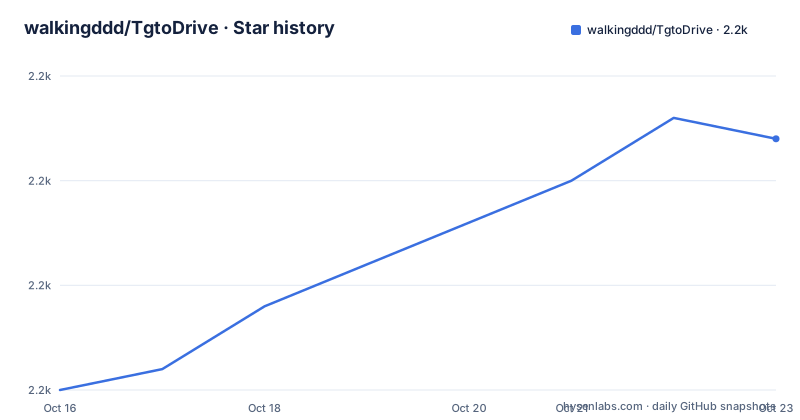
- walkingddd/TgtoDrive2,207 ★ · +12
| Repository | 2026-10-16 | 2026-10-23 |
|---|---|---|
| walkingddd/TgtoDrive | 2.2k | 2.2k |
12 Stars in the last 7 days, measured from the daily GitHub snapshot. Compare with other projects
Editorial analysis
A file organiser for drives you already hold an account with
TgtoDrive ships no media and no catalogue. The project's own notice says it provides no film, music or other resource, and that the files, the drive accounts and the share links are supplied by whoever runs it. That fixes the audience: someone who already holds a 115 网盘, 123 云盘, 光鸭云盘 or 天翼云盘 account and wants the repetitive work around those files handled by a server instead of by hand.
The name invites a wrong guess, because Tg does not stand for Telegram automation. Telegram elements here are limited to a chat group link and an optional task notification, and the deployment prerequisites mention Telegram API access only for that notification. Transfer work is driven by share links you paste into the web panel. What gets automated is the drive, not the messenger, and reading the repository as a Telegram account tool sends you hunting for behaviour that is not in it.
Scope is deliberately personal. Beside the transfer, organising, STRM and proxy work, the feature list includes file cleanup, an Emby dashboard, poster maintenance, task notification, run logs and organising history, which are the chores of someone maintaining one library rather than serving many users.
Deployment runs from an empty directory to a panel on port 12366
Prerequisites are modest: Docker 20.10+, Docker Compose 2.x, and a NAS or Linux server that stays switched on. Telegram API access matters only if you want task notification. You create a working directory plus the two directories the container will write into:
mkdir -p tgtodrive
cd tgtodrive
mkdir -p db strm
Then the compose file. It is short because configuration happens in the browser after startup:
version: '3'

services:
  tgtodrive-service:
    image: walkingd/tgto123:latest
    container_name: TgtoDrive
    network_mode: host  # 推荐 host 模式以简化端口映射和直链访问
    environment:
      # --- 基础配置 ---
      - TZ=Asia/Shanghai
      # 必填:WEB管理页面的登录账号密码
      - ENV_WEB_PASSPORT=admin
      - ENV_WEB_PASSWORD=password
    volumes:
      # 数据库与日志持久化,右侧固定为/app/db
      - ./db:/app/db
      # STRM输出目录:用于保存 /app/strm 下生成内容,/vol1/1000/Emby/strm 改成你的目录,右侧固定为/app/strm
      - /vol1/1000/Emby/strm:/app/strm
      # [可选] 本地文件秒传目录:左侧改为 NAS 上的个人文件目录,不需要可去掉
      - /path/to/local/files:/app/upload

    restart: always
Start it, and the admin panel answers on port 12366:
docker-compose pull  # 拉取最新镜像
docker-compose up -d # 后台启动http://你的服务器IP:12366First login uses ENV_WEB_PASSPORT and ENV_WEB_PASSWORD from that file. One detail catches people on the first pass: the quick deploy block uses the hyphenated docker-compose while the common commands later use the plugin form docker compose, and the stated prerequisite is Docker Compose 2.x. On a host carrying only the v2 plugin, the hyphenated line is the one that fails. One more trap sits in the image name: walkingd/tgto123 is what gets pulled, even though the container, the panel and the project itself are all called TgtoDrive, so grep for the wrong string and you will not find the running service.
Host mode decides which ports the server publishes
network_mode: host is the recommended setting, and because of it the compose file carries no ports mapping at all. Everything the container listens on is bound in the host network namespace rather than published through docker. Nothing shows the effect faster than the admin panel: your server address plus port 12366 is what you type in the browser, with no mapping flag anywhere in the file. A 302 listener behaves the same way. You pick a port under Emby与飞牛反代, and since the container shares the host interfaces, a client reaches the reverse proxy at your server address and that port, with mapping mentioned in the documentation only for the case where you are not using host networking.
That choice moves the exposure decision from the compose file onto the host firewall. Sample configuration sets three environment variables and no more: TZ=Asia/Shanghai, ENV_WEB_PASSPORT and ENV_WEB_PASSWORD, where the username variable really is spelled ENV_WEB_PASSPORT rather than ENV_WEB_USERNAME, and that exact spelling appears only in the compose sample. Those two values are the entire authentication story for the panel. Drive accounts, the proxy, the TMDB Key used for film identification and every notification setting are entered in the browser after the first login, which leaves the host firewall and the two values in the compose sample as the whole perimeter around the panel.
Source and target directories must not touch or nest
The organise pages are where a mistake turns into lost files, because the operations there move rather than copy. Two rules are stated plainly. The source directory and the target directory must be set separately: identical paths, or nesting in either direction, are not allowed. The music directories must also stay outside the range scanned for films, so a film sweep does not walk through a music library you just filled.
A second rule concerns what the tool believes a file is. The music source directory acts as a staging area: audio recognised through MusicBrainz metadata is filed into the region, artist, album and track layout you configured, audio that is not recognised is left where it is, and anything that is not music is moved into the drive's recycle bin. Film identification runs through TMDB information with automatic classification, renaming and archiving, plus rules for repeated files. Note where the discarded files land: the recycle bin belongs to the provider, not to your ./db mount, so a wrongly classified directory is recovered from the drive's own bin.
Full and incremental STRM runs write into one mount
STRM generation is the step that turns organised drive files into something a media server can index. Two run modes exist, a full generation and an incremental update performed after organising, and the incremental mode is what keeps daily use bearable on a large library. Companion files are handled in the same pass: subtitles and covers are synced alongside the pointer files, and entries whose drive file has disappeared are cleaned up instead of being left behind as dead links.
The output is a directory, and the compose file decides where it lands:
- /vol1/1000/Emby/strm:/app/strmThe left side is your media server's STRM directory, the right side is fixed. Logic identical to that covers the other two mounts: ./db is bound to /app/db and holds configuration, history, logs and task state, while the optional /app/upload mount pushes files from a local folder to a drive in one step. Backing up means copying db/ and strm/ directories, since an image tag is not a backup.
One gap is worth naming here. Music organising never produces STRM, so an audio library built through this pipeline needs a separate route to reach the media server.
Emby wants an API Key and 飞牛音乐 wants a directory mapping
Your clients meet the tool at the 302 layer. Under Emby与飞牛反代 you pick a service type, supply an upstream address and a listening port, and Emby also needs an API Key for the server being fronted. Clients then talk to the reverse proxy port instead of the media server, and the drive's direct link performs the actual transfer. 飞牛音乐 is configured differently: it needs the mapping between a local music directory and the matching directory on the drive, and the files in the two must correspond.
That last point sets a hard boundary. 飞牛音乐 plays the original file from the drive and NAS transcoding is not supported, so anything requiring the server to convert a format before playback will not play. The Emby and 飞牛影视 path has no such statement in the documentation, but the geometry is the same: with the bytes on the drive, playback speed and stability belong to the provider's links, and a link that fails at that moment fails the playback. When transfer or playback breaks, the documented first moves are checking the drive login state, the directory configuration, and whether the playback address and port are reachable, then reading the run log.
Providers, architectures and version numbers do not line up
Coverage is uneven across the four providers, and the gap matters more than the list. 115 网盘 gets everything: transfer, film organising, music organising, STRM generation and file cleanup. 123 云盘 adds file import on top of the same organising and STRM work. 光鸭云盘 covers transfer, film and music organising and STRM. 天翼云盘 is the odd one out with transfer and file cleanup only, so a 天翼云盘 account can feed the transfer page but cannot produce a STRM library or be reorganised at all.
Version numbering adds a second kind of confusion. The version badge reads 8.6.4, the newest version number listed for the project is v8.3.39, and the only source tree at the repository root is a directory named v6.6.4(最新版请在docker安装), whose own name sends the reader to Docker instead. The last push was on 2026-09-05, the code is MIT licensed, and three recent versions, v8.3.34, v8.3.35 and v8.3.39, all carry the date 2026-07-29, which describes an image that moves often and a repository tree that does not. Images are published for amd64 and arm64, so the architecture badge covers NAS hardware on either side.
The recent feature work lands where the pipelines are thinnest: phone verification code login for 123 云盘, deep delete in 光鸭云盘, and PIKPAK share instant transfer into 光鸭云盘.
STRM plus 302 against a library of real files on disk
One alternative needs no third-party tool at all: keep the media on local storage and let the media server index it. Where the bytes sit, and who handles them afterwards, is the whole trade. A TgtoDrive library holds small pointer files, the media stays on the provider's disks, and playback depends on the drive handing out a working direct link at the moment the player asks for it. A local library pays for that with local scanning, local storage and a server free to touch the file, which is exactly the capability 飞牛音乐 lacks here.
Upgrades follow the same shape, because the image is the unit of change:
docker compose pull
docker compose up -d
Configuration, history, logs and task state all live in the ./db mount at /app/db, so pulling a new tag does not discard them, and the documentation describes no database migration step and no rollback for a new image that misbehaves against an older ./db. Before trusting a fresh tag with a working library, copy db/ and strm/ off the server. The sample also sets restart: always, so a bad image returns on every boot.
Editorial conclusion
TgtoDrive fits a self-hoster who already pays for a Chinese drive account, wants share links filed into chosen folders, and prefers pointing Emby at pointer files instead of moving the library onto local disks. It does not fit anyone who needs NAS transcoding for 飞牛音乐, anyone on 天翼云盘 who wants STRM output, or anyone unwilling to run a container in host networking mode. Check three things before the first run: that the account you add is supported by the transfer and organise pages, that your source and target directories do not nest, and that the Emby API Key is valid for the upstream server the proxy points at.
Frequently asked questions
Does TgtoDrive include any movies or music?
No. The project states that it provides no film, music or other resource, and that the files, the drive accounts and the share links are supplied by you, with the request that you handle only content you own or are authorised for.
Which cloud drives can TgtoDrive build a STRM library for?
115 网盘, 123 云盘 and 光鸭云盘 all support STRM generation alongside transfer and organising. 天翼云盘 is limited to transfer and file cleanup, so it has no STRM generation and no film or music organising.
Can 飞牛音乐 play through TgtoDrive with NAS transcoding?
No. 飞牛音乐 plays the original files from the drive, and NAS transcoding playback is not supported. You must map the local music directory to the matching drive directory and keep the files in the two in step.
What does TgtoDrive need on the host before it can run?
Docker 20.10+, Docker Compose 2.x, and a NAS or Linux server that stays running. Access to the Telegram API is only needed if you enable task notification. The panel is then reachable on port 12366 of that server.
How do I update TgtoDrive without losing my settings?
Run docker compose pull and then docker compose up -d. Configuration, history, logs and task state are kept in ./db, which is bound to /app/db, so they survive an image change. The README does not document a database migration or a rollback step for the upgrade.
Official sources
Add this badge to your README
If you maintain this project, the badge below links readers to this analysis and shows its maintenance status from the daily GitHub snapshot. Paste the markdown into your README; add ?metric=license or ?metric=stars to the image URL for a different field.

[](https://hysenlabs.com/projects/walkingddd-tgtodrive)Star history chart for your README
[](https://hysenlabs.com/projects/walkingddd-tgtodrive)Was this useful?