vonic: the install line is four betas behind the manifest
GitHub describes it as Mobile UI Components, based on Vue.js and ionic CSS. https://wangdahoo.github.io/vonic-documents. The repository metadata lists Vue as its primary language. The metadata lists the NOASSERTION license. This article stays within the project description and details documented in the GitHub repository README.
At a glance
- What is it?
- A mobile component library for Vue built on an Ionic CSS foundation, with a starter project and a documentation site built by the same script. The code is a decade's snapshot of one particular build toolchain, and the readme has drifted from the manifest.
- Who is it for?
- Vonic is worth reading as a reference for how a component library of that era was packaged, and as a source of ready-made mobile components if you happen to be on the framework version it targets. Two things to check before adopting it.
- Can I use it commercially?
- Check first. The repository uses a licence we do not classify automatically, so read its LICENSE file before any commercial use.
- Is it still maintained?
- Probably not. The repository last received commits 57 months ago, on February 12, 2022.
- What is it written in?
- Mainly Vue, according to GitHub's language statistics.
Answers come from the project's GitHub data, last synced on October 21, 2026, and from our analysis. They are not legal advice.
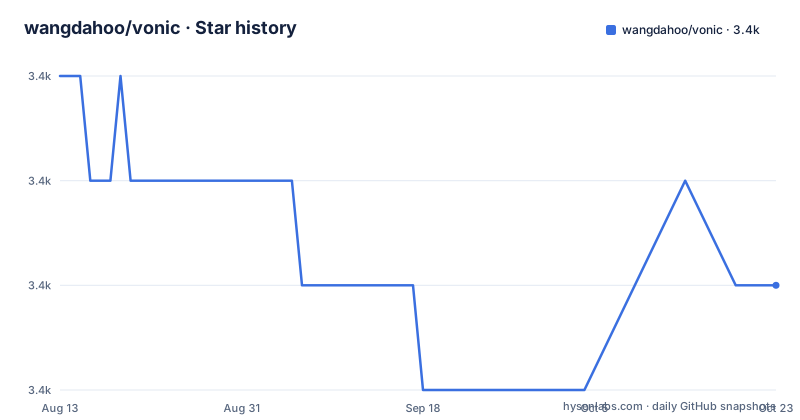
Star history
- wangdahoo/vonic3,377 ★ · -2
| Repository | 2026-08-13 | 2026-10-21 |
|---|---|---|
| wangdahoo/vonic | 3.4k | 3.4k |
-2 Stars in the last 69 days, measured from the daily GitHub snapshot. Compare with other projects
Editorial analysis
The readme's install line is four betas behind the manifest
The notice near the top of the readme tells you which prerelease to install, and the version it names is behind the one the package manifest declares. The notice points at the fifteenth beta of the second major line; the manifest declares the nineteenth. That is a small drift, but it is the kind that produces a confusing first experience: you follow the readme, install a release four steps older than the one in the source tree, and there is no note telling you the newer one exists. The same notice handles the older framework by pointing you at a separate branch rather than at a version range, which is the more significant decision. For a library that shipped betas, pinning by branch was a reasonable way to avoid a prerelease becoming a de facto default, and it means the major line you use is decided by which branch you are on rather than by what resolves.
The last commit to the main branch is from February 2022
The repository is not archived, so the code is still readable and the page still renders. It is also not being changed: the most recent push to the default branch is dated 2022-02-12, and there are no published releases at all. Both facts matter for the same reason. A component library that targets one framework generation and ships only prereleases has no upgrade path without a maintainer, so adoption is a decision to freeze alongside it. The framework dependency in the manifest is the second major line of Vue with a router in the second major line as well, and the readme separately points at a branch for the generation before that. Anyone arriving now should read those three dates together: last commit, framework version, and the absence of releases, and then decide whether a frozen library is worth more than the components inside it.
A bundler from the previous decade, and a native Sass binding
The dependency list is a snapshot of one moment, and the exact versions make it clear. The build is driven by the second generation of a JavaScript bundler with its matching development server, the loader for Vue components is from the same generation, the code is transpiled by the sixth generation of Babel with a matching preset, and stylesheets are compiled by a native Sass binding whose version matters because it compiles against a C library rather than a pure JavaScript one. Two consequences follow for anyone trying to install this today. A native binding pins you to the Node versions it was built for, which is usually the first failure you will see. And the loader generation determines the bundler generation, so upgrading either one alone is not possible. The published entry point is a single prebuilt file in a committed output directory rather than a compiled-on-install artefact, which means the artefact you install was built once by whoever last ran the build.
One build script produces both the bundle and the documentation
There are three scripts and they share an entry point. The development script starts the development server with hot reloading and inline mode, and it binds to all interfaces on a fixed port rather than to loopback, which is convenient on a virtual machine and worth knowing about on a shared network. The build script runs the same Node file without any environment variable set, and the documentation script runs it with a variable set to a documentation value, so the two outputs are the same pipeline pointed at a different target. That is why the root contains both an HTML template and a documentation directory, and why the demo application has its own entry point, component folder, asset folder, and a session file. One build tool producing a library, a documentation site, and a demo is an efficient arrangement for a project this size, and it is also why the output directory is committed: the documentation site is built from the same tree that ships.
The project start is four commands, two of which install a tool globally.
$ npm i vue-cli -g
$ vue init wangdahoo/vonic-template#2.0 my-vonic-app
The version to install into that project is where the readme and the manifest disagree, which is the subject of the first thing worth checking in this repository.
Thirty components, and a list of what the design came from
The component inventory is explicit and reads like a design system checklist: a material-design button, form inputs including search, radio, checkbox, toggle, and a range slider, then feedback and structure in the form of a badge, a toast, a loading indicator, a header, lists and cells, tabs and a button bar, a scalable container, a swipe component, an infinite scroller, a cascade list, an accordion, a date picker, a dialog, a popup, a modal, an action sheet, a sidebar, and a tab bar. Alongside the components, the project credits six other projects by name as sources of its visual and structural approach, among them the CSS framework the components are built on, two other mobile component sets, a Vue-specific component library, and a Google design system. That list is more useful than it looks: it tells you where to look if you want the same look without the dependency.
Two community channels sit in the repository root
The root file listing has a few entries that say more about the project than the readme does. Next to the logo there are two image files whose names identify them as a messaging-group identifier and a scan code for that group, which is how the project runs its community in a market where the usual channels are not the ones people use. The documentation is bilingual in practice rather than in code: the readme carries one link labelled as Chinese documentation, pointing at a documentation site separate from the demo page, and there is a second demo site linked as the project's demo. Two starter repositories are referenced as well, one built on the project's own template for a quick start and one built on an older boilerplate for people who arrived that way. None of this is unusual, but it does mean the community surface is on a chat client rather than a forum.
The licence says MIT twice, and the catalogue says nothing
A small administrative inconsistency is worth recording because it affects anyone automating a licence check. The licence file at the root states the MIT licence, and the package manifest declares the same licence identifier. The catalogue metadata for the repository, however, records no standard licence identifier at all. Two of the three sources agree, so the intent is not in doubt, but a tool that trusts only the metadata will see an unlicensed repository. The same pattern shows up in the readme, which prints the licence name as a bare word with no reference to the file. For a library that people are encouraged to fork and vendor into their own applications, that is worth checking manually once rather than assuming.
Editorial conclusion
Vonic is worth reading as a reference for how a component library of that era was packaged, and as a source of ready-made mobile components if you happen to be on the framework version it targets. Two things to check before adopting it. Its last commit to the main branch is from February 2022 and it publishes no releases, so nothing will arrive when the ecosystem moves on. And the build chain is anchored to an old bundler generation and an old native Sass binding, which usually means a Node upgrade is the first problem you will hit rather than a component bug.
Frequently asked questions
What is the vonic component library?
A set of mobile user interface components for Vue.js, built on Ionic CSS with stylesheets written in Sass. The inventory runs to around thirty components covering buttons, form inputs, feedback, navigation, and overlays, and there is a separate starter project for a quick start.
How do I install vonic?
With the package manager, and the readme's notice pins an exact prerelease version, though the package manifest declares a later prerelease than the notice names. For the generation before the current major line, the readme points you at a separate branch rather than at a version.
How do I start a vonic project?
Generate a project from the starter template with the Vue command line tool, install its dependencies, and run the development script, which serves with hot reloading. A second starter is provided for people coming from the older webpack boilerplate, and the same build script produces the library bundle and the documentation site.
Is vonic still maintained?
There is no evidence of ongoing work: the most recent commit to the default branch is dated February 2022 and the repository publishes no releases. Before adopting it, check the dependency versions, since the build chain is built around a previous generation of the bundler and an older native Sass binding.
Official sources
Add this badge to your README
If you maintain this project, the badge below links readers to this analysis and shows its maintenance status from the daily GitHub snapshot. Paste the markdown into your README; add ?metric=license or ?metric=stars to the image URL for a different field.

[](https://hysenlabs.com/projects/wangdahoo-vonic)Star history chart for your README
[](https://hysenlabs.com/projects/wangdahoo-vonic)