Lakka-LibreELEC: a dedicated retro emulation console built from small hardware
Lakka is a lightweight Linux distribution that transforms a small computer into a full blown game console.
At a glance
- What is it?
- Lakka is a lightweight Linux distribution built around RetroArch that turns a small computer into a dedicated emulation console. Pre-built images at lakka.tv are the documented install path; the repository targets contributors who need to build custom images.
- Who is it for?
- Lakka suits someone who wants a dedicated emulation device on inexpensive hardware, accepts a read-only operating system that updates as a whole image, and has no need for a terminal or package manager. Skip it when you need a general-purpose Linux system that also runs emulators: installing RetroArch directly on Raspberry Pi OS preserves a full Linux environment alongside emulation.
- Can I use it commercially?
- Not without permission. GitHub finds no licence file in the repository, and without a licence all rights are reserved by default: you may read the code but not reuse it. Check the README, or ask the authors, before using it.
- Is it still maintained?
- Yes. The repository last received commits 2 days ago.
- What is it written in?
- Mainly Makefile, according to GitHub's language statistics.
Answers come from the project's GitHub data, last synced on October 23, 2026, and from our analysis. They are not legal advice.
Star history
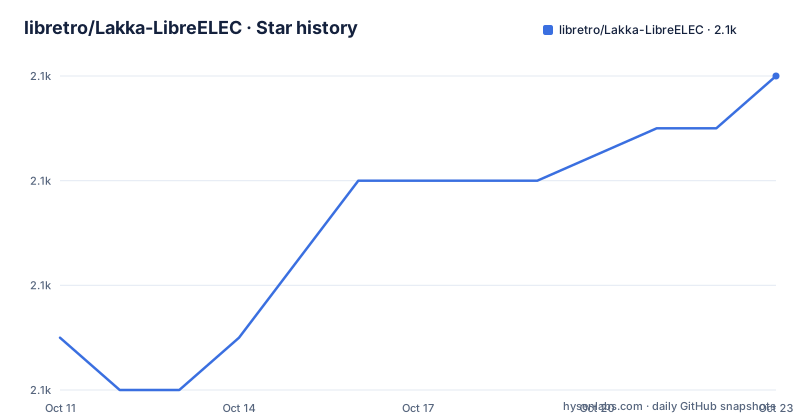
- libretro/Lakka-LibreELEC2,058 ★ · +5
| Repository | 2026-10-11 | 2026-10-23 |
|---|---|---|
| libretro/Lakka-LibreELEC | 2.1k | 2.1k |
5 Stars in the last 12 days, measured from the daily GitHub snapshot. Compare with other projects
Editorial analysis
Lakka builds a single-purpose appliance around RetroArch, not a general Linux system
Lakka is a lightweight Linux distribution whose only application is the RetroArch emulator front-end. After installation, the device runs Lakka and nothing else: no desktop environment, no application launcher, no other software. Every design decision points toward a single-purpose console experience.
LibreELEC is the embedded Linux base underneath Lakka. Originally built for Kodi media center deployments, LibreELEC provides a minimal operating system that Lakka reuses while substituting RetroArch for Kodi. That relationship explains the repository name: Lakka-LibreELEC is Lakka built on top of the LibreELEC toolchain, build system and update mechanism.
Hardware cost is an explicit goal. Powering the device from a micro USB adapter, the same kind that charges a smartphone, keeps the cost low. Combined with SD card storage, the hardware footprint is minimal. The software is described as optimized to run on low-end computers, which aligns with that cost goal.
Pre-built images from lakka.tv are the documented path; this repository is for contributors
For someone who wants to run Lakka on hardware, the documented installation path leads to https://www.lakka.tv/get, not to this repository. Pre-built images exist per hardware platform, and installation amounts to flashing an image to an SD card.
Once the device boots, the workflow is straightforward. Put ROM files onto the SD card, plug in a controller, and use the device as a game console. PS3 and Xbox 360 controllers are explicitly named as supported, so existing hardware does not need to be replaced.
This repository is the build environment for contributors who need to produce custom images: adding emulator cores, modifying packages, or supporting new hardware. The build requires a Linux environment with the LibreELEC toolchain. Someone who just wants to play games on an SD card has no reason to clone this repository.
Rewinding, hotplug and video streaming come from RetroArch; they need no extra setup in Lakka
RetroArch contributes 4 documented features to Lakka's user experience. First is rewinding, compared in the README to the time-manipulation mechanic in Braid, and it lets a player step backwards through game state without reloading a save file by maintaining a ring buffer of recent frames.
Second is joypad hotplug, where a controller connected or disconnected while Lakka is running is detected without a system restart. Third is video streaming, where the gameplay output can be sent to a streaming destination, though the README names the feature without providing configuration steps. Fourth is PS3 and Xbox 360 controller support, meaning both work with Lakka directly without purchasing new hardware.
Reading both the repository description and the README body reveals a small inconsistency worth noting: the description calls Lakka a distribution that turns a computer into a "full blown game console," while the README's opening paragraph calls it a "full blown emulation console." Those two phrases describe different things, and the README's phrasing is more accurate to what the software actually does.
The Makefile provides four image-build targets and two cleanup paths
Building Lakka from source uses a Makefile at the repository root with 8 named targets, all of which dispatch to one of 2 helper scripts. All image-building calls go to scripts/image with different arguments:
release:
	./scripts/image release

image:
	./scripts/image mkimage

noobs:
	./scripts/image noobs
The noobs target produces a NOOBS package. NOOBS (New Out-Of-Box Software) is a Raspberry Pi-specific installer, and its presence in the Makefile confirms Raspberry Pi as an explicit build target even though the README never names specific hardware models.
Clean-up dispatches to a 2nd helper:
clean:
	./scripts/makefile_helper --clean

distclean:
	./scripts/makefile_helper --distclean
An 8th target, src-pkg, runs `tar cvJf sources.tar.xz sources` to produce a source archive, which is a standard step when a distribution includes components that carry source-distribution requirements. The distributions/, packages/, projects/ and config/ directories in the repository layout confirm a multi-platform build system that produces 1 image per target device.
Open source code from Lakka, commercial-use restrictions from the bundled emulators
Bundled emulators restrict commercial use, and the licenses/ directory in the repository holds the texts that define those restrictions for each component. Anyone planning to deploy Lakka in a commercial setting, such as a kiosk or a paid arcade service, should read that directory before shipping.
Contributions to Lakka go through the standard GitHub pull-request workflow. CONTRIBUTING.md at the repository root describes the process, and the project works to integrate its own patches into upstream projects where applicable, which is a normal practice for a distribution that repackages open source components.
A CHANGELOG.md file and a CONTRIBUTING.md file both sit at the repository root, giving contributors a clear starting point for understanding what changed between image builds and how to submit new work.
No terminal or package manager: Lakka replaces the OS rather than sitting on top of one
Installing Lakka replaces whatever was on the device beforehand. After installation, the device runs Lakka and only Lakka. There is no terminal accessible during normal operation and no way to install additional software without building a custom image from the repository.
This is a different approach from installing RetroArch on top of a general-purpose Linux distribution. On a Raspberry Pi running Raspberry Pi OS, installing RetroArch preserves full Linux access alongside emulation. Lakka removes that access in exchange for an appliance-like experience where the operating system does one thing.
Updates work at the image level rather than the package level. An upgrade replaces the system partition with a new image. Any file written outside the designated configuration and ROM areas on the card is lost on upgrade. The trade-off is a clean, predictable system state in exchange for that constraint.
Support channels span IRC, Discord and the libretro forums, with a FAQ wiki as the first stop
4 support channels are listed in the README: a wiki FAQ at github.com/libretro/Lakka-LibreELEC/wiki/FAQ, an IRC channel at #lakkatv on irc.libera.chat, a Discord at discord.gg/BNFR4hM, and a Lakka forum section at forums.libretro.com/c/libretro/lakka-tv-general.
GitHub issues are not mentioned in the README as a support path, which means someone who opens an issue on the repository may not get a timely response. Hardware-specific troubleshooting, which is where most end-user questions land, fits better in the Discord or the forums.
Contributors who want to add a new hardware target or modify a package start with CONTRIBUTING.md at the repository root, since that file describes the submission process and the project's approach to integrating patches upstream.
Editorial conclusion
Lakka suits someone who wants a dedicated emulation device on inexpensive hardware, accepts a read-only operating system that updates as a whole image, and has no need for a terminal or package manager. Skip it when you need a general-purpose Linux system that also runs emulators: installing RetroArch directly on Raspberry Pi OS preserves a full Linux environment alongside emulation. Before flashing, read the FAQ at github.com/libretro/Lakka-LibreELEC/wiki/FAQ to confirm controller compatibility with your specific hardware, and verify whether your hardware model is in the supported list at lakka.tv/get.
Frequently asked questions
How do I install Lakka on Raspberry Pi?
Pre-built Raspberry Pi images are available at lakka.tv/get. Flash the image to an SD card, place your ROM files on the card, and connect a controller. The repository's Makefile also includes a noobs target for building a NOOBS installer package from source.
What emulators does Lakka include?
Lakka is built on RetroArch, which supports a large range of hardware. The README does not list individual emulator cores by name.
Does Lakka work with PS3 and Xbox 360 controllers?
Yes. The README explicitly names PS3 and Xbox 360 controllers as supported, so they work without purchasing new hardware.
What is the difference between Lakka and RetroArch installed on Raspberry Pi OS?
Lakka replaces the entire operating system with a single-purpose image built around RetroArch, giving an appliance experience with no terminal or package manager. Installing RetroArch on Raspberry Pi OS preserves a full Linux environment alongside emulation.
Can Lakka be used for commercial purposes?
The README states that bundled emulators forbid commercialisation. Read the licenses/ directory in the repository to determine which components carry that restriction before deploying commercially.
Official sources
Add this badge to your README
If you maintain this project, the badge below links readers to this analysis and shows its maintenance status from the daily GitHub snapshot. Paste the markdown into your README; add ?metric=license or ?metric=stars to the image URL for a different field.

[](https://hysenlabs.com/projects/libretro-lakka-libreelec)Star history chart for your README
[](https://hysenlabs.com/projects/libretro-lakka-libreelec)Was this useful?