wavedrom: one release from 2019, a package seven majors ahead, and three files in three lines of one tutorial
:ocean: Digital timing diagram rendering engine
At a glance
- What is it?
- A timing diagram renderer that turns a compact JSON description into SVG, shipped as a library, a command line tool, four CDN bundles and a desktop editor. Its release page holds a single tag from seven years ago, its server section is six empty code fences, and the Linux editor instructions name a different file in each step.
- Who is it for?
- Use it if your audience is hardware engineers, because the compact text format is the reason to choose it over a drawing tool, and the editor means nobody has to learn the syntax to start. Four things to check.
- Can I use it commercially?
- Yes. MIT is a permissive licence: you can use, modify and sell software built on it, as long as you keep its copyright and licence notices.
- Is it still maintained?
- Yes. The repository last received commits 31 days ago.
- What is it written in?
- Mainly JavaScript, according to GitHub's language statistics.
Answers come from the project's GitHub data, last synced on November 25, 2026, and from our analysis. They are not legal advice.
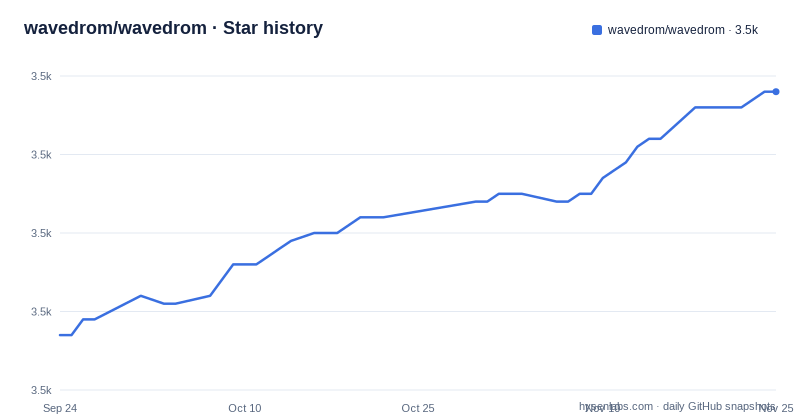
Star history
- wavedrom/wavedrom3,528 ★ · +31
| Repository | 2026-09-24 | 2026-11-25 |
|---|---|---|
| wavedrom/wavedrom | 3.5k | 3.5k |
31 Stars in the last 62 days, measured from the daily GitHub snapshot. Compare with other projects
Editorial analysis
The release list has one entry from 2019 and the package says 3.7.0
Compare two numbers in the same project. The release list contains exactly one tag, version 2.1.2, published on 2019-05-28 with the title Added CLI version. The package manifest says the version is 3.7.0, and the embedding instructions in the readme pull major version 3 from a content delivery network. The default branch, which is named trunk rather than master or main, was pushed on 2026-08-31. The GitHub releases page alone does not establish whether later Git tags or npm versions exist. Readers should check the package registry and tags separately when choosing a version, and consult commits or other project documentation for changes not described on the release page.
The documented embedding path floats a major version with no integrity hash
Embedding a diagram in a page is three steps, and the first is a script tag:
<script src="https://cdn.jsdelivr.net/npm/wavedrom@3/wavedrom.min.js" type="text/javascript"></script>with the same URL offered from a second content delivery network. The version is pinned to the major line and nothing else, so every page view resolves to whatever the newest patch in that line is at that moment. There is no integrity attribute and no hash in the snippet, so the browser has nothing to compare against. That is a normal thing for documentation to do and a strange thing to copy into a long-lived page, because a rendering change in a patch release silently reaches every page that embedded the script. The second step sets a load handler on the body and the third wraps the JSON in a script tag with a custom type, which the library finds and replaces in place. The result is genuinely good for a blog post and a dependency you did not pin.
The server section is six empty code fences
There is a section headed Server, one line naming a host, and then six fenced code blocks that contain nothing at all. Three are labelled as markdown, one is labelled as HTML, and two carry no language. So the documentation introduces a rendering server, gives its address, and then shows six empty examples. Whatever those examples were meant to contain, they are not in the repository, and the section as it stands tells a reader nothing about how the server is called, what it accepts, or what it returns. This is the one part of the file where the gap is not merely cosmetic: everything else in the readme documents an interface you can use, and this section documents an interface you cannot learn from. The rest of the file is unusually well specified by comparison, which makes the empty block conspicuous rather than merely incomplete.
The Linux editor tutorial names three different files in three lines
The standalone editor has three download instructions, one per platform, and the Linux one does not agree with itself. Step one says to download the archive named for version 2.4.2, with the architecture selectable between two values. Step two says to extract a different archive, one minor version earlier and with the architecture fixed:
unzip-untar the package: `tar -xvzf wavedrom-editor-v2.3.2-linux-x64.tar.gz`Step three then tells you to run a path that corresponds to neither filename: `./WaveDromEditor/linux64/wavedrom-editor`, which implies an extracted directory named for the application and an architecture subdirectory rather than the version-and-architecture archive name used one line earlier. So a reader on Linux has three candidate filenames and one run path that belongs to none of them. The Windows and macOS instructions name version 2.4.2 consistently, which is what makes the Linux divergence look like an edit that was never finished rather than a deliberate change.
The command line tool has no output option, so files come from redirection
The tool takes three options and that is the whole list: an input path, which is required; an indent level for the output; and a help flag. There is no output file, no output format, and no flag to choose a destination, which shapes every example in the section. The simplest invocation redirects standard output into a file. The global-install example adds the indent flag and redirects again. And the PNG export is a pipe through an entirely different package:
npx wavedrom -i source.json5 | npx @resvg/resvg-js-cli - output.pngThat is a well-chosen pipeline, since the second stage takes the first stage's standard input, but it also means producing a bitmap requires fetching and running a second tool, and the file argument position is the reading tool's rather than the renderer's. For a command line tool that is otherwise pleasantly small, the absence of an output flag is the constraint that shapes everything you do with it.
Four bundles from one source, and both CDNs get the same one
The build produces four distributable files from a single entry module. One script bundles it as an immediately-invoked function into an unminified file, a second minifies it and prepends a banner generated by running another script, and two more scripts produce a pair of files whose names carry the name of a content delivery network. The manifest then points both content delivery network fields at the same one of those two:
"unpkg": "wavedrom.unpkg.min.js",
"jsdelivr": "wavedrom.unpkg.min.js",
So four artefacts exist, and the naming suggests two are network-specific variants while the configuration makes both networks serve the same one. The exports map publishes three entry points, the library root, the package file, and a wildcard into the skins directory, and the files list ships the bundles alongside the library and the skins. For a project whose pitch is that it works in the browser with nothing to install, four near-identical files is more surface than the use case needs, and the reason is not stated anywhere.
Installing from a clone runs the linter, the tests and four builds
The prepare script is the whole pipeline in one line: run the tests, run both distribution builds, then run both content delivery network builds. Package managers run prepare when installing from a source checkout as well as before publishing, so cloning this repository and running a plain install executes the linter, the coverage-instrumented test run, and four esbuild invocations before anything is usable. The test script is itself a chain: it runs the linter over the library and the command line directory first, and only then runs the test suite under a coverage reporter emitting both a machine-readable and a terminal summary. That ordering is deliberate and good practice for continuous integration, where a style failure should stop a run cheaply. It is a surprise in a local clone, where the equivalent of an install does the work of a build.
The format is specified in another repository and named three ways
The description says the engine converts a WaveJSON input text description into SVG, and the links to that specification point at a separate repository with its own file, so the format is versioned independently of the renderer that consumes it. That is the right arrangement for an interchange format and it has a practical consequence: the renderer and the schema can move at different speeds. The input itself is named three ways in one file. It is called WaveJSON in the introduction, the command line section says it generates SVG from JSON5 source, the option descriptions call it the WaveJSON source file, and the web integration wraps it in a script tag with a custom type. JSON5 is a superset of JSON, so the parser is more permissive than the name suggests, which is convenient and also means a file that parses under the tool may not be valid under the specification it claims to follow.
Editorial conclusion
Use it if your audience is hardware engineers, because the compact text format is the reason to choose it over a drawing tool, and the editor means nobody has to learn the syntax to start. Four things to check. The release page will not tell you what is installed, since it holds one tag from 2019 while the package is seven majors ahead, so read the changelog rather than the releases. The documented way to embed a diagram in a page pulls a floating major version from a content delivery network with no integrity hash, which means a blog post can change rendering without anyone touching it. If you script it, note the command line tool has no output option at all, so every file is produced by redirecting standard output. And the desktop editor binaries are versioned and named separately from the library, which is where the stale instructions live.
Frequently asked questions
how to use wavedrom
Three steps for a web page: add a script tag pointing at the minified bundle on a content delivery network, set a load handler on the body that processes the page, and put the JSON description inside a script tag with the custom WaveDrom type. The script finds every such instance and inserts a diagram there. A command line tool is also available, taking an input path and an indent level.
how to install wavedrom
For scripting, install it globally with npm and run the binary, or use npx without installing. Output is written to standard output, so redirect it into a file, and pipe it into a separate vector rasteriser to produce a PNG. The manifest also declares unpkg and jsdelivr entry fields so the browser bundles resolve from either content delivery network.
is wavedrom open source
Yes. The readme describes it as a free and open source online digital timing diagram rendering engine, and the manifest declares the MIT licence with a licence file at the root of the repository. Contributions are invited through a contributing document in the github directory.
Does WaveDrom have a version history I can check?
The release page lists a single tag, version 2.1.2 from 2019, titled Added CLI version, while the package manifest reports version 3.7.0 and the default branch has moved since. The changelog file is the version history the project points to, and the format specification lives in a separate repository with its own file.
Official sources
Add this badge to your README
If you maintain this project, the badge below links readers to this analysis and shows its maintenance status from the daily GitHub snapshot. Paste the markdown into your README; add ?metric=license or ?metric=stars to the image URL for a different field.

[](https://hysenlabs.com/projects/wavedrom-wavedrom)Star history chart for your README
[](https://hysenlabs.com/projects/wavedrom-wavedrom)Was this useful?