aweswitch: two ways to change an agent's endpoint, one that rewrites files
CLI proxy for switching AI model profiles (Claude Code, Codex, etc.)
At a glance
- What is it?
- A small Python launcher that switches AI coding agent profiles between a frozen per-session environment and a persistent edit of the agent's own config. Supports Claude Code, Codex, OpenCode and zcode, and depends on click and nothing else.
- Who is it for?
- aweswitch is worth installing if you routinely run two endpoints at once, since frozen launch sessions are the feature nothing else in your shell gives you. Skip it if a single stable default is enough, and check the alpha status classifier before trusting it with your only working configuration.
- Can I use it commercially?
- Yes, with conditions. MPL-2.0 is a weak copyleft licence: you can use it inside commercial and closed-source software, but if you distribute changes to its own files, you must publish those changes under the same licence.
- Is it still maintained?
- Yes. The repository last received commits 33 days ago.
- What is it written in?
- Mainly Python, according to GitHub's language statistics.
Answers come from the project's GitHub data, last synced on October 22, 2026, and from our analysis. They are not legal advice.
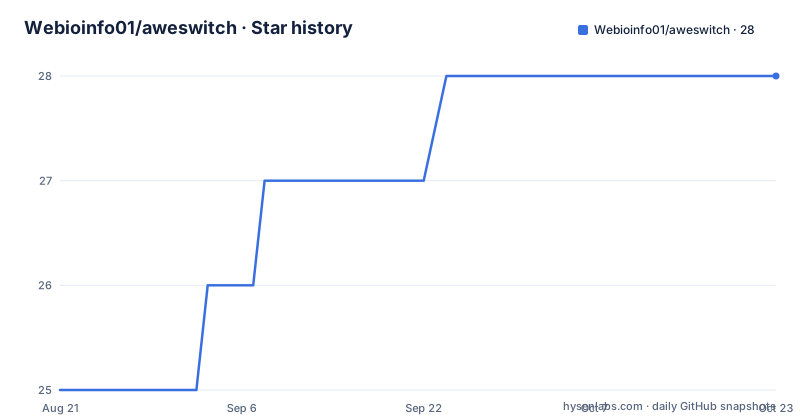
Star history
- Webioinfo01/aweswitch28 ★ · +3
| Repository | 2026-08-21 | 2026-10-22 |
|---|---|---|
| Webioinfo01/aweswitch | 25 | 28 |
3 Stars in the last 62 days, measured from the daily GitHub snapshot. Compare with other projects
Editorial analysis
Launch freezes the environment, apply rewrites the file
The tool has exactly two modes and the distinction is the whole design. Launch mode, `aweswitch <profile>`, starts a new agent session with an isolated environment: that session gets its own API endpoint, token and model, different terminals can run different profiles at the same time, and the environment is frozen at launch so later edits cannot change a running session. That last property is what makes parallel work possible, since two terminals pointed at different endpoints cannot fight over one global config file. Write mode, `aweswitch apply <profile>`, does the opposite and edits persistent defaults. Claude environment values go into `~/.claude/settings.json`, the Codex provider and model into `~/.codex/config.toml`, OpenCode providers and models into `~/.config/opencode/opencode.json`, and zcode into `~/.zcode/v2/config.json`. A bare `aweswitch apply` bulk-syncs every OpenCode and zcode profile, with `--opencode` and `--zcode` narrowing that bulk to one agent. Claude and Codex are limited to one active default at a time. The practical difference is where a mistake shows up: a bad launch costs you one terminal, while a bad apply changes the config every future session will read. That is also why the write path has a backup behind it and the launch path does not need one.
One dependency, one entry point, one bundled default config
The packaging keeps the footprint small enough to read in one screen. `click>=8.1` is the only runtime dependency, and the console script maps `aweswitch` to `aweswitch.cli:main`. Python 3.9 or newer is required, the layout uses `src/`, and the distribution ships a single package data file, `default-config.json`, which is what `aweswitch config init` writes out. The author is listed as Peng, the license is MPL-2.0, and the project classifies itself as `Development Status :: 3 - Alpha` with a console environment and a developer audience. Tests live in `tests/` with pytest as an optional dev extra, so the test dependency is not pulled into a normal install. The repository root also holds a `verify` script, a `resources/` directory, and `assets/` and `logo/` folders, which points to this being packaged for more than a personal machine despite the tiny dependency list. A `MANIFEST.in` sits next to the manifest, and the module lives under `src/aweswitch/` with the CLI entry at `cli.py`.
Profiles are grouped by kind first, then by provider
The config at `~/.config/aweswitch/config.json` splits profiles under `profiles` by kind first, with `api` for environment-based API profiles and `accounts` for official logins, and only then by provider name. The reference config shows two Claude entries. `cc-glm` sets `ANTHROPIC_BASE_URL` to the BigModel endpoint at `https://open.bigmodel.cn/api/anthropic` and `ANTHROPIC_MODEL` to `glm-5.1`. `cc-xiaomi` points at `https://token-plan-sgp.xiaomimimo.com/anthropic` with `mimo-v2.5-pro`. A Codex group follows the same shape under `codex`. Official-login entries live in the other branch, which is where the Claude Code and Codex OAuth accounts sit. The structure exists because a provider can have both kinds of profile and they are not interchangeable. The reference config shown in the guide is itself cut off partway through the Codex group, so treat it as a shape to copy rather than a complete file, and note that every Claude profile carries exactly three environment keys: base URL, auth token and model.
Tokens are referenced, never stored in the config
Every secret in the example config is a shell variable reference such as `${GLM_ANTHROPIC_AUTH_TOKEN}` rather than a literal, which is the design decision that makes the file safe to read and safe to share. The four variables you are expected to define are grouped by what consumes them:
# Claude / OpenCode profiles
export GLM_ANTHROPIC_AUTH_TOKEN="..."
export XIAOMI_ANTHROPIC_AUTH_TOKEN="..."

# Codex profiles
export OPENAI_API_KEY="..."

# zcode profiles
export ZCODE_API_KEY="..."
Long-lived values belong in the shell config so every shell has them: `~/.zshrc` on macOS, `~/.bashrc` or `~/.bash_profile` on bash, and `$PROFILE` on PowerShell. The agent reads the same files, so when a profile is written for you the key is picked up from your environment rather than typed in again. That indirection has a consequence worth planning for: a profile only works in shells where the variable is exported, so a login shell started without your config will produce an unauthenticated request rather than a helpful error.
The agent applies profiles but never launches them
One rule is enforced deliberately: an agent will not launch a profile for you, because that would nest an agent inside an agent. Applying profiles and editing config are fair game for the agent, launching stays in your own terminal:
aweswitch cc-glmThe bootstrap works the same way, by handing the agent a single instruction:
Read https://github.com/wehuman01/aweswitch/blob/main/README.ai.md and follow it to install and configure aweswitch.That bootstrap installs the CLI, initializes the config, installs the management skill and writes a first profile, reusing keys already exported in your shell config and asking only for what is missing. Confirm the skill landed by invoking skills with `/` in Claude Code or `$` in Codex, and restart the agent if it does not appear. Note the bootstrap URL points at a different owner namespace than the repository it lives in. If you would rather do the setup by hand, the second prompt installs the management skill on its own so the agent can list, inspect, add, edit and delete profiles, apply them, restore from backup, and read your existing keys out of the shell config when writing a new profile.
Configs from before v0.4 get rewritten on first load
The config format changed once, and the tool handles old files for you. Configs written before v0.4, where profiles were grouped directly by provider instead of under a kind, are migrated automatically the first time they load, and a `config.json.bak` backup is written next to the config before the change. The counterpart command is `aweswitch config restore`, which is part of what the installed skill teaches an agent to do alongside listing, inspecting, adding, editing and deleting profiles. Migration only covers the group-by-kind change, so a file hand edited after v0.4 is left to the backup rather than to any merge logic, and the `.bak` copy is the first place to look when a migrated file looks wrong. Release cadence is fast: v0.6.9 on 2026-09-12, v0.7.0 on 2026-09-13 and v0.7.1 on 2026-09-17, with the last commit on 2026-09-19. Two folded examples in the guide, one for listing profiles and one for applying a profile, are left empty, and an `aweski` command appears truncated inside the skill installation block, so treat the skill path as the least documented part of the tool and verify it end to end on the first run.
One config path across Ubuntu, macOS and Windows
The claim is that the same config and the same command work on all three operating systems, and the manual path is the fallback when you are not working inside a coding agent:
# Install from PyPI
pip3 install aweswitch
aweswitch --help

# Create the default config, then align it with your real providers
aweswitch config init
aweswitch config edit

# Or add a profile / official account interactively (api or official)
aweswitch add

# Verify the configured profiles (secrets redacted)
aweswitch list
aweswitch show cc-glm
`list` redacts secrets, which is what makes it safe to paste into an issue. `add` is interactive and takes either kind, api or official, and `config edit` opens the file for hand editing when the reference shape needs adjusting. The package page is on PyPI rather than a website, so the distribution is the documentation entry point, and the repository carries three READMEs: the English one, a Simplified Chinese translation, and a separate bootstrap file written for agents rather than people.
Editorial conclusion
aweswitch is worth installing if you routinely run two endpoints at once, since frozen launch sessions are the feature nothing else in your shell gives you. Skip it if a single stable default is enough, and check the alpha status classifier before trusting it with your only working configuration.
Frequently asked questions
Is Auschwitz still open to the public?
That question has nothing to do with this repository. aweswitch is a Python command line tool for switching AI coding agent runtime profiles, released under MPL-2.0 and installed with pip3 install aweswitch.
Can you wear jeans to Auschwitz?
The repository does not cover visitor dress codes or travel rules. What it covers is agent configuration: a profile launcher that starts isolated sessions and writes persistent defaults into Claude, Codex, OpenCode and zcode config files.
How much do Auschwitz tickets cost?
No ticketing information appears here. The only costs mentioned in this project are the ones you create yourself: the API tokens behind your profiles, exported as GLM_ANTHROPIC_AUTH_TOKEN, OPENAI_API_KEY, ZCODE_API_KEY and similar variables.
Official sources
Add this badge to your README
If you maintain this project, the badge below links readers to this analysis and shows its maintenance status from the daily GitHub snapshot. Paste the markdown into your README; add ?metric=license or ?metric=stars to the image URL for a different field.

[](https://hysenlabs.com/projects/webioinfo01-aweswitch)Star history chart for your README
[](https://hysenlabs.com/projects/webioinfo01-aweswitch)