story-to-game and the JSON contract between its two halves
A complete toolkit for creating & running branch narrative games: includes an HTML-based interactive story game launcher (supports JSON scripts) and an AI skill that converts novels/ scripts/outlines into playable branch story game JSON files.
At a glance
- What is it?
- A single-file HTML launcher for text branching narratives plus an AI skill that adapts novels and screenplays into the JSON the launcher expects. Nothing is deployed and nothing is installed on the player's side; the entire interface between the two halves is one script file that has to survive thirteen checks.
- Who is it for?
- It fits a writer or a screenwriter who already has source material and wants a playable text branch of it without commissioning an engine, and who is willing to supervise the adaptation rather than accept whatever comes out. It does not fit a project expecting art, audio or save servers, since this is text only and saves live in browser storage.
- Can I use it commercially?
- Yes. MIT is a permissive licence: you can use, modify and sell software built on it, as long as you keep its copyright and licence notices.
- Is it still maintained?
- Yes. The repository last received commits 143 days ago.
- What is it written in?
- Mainly HTML, according to GitHub's language statistics.
Answers come from the project's GitHub data, last synced on October 22, 2026, and from our analysis. They are not legal advice.
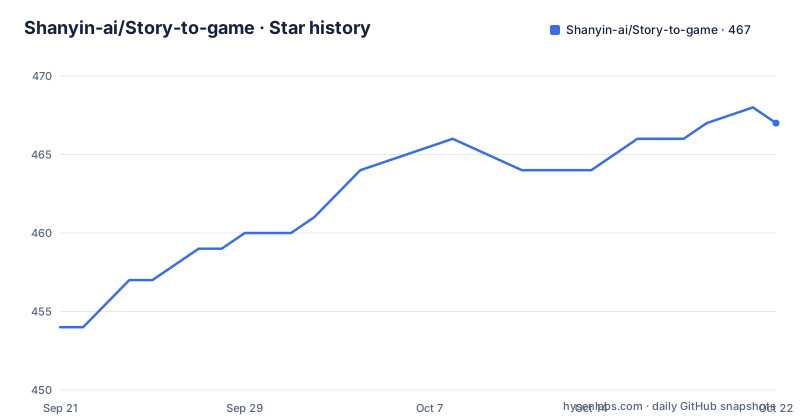
Star history
- Shanyin-ai/Story-to-game467 ★ · +13
| Repository | 2026-09-21 | 2026-10-22 |
|---|---|---|
| Shanyin-ai/Story-to-game | 454 | 467 |
13 Stars in the last 31 days, measured from the daily GitHub snapshot. Compare with other projects
Editorial analysis
Two artifacts that meet at one script file
The project is two tools with a contract between them, and the contract is the JSON. The first half is a branch narrative game launcher shipped as a single HTML file that loads JSON scripts directly and plays them as pure text branching. It has no dependencies and needs no server: you open the file in a browser and play. The second half is an AI skill that takes a novel, a screenplay or a story outline of any size and converts it into a branch narrative JSON file that conforms to the launcher's specification. The documentation is explicit that this is not a format conversion, describing it instead as a full-chain narrative adaptation system that runs source understanding, style fidelity, branch design and quality validation. That framing matters for expectations, because the interesting question is not whether the model can emit valid JSON but whether the adaptation keeps the tone of the thing it is adapting. The author is a screenwriter, director and writer who founded a studio, has judged AI units and AI film seasons at festivals, and whose own work has been selected or awarded at several international festivals, which is the background that explains why the skill treats fidelity to a source as the primary constraint rather than a nice-to-have.
The bookshelf is a file picker, not an install
The launcher's interface is deliberately spare, described as a minimal bookshelf-style screen for importing and managing JSON scripts, switching display mode and loading sample works. Chrome and Edge are the recommended browsers, and the reason is a specific API rather than a rendering preference: they support the File System Access API, so the launcher can read a local folder directly and treat it as the library. Other browsers are not blocked, since scripts can be imported through the insert JSON option instead, and the documentation says the core functions are unaffected by the loss of direct folder access. The play flow is keyboard and mouse friendly, with clicking or pressing Enter to advance the story, choosing between options, and going back as well as saving and loading. Scenes and chapters are first-class: large scene cards, chapter checkpoints, and animated transitions between both.
Branching state is a main value plus flags
The variable system is small on purpose and is what the JSON has to express. There is a val main state, custom variables on top of it, flag markers, and conditional options with automatic routing, which means a choice can gate later content without every scene re-testing the same condition. Endings and achievements are tracked as first-class objects: unlocked endings and achievements are recorded, endings carry effects and a closing line, and achievements get their own animation. Presentation is adjustable in four directions, with light and dark modes, font size, animation intensity and autoplay speed, which is the difference between a launcher for reading and one for streaming. The through-line is that every one of those knobs is a value the script can set, so the JSON is not just branching text but branching text plus display state.
Saves live in browser storage, so cache clearing loses them
One caveat is called out under its own heading and it is the one that will bite a player. Save and achievement records are stored in the browser locally, so clearing the cache loses them, and the documentation advises manually saving at key nodes. There is no account, no sync and no server-side record anywhere in the design, which is the same property that makes the launcher a file you can email to someone. The practical consequence is that a long branching game with many endings is not safe to play across a browser reset, and a player who finds a route they like has no way to preserve it except by saving inside the tool and not clearing storage.
The skill is a nine-step workflow, not a converter
The skill's main file is described as a nine-step core workflow, with the finer rules split across reference documents rather than kept in one prompt. Those documents are named and their scope is specific: a JSON format cheat sheet, source ingestion and memory indexing, style fingerprint extraction, structure decomposition and branch design, the state system and ending matrix, segmented writing rules, and validation and output rules. The style step is the one that distinguishes this from a template filler. It extracts the source's narrative temperature, its dialogue rules, its rhythm patterns and its strategy for shifting point of view, all in order to prevent style drift once the model is writing branches that the original never contained. Input size is handled by planning rather than by a fixed node count, with short stories, novellas, full novels, screenplays and outlines each getting an automatic node and play-length plan. Using it is a supervised loop rather than a one-shot prompt: you drag the skill file or the packaged bundle into an AI tool that can read files, paste the source text, confirm the adaptation direction the model proposes, and only then wait for the JSON.
Branches are budgeted and endings have a fallback rule
Branch design is described as budgeted work rather than free improvisation. Attitude, path and fate branches are allocated by ratio, transition nodes are filled in so the plot does not jump, and branch content is required to be as substantial as the main line rather than a stub that exists to reach an ending. The state system follows the same logic, with a dramatic main state value and a matrix of ending types, and a fallback mechanism on ending triggers so that no path dead-ends. That fallback is also listed as a design rule rather than a technical detail: every choice must have immediate, persistent and ending layers of influence, and any arbitrary sequence of choices has to arrive at some ending. Two further rules shape the experience. Transitions are auto-completed so events connect naturally, and the confirmation stage is deliberately anti-spoiler, showing only a basic adaptation direction and leaving the surprises for play. Underneath those rules sits a stated purpose, that the point of branching is to deepen understanding of the original work rather than replace it, which is also why deviating from the source calls for newly written content instead of reused text.
Thirteen checks stand between the JSON and the launcher
The documented workflow ends with validation rather than with a JSON file, and the validation script is named as part of the package: a Python script performing thirteen checks, with node reachability, reference integrity, branch depth and ending completeness among them. The usage notes are unambiguous that AI-generated JSON must be validated before it is imported into the launcher, precisely to avoid broken node links and dead ends, and step four of the quick start is importing the file and playing it to confirm the result. One thing to know before you clone: the repository root does not match the directory tree the README describes. What is actually there is the skill as a single packaged file, a developer debug build of the launcher HTML rather than the plainly named launcher the quick start tells you to download, a markdown document of JSON script rules at the root, a test case script, and the license. The primary language is recorded as HTML, which fits a project whose shipped artifact is a page.
Editorial conclusion
It fits a writer or a screenwriter who already has source material and wants a playable text branch of it without commissioning an engine, and who is willing to supervise the adaptation rather than accept whatever comes out. It does not fit a project expecting art, audio or save servers, since this is text only and saves live in browser storage. Before you import anything, run the generated JSON through validate.py as the documentation insists, and read the launcher in a browser first, because the repository ships a developer debug build of the launcher rather than the plain one its quick start names.
Frequently asked questions
What do I need to run the story-to-game launcher?
A modern browser and nothing else. The launcher is a single HTML file with no dependencies and no server, opened directly in Chrome or Edge, after which you import a JSON script through the insert option.
Why does generated JSON have to pass validation before import?
The validation script runs thirteen checks including node reachability, reference integrity, branch depth and ending completeness. The documentation says unvalidated JSON should not be imported because it can contain broken node links and dead ends.
Which AI tool does story-to-game recommend for long novels?
Codex or Claude Code, described as strongly preferred for very long context so medium and long novels or screenplays are handled more steadily. ChatGPT and Claude are the basic recommendation for shorter input.
Where are story-to-game saves and achievements stored?
In the browser's local storage. The documentation warns that clearing the cache loses those records and recommends manually saving at key nodes.
Can story-to-game run in a browser other than Chrome or Edge?
Yes. Chrome and Edge are recommended because they support the File System Access API for reading a local folder as a library, and other browsers can still import scripts through the insert JSON option with core functions unaffected.
Official sources
Add this badge to your README
If you maintain this project, the badge below links readers to this analysis and shows its maintenance status from the daily GitHub snapshot. Paste the markdown into your README; add ?metric=license or ?metric=stars to the image URL for a different field.

[](https://hysenlabs.com/projects/shanyin-ai-story-to-game)Star history chart for your README
[](https://hysenlabs.com/projects/shanyin-ai-story-to-game)