Wombat: the JavaScript overrides that make a replayed page behave
Wombat.js client-side rewriting library
At a glance
- What is it?
- Wombat is a client-side URL rewriting library for web archiving, split out of pywb into its own module and published as three bundles that patch the browser's own APIs. It rewrites URLs at runtime through targeted JavaScript overrides, helping archived pages load resources during replay.
- Who is it for?
- Wombat is worth using if you are replaying recorded web pages and the problem you have is that archived JavaScript breaks on a modern browser, because the whole library is a maintained set of overrides against the live web platform rather than a capture format or a proxy. It is not a standalone archiving tool: the output is three generated bundles that belong in a pywb static directory, and pywb 2.3 and later is what depends on this module.
- Can I use it commercially?
- Yes, with strict conditions. AGPL-3.0 is a network copyleft licence: if people use a modified version over a network, for example as a hosted service, you must offer them its source code under the same licence.
- Is it still maintained?
- Yes. The repository last received commits 3 days ago.
- What is it written in?
- Mainly JavaScript, according to GitHub's language statistics.
Answers come from the project's GitHub data, last synced on November 15, 2026, and from our analysis. They are not legal advice.
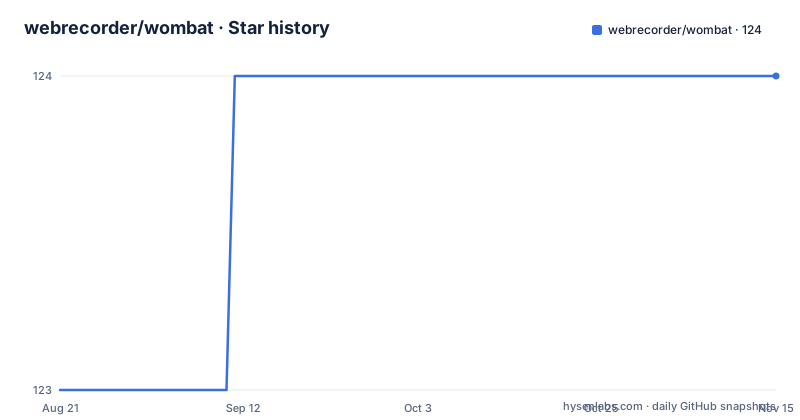
Star history
- webrecorder/wombat124 ★ · +1
| Repository | 2026-08-21 | 2026-11-15 |
|---|---|---|
| webrecorder/wombat | 123 | 124 |
1 Stars in the last 86 days, measured from the daily GitHub snapshot. Compare with other projects
Editorial analysis
Rewriting happens in JavaScript, not in the HTML
The first thing to understand is the mechanism. Wombat is described as a standalone client-side URL rewriting system that performs its rewrites through targeted JavaScript overrides. That is a different approach from rewriting markup on the way through a proxy, and the difference has consequences. The page that arrives in the browser is the archived page, unmodified at the HTML level, and a script injected alongside it changes the behaviour of the APIs the page calls. So a relative URL that would resolve against today's domain instead resolves against the replay's date-based prefix, and code that reads `location` sees the archived address rather than the live one. The same applies to storage, XHR, and fetch. What you get is a page whose own scripts still run, which is the point, and also a page whose scripts are being lied to by a layer the page cannot detect or consent to.
Three bundles, three different jobs
The library compiles down to three files, and each is a bundle, meaning a single file produced by concatenating source files. `wombat.js` is the primary one, used in both non-proxy recording and replay, and its entry point is `src/wbWombat.js`. Beneath it sit the function map, custom storage, the location shim, listeners, and an auto fetch worker. `wombatProxyMode.js` is explicitly a stripped down version of the first, applying a minimal set of overrides to the browser's JavaScript APIs so that pywb's proxy recording mode can function; its entry point is `src/wbWombatProxyMode.js` and it pulls in a lite core with a proxy-mode fetch worker. `wombatWorkers.js` is called out as not really a bundle but a flat file, carrying the minimum overrides needed for web and service workers to behave as expected under both non-proxy recording and replay. The split matters in practice: the proxy-mode build is a cost decision, since a page being captured through a proxy does not need the full override set, and the worker file exists because a worker context has no `window` for the location shim to attach to.
The output is generated, and it lands in pywb
The bundles are not checked in as source of truth. They are produced as part of the library's build step and are expected to sit in the static directory of pywb, which is where a replay server serves them from. The library itself lives in a `wombat` directory at the root of its own repository, and its history explains the arrangement: Wombat was originally included in and distributed as part of pywb, then refactored and split off into this module for improved maintenance. The coupling is explicit in both directions, since pywb release 2.3 and later rely on this standalone module, and the documentation in this repository covers the development and testing of the library plus the creation of the system from the library. So the deliverable you consume is a set of generated files destined for someone else's static directory, not a package you import and configure. Anyone building a replay system from scratch will find the pieces are documented but the assembly instructions belong to pywb.
Standards correctness is the test suite's job
What the standalone module added over its years inside pywb is a testing suite, and the claim made about it is specific: it checks the correctness of the overrides with respect to web standards. That is the right thing to test and it is hard to test, because an override that returns a plausible value where the platform returns an error is a bug that only shows up as a subtly broken archive months later. The test tooling reflects that effort. Tests run under ava, configured for serial execution with concurrency of one, which is what you do when tests share a browser rather than when they are merely slow. The browser is driven through the Chrome DevTools Protocol using chrome-launcher and a remote interface library, and a local fastify server with static and favicon plugins is part of the harness, which is how a test can load a real page with the bundle injected rather than a mock. A separate rollup configuration builds a test page bundle, so the artifact under test is the same artifact that ships.
Build, watch and format are separate rollup configs
The build is driven by rollup with three committed configurations, one per mode, and the split tells you what the project optimises for. The production config produces the shipping bundles, the dev config builds unminified output and its watch variants add `--watch`, and the test config produces the bundle the test harness loads. Two of the dev scripts set environment variables before invoking rollup: `ALL=1` for the full dev build and `PROXY=1` for the watch variant dedicated to proxy mode, which is how one config file can emit both the complete and the stripped-down bundle. There is a `build-full-test` script that chains the test bundle and the page bundle together, and a separate `build-test-bundle` for just the page. Formatting and linting are one command each and cover the same two globs, `src/*.js` and `test/*.js`, with prettier configured for single quotes and eslint available in a fix mode. The dev dependency list is from the yarn era, with a lockfile committed and rollup itself at a much newer major than the plugins around it.
AGPL with a NOTICE file, which is the licensing fact that matters
The package declares `AGPL-3.0-or-later`, and the repository carries both a `LICENSE.md` and a separate `NOTICE` file, which is the pattern used when third-party code is bundled in and needs attribution. That combination is the part to read carefully rather than skim, because Wombat is distributed as generated bundles that get copied into a server's static directory and served to browsers, which is a distribution of the code in the most literal sense. An archive tool that embeds it inherits the obligation. This is a different situation from a permissive library you call through an API, and the difference is entirely about whether the bundle ends up in something you ship. The author and contributor fields name the Webrecorder Software side of the project, and the repository URL in the package metadata points back at this repository, so the attribution trail for a NOTICE obligation is present. If your use is a personal replay instance, none of this bites. If you are packaging an archive viewer for distribution, read the licence text rather than the field in the manifest.
The README declines to explain the overrides, on purpose
There is a deliberate gap in the documentation and it is worth quoting rather than filling in. After listing the bundles and their contents, the project says it does not go into details of each file included in a bundle, because those details are out of scope, and asks anyone interested to consult the documentation included in each file's source code. That is a defensible editorial decision and a practical trap. A developer who wants to know what Wombat does to `localStorage`, or how it handles `fetch` with a cross-origin URL, or what the function map is for, will not find it here. The bundle structure listing gives the file names inside `wombat.js`, which is a map rather than a description, and the interesting behaviour lives in the source of each. The two terms the documentation bothers to define, a bundle as concatenated source files and a bundle entry point as the root file that imports everything else, are exactly the vocabulary you need to navigate `src/` and the rollup configs yourself. So treat this repository as a build system plus a set of overrides, and budget time for reading the source.
Editorial conclusion
Wombat is worth using if you are replaying recorded web pages and the problem you have is that archived JavaScript breaks on a modern browser, because the whole library is a maintained set of overrides against the live web platform rather than a capture format or a proxy. It is not a standalone archiving tool: the output is three generated bundles that belong in a pywb static directory, and pywb 2.3 and later is what depends on this module. Two things to check before you build on it. The licence is AGPL-3.0-or-later with a NOTICE file, which matters if you intend to embed the bundle in something you distribute, and the source of truth for any override is the file's own source rather than the README, which explicitly declines to describe what each bundle contains. The current version is 3.10.8 and the last push was on 2026-08-25.
Frequently asked questions
What is the Wombat JavaScript library used for?
Wombat is a standalone client-side URL rewriting system used when replaying recorded web pages. It performs the rewrites through targeted JavaScript overrides rather than by rewriting the HTML, so archived scripts keep running against the replayed address instead of the live one.
What are the three files that make up the Wombat client-side system?
wombat.js is the primary bundle used in both non-proxy recording and replay, wombatProxyMode.js is a stripped down version for pywb's proxy recording mode, and wombatWorkers.js is a flat file of minimal overrides so web and service workers behave during recording and replay.
Where do the Wombat bundles go after they are built?
They are generated as part of the library's build step and are located in the static directory of pywb, which is where a replay server serves them from. The library source itself lives in the wombat directory at the root of this repository.
How is Wombat related to pywb?
Wombat was originally included in and distributed as part of pywb, then refactored and split off into its own module for maintenance. pywb release 2.3 and later rely on this standalone module, and its testing suite checks the correctness of the overrides against web standards.
How do you build the Wombat bundles?
Rollup drives the build with three committed configurations: build-prod for shipping bundles, build-dev for unminified output, and build-test for the bundle the test harness loads. The dev scripts set ALL=1 for the full build and PROXY=1 for the proxy-mode watch build. Tests run with ava in serial mode against a real browser.
What licence does Wombat use and does it bundle third-party code?
The package declares AGPL-3.0-or-later, and the repository contains both a LICENSE.md and a separate NOTICE file, the pattern used for bundled third-party attribution. Since the generated bundles are copied into a server's static directory and served to browsers, redistributing them is distribution of the code.
Official sources
Add this badge to your README
If you maintain this project, the badge below links readers to this analysis and shows its maintenance status from the daily GitHub snapshot. Paste the markdown into your README; add ?metric=license or ?metric=stars to the image URL for a different field.

[](https://hysenlabs.com/projects/webrecorder-wombat)Star history chart for your README
[](https://hysenlabs.com/projects/webrecorder-wombat)Was this useful?