Claude Code guide: two dead anchors kept alive, and a price rise that never happened
A practical Claude Code guide with clear mental models and copy-paste examples — setup, prompt engineering, slash commands, skills, hooks, subagents, agent teams, and MCP servers. Beginner path to power-user depth. Featured in Awesome Claude Code.
At a glance
- What is it?
- A community-written guide to Anthropic's terminal tool, covering prompts, skills, hooks, subagents, workflows, agent teams and external tool servers, with the model lineup written as a dated changelog. It preserves two anchor links named after retired models, compares five extension points in a table where only one has a number in it, and ships the server and agent files it teaches.
- Who is it for?
- This guide suits a developer who has installed the tool and wants to know which of its five extension points to reach for, and who reads documentation closely enough to notice that a table is a rule rather than a suggestion. It does not suit anyone treating the model section as current: eight launch dates and four prices in one paragraph is a snapshot that expires, and the guide itself points at a separate reference file for full specifications.
- Can I use it commercially?
- Check first. The repository uses a licence we do not classify automatically, so read its LICENSE file before any commercial use.
- Is it still maintained?
- Yes. The repository received new commits within the last day.
- What is it written in?
- Mainly Python, according to GitHub's language statistics.
Answers come from the project's GitHub data, last synced on November 15, 2026, and from our analysis. They are not legal advice.
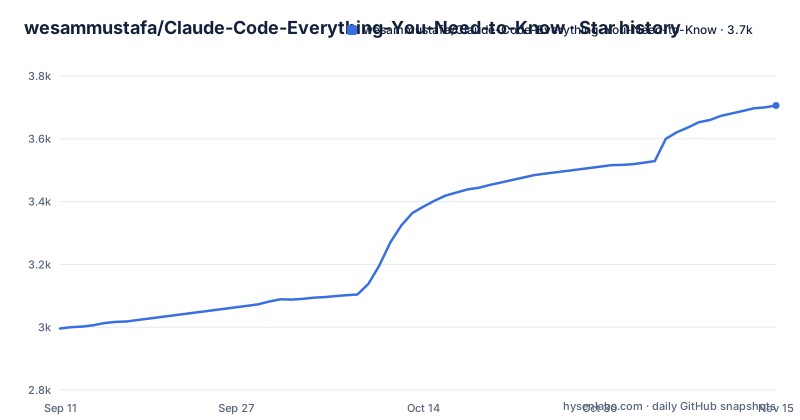
Star history
- wesammustafa/Claude-Code-Everything-You-Need-to-Know3,706 ★ · +710
| Repository | 2026-09-11 | 2026-11-15 |
|---|---|---|
| wesammustafa/Claude-Code-Everything-You-Need-to-Know | 3k | 3.7k |
710 Stars in the last 65 days, measured from the daily GitHub snapshot. Compare with other projects
Editorial analysis
Two anchors named after retired models are still in the page
There is a comment in this readme that says compatibility anchors for old inbound links, and it sits directly above a section titled with a version that no longer exists as a latest.
The two anchor identifiers are named after two models that were, at some earlier point, the ones the section was about: an anchor for a model in the 4.6 generation described as the latest powerhouse, and one for the 4.7 generation described as the latest flagship. Both are empty link targets sitting in the document while the section beneath them is about the generation that followed.
There is a third pair, further down, doing the same job for a section about what language models are and how they differ from ordinary AI tools. That anchor is a full descriptive slug rather than a model name, which tells you the same section has been renamed at least once.
This is worth noticing because it is the opposite of what most guides do. A guide chasing a fast-moving product usually rewrites its headings and lets old links rot. This one keeps the old identifiers alive so that a link somebody pasted into a chat window six months ago still lands on the right content.
It is also the clearest signal in the document that the content underneath has been rewritten more than once.
One of the five extension points has a number in it and four do not
The centrepiece of the guide is a table comparing the five ways to extend the tool, with three columns: when to reach for it, when to skip it, and where the file lives.
The file locations are concrete and useful. Skills are markdown files under a commands directory. Hooks go in the settings file. Subagents are markdown files under an agents directory. Workflows are JavaScript files under a workflows directory. The external tool servers are configured per project rather than dropped in a directory.
The trigger column is where the table gets uneven. Exactly one row has a number: skills are for when you repeat the same prompt or workflow three or more times. The other four are judgements. Hooks are for when you want code to run automatically on tool use or at session start. Subagents are for when a subtask is big enough to need its own isolated context. Workflows are for when the job needs more agents than one conversation can coordinate.
So the table can be acted on directly for one of the five, and has to be argued about for the rest. That is not a criticism so much as a measurement: it tells you which of the five the author found easy to give a rule for.
The model section is a changelog with eight launch dates
One section of this guide is a model lineup, and it reads like a release log rather than prose.
It opens by saying launches landed in quick succession through the year, then lists eight of them with exact dates: a 4.8 generation model in late May, a pair in early June where one of the pair opened a new class tier above the previous flagship, another in late June, one in late July, two in early September, one in late September, and one more the following week.
Then the current state. Since a named version of the tool, one model is the default across every plan and the API. The context window is described as now standard across the current families, with no beta flag and no surcharge for long context, and a maximum output size is given.
So the section has already been rewritten at least three times as the year progressed, which is what a guide about a fast-moving product looks like after a year of maintenance.
The guide is honest about where the details live: a pointer to a separate reference file for full specifications, capabilities and pricing. The front page is the summary; the reference file is the table you would actually pin.
A scheduled price rise was cancelled, and one model was retired on two clouds only
Two details in the deprecation paragraph are the kind that only a maintainer who reads the announcements would write down.
The first is a price rise that did not happen. One model's introductory price was originally described as temporary, with a planned increase scheduled for the first of September. The guide records that the introductory price was instead made permanent in August, and therefore that the scheduled increase never took effect.
That is a small sentence doing real work. A reader who read the older version of this page, or who assumed the listed price was going to change, would otherwise budget for an increase that is not coming.
The second detail is a retirement with an exception. One older model is recorded as retired in August, except on two cloud providers. So a function that fails on one deployment path can still work on another, which is exactly the kind of thing that wastes an afternoon if you have not read it.
Around those two, the paragraph lists eight models as legacy but still available. That list is the other half of the story: nothing here has vanished except one model, and that one only partly.
One model is another model with different safeguards and an invitation
The newest tier is described in a way that is worth reading carefully, because it is not a new model in the usual sense.
The guide says the restricted sibling in the June pair opened a new class tier above the previous flagship. Then, in the deprecation paragraph, it says that one of the models in that class shares another model's specifications and pricing exactly, and that its later version is the same model as a different one with different safeguards, available only through the provider's trusted access programmes.
So: two names, one model, two safety configurations. The capability and the price are identical. What differs is the guardrail, and access to one version is by invitation only while the other goes through a named access programme.
For a guide aimed at developers choosing what to point a tool at, that is a more useful distinction than a benchmark would have been, and it is the kind of thing a marketing page would not say in that form.
It also explains the tier language. A tier named for something other than the flagship series, described as sitting above it while sharing its price, is unusual enough that the guide defines it explicitly rather than assuming you know what it means.
The repository ships the server and agent files it teaches
This is a guide that dogfoods the thing it documents, and the repository layout shows it.
At the root there is a directory for external tool servers and another for specialised agent definitions, which are exactly the two things the extension table tells you to create. So the paths in the table are not hypothetical; they are the paths the repository itself uses.
There is also a configuration directory for the tool at the root, which means the guide's own repository is set up the way the guide recommends. A reader who clones it can look at a working setup rather than assembling one from the prose.
Alongside those are a documentation directory, which the reference links point into, an images directory for the screenshots, a security file, a contributing guide, a licence, and the usual repository metadata.
That is a deliberately small tree for a document of this length. Almost everything is prose, and the executable material is confined to the two directories that hold the things you would otherwise have to write yourself.
The install command belongs to the vendor, not to the guide
The first command in this document is not the guide's product, and the guide is clear about that.
The install line fetches a script from the vendor's own domain and pipes it into a shell:
curl -fsSL https://claude.ai/install.sh | bashThe guide says which platforms that covers, naming macOS, Linux, and the Linux-on-Windows environment, and it points at the official setup guide for Windows and for the other installation methods.
So the vendor ships the installer and the guide documents it. That matters for how you read everything else: when the guide says a file goes in a particular directory, that is a statement about the vendor's tool's configuration, and it will drift when the vendor changes it rather than when the guide's author does.
The guide's own scope note is the other thing to read first. It says it is for developers using or about to use the tool, that beginners get a guided path and power users get depth on the four harder mechanisms. There is no claim of completeness, and the path table gives time estimates that range from fifteen minutes to varies.
That last entry, varies, is doing honest work.
Editorial conclusion
This guide suits a developer who has installed the tool and wants to know which of its five extension points to reach for, and who reads documentation closely enough to notice that a table is a rule rather than a suggestion. It does not suit anyone treating the model section as current: eight launch dates and four prices in one paragraph is a snapshot that expires, and the guide itself points at a separate reference file for full specifications. Before you follow it, check three things: which model your account actually defaults to, since the guide names one default and a version-specific default that changed; whether the extension you want has a numeric trigger or a judgement call, because only one of the five does; and whether you want the extra context isolation of a subagent, which is the difference the table calls big enough.
Frequently asked questions
What is the Claude-Code-Everything-You-Need-to-Know guide?
An MIT licensed community guide to Claude Code, Anthropic's command line tool, running from a first prompt through prompt engineering, slash commands, skills, hooks, subagents, dynamic workflows, agent teams and external tool servers. It offers two routes, a guided beginner path estimated at about fifteen minutes and a depth route at about thirty minutes per topic, and it is listed in a third-party curated collection of Claude Code resources.
What are the five extension points the guide compares?
Skills, which live as markdown files under a commands directory and are for a prompt you repeat. Hooks, which live in the settings file and run automatically on tool use or at session start. Subagents, which live as markdown files under an agents directory and isolate a large subtask. Workflows, which live as JavaScript files under a workflows directory and coordinate more agents than one conversation can. And external tool servers, configured per project, for reaching tools outside your files. The guide says they compose and that most setups use two or three.
Which Claude model does the guide recommend?
Four options in a table. An everyday coding model in the 5.5 generation at two and ten per million tokens, where the guide says most tasks live. A default model for complex reasoning, large refactors and orchestrating agents, at four and twenty, twenty percent less than its predecessor. A harder-tier model described as Mythos-class capability above the default at ten and fifty. And a fast lightweight model with a two hundred thousand token context at one and five.
Do I need coding knowledge to use Claude Code?
The guide does not state a prerequisite outright in the visible portion. It scopes itself to developers who are using or about to use the tool, and it describes that tool as reading your actual repository, following imports, editing in place and then running your test suite, naming test runners from three different language ecosystems. So the examples assume a working development environment even though the guide does not require one in so many words.
Official sources
Add this badge to your README
If you maintain this project, the badge below links readers to this analysis and shows its maintenance status from the daily GitHub snapshot. Paste the markdown into your README; add ?metric=license or ?metric=stars to the image URL for a different field.

[](https://hysenlabs.com/projects/wesammustafa-claude-code-everything-you-need-to-know)Star history chart for your README
[](https://hysenlabs.com/projects/wesammustafa-claude-code-everything-you-need-to-know)Was this useful?