MCP Kali Server: the security boundary is the bind address, not a token
MCP configuration to connect AI agent to a Linux machine.
At a glance
- What is it?
- Two Python scripts that put an HTTP command execution API on a Kali box and let an MCP client drive it, built for authorised testing and CTF work. There is no documented authentication layer. The loopback default limits network exposure but does not protect the service from other local processes.
- Who is it for?
- MCP Kali Server fits somebody with an isolated lab machine who wants an assistant driving a disposable Kali box during authorised testing or a CTF, where the whole value is that the commands come from a model rather than from you typing them. Do not run it on a workstation with anything you care about, since the documented surface is arbitrary command execution with no authentication, no transport security and no allowlist.
- Can I use it commercially?
- Yes. MIT is a permissive licence: you can use, modify and sell software built on it, as long as you keep its copyright and licence notices.
- Is it still maintained?
- Activity is slowing. The repository last received commits 8 months ago.
- What is it written in?
- Mainly Python, according to GitHub's language statistics.
Answers come from the project's GitHub data, last synced on November 14, 2026, and from our analysis. They are not legal advice.
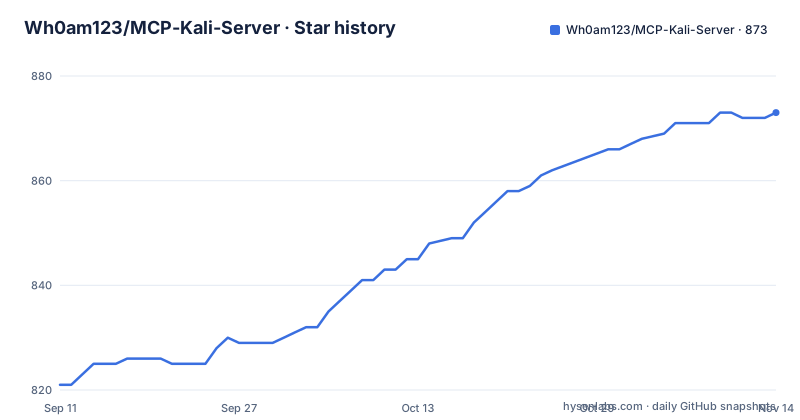
Star history
- Wh0am123/MCP-Kali-Server873 ★ · +52
| Repository | 2026-09-11 | 2026-11-14 |
|---|---|---|
| Wh0am123/MCP-Kali-Server | 821 | 873 |
52 Stars in the last 64 days, measured from the daily GitHub snapshot. Compare with other projects
Editorial analysis
Two Python scripts and no authentication layer
The entire server is a short repository: a client script, a server script, a requirements file, an example MCP configuration, a README and a licence. That is the whole thing, and it is worth knowing before you install anything.
The dependency list is three lines: Flask 3.0 or newer for the HTTP side, requests 2.31 or newer, and the MCP SDK at 1.0. So the architecture is an ordinary Flask application exposing command execution on a port, with a separate MCP client that translates model tool calls into HTTP requests.
What is not in that list matters as much as what is. The documentation describes no API token, no bearer credential, no client allowlist, no TLS termination and no per-command approval step. The bind address is described as the security control, and the default is loopback.
That is a coherent design for its stated purpose, where the server runs on a machine the operator already controls and the client is a desktop application on the same box or reached through a tunnel. It is not a design for a shared network, and the documentation says so in as many words when it discusses binding to all interfaces.
So the mental model to carry in: this is a lab instrument, and the host machine is disposable by design rather than by accident.
Bind choices and the limits of loopback
The command line has three options and the security discussion lives entirely in the first.
# Run on localhost only (default; local processes can still connect)
./server.py

# Run on all interfaces (less secure, useful for remote access)
./server.py --ip 0.0.0.0

# Run on a specific IP and custom port
./server.py --ip 192.168.1.100 --port 8080

# Run with debug mode
./server.py --debug
The `--ip` option takes an address, and the documentation spells out what each choice means. Loopback restricts network exposure to the local machine, but other local processes may still connect to an unauthenticated service. All interfaces allows connections from any network the host is attached to, and it is labelled very dangerous with a caution. A specific address binds to one interface, which is the middle case.
The port defaults to 5000 and `--debug` turns on verbose logging.
Two things follow from reading that list carefully. The documented options do not add authentication, so bind address alone should not be treated as a complete security boundary. Limit which users and processes can access the host and use an authenticated tunnel for remote access. And the verbose mode is worth avoiding on a machine with other users, because command output passing through a debug log is a smaller leak than a running shell but is still a leak.
If you find yourself reaching for all interfaces to make a remote client work, the answer is a tunnel rather than a wider bind, which is what the project itself recommends.
Installing from apt is two commands, and the git route is four more
There are two install paths, and the packaged one is much shorter.
sudo apt install mcp-kali-server
kali-server-mcp
That is the route for a machine with the package available, and the second command starts the server.
The alternative is described as bleeding edge, which in practice means the current source rather than a distribution build. It is a clone, a change into the directory, a virtual environment, activation, a dependency install and then the server script:
git clone https://github.com/Wh0am123/MCP-Kali-Server.git
cd MCP-Kali-Server
python3 -m venv .venv
source .venv/bin/activate
pip install -r requirements.txt
./server.py
The virtual environment is the right call here rather than a formality, because the requirements are unpinned at the top end and a global install would drag Flask, requests and the MCP SDK into whatever else on the machine depends on them.
One practical note from the surrounding discussion: the packaged command is named differently from the repository, so the two install routes give you two different program names to remember. The apt route gives you `kali-server-mcp`, the source route leaves you running `./server.py`.
The client is local, tunnelled, or openly hosted and discouraged
The client side has three documented arrangements, and the documentation is unusually direct about the third one.
When the client and server share a Kali machine, you point the client at loopback. Either the packaged command or the script works:
## OS package
kali-server-mcp --server http://127.0.0.1:5000

# ...OR...

## Bleeding edge
./client.py --server http://127.0.0.1:5000
When the client is on another machine, whether Linux, Windows or macOS, the documented path is an SSH tunnel and two terminals. In the first you forward the port to the Kali box, and in the second you clone the repository, set up the environment and start the client against loopback, which now resolves through the tunnel:
ssh -L 5000:localhost:5000 user@LINUX_IPThe third arrangement is hosting the server openly on the network and pointing the client at the machine's address. It works, and the documentation marks it as strongly discouraged, recommending SSH instead in the same sentence.
That ordering is the correct one to copy. A tunnel gives you the encryption and the authentication of SSH for free, while an open bind gives you neither, and the only thing protecting a command execution endpoint in that arrangement is the network you happen to be on.
MCP configuration is two file paths and a shipped example
Wiring an MCP client in is short, and each client wants a different shape of configuration.
For Claude Desktop you edit an existing JSON file. On macOS it lives under the application support directory for Claude, and on Windows it is under the app data directory for Claude. The repository ships a ready example file named after the project, so the realistic workflow is copying that file's entry into your own configuration rather than writing one from memory.
For 5ire the process is simpler because the application generates the files itself. You add an MCP entry whose command runs the client script with an absolute path and the server address, and the desktop application writes the rest.
Two details in the 5ire example are worth copying even if you use a different client. The path to the client script must be absolute, because the application launches the command outside any working directory you control. And the server address is passed as an argument to that command rather than configured separately, which means the client is stateless and you can point several installations at different servers.
Nothing in this section involves credentials, again because nothing in the project has a credential to configure.
The tool list is an inventory, and the audience is named
The capability list is a set of well-known security tools the server can drive: Dirb, enum4linux, gobuster, Hydra, John the Ripper, the Metasploit framework, Nikto, Nmap, sqlmap and WPScan, in addition to running raw commands. Nothing about that list is hidden, and nothing about it is the interesting part.
What is interesting is the shape of the integration. The MCP side is expected to talk to model endpoints such as OpenAI, Claude, DeepSeek or a local Ollama instance, or any other model, and the bridge lets a model send commands and receive structured output rather than scraping a terminal. The examples in the documentation are a web capture-the-flag challenge and a machine from Hack The Box, both driven with a flash-class model.
The stated audience is equally specific: red teamers, bug bounty hunters and CTF players automating common tasks. That is an authorised-testing framing, and the project repeats it in its disclaimer, which limits itself to educational and ethical testing and prohibits unauthorised access, exploitation and malicious activity.
For that audience the value is real but narrow. A model that can already call a shell will not suddenly become a better operator; what the bridge adds is persistence of a session and structured output that a human can review, which matters when you are reconstructing what a run actually did.
Forensics is listed as a possibility, and there is one release tag
The last section of the README widens the use case beyond web and network work. Memory forensics with Volatility is described in terms of automating process enumeration, checks for injected code and registry extraction from memory dumps. Disk forensics with SleuthKit is described in terms of disk image analysis, timeline generation, file carving and hash comparisons.
Those are analysis workflows rather than exploitation workflows, which makes them the least surprising part of the project, and they are the reason the tool is described as lightweight API bridge rather than as a scanner.
Maintenance is where the project looks thinnest. There is a single release tag, and it is named `security`, dated 2025-04-08. The last push to the default branch was 2026-03-17. So the distribution history is one tag whose name suggests a fix rather than a feature line, with roughly six and a half months of commits since and no version numbers to map them onto.
For an operator, the practical implication is that you are running unreleased source from a repository whose version history will not tell you which fixes you have. If the loopback default and the SSH tunnel are respected and the host is disposable, that is an acceptable posture for lab work. It is not an acceptable posture for anything shared.
Editorial conclusion
MCP Kali Server fits somebody with an isolated lab machine who wants an assistant driving a disposable Kali box during authorised testing or a CTF, where the whole value is that the commands come from a model rather than from you typing them. Do not run it on a workstation with anything you care about, since the documented surface is arbitrary command execution with no authentication, no transport security and no allowlist. Before you start it, read the bind address rules and keep the default loopback, tunnel with SSH if the client is on another machine, and treat any move to all interfaces as a change you would have to justify to your own network team.
Frequently asked questions
What is MCP Kali Server?
A lightweight API bridge that connects MCP clients such as Claude Desktop or 5ire to an API server on a Kali machine, letting a model run terminal commands and web requests and receive structured output. It is aimed at red teamers, bug bounty hunters and CTF players.
How do I use MCP Kali Server?
Install it on the Kali machine with sudo apt install mcp-kali-server and start it with kali-server-mcp, or clone the repository into a virtual environment and run ./server.py. Then point a client at it with kali-server-mcp --server http://127.0.0.1:5000, tunnelling over SSH if the client is on another machine.
Does MCP Kali Server have authentication?
None is documented. The documented control is the bind address, which defaults to 127.0.0.1 for localhost only. Binding to 0.0.0.0 is labelled very dangerous, and the project recommends an SSH tunnel instead of hosting the server openly.
What does MCP Kali Server require to install?
Three Python packages: Flask 3.0 or newer, requests 2.31 or newer and the MCP SDK 1.0 or newer. It installs from an apt package or from a git clone into a virtual environment, and the client side needs a Claude Desktop or 5ire configuration file.
Which security tools can MCP Kali Server run?
It can drive Dirb, enum4linux, gobuster, Hydra, John the Ripper, the Metasploit framework, Nikto, Nmap, sqlmap and WPScan, plus raw commands. The README also lists Volatility and SleuthKit workflows for memory and disk forensics.
Official sources
Add this badge to your README
If you maintain this project, the badge below links readers to this analysis and shows its maintenance status from the daily GitHub snapshot. Paste the markdown into your README; add ?metric=license or ?metric=stars to the image URL for a different field.

[](https://hysenlabs.com/projects/wh0am123-mcp-kali-server)Star history chart for your README
[](https://hysenlabs.com/projects/wh0am123-mcp-kali-server)Was this useful?